
ആമുഖം
This manual provides instructions for the safe and efficient use of your Lifetime Air Mini USB Table Fan. Please read this manual thoroughly before operating the device and retain it for future reference. This compact and portable fan is designed to provide personal cooling in various indoor environments.
സുരക്ഷാ നിർദ്ദേശങ്ങൾ
തീ, വൈദ്യുതാഘാതം അല്ലെങ്കിൽ പരിക്ക് എന്നിവ കുറയ്ക്കുന്നതിന്, എല്ലായ്പ്പോഴും ഈ അടിസ്ഥാന സുരക്ഷാ മുൻകരുതലുകൾ പാലിക്കുക:
- ഊർജ്ജ സ്രോതസ്സ് വോളിയം ഉറപ്പാക്കുകtage matches the fan's requirements (5V DC).
- ഫാൻ, കോർഡ്, പ്ലഗ് എന്നിവ വെള്ളത്തിലോ മറ്റ് ദ്രാവകങ്ങളിലോ മുക്കരുത്.
- താപ സ്രോതസ്സുകൾ, നേരിട്ടുള്ള സൂര്യപ്രകാശം, കത്തുന്ന വസ്തുക്കൾ എന്നിവയിൽ നിന്ന് ഫാനിനെ അകറ്റി നിർത്തുക.
- ഫാൻ ഗ്രിൽ പ്രവർത്തിക്കുമ്പോൾ വിരലുകളോ മറ്റ് വസ്തുക്കളോ അതിനുള്ളിൽ കയറ്റരുത്.
- Unplug the fan from the USB port when not in use, before cleaning, or before moving it.
- Do not operate the fan with a damaged cord or plug, or if the fan malfunctions or has been dropped or damaged in any manner.
- ശാരീരികമോ ഇന്ദ്രിയപരമോ മാനസികമോ ആയ കഴിവുകൾ കുറവുള്ള വ്യക്തികൾ (കുട്ടികൾ ഉൾപ്പെടെ) അല്ലെങ്കിൽ അവരുടെ സുരക്ഷയ്ക്ക് ഉത്തരവാദിയായ ഒരു വ്യക്തി ഉപകരണത്തിൻ്റെ ഉപയോഗത്തെ സംബന്ധിച്ച മേൽനോട്ടമോ നിർദ്ദേശമോ നൽകിയിട്ടില്ലെങ്കിൽ, ഈ ഉപകരണം ഉപയോഗിക്കാൻ ഉദ്ദേശിച്ചുള്ളതല്ല. .
- കുട്ടികൾ ഉപകരണം ഉപയോഗിച്ച് കളിക്കുന്നില്ലെന്ന് ഉറപ്പാക്കാൻ മേൽനോട്ടം വഹിക്കണം.
- Use only the provided USB cable.
പാക്കേജ് ഉള്ളടക്കം
പാക്കേജിൽ എല്ലാ ഇനങ്ങളും ഉണ്ടെന്ന് ഉറപ്പാക്കുക:
- 1 x Lifetime Air Mini USB Table Fan
- 1 x യുഎസ്ബി പവർ കേബിൾ
- 1 x ഉപയോക്തൃ മാനുവൽ (ഈ പ്രമാണം)

Image: Product packaging for the Lifetime Air Mini USB Fan, highlighting its features like 3 speeds, tilt function, and included USB cable.
ഉൽപ്പന്ന സവിശേഷതകൾ
- ഒതുക്കമുള്ളതും പോർട്ടബിൾ ഡിസൈൻ: Easy to carry and place on any flat surface.
- USB പവർ: Connects to any standard USB port (computer, laptop, power bank, USB adapter).
- 3 വേഗത ക്രമീകരണങ്ങൾ: വ്യക്തിഗതമാക്കിയ സുഖസൗകര്യങ്ങൾക്കായി ക്രമീകരിക്കാവുന്ന വായുപ്രവാഹം.
- ക്രമീകരിക്കാവുന്ന ടിൽറ്റ്: Direct airflow where needed.
- ടച്ച്പാഡ് നിയന്ത്രണം: Simple operation with an electronic touch switch.
- കുറഞ്ഞ ശബ്ദ നില: Designed for quiet operation.

ചിത്രം: മുൻഭാഗം view of the white Lifetime Air Mini USB Fan, showing the fan blades and protective grille.

ചിത്രം: വശം view of the fan, illustrating its adjustable tilt feature with an arrow indicating movement.
സജ്ജമാക്കുക
- അൺപാക്ക്: പാക്കേജിംഗിൽ നിന്ന് ഫാനും എല്ലാ അനുബന്ധ ഉപകരണങ്ങളും ശ്രദ്ധാപൂർവ്വം നീക്കം ചെയ്യുക.
- പ്ലേസ്മെൻ്റ്: Place the fan on a stable, flat surface such as a desk, table, or nightstand. Ensure there is adequate space around the fan for proper airflow.
- പവർ ബന്ധിപ്പിക്കുക: Insert the small end of the provided USB cable into the USB port located at the back of the fan.
- ഊർജ്ജ സ്രോതസ്സ്: Plug the larger end of the USB cable into a compatible USB power source (e.g., computer USB port, laptop, power bank, or a USB wall adapter).
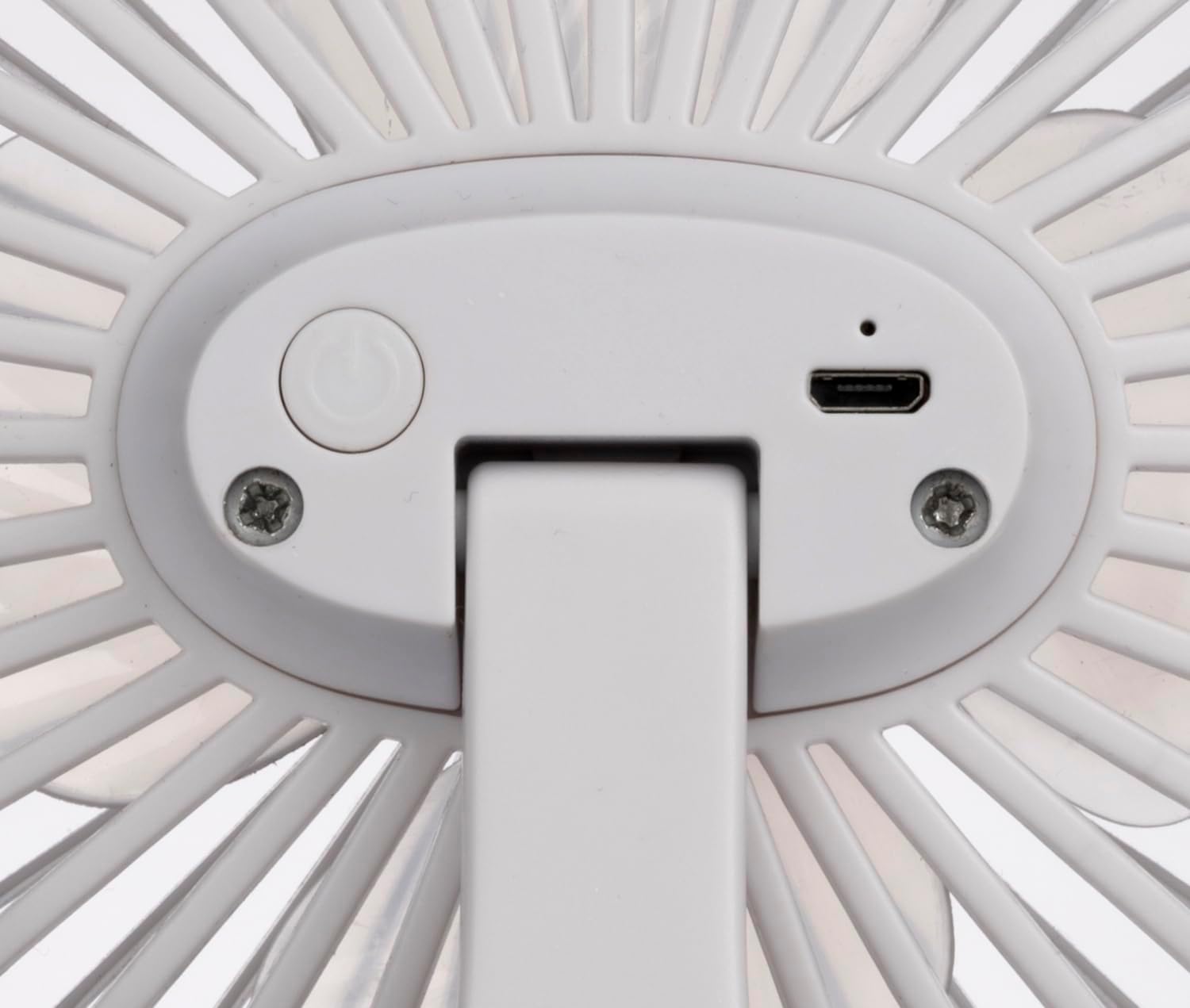
Image: Close-up of the back of the fan, showing the power button and the micro-USB input port.

Image: The mini USB fan placed on a wooden desk, connected via USB cable to a laptop, with a smartphone nearby.
പ്രവർത്തന നിർദ്ദേശങ്ങൾ
- പവർ ഓൺ/ഓഫ്: Press the power button located on the back of the fan once to turn it on. Press it again to cycle through speeds or turn it off.
- വേഗത ക്രമീകരിക്കുക:
- Press once for Speed 1 (Low).
- Press twice for Speed 2 (Medium).
- Press three times for Speed 3 (High).
- Press four times to turn the fan off.
- ടിൽറ്റ് ക്രമീകരിക്കുക: Gently tilt the fan head up or down to direct the airflow to your desired angle.

Image: The mini USB fan operating on a desk, with blue lines indicating airflow towards a person working.

Image: The mini USB fan placed on a white bedside table next to a sleeping person, providing gentle airflow.
മെയിൻ്റനൻസ്
പതിവ് അറ്റകുറ്റപ്പണികൾ നിങ്ങളുടെ ഫാനിന്റെ ദീർഘായുസ്സും മികച്ച പ്രകടനവും ഉറപ്പാക്കാൻ സഹായിക്കുന്നു.
- വൃത്തിയാക്കൽ:
- വൃത്തിയാക്കുന്നതിന് മുമ്പ് എല്ലായ്പ്പോഴും ഫാൻ അൺപ്ലഗ് ചെയ്യുക.
- ഒരു സോഫ്റ്റ് ഉപയോഗിക്കുക, ഡിamp ഫാനിന്റെ പുറംഭാഗങ്ങൾ തുടയ്ക്കാൻ തുണി.
- ഉരച്ചിലുകളുള്ള ക്ലീനറുകളോ ലായകങ്ങളോ ഉപയോഗിക്കരുത്.
- To clean dust from the fan blades, use a soft brush or a vacuum cleaner with a brush attachment. Do not attempt to disassemble the fan.
- വീണ്ടും പ്ലഗ് ഇൻ ചെയ്യുന്നതിന് മുമ്പ് ഫാൻ പൂർണ്ണമായും ഉണങ്ങിയെന്ന് ഉറപ്പാക്കുക.
- സംഭരണം: When not in use for extended periods, store the fan in a cool, dry place, preferably in its original packaging, away from direct sunlight and moisture.
ട്രബിൾഷൂട്ടിംഗ്
| പ്രശ്നം | സാധ്യമായ കാരണം | പരിഹാരം |
|---|---|---|
| ഫാൻ ഓണാകുന്നില്ല. | വൈദ്യുതി വിതരണം ഇല്ല. യുഎസ്ബി കേബിൾ ശരിയായി ബന്ധിപ്പിച്ചിട്ടില്ല. തെറ്റായ യുഎസ്ബി പോർട്ട്. |
Ensure the USB cable is securely plugged into both the fan and the power source. മറ്റൊരു USB പോർട്ട് അല്ലെങ്കിൽ പവർ അഡാപ്റ്റർ പരീക്ഷിക്കുക. പവർ സ്രോതസ്സ് സജീവമാണോ എന്ന് പരിശോധിക്കുക. |
| ഫാൻ അസാധാരണമായ ശബ്ദമുണ്ടാക്കുന്നു. | ഫാൻ ബ്ലേഡുകളിൽ തടസ്സം. ഫാൻ ഒരു സ്ഥിരതയുള്ള പ്രതലത്തിലല്ല. |
Unplug the fan and carefully check for any obstructions. Remove if safe to do so. ഫാൻ ഒരു ഉറച്ച, നിരപ്പായ പ്രതലത്തിൽ വയ്ക്കുക. |
| വായുസഞ്ചാരം ദുർബലമാണ്. | ഫാൻ വേഗത വളരെ കുറവായി സജ്ജീകരിച്ചിരിക്കുന്നു. Dust accumulation on blades/grille. |
Increase the fan speed using the power button. Clean the fan blades and grille as per maintenance instructions. |
സ്പെസിഫിക്കേഷനുകൾ
| ബ്രാൻഡ്: | Lifetime Air |
| മോഡലിൻ്റെ പേര്: | 871125224954 |
| നിറം: | വെള്ള |
| ഊർജ്ജ സ്രോതസ്സ്: | USB |
| ഇൻപുട്ട് വോളിയംtage: | 5 വി.ഡി.സി |
| പരമാവധി വൈദ്യുതി ഉപഭോഗം: | 4 വാട്ട്സ് |
| വേഗതകളുടെ എണ്ണം: | 3 |
| ബ്ലേഡുകളുടെ എണ്ണം: | 4 |
| മെറ്റീരിയൽ: | അക്രിലോണിട്രൈൽ ബ്യൂട്ടാഡീൻ സ്റ്റൈറൈൻ (എബിഎസ്) പ്ലാസ്റ്റിക് |
| അളവുകൾ (L x W x H): | 120 x 77 x 150 മിമി (ഏകദേശം) |
| ഭാരം: | 159 ഗ്രാം (ഏകദേശം) |
| നിയന്ത്രണ തരം: | Touchpad Control / Electronic Touch-Control |
| ഇൻഡോർ/doട്ട്ഡോർ ഉപയോഗം: | ഇൻഡോർ |
വാറൻ്റിയും പിന്തുണയും
For warranty information and customer support, please refer to the documentation provided at the time of purchase or contact your retailer. Keep your proof of purchase for warranty claims.