
ആമുഖം
Thank you for choosing the Nuvance Professional Hair Clipper. This manual provides essential information for the safe and effective use, maintenance, and troubleshooting of your new hair clipper. Please read these instructions thoroughly before first use and keep them for future reference.
പ്രധാനപ്പെട്ട സുരക്ഷാ നിർദ്ദേശങ്ങൾ
വൈദ്യുതാഘാതം, പരിക്ക് അല്ലെങ്കിൽ തീപിടുത്തം എന്നിവയുടെ അപകടസാധ്യത കുറയ്ക്കുന്നതിന്, എല്ലായ്പ്പോഴും ഈ അടിസ്ഥാന സുരക്ഷാ മുൻകരുതലുകൾ പാലിക്കുക:
- ഉപകരണം വെള്ളത്തിലോ മറ്റ് ദ്രാവകങ്ങളിലോ മുക്കരുത്.
- Keep the appliance away from water sources, especially when charging.
- Do not use the clipper if it has a damaged cord or plug, or if it is not working properly.
- ശാരീരികമോ, ഇന്ദ്രിയപരമോ, മാനസികമോ ആയ കഴിവുകൾ കുറഞ്ഞവർ, അല്ലെങ്കിൽ അനുഭവപരിചയമോ അറിവോ ഇല്ലാത്തവർ എന്നിവർക്ക് ഈ ഉപകരണം ഉപയോഗിക്കാൻ ഉദ്ദേശിച്ചുള്ളതല്ല, അവരുടെ സുരക്ഷയ്ക്ക് ഉത്തരവാദിയായ ഒരു വ്യക്തി ഉപകരണത്തിന്റെ ഉപയോഗത്തെക്കുറിച്ച് മേൽനോട്ടമോ നിർദ്ദേശമോ നൽകിയിട്ടില്ലെങ്കിൽ.
- കുട്ടികൾ ഉപകരണം ഉപയോഗിച്ച് കളിക്കുന്നില്ലെന്ന് ഉറപ്പാക്കാൻ മേൽനോട്ടം വഹിക്കണം.
- Only use attachments supplied by the manufacturer.
- Unplug the clipper before cleaning or performing maintenance.
- Store the clipper in a dry place when not in use.
പാക്കേജ് ഉള്ളടക്കം
പാക്കേജിൽ എല്ലാ ഇനങ്ങളും ഉണ്ടെന്ന് ഉറപ്പാക്കുക:
- Nuvance Professional Hair Clipper
- 12 Guide Combs (various lengths)
- യുഎസ്ബി ചാർജിംഗ് കേബിൾ
- ക്ലീനിംഗ് ബ്രഷ്
- ബ്ലേഡ് ഓയിൽ
- ഉപയോക്തൃ മാനുവൽ
ഉൽപ്പന്നം കഴിഞ്ഞുview
Familiarize yourself with the components of your Nuvance Hair Clipper.

ചിത്രം 1: Nuvance Hair Clipper components. This image shows the clipper from the side, highlighting the stainless steel blade, the blade adjustment lever, the power on/off switch, the battery indicator screen, and the USB charging port. The overall height of the clipper is indicated as 18.5 cm.
- സ്റ്റെയിൻലെസ്സ് സ്റ്റീൽ ബ്ലേഡ്: High-quality cutting blades for precise trimming.
- Blade Adjustment Lever: Allows fine-tuning of cutting length from 0.8mm to 2.0mm without a guide comb.
- പവർ ഓൺ/ഓഫ് സ്വിച്ച്: Activates and deactivates the clipper.
- ഡിജിറ്റൽ ഡിസ്പ്ലേ: ബാറ്ററി നിലയും ചാർജിംഗ് നിലയും കാണിക്കുന്നു.
- യുഎസ്ബി ചാർജിംഗ് പോർട്ട്: യുഎസ്ബി ചാർജിംഗ് കേബിൾ ബന്ധിപ്പിക്കുന്നതിന്.
- Guide Comb Attachments: Various sizes for different hair lengths.
സജ്ജമാക്കുക
ക്ലിപ്പർ ചാർജ് ചെയ്യുന്നു
Before first use, fully charge the clipper. A full charge typically takes approximately 3 hours and provides extended cordless operation.
- ക്ലിപ്പർ ഓഫാക്കിയിട്ടുണ്ടെന്ന് ഉറപ്പാക്കുക.
- Insert the USB charging cable into the charging port at the bottom of the clipper.
- Connect the other end of the USB cable to a USB power adapter (not included) or a compatible USB port (e.g., computer, power bank).
- The digital display will show the charging progress. Once fully charged, the display will indicate 100%.

ചിത്രം 2: USB charging and digital display. The image illustrates the clipper being charged via a USB cable, with the digital screen showing the battery percentage. It also highlights the power switch for quick operation.
Attaching Guide Combs
The clipper comes with 12 guide combs to achieve various hair lengths from 0.8mm to 25mm.

ചിത്രം 3: Guide comb lengths. This image displays different guide comb attachments, indicating their respective trimming lengths: 1.5mm, 3mm, 4.5mm, 6mm, 10mm, 13mm, 19mm, and 25mm. It also mentions 4 reserve attachments for 1, 2, 3, and 4.
- Select the desired guide comb for your preferred hair length.
- Align the guide comb with the clipper blade and push it firmly until it clicks into place.
- ചീപ്പ് നീക്കം ചെയ്യാൻ, ബ്ലേഡിൽ നിന്ന് പതുക്കെ ചീപ്പ് വലിക്കുക.
പ്രവർത്തന നിർദ്ദേശങ്ങൾ
അടിസ്ഥാന പ്രവർത്തനം
- Ensure the clipper is charged and a guide comb is securely attached (if desired).
- Press the Power On/Off switch to turn on the clipper.
- Hold the clipper with the blade pointing downwards.
- രോമവളർച്ചയുടെ ദിശയ്ക്കെതിരെ ക്ലിപ്പർ സാവധാനം നീക്കുക.
- After use, press the Power On/Off switch to turn off the clipper.
Adjusting Cutting Length (without guide comb)
The blade adjustment lever allows for precise cutting length adjustments from 0.8mm to 2.0mm without a guide comb.
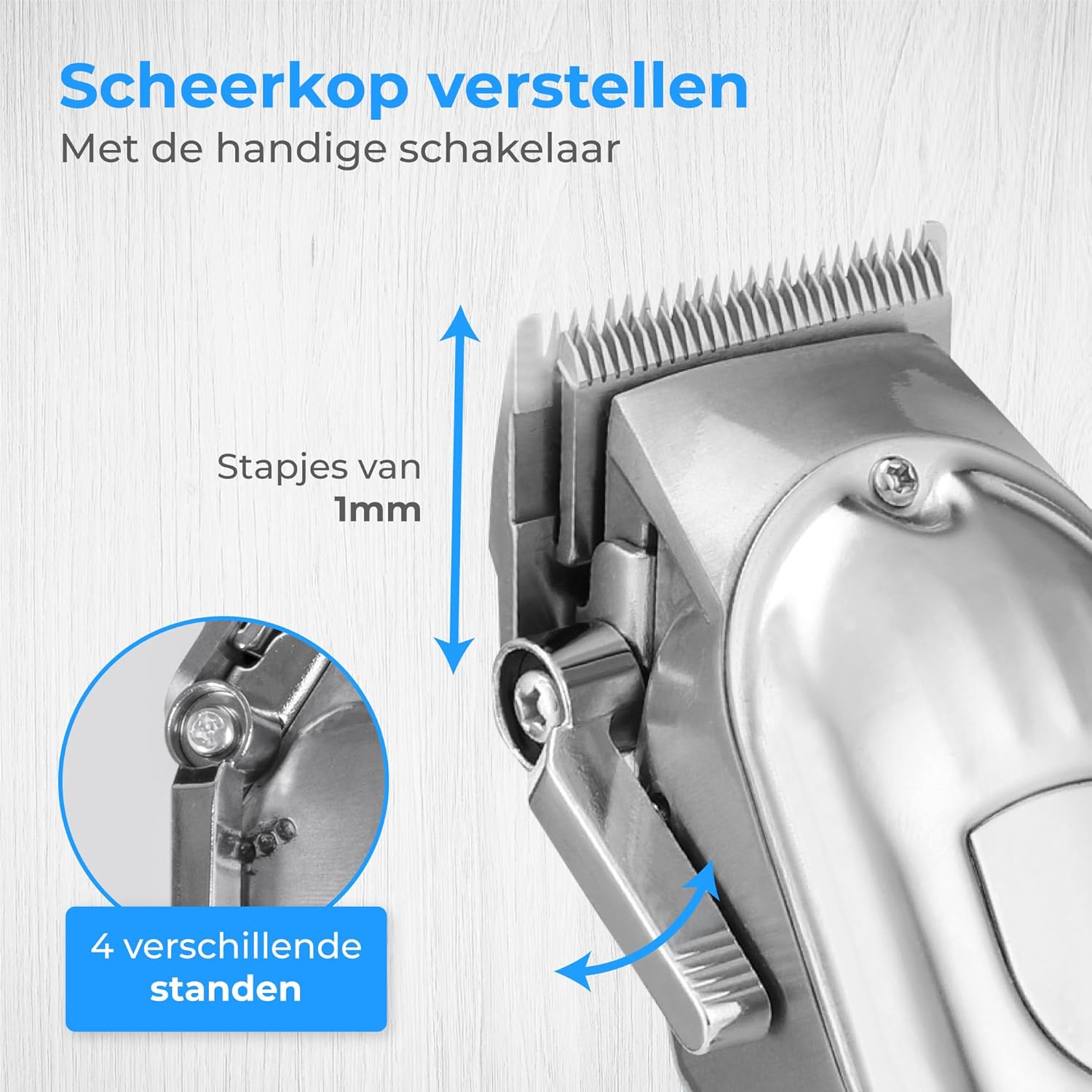
ചിത്രം 4: Blade adjustment lever. This image focuses on the side of the clipper, illustrating the lever that allows for fine adjustment of the blade's cutting length in 1mm increments, offering 4 different settings.
- Move the lever up for a shorter cut (closer to 0.8mm).
- Move the lever down for a longer cut (closer to 2.0mm).
Trimming Hair and Beard
This clipper is suitable for various grooming needs, including head hair, beard, and body hair.

ചിത്രം 5: Multi-functional use. This image highlights the clipper's ability to trim hair on various body parts, including head hair, beard, chest, and stomach, indicating its versatile application.
- For head hair: Start with a longer guide comb and gradually reduce the length until the desired style is achieved.
- For beard trimming: Use a guide comb to maintain an even length. For detailing, remove the guide comb and use the blade adjustment lever.
- For body hair: Use appropriate guide combs for sensitive areas.
മെയിൻ്റനൻസ്
ബ്ലേഡുകൾ വൃത്തിയാക്കുന്നു
Regular cleaning ensures optimal performance and extends the life of your clipper.
- Turn off and unplug the clipper.
- Remove any attached guide comb.
- Use the provided cleaning brush to remove loose hairs from the blades.
- For a more thorough clean, the blades can be carefully detached (refer to specific instructions if provided in the physical manual for blade removal). Rinse detached blades under running water and ensure they are completely dry before reattaching. Do not rinse the clipper body.
ബ്ലേഡുകളിൽ എണ്ണയിടുന്നു
Apply a few drops of the supplied blade oil to the blades after every few uses to maintain sharpness and smooth operation.
- Apply 1-2 drops of oil to the top of the blades.
- എണ്ണ തുല്യമായി വിതരണം ചെയ്യാൻ ക്ലിപ്പർ കുറച്ച് സെക്കൻഡ് ഓണാക്കുക.
- ഏതെങ്കിലും അധിക എണ്ണ മൃദുവായ തുണി ഉപയോഗിച്ച് തുടയ്ക്കുക.
ട്രബിൾഷൂട്ടിംഗ്
| പ്രശ്നം | സാധ്യമായ കാരണം | പരിഹാരം |
|---|---|---|
| ക്ലിപ്പർ ഓണാകുന്നില്ല. | ബാറ്ററി തീർന്നു. | ക്ലിപ്പർ പൂർണ്ണമായും ചാർജ് ചെയ്യുക. |
| Clipper pulls hair or cuts poorly. | Blades are dull, dirty, or not oiled. | Clean and oil the blades. If problem persists, blades may need replacement. |
| ക്ലിപ്പർ അസാധാരണമായ ശബ്ദമുണ്ടാക്കുന്നു. | Blades are not properly aligned or lubricated. | Ensure blades are clean and oiled. Check for proper blade attachment. |
| ഡിജിറ്റൽ ഡിസ്പ്ലേ പ്രവർത്തിക്കുന്നില്ല. | Unit is off or battery is completely dead. | Turn on the clipper or connect to charger. |
സ്പെസിഫിക്കേഷനുകൾ
- മോഡൽ: HF-8933
- ബ്രാൻഡ്: നുവൻസ്
- ഊർജ്ജ സ്രോതസ്സ്: USB റീചാർജബിൾ
- ബ്ലേഡ് മെറ്റീരിയൽ: സ്റ്റെയിൻലെസ്സ് സ്റ്റീൽ
- കട്ടിംഗ് ദൈർഘ്യം: 0.8mm - 25mm (with 12 guide combs)
- ബാറ്ററി സൂചകം: ഡിജിറ്റൽ ഡിസ്പ്ലേ
വാറൻ്റിയും പിന്തുണയും
Nuvance products are manufactured to high-quality standards. For warranty information or technical support, please refer to the contact details provided with your purchase or visit the official Nuvance webസൈറ്റ്.
ഏതെങ്കിലും വാറന്റി ക്ലെയിമുകൾക്കായി നിങ്ങളുടെ വാങ്ങിയതിന്റെ തെളിവ് സൂക്ഷിക്കുക.