
TANLANIN TE-012GR
ഇൻസ്ട്രക്ഷൻ മാനുവൽ
TANLANIN Vintage Bluetooth Vinyl Record Player
Model: TE-012GR
1. ആമുഖം
വാങ്ങിയതിന് നന്ദി.asing the TANLANIN Vintage Bluetooth Vinyl Record Player. This portable suitcase-style record player is designed to provide a versatile audio experience, allowing you to enjoy your vinyl collection, stream music wirelessly via Bluetooth, record vinyl to USB/SD, and connect to various audio devices. Please read this manual thoroughly before use to ensure proper operation and to maximize your enjoyment of the product.
2 പ്രധാനപ്പെട്ട സുരക്ഷാ വിവരങ്ങൾ
- യൂണിറ്റ് പ്രവർത്തിപ്പിക്കുന്നതിന് മുമ്പ് എല്ലാ നിർദ്ദേശങ്ങളും വായിക്കുക.
- ഭാവി റഫറൻസിനായി ഈ മാനുവൽ സൂക്ഷിക്കുക.
- മഴയോ ഈർപ്പമോ യൂണിറ്റ് തുറന്നുകാട്ടരുത്.
- വെൻ്റിലേഷൻ ഓപ്പണിംഗുകളൊന്നും തടയരുത്.
- നിർമ്മാതാവ് വ്യക്തമാക്കിയ അറ്റാച്ച്മെൻ്റുകൾ/ആക്സസറികൾ മാത്രം ഉപയോഗിക്കുക.
- മിന്നൽ കൊടുങ്കാറ്റുകളുടെ സമയത്തോ ദീർഘകാലത്തേക്ക് ഉപയോഗിക്കാത്ത സമയത്തോ യൂണിറ്റ് അൺപ്ലഗ് ചെയ്യുക.
- എല്ലാ സേവനങ്ങളും യോഗ്യതയുള്ള സേവന ഉദ്യോഗസ്ഥർക്ക് റഫർ ചെയ്യുക.
3. പാക്കേജ് ഉള്ളടക്കം
പാക്കേജിൽ എല്ലാ ഇനങ്ങളും ഉണ്ടെന്ന് ഉറപ്പാക്കുക:
- TANLANIN Vintage Bluetooth Vinyl Record Player
- പവർ യൂണിറ്റ്
- 45 ആർപിഎം അഡാപ്റ്റർ
- Spare Needle
- സ്ലിപ്പ്മാറ്റ്
- Users Manual (this document)
4. ഉൽപ്പന്നം കഴിഞ്ഞുview
നിങ്ങളുടെ റെക്കോർഡ് പ്ലെയറിന്റെ ഘടകങ്ങളുമായി പരിചയപ്പെടുക.

ചിത്രം 4.1: മൊത്തത്തിൽ view of the TANLANIN Vintage Bluetooth Vinyl Record Player.
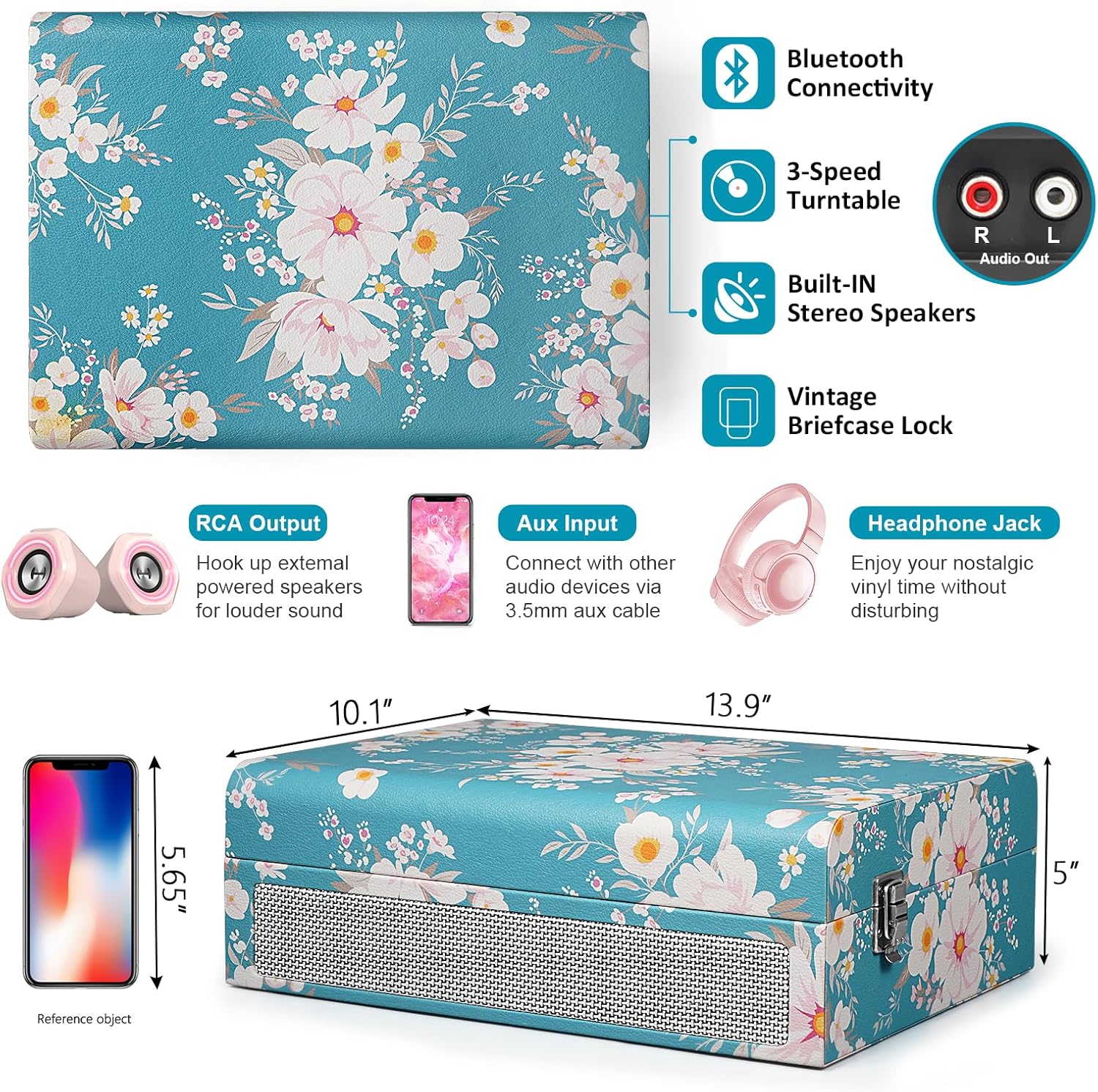
Figure 4.2: Rear and side panel connections including RCA output, Aux input, and Headphone Jack.

Figure 4.3: Control panel with USB port, TF card slot, and recording buttons.
Video 4.1: A demonstration of the record player's features, including power, speed selection, needle operation, built-in speakers, headphone jack, RCA output, USB/TF card slots, and automatic stop function.
5. സജ്ജീകരണം
- അൺപാക്ക് ചെയ്യുന്നു: റെക്കോർഡ് പ്ലെയർ അതിന്റെ പാക്കേജിംഗിൽ നിന്ന് ശ്രദ്ധാപൂർവ്വം നീക്കം ചെയ്യുക. ഭാവിയിലെ ഗതാഗതത്തിനോ സംഭരണത്തിനോ വേണ്ടി എല്ലാ പാക്കേജിംഗ് വസ്തുക്കളും സൂക്ഷിക്കുക.
- പ്ലേസ്മെൻ്റ്: നേരിട്ടുള്ള സൂര്യപ്രകാശം, താപ സ്രോതസ്സുകൾ, അമിതമായ പൊടി അല്ലെങ്കിൽ വൈബ്രേഷൻ എന്നിവയിൽ നിന്ന് അകലെ ഒരു പരന്നതും സ്ഥിരതയുള്ളതുമായ പ്രതലത്തിൽ യൂണിറ്റ് സ്ഥാപിക്കുക.
- പവർ കണക്ഷൻ: Connect the provided power unit to the DC IN port on the back of the record player and then plug it into a wall outlet.
- സംരക്ഷണ കവർ നീക്കം ചെയ്യുക: Remove the white protective cover from the stylus (needle) before playing any records.
- Platter Protection: Remove the white foam pad from the turntable platter. Place the included slipmat on the platter.
6. പ്രവർത്തന നിർദ്ദേശങ്ങൾ
6.1 ഒരു വിനൈൽ റെക്കോർഡ് പ്ലേ ചെയ്യുന്നു
- Open the record player lid.
- Place a vinyl record on the turntable platter. If playing a 45 RPM single, place the 45 RPM adapter on the center spindle.
- സ്പീഡ് സെലക്ടർ സ്വിച്ച് ഉപയോഗിച്ച് ഉചിതമായ വേഗത (33, 45, അല്ലെങ്കിൽ 78 RPM) തിരഞ്ഞെടുക്കുക.
- Turn the Power Switch/Volume Knob clockwise to power on the unit.
- Release the tone arm clip.
- Gently lift the tone arm using the cue lever and position the stylus over the desired track of the record.
- ക്യൂ ലിവർ ഉപയോഗിച്ച് ടോൺ ആം പതുക്കെ താഴ്ത്തുക. റെക്കോർഡ് പ്ലേ ചെയ്യാൻ തുടങ്ങും.
- Adjust the volume to your desired level using the Power Switch/Volume Knob.
- At the end of the record, the turntable will automatically stop if the Auto-Stop switch is in the ON position. Lift the tone arm and return it to the tone arm rest.

Figure 6.1: Playing a vinyl record on the turntable.
6.2 ബ്ലൂടൂത്ത് പ്ലേബാക്ക്
- റെക്കോർഡ് പ്ലെയർ ഓണാക്കുക.
- Press the 'M' button on the control panel to switch to Bluetooth mode. The LED display will show 'BT'.
- Enable Bluetooth on your mobile device (smartphone, tablet, etc.) and search for 'TE-012'.
- Select 'TE-012' to pair. Once paired, you will hear a confirmation sound.
- Start playing music from your device. The audio will stream through the record player's built-in speakers.

Figure 6.2: Wireless music playback via Bluetooth connection.
6.3 USB/SD Recording
- Insert a USB drive or SD card into the corresponding slot on the control panel.
- Play a vinyl record as described in Section 6.1.
- Long press the 'M' button to start recording. The LED display will show 'REC' and a timer.
- To stop recording, long press the 'M' button again. The recording will be saved as an MP3 or WAV file on your USB drive or SD card.
6.4 AUX ഇൻപുട്ട്
Connect external audio devices (e.g., MP3 player, CD player) to the AUX IN port using a 3.5mm audio cable. The audio from the external device will play through the record player's speakers.
6.5 RCA ഔട്ട്പുട്ട്
To connect the record player to external powered speakers or an amplifier, use an RCA cable (not included) to connect the RCA OUT jacks on the back of the unit to the audio input of your external audio system.
6.6 ഹെഡ്ഫോൺ ജാക്ക്
For private listening, plug headphones into the 3.5mm headphone jack on the front of the unit. The built-in speakers will be muted automatically.
7. പരിപാലനം
- സ്റ്റൈലസ് വൃത്തിയാക്കൽ: Use a soft brush to gently clean the stylus from back to front. Do not use excessive force.
- യൂണിറ്റ് വൃത്തിയാക്കൽ: മൃദുവായതും ഉണങ്ങിയതുമായ തുണി ഉപയോഗിച്ച് യൂണിറ്റിന്റെ പുറംഭാഗം തുടയ്ക്കുക. കഠിനമായ രാസവസ്തുക്കളോ ഉരച്ചിലുകളുള്ള ക്ലീനറുകളോ ഉപയോഗിക്കരുത്.
- റെക്കോർഡ് കെയർ: Keep your records clean and free of dust to ensure optimal sound quality and prolong the life of your stylus.
- സ്റ്റൈലസ് മാറ്റിസ്ഥാപിക്കൽ: The stylus is a consumable part and should be replaced after approximately 300-500 hours of use. Refer to the manufacturer's guidelines for replacement stylus models.
8. പ്രശ്നപരിഹാരം
| പ്രശ്നം | സാധ്യമായ കാരണം | പരിഹാരം |
|---|---|---|
| ശക്തിയില്ല | പവർ അഡാപ്റ്റർ ബന്ധിപ്പിച്ചിട്ടില്ല അല്ലെങ്കിൽ ഔട്ട്ലെറ്റ് പ്രവർത്തിക്കുന്നില്ല. | Ensure power adapter is securely connected and try a different power outlet. |
| സ്പീക്കറുകളിൽ നിന്ന് ശബ്ദമില്ല | ശബ്ദം വളരെ കുറവാണ്; ഹെഡ്ഫോണുകൾ കണക്റ്റ് ചെയ്തു; തെറ്റായ മോഡ് തിരഞ്ഞെടുത്തു. | Increase volume; disconnect headphones; ensure correct mode (Phono, BT, AUX) is selected. |
| റെക്കോർഡ് ഒഴിവാക്കൽ | Record is dirty or scratched; unit is not on a stable surface; stylus is worn. | Clean record; place unit on a stable, level surface; replace stylus. |
| ബ്ലൂടൂത്ത് ജോടിയാക്കുന്നില്ല | Record player not in Bluetooth mode; device too far; already paired to another device. | Ensure record player is in BT mode; move device closer; disconnect from other devices. |
9 സ്പെസിഫിക്കേഷനുകൾ
| ഫീച്ചർ | വിശദാംശങ്ങൾ |
|---|---|
| ബ്രാൻഡ് | ടാൻലാനിൻ |
| മോഡലിൻ്റെ പേര് | TE-012GR |
| പരമാവധി റൊട്ടേഷണൽ സ്പീഡ് | 78 ആർപിഎം |
| പ്രത്യേക ഫീച്ചർ | Adjustable Speed, Digital Recorder, Headphone Jack Output, LED Display, USB/SD Recording |
| മെറ്റീരിയൽ | എഞ്ചിനീയറിംഗ് വുഡ് |
| ഇനത്തിൻ്റെ ഭാരം | 5.2 പൗണ്ട് |
| ഇനത്തിൻ്റെ അളവുകൾ L x W x H | 14"L x 10"W x 5"H |
| കണക്റ്റിവിറ്റി ടെക്നോളജി | Bluetooth, AUX, USB, SD Card, RCA, Headphone Jack |
| പവർ ഉറവിടം | കോർഡഡ് ഇലക്ട്രിക് |
| വാല്യംtage | 5 വോൾട്ട് |
| വൈദ്യുതി ഉപഭോഗം | 5 വാട്ട്സ് |
| സിഗ്നൽ-ടു-നോയിസ് അനുപാതം | 75 ഡി.ബി |
10. വാറൻ്റിയും പിന്തുണയും
This product comes with a standard manufacturer's warranty. For specific warranty details, please refer to the warranty card included in your package or contact TANLANIN customer support. If you encounter any issues or have questions regarding your record player, please reach out to our customer service team for assistance.
Ask a question about this manual
Ask about setup, troubleshooting, compatibility, parts, safety, or missing instructions. Manuals+ will review the question and use this page’s manual context to help answer it.