
BOTHSTAR YJ42
ഉപയോക്തൃ മാനുവൽ
Double Sided Keyless Door Knob Lock with Fingerprint and Keypad
Brand: BOTHSTAR | Model: YJ42
1. ആമുഖം
Thank you for choosing the BOTHSTAR Double Sided Keyless Door Knob Lock. This advanced smart lock provides secure and convenient access control for both interior and exterior doors. With multiple unlocking methods including fingerprint, keypad code, and traditional key, it offers enhanced security and flexibility for homes, offices, and various other settings. This manual will guide you through the installation, setup, operation, and maintenance of your new smart doorknob.

Figure 1.1: BOTHSTAR Double Sided Keyless Door Knob Lock (Satin Nickel)
2 പ്രധാനപ്പെട്ട സുരക്ഷാ വിവരങ്ങൾ
- ഇൻസ്റ്റാൾ ചെയ്യുന്നതിനും ഉപയോഗിക്കുന്നതിനും മുമ്പ് എല്ലാ നിർദ്ദേശങ്ങളും ശ്രദ്ധാപൂർവ്വം വായിക്കുക.
- ലോക്ക് വേർപെടുത്താനോ പരിഷ്ക്കരിക്കാനോ ശ്രമിക്കരുത്. ഇത് കേടുപാടുകൾക്ക് കാരണമായേക്കാം, വാറന്റി അസാധുവാക്കിയേക്കാം.
- ബാക്കപ്പ് കീകൾ പ്രോപ്പർട്ടിക്ക് പുറത്ത് സുരക്ഷിതമായ ഒരു സ്ഥലത്ത് സൂക്ഷിക്കുക.
- Ensure proper battery installation and replace batteries when the low battery voice prompt is activated.
- This product is designed for specific door thickness and backset. Verify compatibility before installation.
- While the lock is IPX6 waterproof, avoid prolonged submersion or direct high-pressure water spray.
3. പാക്കേജ് ഉള്ളടക്കം
Carefully unpack the box and ensure all components are present and in good condition. If any items are missing or damaged, please contact customer support.
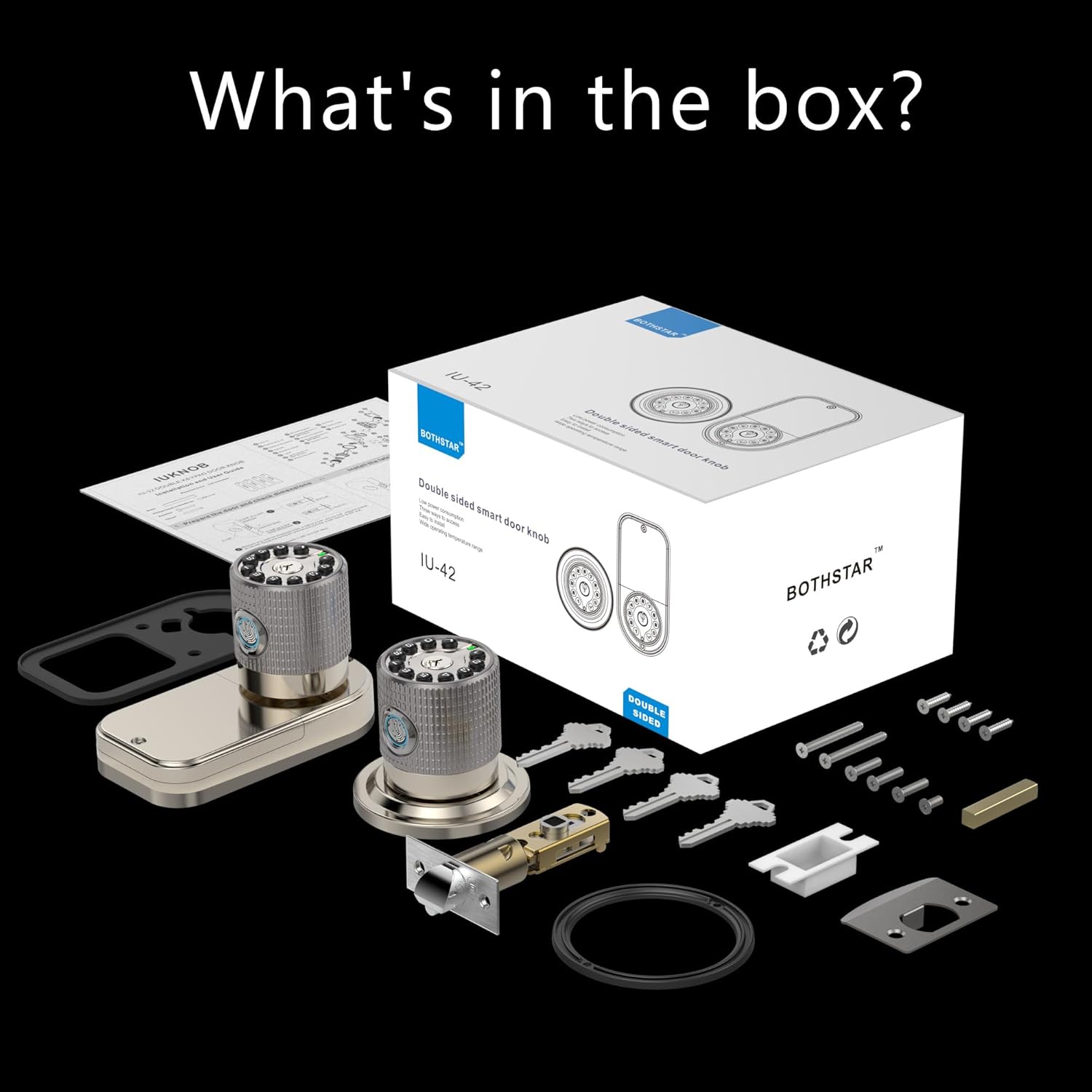
ചിത്രം 3.1: ബോക്സിൽ എന്താണുള്ളത്?
- Double Sided Fingerprint Door Knob (Exterior)
- Double Sided Fingerprint Door Knob (Interior)
- Adjustable Latch (2-3/8" or 2-3/4")
- സ്ട്രൈക്ക് പ്ലേറ്റ്
- മൗണ്ടിംഗ് സ്ക്രൂകളും ഹാർഡ്വെയറും
- Physical Keys (Set of 4)
- ഇൻസ്റ്റാളേഷൻ ടെംപ്ലേറ്റ്
- ഉപയോക്തൃ മാനുവൽ
4. ഇൻസ്റ്റാളേഷൻ ഗൈഡ്
ഇൻസ്റ്റാളേഷൻ ആരംഭിക്കുന്നതിന് മുമ്പ്, നിങ്ങളുടെ വാതിൽ ഇനിപ്പറയുന്ന സ്പെസിഫിക്കേഷനുകൾ പാലിക്കുന്നുണ്ടെന്ന് ഉറപ്പാക്കുക:
- Door Thickness: 1-1/4" to 3-7/8" (32mm to 98mm)
- Backset: Adjustable for 2-3/8" (60mm) or 2-3/4" (70mm)

Figure 4.1: Door thickness and latch dimensions
ഇൻസ്റ്റലേഷൻ ഘട്ടങ്ങൾ:
- വാതിൽ തയ്യാറാക്കുക: If replacing an existing lock, remove it. Use the provided template to mark and drill holes if installing on a new door.
- ലാച്ച് ഇൻസ്റ്റാൾ ചെയ്യുക: Insert the latch into the door edge. Ensure the latch bolt faces the correct direction (slanted side towards the door frame). Secure with screws.
- എക്സ്റ്റീരിയർ നോബ് ഇൻസ്റ്റാൾ ചെയ്യുക: Feed the cable from the exterior knob through the door hole. Align the knob with the latch and secure it.
- ഇന്റീരിയർ നോബ് ഇൻസ്റ്റാൾ ചെയ്യുക: Connect the cable from the exterior knob to the interior knob. Align the interior knob with the mounting plate and secure it with screws.
- ബാറ്ററികൾ ചേർക്കുക: Open the battery cover on the interior knob and insert 4 AAA batteries (not included), ensuring correct polarity.
- ടെസ്റ്റ് ഓപ്പറേഷൻ: After installation, test the mechanical operation of the latch and knobs.
5. പ്രാരംഭ സജ്ജീകരണവും പ്രോഗ്രാമിംഗും
The BOTHSTAR smart lock offers multiple functions for enhanced security and convenience.

Figure 5.1: Multi-function & Security Features
5.1 Adding Fingerprints (Up to 100)
- Press the 'Set' button on the interior knob. The lock will prompt for administrator fingerprint.
- Place your finger on the fingerprint sensor. The lock will beep and prompt you to lift and place your finger multiple times for a complete scan.
- Once successfully registered, the lock will confirm with a voice prompt.
- Repeat for additional fingerprints.
5.2 Adding User Codes (Up to 50)
- Press the 'Set' button. Enter the administrator code (default is 123456) followed by '#'.
- Press '1' to add a user code.
- Enter your desired 6-10 digit user code, then press '#'.
- Re-enter the same user code and press '#' to confirm.
- The lock will confirm successful addition.
5.3 Setting Auto-Lock Function
The auto-lock feature can be set to automatically lock the door after a specified delay (2 seconds to 12 hours).
- Press the 'Set' button. Enter the administrator code followed by '#'.
- Press '3' to enter auto-lock settings.
- Enter the desired delay time in seconds (e.g., '5' for 5 seconds) or hours (e.g., '12H' for 12 hours), then press '#'.
- The lock will confirm the setting.
6. ഓപ്പറേഷൻ
The BOTHSTAR smart lock provides convenient access from both sides of the door.

Figure 6.1: Double-sided access with multiple unlock methods
6.1 ഫിംഗർപ്രിൻ്റ് ഉപയോഗിച്ച് അൺലോക്ക് ചെയ്യുന്നു
- ഫിംഗർപ്രിൻ്റ് സെൻസറിൽ രജിസ്റ്റർ ചെയ്ത വിരൽ വയ്ക്കുക.
- The lock will verify the fingerprint (approx. 0.25s) and unlock.
- വാതിൽ തുറക്കാൻ നോബ് തിരിക്കുക.
6.2 Unlocking with Keypad Code
- Enter a registered user code on the keypad.
- Press the '#' key.
- The lock will verify the code and unlock.
- വാതിൽ തുറക്കാൻ നോബ് തിരിക്കുക.
6.3 ഫിസിക്കൽ കീ ഉപയോഗിച്ച് അൺലോക്ക് ചെയ്യുന്നു
- Insert the physical key into the keyhole.
- Turn the key to unlock the door.
- വാതിൽ തുറക്കാൻ നോബ് തിരിക്കുക.
6.4 വാതിൽ പൂട്ടുന്നു
- യാന്ത്രിക ലോക്ക്: If auto-lock is enabled, the door will lock automatically after the set delay once closed.
- മാനുവൽ ലോക്ക്: Press and hold the '#' key on the keypad for 2 seconds to manually lock the door.
7. പരിപാലനം
7.1 ബാറ്ററി മാറ്റിസ്ഥാപിക്കൽ
- The lock will provide a voice prompt when batteries are low.
- Open the battery cover on the interior knob.
- Replace all 4 AAA batteries with new, high-quality alkaline batteries. Ensure correct polarity.
- In case of completely dead batteries, the lock can be temporarily powered via a 5V USB-C cord for emergency access.
7.2 വൃത്തിയാക്കൽ
- Clean the lock surface with a soft, damp തുണി.
- അബ്രാസീവ് ക്ലീനറുകളോ, ലായകങ്ങളോ, കഠിനമായ രാസവസ്തുക്കളോ ഉപയോഗിക്കരുത്, കാരണം ഇവ ഫിനിഷിനും ഇലക്ട്രോണിക് ഘടകങ്ങൾക്കും കേടുവരുത്തും.
- മികച്ച പ്രകടനത്തിനായി ഫിംഗർപ്രിന്റ് സെൻസർ വൃത്തിയായും വരണ്ടതുമായി സൂക്ഷിക്കുക.
8. പ്രശ്നപരിഹാരം
| പ്രശ്നം | സാധ്യമായ കാരണം | പരിഹാരം |
|---|---|---|
| ലോക്ക് പ്രതികരിക്കുന്നില്ല. | ഡെഡ് ബാറ്ററികൾ. | Replace batteries. Use USB-C for emergency power. |
| വിരലടയാളം തിരിച്ചറിഞ്ഞില്ല. | Finger is wet/dirty, sensor is dirty, or fingerprint not registered correctly. | വിരലും സെൻസറും വൃത്തിയാക്കുക. ആവശ്യമെങ്കിൽ വിരലടയാളം വീണ്ടും രജിസ്റ്റർ ചെയ്യുക. |
| Keypad code not working. | Incorrect code entered, code not registered, or keypad malfunction. | Verify code. Re-register code. Check for keypad damage. |
| ലോക്ക് യാന്ത്രികമായി ലോക്ക് ചെയ്യുന്നില്ല. | Auto-lock feature disabled or incorrect delay set. | Check auto-lock settings and enable/adjust as needed. |
| ലോക്ക് അസാധാരണമായ ശബ്ദങ്ങൾ ഉണ്ടാക്കുന്നു. | മെക്കാനിക്കൽ തടസ്സം അല്ലെങ്കിൽ ആന്തരിക പ്രശ്നം. | Check for obstructions around the latch. If problem persists, contact support. |
9. ഉൽപ്പന്ന സവിശേഷതകൾ
| ഫീച്ചർ | സ്പെസിഫിക്കേഷൻ |
|---|---|
| ബ്രാൻഡ് | ബോത്ത്സ്റ്റാർ |
| മോഡലിൻ്റെ പേര് | YJ42 LOCK |
| ലോക്ക് തരം | കോമ്പിനേഷൻ ലോക്ക് |
| പ്രത്യേക സവിശേഷതകൾ | Double sided fingerprint, Double sided keypad |
| മെറ്റീരിയൽ | Zinc Alloy, Metal Handle |
| നിറം | സാറ്റിൻ നിക്കൽ |
| ഉൽപ്പന്ന അളവുകൾ | 8 x 4 x 4 ഇഞ്ച് |
| ഇനത്തിൻ്റെ ഭാരം | 3.58 പൗണ്ട് (1.63 കിലോഗ്രാം) |
| വാതിലിന്റെ കനം അനുയോജ്യത | 1-1/4" to 3-7/8" |
| Latch Bolt Specifications | 2-3/8" or 2-3/4" adjustable |
| പവർ ഉറവിടം | 4 x AAA ബാറ്ററികൾ (ഉൾപ്പെടുത്തിയിട്ടില്ല) |
| എമർജൻസി പവർ | 5V USB-C |
| വാട്ടർപ്രൂഫ് റേറ്റിംഗ് | IPX6 |
| പ്രവർത്തന താപനില | -22°F മുതൽ +176°F വരെ (-30°C മുതൽ +80°C വരെ) |
| വിരലടയാള ശേഷി | 100 |
| ഉപയോക്തൃ കോഡ് ശേഷി | 50 |
10. വാറൻ്റിയും പിന്തുണയും
BOTHSTAR provides a comprehensive warranty and dedicated customer support for your smart lock.
വാറൻ്റി വിവരങ്ങൾ:
- സൗജന്യമായി മാറ്റിസ്ഥാപിക്കൽ: Enjoy a free replacement for your product within 1 year from the date of purchase.
- Lifetime After-Sales Customer Service: We are committed to providing support for the lifetime of your product.
സാങ്കേതിക സഹായം:
For any technical assistance, troubleshooting, or warranty claims, please contact our 24/7 online technical support. Refer to the contact information provided on the product packaging or the official BOTHSTAR webസൈറ്റ്.
Ask a question about this manual
Ask about setup, troubleshooting, compatibility, parts, safety, or missing instructions. Manuals+ will review the question and use this page’s manual context to help answer it.