ആമുഖം
The Earclip Bluetooth Earphone LNV - XT83 II TWS Earbuds are designed for a comfortable and immersive audio experience. Featuring air conduction technology and 3D stereo sound, these earbuds are suitable for various activities including gaming, calls, and daily listening. Their ergonomic design ensures a secure and comfortable fit for extended wear, while touch controls provide easy management of audio and calls.

Image: The XT83 II TWS Earbuds in their open charging case, showcasinഅവയുടെ ഒതുക്കമുള്ള ഡിസൈൻ.
ബോക്സിൽ എന്താണുള്ളത്
Upon opening your product package, please ensure all the following components are present:
- 1x ചാർജിംഗ് കേസ്
- 2x Earbuds (Right & Left)
- 1x യുഎസ്ബി ചാർജിംഗ് കേബിൾ
- 1x ഉപയോക്തൃ മാനുവൽ
സജ്ജീകരണ ഗൈഡ്
ഇയർബഡുകളും കേസും ചാർജ് ചെയ്യുന്നു
Before first use, fully charge the earbuds and the charging case. Connect the provided USB-C charging cable to the charging port on the case and a compatible power source. The charging case has a battery capacity of 250 mAh and takes approximately 1 hour to fully charge. The earbuds themselves offer up to 15 hours of battery life on a full charge.
ബ്ലൂടൂത്ത് ജോടിയാക്കൽ
To pair your XT83 II TWS Earbuds with a device:
- നിങ്ങളുടെ ഉപകരണത്തിന്റെ ബ്ലൂടൂത്ത് പ്രവർത്തനക്ഷമമാക്കിയിട്ടുണ്ടെന്ന് ഉറപ്പാക്കുക.
- ചാർജിംഗ് കേസ് തുറന്ന് രണ്ട് ഇയർബഡുകളും നീക്കം ചെയ്യുക. അവ സ്വയമേവ ജോടിയാക്കൽ മോഡിലേക്ക് പ്രവേശിക്കും.
- On your device, search for "Lenovo XT83 II" in the Bluetooth settings and select it to connect.
- കണക്റ്റ് ചെയ്തുകഴിഞ്ഞാൽ, ഒരു സ്ഥിരീകരണ ശബ്ദം പ്ലേ ചെയ്യും, ഇയർബഡുകൾ ഉപയോഗത്തിന് തയ്യാറാണ്.
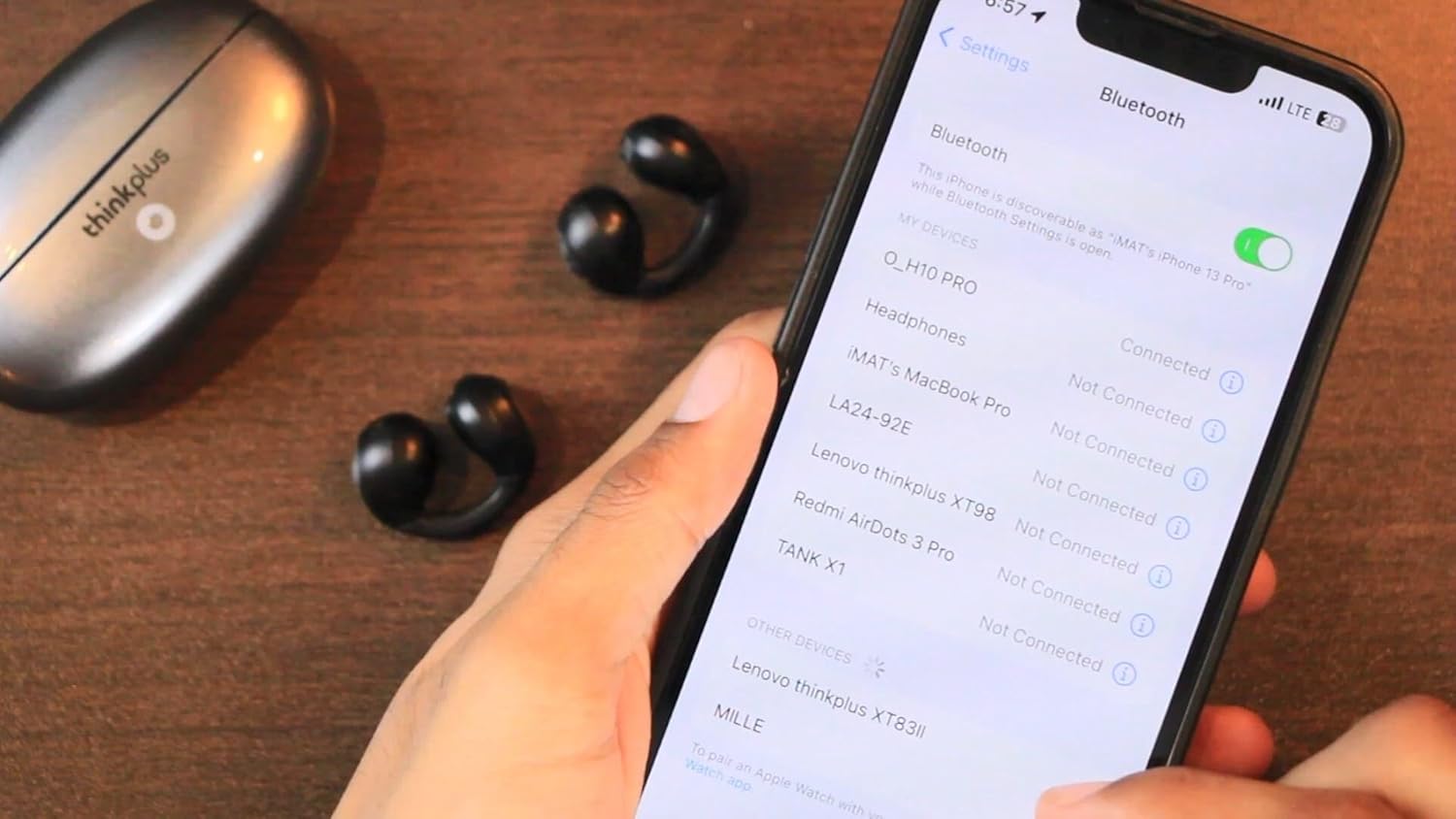
Image: Connecting the XT83 II earbuds to a smartphone via Bluetooth settings.
Video: This video demonstrates the physical details of the XT83 II earbuds and charging case, including how to remove the earbuds from the case, place them back, and shows the pairing process with a smartphone. It also illustrates how to wear the earbuds and use their touch controls for playback and volume adjustment.
പ്രവർത്തന നിർദ്ദേശങ്ങൾ
ടച്ച് നിയന്ത്രണങ്ങൾ
The XT83 II earbuds feature intuitive touch controls for easy management of your audio and calls:
- ഒറ്റ ടാപ്പ്: ഓഡിയോ പ്ലേ ചെയ്യുക/താൽക്കാലികമായി നിർത്തുക.
- ഇരട്ട ടാപ്പ്: Increase or decrease volume (specific earbud for each function, refer to the video for demonstration).
- ട്രിപ്പിൾ ടാപ്പ്: Switch to the next or previous song (specific earbud for each function).
- ലോംഗ് പ്രസ്സ്: Activate voice assistant or reject a call.
- During a Call: Single tap to answer/end a call.

Image: The XT83 II earbud worn comfortably on the ear, highlighting its ergonomic design.
ഗെയിം മോഡും സംഗീത മോഡും
The earbuds support switching between Game Mode and Music Mode. Game Mode offers ultra-low latency, as low as 40ms, for a synchronized gaming experience. Refer to the product's specific instructions or experiment with touch controls to switch between these modes.

Image: Visual representation of the XT83 II earbuds' Game Mode and Music Mode functionality.
മെയിൻ്റനൻസ്
To ensure the longevity and optimal performance of your XT83 II TWS Earbuds, follow these maintenance guidelines:
- വൃത്തിയാക്കൽ: മൃദുവായതും ഉണങ്ങിയതും ലിന്റ് രഹിതവുമായ തുണി ഉപയോഗിച്ച് ഇയർബഡുകളും ചാർജിംഗ് കെയ്സും പതിവായി തുടയ്ക്കുക. ഉരച്ചിലുകളുള്ള വസ്തുക്കളോ കഠിനമായ രാസവസ്തുക്കളോ ഉപയോഗിക്കുന്നത് ഒഴിവാക്കുക.
- സംഭരണം: ഉപയോഗത്തിലില്ലാത്തപ്പോൾ, പൊടിയിൽ നിന്നും കേടുപാടുകളിൽ നിന്നും സംരക്ഷിക്കാൻ ഇയർബഡുകൾ അവയുടെ ചാർജിംഗ് കേസിൽ സൂക്ഷിക്കുക. നേരിട്ടുള്ള സൂര്യപ്രകാശത്തിൽ നിന്നും കടുത്ത താപനിലയിൽ നിന്നും അകന്ന് തണുത്തതും വരണ്ടതുമായ സ്ഥലത്ത് സൂക്ഷിക്കുക.
- ജല പ്രതിരോധം: The earbuds have a waterproof rating. However, avoid submerging them in water or exposing them to excessive moisture for prolonged periods. Dry them thoroughly if they get wet.
- ചാർജിംഗ്: Use only the provided USB-C cable or a certified equivalent for charging. Do not attempt to charge the device if it is wet.
ട്രബിൾഷൂട്ടിംഗ്
If you encounter issues with your XT83 II TWS Earbuds, try the following solutions:
- ഇയർബഡുകൾ ജോടിയാക്കുന്നില്ല:
- രണ്ട് ഇയർബഡുകളും പൂർണ്ണമായും ചാർജ് ചെയ്തിട്ടുണ്ടെന്ന് ഉറപ്പാക്കുക.
- Place both earbuds back into the charging case, close the lid, wait a few seconds, then open the lid and remove them again.
- നിങ്ങളുടെ ഉപകരണത്തിന്റെ Bluetooth ഓഫാക്കി ഓണാക്കുക.
- Forget the device ("Lenovo XT83 II") from your device's Bluetooth list and attempt to pair again.
- ഒരു ഇയർബഡിൽ നിന്ന് ശബ്ദമില്ല:
- രണ്ട് ഇയർബഡുകളും ചാർജ്ജ് ചെയ്തിട്ടുണ്ടെന്ന് ഉറപ്പാക്കുക.
- Place both earbuds back into the case and take them out simultaneously.
- ഇയർബഡുകളിലെയും കെയ്സിലെയും ചാർജിംഗ് കോൺടാക്റ്റുകൾ വൃത്തിയാക്കുക.
- ചാർജിംഗ് പ്രശ്നങ്ങൾ:
- ചാർജിംഗ് കേബിൾ കേസിലേക്കും പവർ സ്രോതസ്സിലേക്കും സുരക്ഷിതമായി ബന്ധിപ്പിച്ചിട്ടുണ്ടോയെന്ന് പരിശോധിക്കുക.
- മറ്റൊരു USB-C കേബിളും പവർ അഡാപ്റ്ററും പരീക്ഷിച്ചുനോക്കൂ.
- ഇയർബഡുകളിലെയും കേസിനുള്ളിലെയും ചാർജിംഗ് കോൺടാക്റ്റുകൾ വൃത്തിയുള്ളതും അവശിഷ്ടങ്ങളില്ലാത്തതുമാണെന്ന് ഉറപ്പാക്കുക.
- മോശം ശബ്ദ നിലവാരം അല്ലെങ്കിൽ വിച്ഛേദങ്ങൾ:
- Ensure your device is within the Bluetooth range (up to 10.2 meters).
- മറ്റ് വയർലെസ് ഉപകരണങ്ങളിൽ നിന്ന് മാറി ഇടപെടൽ കുറയ്ക്കുക.
- നിങ്ങളുടെ ഉപകരണത്തിന്റെ ഓഡിയോ ക്രമീകരണങ്ങൾ പരിശോധിക്കുക.
സ്പെസിഫിക്കേഷനുകൾ
| ഫീച്ചർ | വിശദാംശങ്ങൾ |
|---|---|
| മോഡലിൻ്റെ പേര് | ലെനോവോ XT83 II |
| കണക്റ്റിവിറ്റി ടെക്നോളജി | വയർലെസ് |
| വയർലെസ് കമ്മ്യൂണിക്കേഷൻ ടെക്നോളജി | ബ്ലൂടൂത്ത് |
| ബ്ലൂടൂത്ത് പതിപ്പ് | 5.3 |
| ബ്ലൂടൂത്ത് ശ്രേണി | 10.2 മീറ്റർ |
| ബാറ്ററി ലൈഫ് (ഇയർബഡുകൾ) | 15 മണിക്കൂർ |
| ചാർജിംഗ് സമയം (കേസ്) | 1 മണിക്കൂർ |
| കാരിയർ കെയ്സ് ബാറ്ററി കപ്പാസിറ്റി | 250 മില്ലിamp മണിക്കൂറുകൾ |
| നിയന്ത്രണ തരം | മീഡിയ നിയന്ത്രണം, ടച്ച് |
| ജല പ്രതിരോധ നില | വാട്ടർപ്രൂഫ് |
| ശബ്ദ നിയന്ത്രണം | Active Noise Cancellation (DNS Precise Noise Reduction) |
| മെറ്റീരിയൽ | പ്ലാസ്റ്റിക് |
| ഫോം ഫാക്ടർ | In Ear (Earclip) |
വാറൻ്റിയും പിന്തുണയും
For information regarding warranty coverage, technical support, or service inquiries, please refer to the warranty card included in your product packaging or contact the retailer from whom you purchased the product. Keep your proof of purchase for any warranty claims.


