
Wood's Como 12000
Wood's Como 12k Smart Air Conditioner User Manual
Model: Como 12000
1. ആമുഖം
Thank you for choosing the Wood's Como 12k Smart Air Conditioner. This powerful and elegant unit is designed to provide efficient temperature regulation in your home or workplace, ensuring a comfortable climate year-round. This manual provides essential information for the safe and effective operation, maintenance, and troubleshooting of your new air conditioner. Please read it thoroughly before use and retain it for future reference.
2 സുരക്ഷാ വിവരങ്ങൾ
പ്രധാനപ്പെട്ട സുരക്ഷാ നിർദ്ദേശങ്ങൾ:
- യൂണിറ്റ് എല്ലായ്പ്പോഴും ഒരു സ്ഥിരതയുള്ള, നിരപ്പായ പ്രതലത്തിലാണ് സ്ഥാപിച്ചിരിക്കുന്നതെന്ന് ഉറപ്പാക്കുക.
- എയർ ഇൻലെറ്റുകളോ ഔട്ട്ലെറ്റുകളോ തടയരുത്. ശരിയായ വായുസഞ്ചാരത്തിനായി യൂണിറ്റിന് ചുറ്റും മതിയായ ക്ലിയറൻസ് നിലനിർത്തുക.
- Do not operate the unit with a damaged power cord or plug. If damaged, contact qualified service personnel.
- പ്രവർത്തന സമയത്ത് കുട്ടികളെയും വളർത്തുമൃഗങ്ങളെയും യൂണിറ്റിൽ നിന്ന് അകറ്റി നിർത്തുക.
- വൃത്തിയാക്കുന്നതിനോ അറ്റകുറ്റപ്പണികൾ നടത്തുന്നതിനോ മുമ്പ് യൂണിറ്റ് അൺപ്ലഗ് ചെയ്യുക.
- നനഞ്ഞതോ ചൂടുള്ളതോ ആയ കാലാവസ്ഥയിൽ യൂണിറ്റ് ഉപയോഗിക്കരുത്.amp കുളിമുറി പോലുള്ള പരിതസ്ഥിതികൾ.
- ഈ ഉപകരണം, അവരുടെ സുരക്ഷയ്ക്ക് ഉത്തരവാദിയായ ഒരു വ്യക്തി ഉപകരണത്തിൻ്റെ ഉപയോഗത്തെ സംബന്ധിച്ച മേൽനോട്ടമോ നിർദ്ദേശമോ നൽകിയിട്ടില്ലെങ്കിൽ, ശാരീരികമോ ഇന്ദ്രിയപരമോ മാനസികമോ ആയ കഴിവുകൾ കുറഞ്ഞതോ അനുഭവത്തിൻ്റെയും അറിവിൻ്റെയും അഭാവം ഉള്ള വ്യക്തികൾക്ക് (കുട്ടികൾ ഉൾപ്പെടെ) ഉപയോഗിക്കാൻ ഉദ്ദേശിച്ചുള്ളതല്ല.
3. ഉൽപ്പന്നം കഴിഞ്ഞുview
The Wood's Como 12k is a portable air conditioner designed for ease of use and mobility. It features a digital touch control panel, a remote control, and sturdy wheels for easy relocation.
പ്രധാന സവിശേഷതകൾ:
- Remote Control for convenient operation.
- Programmable Timer for scheduled operation.
- Integrated Dust Filter for improved air quality.
- Auto Swing function for even air distribution.
- Washable air filter for easy maintenance.
- Smart control via Wood's Connect app (iOS and Android).
ഘടകങ്ങൾ:

ചിത്രം 3.1: ഫ്രണ്ട് view of the Wood's Como 12k Smart Air Conditioner, showing its sleek white design and the Wood's logo.
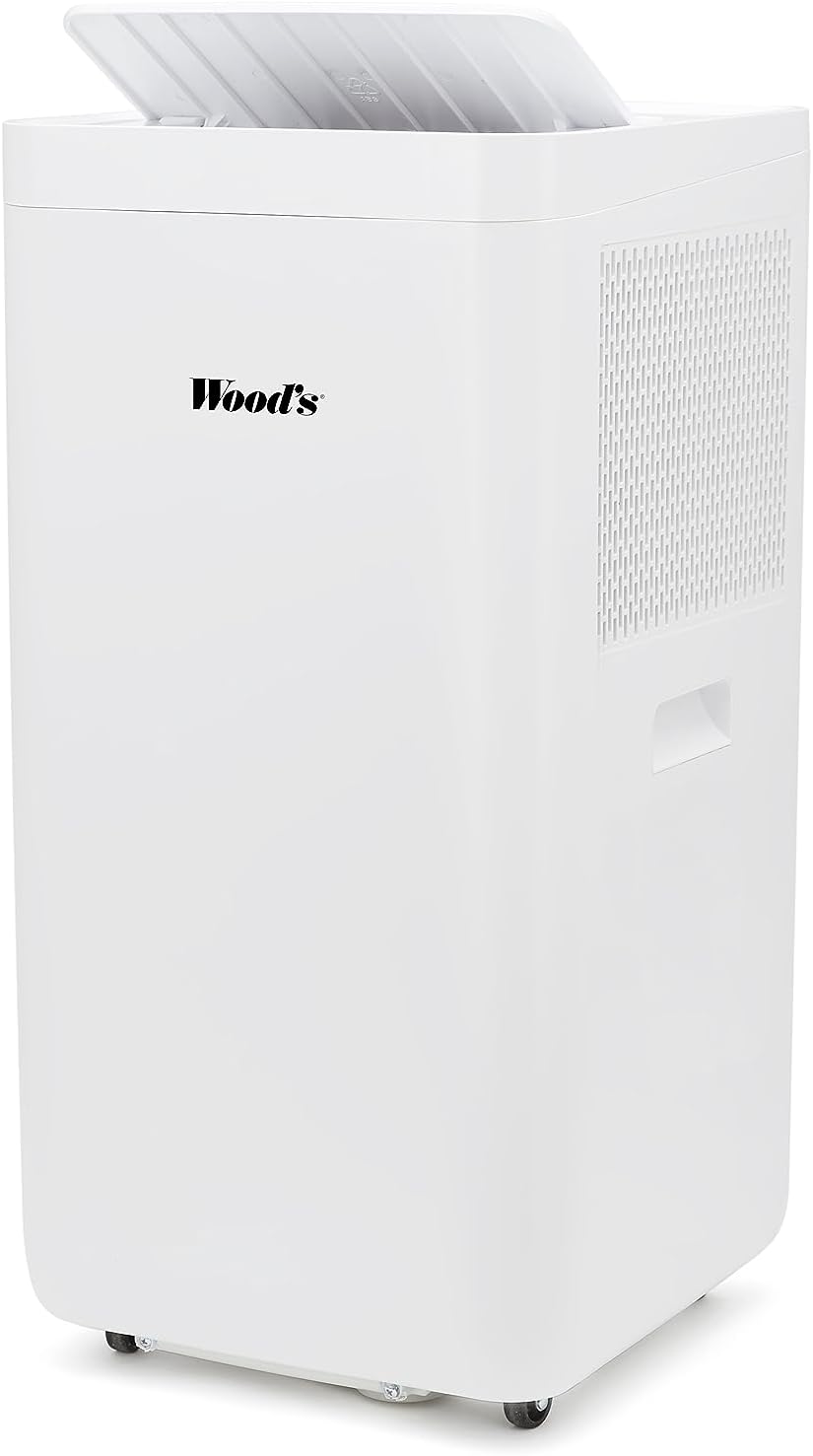
ചിത്രം 3.2: മുകളിൽ view of the air conditioner, illustrating the open lid revealing the air outlet and control panel area.

ചിത്രം 3.3: Included accessories: remote control, exhaust hose, and window kit for easy installation without drilling.

ചിത്രം 3.4: Dimensions of the unit and exhaust kit: 73cm height, 32cm depth, and 37cm width.
4. സജ്ജീകരണം
Follow these steps to set up your Wood's Como 12k Smart Air Conditioner:
- അൺപാക്ക് ചെയ്യുന്നു: Carefully remove the air conditioner and all accessories from the packaging. Retain packaging for future storage or transport.
- പ്ലേസ്മെൻ്റ്: Position the unit on a firm, level surface near a window or opening where the exhaust hose can be vented. Ensure there is at least 30 cm (12 inches) of clearance around the unit for proper air circulation.
- എക്സ്ഹോസ്റ്റ് ഹോസ് ഇൻസ്റ്റാളേഷൻ:
- എക്സ്ഹോസ്റ്റ് ഹോസിന്റെ ഒരറ്റം യൂണിറ്റിന്റെ പിൻഭാഗത്തുള്ള എയർ ഔട്ട്ലെറ്റിൽ ഘടിപ്പിക്കുക.
- എക്സ്ഹോസ്റ്റ് ഹോസിന്റെ മറ്റേ അറ്റം വിൻഡോ കിറ്റ് അഡാപ്റ്ററുമായി ഘടിപ്പിക്കുക.
- Install the window kit in your window opening, ensuring a secure fit to prevent hot air from re-entering the room.
- Extend the exhaust hose through the window kit. Minimize bends and length of the hose for optimal performance.

ചിത്രം 4.1: പിൻഭാഗം view of the unit, showing the exhaust port where the hose connects to expel hot air.
- പവർ കണക്ഷൻ: പവർ കോർഡ് ഒരു ഗ്രൗണ്ടഡ് ഇലക്ട്രിക്കൽ ഔട്ട്ലെറ്റിലേക്ക് പ്ലഗ് ചെയ്യുക. വോള്യം ഉറപ്പാക്കുകtage യൂണിറ്റിന്റെ ആവശ്യകതകളുമായി പൊരുത്തപ്പെടുന്നു (2.3E+2 വോൾട്ട് AC).
- ആപ്പ് കണക്ഷൻ (ഓപ്ഷണൽ): Download the "Wood's Connect" app from your device's app store (iOS or Android). Follow the in-app instructions to connect your air conditioner for smart control and monitoring.
5. പ്രവർത്തന നിർദ്ദേശങ്ങൾ
Your Wood's Como 12k Smart Air Conditioner can be operated using the digital touch control panel on the unit or the included remote control.
നിയന്ത്രണ പാനൽ / റിമോട്ട് കൺട്രോൾ പ്രവർത്തനങ്ങൾ:
- പവർ ബട്ടൺ: യൂണിറ്റ് ഓണാക്കുകയോ ഓഫാക്കുകയോ ചെയ്യുന്നു.
- മോഡ് ബട്ടൺ: Cycles through operating modes (e.g., Cool, Fan, Dry).
- താപനില കൂട്ടുകയോ കുറയ്ക്കുകയോ ചെയ്യുന്നതിനുള്ള ബട്ടണുകൾ: ആവശ്യമുള്ള താപനില ക്രമീകരണം ക്രമീകരിക്കുന്നു.
- ഫാൻ സ്പീഡ് ബട്ടൺ: ഫാൻ വേഗത (കുറഞ്ഞ, ഇടത്തരം, ഉയർന്ന) തിരഞ്ഞെടുക്കുന്നു.
- ടൈമർ ബട്ടൺ: Sets the programmable timer for automatic ON/OFF.
- സ്വിംഗ് ബട്ടൺ: Activates or deactivates the auto-swing function for the air louvers.
പ്രവർത്തന രീതികൾ:
- രസകരമായ മോഡ്: Provides cooling by expelling hot air. Set your desired temperature.
- ഫാൻ മോഡ്: തണുപ്പിക്കാതെ വായു സഞ്ചാരം നൽകുന്നു. വായുസഞ്ചാരത്തിന് ഉപയോഗപ്രദമാണ്.
- ഡ്രൈ മോഡ് (ഈർപ്പരഹിതമാക്കുക): മുറിയിലെ ഈർപ്പം കുറയ്ക്കുന്നു.
Using the Wood's Connect App:
The Wood's Connect app allows you to control your air conditioner remotely and monitor room conditions. Refer to the app's instructions for detailed pairing and usage information. Features include:
- Remote ON/OFF and mode selection.
- Temperature and fan speed adjustment.
- Setting schedules and timers.
- Viewing real-time temperature and humidity data.
6. പരിപാലനം
പതിവ് അറ്റകുറ്റപ്പണികൾ മികച്ച പ്രകടനം ഉറപ്പാക്കുകയും നിങ്ങളുടെ എയർ കണ്ടീഷണറിന്റെ ആയുസ്സ് വർദ്ധിപ്പിക്കുകയും ചെയ്യുന്നു.
എയർ ഫിൽട്ടർ വൃത്തിയാക്കൽ:
ഉപയോഗവും വായുവിന്റെ ഗുണനിലവാരവും അനുസരിച്ച് രണ്ടാഴ്ച കൂടുമ്പോൾ അല്ലെങ്കിൽ കൂടുതൽ തവണ എയർ ഫിൽറ്റർ വൃത്തിയാക്കണം.
- പവർ ഓഫ്: പവർ ഔട്ട്ലെറ്റിൽ നിന്ന് എയർ കണ്ടീഷണർ ഊരിമാറ്റുക.
- ഫിൽറ്റർ നീക്കം ചെയ്യുക: Locate the air filter panel on the back or side of the unit. Gently pull to remove the filter.
- ഫിൽട്ടർ വൃത്തിയാക്കുക: Wash the filter under running water (lukewarm) or use a vacuum cleaner to remove dust. For heavy dirt, a mild detergent can be used.
- ഡ്രൈ ഫിൽട്ടർ: Allow the filter to air dry completely before reinserting. Do not expose to direct sunlight or high heat.
- ഫിൽറ്റർ വീണ്ടും ഇൻസ്റ്റാൾ ചെയ്യുക: Carefully slide the dry filter back into its slot until it clicks into place.

ചിത്രം 6.1: A hand demonstrating the removal of the washable air filter from the side of the unit.
യൂണിറ്റ് പുറംഭാഗം വൃത്തിയാക്കൽ:
- ഒരു സോഫ്റ്റ്, ഡി ഉപയോഗിച്ച് പുറംഭാഗം തുടയ്ക്കുകamp തുണി.
- കഠിനമായ രാസവസ്തുക്കളോ, അബ്രസീവ് ക്ലീനറുകളോ, ലായകങ്ങളോ ഉപയോഗിക്കരുത്, കാരണം ഇവ ഉപരിതലത്തിന് കേടുവരുത്തും.
സീസണൽ സ്റ്റോറേജ്:
- Before storing, ensure the unit is completely dry. Run the fan-only mode for a few hours to dry the internal components.
- എയർ ഫിൽട്ടറും പുറംഭാഗവും വൃത്തിയാക്കുക.
- Drain any accumulated water from the drainage port.
- പവർ കോർഡ് വൃത്തിയായി ചുരുട്ടുക.
- യൂണിറ്റ് തണുത്തതും വരണ്ടതുമായ സ്ഥലത്ത് സൂക്ഷിക്കുക, വെയിലത്ത് അതിന്റെ യഥാർത്ഥ പാക്കേജിംഗിൽ.
7. പ്രശ്നപരിഹാരം
ഉപഭോക്തൃ പിന്തുണയുമായി ബന്ധപ്പെടുന്നതിന് മുമ്പ്, ദയവായി ഇനിപ്പറയുന്ന ട്രബിൾഷൂട്ടിംഗ് ഗൈഡ് പരിശോധിക്കുക:
| പ്രശ്നം | സാധ്യമായ കാരണം | പരിഹാരം |
|---|---|---|
| യൂണിറ്റ് ഓണാക്കുന്നില്ല. | വൈദ്യുതിയില്ല; പവർ കോർഡ് പ്ലഗ് ഇൻ ചെയ്തിട്ടില്ല; സർക്യൂട്ട് ബ്രേക്കർ ട്രിപ്പ് ചെയ്തു. | Ensure unit is plugged in; Check power outlet; Reset circuit breaker. |
| യൂണിറ്റ് ഫലപ്രദമായി തണുപ്പിക്കുന്നില്ല. | Air filter dirty; Exhaust hose not properly installed or blocked; Room too large; Doors/windows open. | Clean air filter; Check exhaust hose for kinks or blockages; Ensure room size is within unit capacity; Close all doors and windows. |
| യൂണിറ്റ് ശബ്ദമയമാണ്. | Unit not on a level surface; Air filter dirty; Internal components loose. | യൂണിറ്റ് ഒരു നിരപ്പായ പ്രതലത്തിൽ സ്ഥാപിക്കുക; എയർ ഫിൽറ്റർ വൃത്തിയാക്കുക; ശബ്ദം തുടരുകയാണെങ്കിൽ, ഉപഭോക്തൃ പിന്തുണയുമായി ബന്ധപ്പെടുക. |
| വെള്ളം ചോർച്ച. | Drainage plug not secured; Water tank full (if applicable). | Ensure drainage plug is tightly closed; Drain water tank if full. |
| റിമോട്ട് കൺട്രോൾ പ്രവർത്തിക്കുന്നില്ല. | ബാറ്ററികൾ തീർന്നുപോയതോ തെറ്റായി ചേർത്തതോ; റിമോട്ടിനും യൂണിറ്റിനും ഇടയിലുള്ള തടസ്സം. | Replace batteries (Alkaline, Yes required); Remove obstructions; Ensure remote is pointed at the unit's receiver. |
8 സ്പെസിഫിക്കേഷനുകൾ
| ഫീച്ചർ | വിശദാംശങ്ങൾ |
|---|---|
| ബ്രാൻഡ് | Wood's |
| മോഡൽ | കോമോ 12000 |
| ഉൽപ്പന്ന അളവുകൾ | 32 x 37 x 73 സെ.മീ (D x W x H) |
| ഇനത്തിൻ്റെ ഭാരം | 26 കി.ഗ്രാം |
| ഇൻസ്റ്റലേഷൻ തരം | Window (Portable) |
| ഫോം ഫാക്ടർ | പോർട്ടബിൾ |
| പ്രത്യേക സവിശേഷതകൾ | Dust Filter, Remote Control, Programmable Timer, Auto Swing, Washable air filter, Smart App Control |
| വാല്യംtage | 2.3E+2 വോൾട്ട് (AC) |
| വാട്ട്tage | 3516 വാട്ട്സ് |
| ബാറ്ററികൾ ആവശ്യമാണ് | അതെ (ആൽക്കലൈൻ) |
| നിയന്ത്രണ രീതി | റിമോട്ട്, ടച്ച് |
9. വാറൻ്റിയും പിന്തുണയും
The Wood's Como 12k Smart Air Conditioner comes with a limited warranty. Please refer to the warranty card included with your purchase for specific terms and conditions. For technical support, service, or warranty claims, please contact Wood's customer service or your local retailer.
ബന്ധപ്പെടാനുള്ള വിവരങ്ങൾ: Please visit the official Wood's website or refer to your purchase documentation for the most up-to-date contact details for customer support in your region.
Ask a question about this manual
Ask about setup, troubleshooting, compatibility, parts, safety, or missing instructions. Manuals+ will review the question and use this page’s manual context to help answer it.