
1. ആമുഖം
Thank you for choosing the AWEI T36 Wireless Sport Earbuds. These in-ear earphones are designed to provide a high-quality audio experience with convenience and durability, especially for active lifestyles. Featuring Bluetooth 5.0 connectivity, touch controls, and an IPX4 water resistance rating, the T36 earbuds are suitable for various activities, including sports.
2. പാക്കേജ് ഉള്ളടക്കം
പാക്കേജിൽ ഇനിപ്പറയുന്ന ഇനങ്ങൾ ഉണ്ടോ എന്ന് പരിശോധിക്കുക:
- AWEI T36 Wireless Sport Earbuds (Left and Right)
- ചാർജിംഗ് കേസ്
- യുഎസ്ബി ചാർജിംഗ് കേബിൾ
- ഉപയോക്തൃ മാനുവൽ
3. ഉൽപ്പന്നം കഴിഞ്ഞുview
Familiarize yourself with the components of your AWEI T36 earbuds.
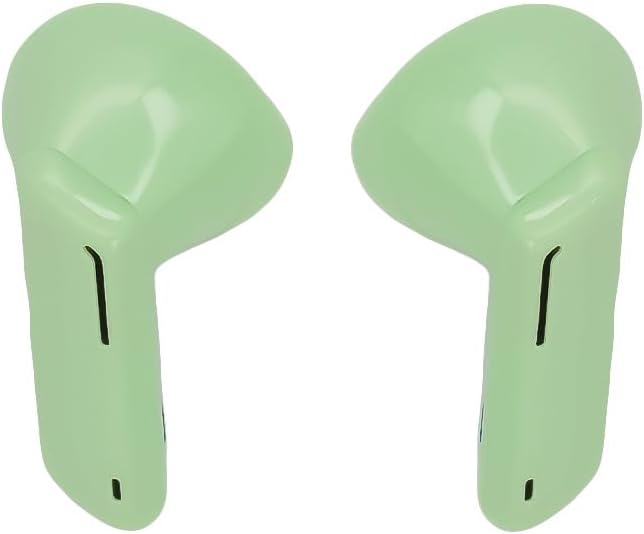
Image 1: AWEI T36 Wireless Sport Earbuds. This image displays the two green earbuds, highlighting their ergonomic design for in-ear fit.

Image 2: AWEI T36 Charging Case. This image shows the compact green charging case with the 'awei' brand logo on its lid.
4. സജ്ജീകരണം
4.1 ഇയർബഡുകളും കേസും ചാർജ് ചെയ്യുന്നു
- പ്രാരംഭ ചാർജ്: ആദ്യ ഉപയോഗത്തിന് മുമ്പ്, ചാർജിംഗ് കെയ്സും ഇയർബഡുകളും പൂർണ്ണമായും ചാർജ് ചെയ്യുക.
- കേസ് ചാർജ് ചെയ്യുന്നത്: Connect the USB charging cable to the charging port on the case and to a power source. The case takes approximately 90 minutes to fully charge.
- ഇയർബഡുകൾ ചാർജ് ചെയ്യുന്നു: Place the earbuds into the charging case. Ensure they are correctly seated. The earbuds will charge automatically from the case. The earbuds take approximately 1.5 hours to fully charge.
4.2 ഒരു ഉപകരണവുമായി ജോടിയാക്കൽ
- ആദ്യമായി ജോടിയാക്കൽ:
- ചാർജിംഗ് കേസ് തുറന്ന് രണ്ട് ഇയർബഡുകളും നീക്കം ചെയ്യുക. അവ സ്വയമേവ ജോടിയാക്കൽ മോഡിലേക്ക് പ്രവേശിക്കും.
- നിങ്ങളുടെ ഉപകരണത്തിൽ (സ്മാർട്ട്ഫോൺ, ടാബ്ലെറ്റ് മുതലായവ), ബ്ലൂടൂത്ത് പ്രവർത്തനക്ഷമമാക്കുക.
- ഇതിനായി തിരയുക available Bluetooth devices and select "AWEI T36" from the list.
- കണക്റ്റ് ചെയ്തുകഴിഞ്ഞാൽ, ഒരു സ്ഥിരീകരണ ശബ്ദം നിങ്ങൾ കേൾക്കും, ഇയർബഡുകൾ ഉപയോഗത്തിന് തയ്യാറാകും.
- യാന്ത്രിക പുനഃസംയോജനം: After the initial pairing, the earbuds will automatically connect to the last paired device when removed from the charging case, provided Bluetooth is enabled on the device and it is within range.
5. പ്രവർത്തന നിർദ്ദേശങ്ങൾ
5.1 ഇയർബഡുകൾ ധരിക്കൽ
Gently insert the earbuds into your ears, ensuring a comfortable and secure fit. Adjust them until the sound quality is optimal and they feel stable, especially during physical activity.
5.2 ടച്ച് നിയന്ത്രണങ്ങൾ
The AWEI T36 earbuds feature touch-sensitive controls on each earbud. The following actions can be performed:
- പ്ലേ/താൽക്കാലികമായി നിർത്തുക: ഇയർബഡുകളിൽ ഏതെങ്കിലുമൊന്നിൽ ഒറ്റ ടാപ്പ് ചെയ്യുക.
- അടുത്ത ട്രാക്ക്: വലതുവശത്തെ ഇയർബഡിൽ രണ്ടുതവണ ടാപ്പ് ചെയ്യുക.
- മുമ്പത്തെ ട്രാക്ക്: ഇടതുവശത്തെ ഇയർബഡിൽ രണ്ടുതവണ ടാപ്പ് ചെയ്യുക.
- ഉത്തരം/അവസാന കോൾ: ഇൻകമിംഗ് കോളിലോ സജീവ കോളിലോ ഇയർബഡിൽ ഒറ്റ ടാപ്പ് ചെയ്യുക.
- കോൾ നിരസിക്കുക: ഇൻകമിംഗ് കോൾ വരുമ്പോൾ ഇയർബഡുകളിൽ ഏതെങ്കിലുമൊന്ന് 2 സെക്കൻഡ് അമർത്തിപ്പിടിക്കുക.
- വോയ്സ് അസിസ്റ്റന്റിനെ സജീവമാക്കുക: ഇയർബഡുകളിൽ ഏതെങ്കിലുമൊന്നിൽ മൂന്ന് തവണ ടാപ്പ് ചെയ്യുക.
6. പരിപാലനം
6.1 വൃത്തിയാക്കൽ
മികച്ച പ്രകടനവും ശുചിത്വവും ഉറപ്പാക്കാൻ നിങ്ങളുടെ ഇയർബഡുകളും ചാർജിംഗ് കേസും പതിവായി വൃത്തിയാക്കുക.
- ഇയർബഡുകളും ചാർജിംഗ് കെയ്സും തുടയ്ക്കാൻ മൃദുവായതും ഉണങ്ങിയതും ലിന്റ് രഹിതവുമായ ഒരു തുണി ഉപയോഗിക്കുക.
- അബ്രാസീവ് ക്ലീനറുകൾ, ലായകങ്ങൾ, എയറോസോൾ സ്പ്രേകൾ എന്നിവ ഉപയോഗിക്കരുത്.
- ഇയർബഡ് മെഷിൽ നിന്ന് ഇയർവാക്സ് അല്ലെങ്കിൽ അവശിഷ്ടങ്ങൾ ഒരു ചെറിയ മൃദുവായ ബ്രഷ് അല്ലെങ്കിൽ കോട്ടൺ സ്വാബ് ഉപയോഗിച്ച് സൌമ്യമായി നീക്കം ചെയ്യുക.
6.2 സംഭരണം
ഉപയോഗത്തിലില്ലാത്തപ്പോൾ, പൊടി, കേടുപാടുകൾ എന്നിവയിൽ നിന്ന് സംരക്ഷിക്കുന്നതിനും ചാർജ്ജ് ചെയ്ത് നിലനിർത്തുന്നതിനും ഇയർബഡുകൾ അവയുടെ ചാർജിംഗ് കേസിൽ സൂക്ഷിക്കുക.
7. പ്രശ്നപരിഹാരം
എന്തെങ്കിലും പ്രശ്നങ്ങൾ നേരിടുകയാണെങ്കിൽ, ഇനിപ്പറയുന്ന പൊതുവായ പരിഹാരങ്ങൾ പരിശോധിക്കുക:
- ഇയർബഡുകൾ ജോടിയാക്കുന്നില്ല: Ensure both earbuds are removed from the case and are in pairing mode. Turn off and on Bluetooth on your device, then try pairing again.
- ഒരു ഇയർബഡ് മാത്രമേ പ്രവർത്തിക്കുന്നുള്ളൂ: രണ്ട് ഇയർബഡുകളും ചാർജിംഗ് കെയ്സിലേക്ക് തിരികെ വയ്ക്കുക, ലിഡ് അടയ്ക്കുക, കുറച്ച് നിമിഷങ്ങൾ കാത്തിരിക്കുക, തുടർന്ന് അവ വീണ്ടും നീക്കം ചെയ്യുക. ഇത് പലപ്പോഴും അവയെ വീണ്ടും സമന്വയിപ്പിക്കുന്നു.
- ശബ്ദമില്ല: നിങ്ങളുടെ ഉപകരണത്തിലെ വോളിയം ലെവൽ പരിശോധിച്ച് ഇയർബഡുകൾ ശരിയായി ബന്ധിപ്പിച്ചിട്ടുണ്ടെന്ന് ഉറപ്പാക്കുക.
- ചാർജിംഗ് പ്രശ്നങ്ങൾ: Ensure the charging cable is securely connected to both the case and the power source. Check if the charging contacts on the earbuds and inside the case are clean.
- മോശം ശബ്ദ നിലവാരം: Ensure the earbuds are properly seated in your ears. Try cleaning the earbud mesh.
8 സ്പെസിഫിക്കേഷനുകൾ
| ബ്രാൻഡ് | AWEI |
| മോഡൽ | T36 |
| ഹെഡ്ഫോൺ തരം | ഇൻ-ഇയർ |
| ബ്ലൂടൂത്ത് പതിപ്പ് | 5.0 |
| ഇയർബഡ് ബാറ്ററി ശേഷി | 45 mAh (ഓരോന്നും) |
| ചാർജിംഗ് കെയ്സ് ബാറ്ററി കപ്പാസിറ്റി | 320 mAh |
| മ്യൂസിക് പ്ലേടൈം | 5 മണിക്കൂർ വരെ |
| സംസാര സമയം | 8 മണിക്കൂർ വരെ |
| ചാർജിംഗ് സമയം | Approx. 1.5 hours (earbuds/case) |
| സ്റ്റാൻഡ്ബൈ സമയം | 210 മണിക്കൂർ വരെ |
| വാട്ടർ റെസിസ്റ്റൻസ് റേറ്റിംഗ് | IPX4 |
| നിയന്ത്രണ തരം | ടച്ച് നിയന്ത്രണം |
| നിറം | പച്ച |
9. വാറൻ്റി വിവരങ്ങൾ
Specific warranty details may vary by region and retailer. Please refer to the warranty card included with your product or contact your point of purchase for detailed warranty terms and conditions.
10. പിന്തുണ
For further assistance or inquiries, please contact AWEI customer support. You may also find additional resources and support via the official AWEI channels.
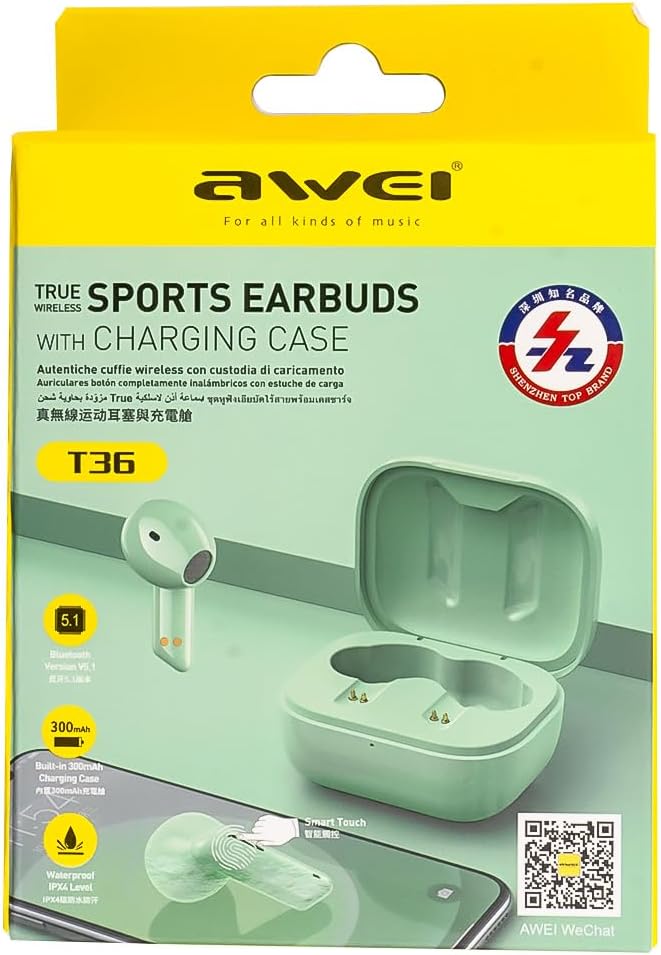
Image 3: AWEI T36 Product Packaging. This image shows the product box, which includes a QR code for WeChat support.
ഉൽപ്പന്ന പാക്കേജിംഗിലെ QR കോഡ് സ്കാൻ ചെയ്യുക അല്ലെങ്കിൽ സന്ദർശിക്കുക http://weixin.qq.com/r/7XQ0O7vEfoUBh6pYnyHJ for WeChat support.