
1. ആമുഖം
Thank you for choosing the Amax 20537-60 Electronic Transformer. This device is designed to convert standard 120 Volt AC household current to 12 Volt AC, suitable for powering low-voltage halogen lighting fixtures. Please read this manual thoroughly before installation and operation to ensure safe and efficient use of your transformer.
2 സുരക്ഷാ വിവരങ്ങൾ
WARNING: Risk of Electric Shock. Improper installation or use can lead to serious injury or death.
- Always disconnect power at the circuit breaker before installing, servicing, or performing any work on the transformer or connected fixtures.
- Installation should be performed by a qualified electrician or a knowledgeable individual familiar with electrical wiring codes and practices.
- This transformer is designed for ഇൻഡോർ ഉപയോഗം മാത്രം. Do not expose to moisture, water, or extreme temperatures.
- മൊത്തം വാട്ട് ഉറപ്പാക്കുകtage of connected low-voltage fixtures does not exceed the transformer's maximum output of 60 watts.
- Do not attempt to open or modify the transformer. There are no user-serviceable parts inside.
- Ensure proper ventilation around the transformer to prevent overheating.
- Use only appropriate wire gauges for connections as specified by local electrical codes.
3. പാക്കേജ് ഉള്ളടക്കം
- Amax 20537-60 Electronic Transformer (1 unit)
4 സ്പെസിഫിക്കേഷനുകൾ
| മോഡൽ നമ്പർ | 20537-60 |
| ഇൻപുട്ട് വോളിയംtage | 120V എസി |
| Putട്ട്പുട്ട് വോളിയംtage | 12V എസി |
| Maximum Output Wattage | 60 വാട്ട്സ് |
| അളവുകൾ (L x W x H) | 2.9" x 1.4" x 0.9" (ഏകദേശം) |
| മൗണ്ടിംഗ് തരം | ഉപരിതല മൗണ്ട് |
| സർട്ടിഫിക്കേഷൻ | UL ലിസ്റ്റുചെയ്തു |
| പവർ ഉറവിടം | കോർഡഡ് ഇലക്ട്രിക് |
5. സജ്ജീകരണവും ഇൻസ്റ്റാളേഷനും
ശരിയായ ഇൻസ്റ്റാളേഷനായി ഈ ഘട്ടങ്ങൾ ശ്രദ്ധാപൂർവ്വം പാലിക്കുക:
- പവർ വിച്ഛേദിക്കുക: Before starting any installation, ensure the main power supply to the circuit is turned OFF at the circuit breaker. Verify with a voltagഇ ടെസ്റ്റർ.
- മൗണ്ടിംഗ്: The Amax 20537-60 transformer is designed for surface mounting. Choose a suitable, dry, and well-ventilated location. Secure the transformer using appropriate screws (not included) through its mounting tabs. Ensure there is adequate space around the unit for heat dissipation.
- വയറിംഗ് കണക്ഷനുകൾ:
- Input (120V AC): Connect the 120V AC input wires from your power source to the designated input terminals on the transformer. Typically, these are labeled for Line (L) and Neutral (N). Ensure a secure connection.
- Output (12V AC): Connect the 12V AC output wires from the transformer to your low-voltage halogen lighting fixtures. Ensure the total wattage of all connected fixtures does not exceed 60 watts.
- ഗ്രൗണ്ടിംഗ്: Follow all local electrical codes for proper grounding.
- കണക്ഷനുകൾ പരിശോധിക്കുക: Double-check all wiring connections to ensure they are tight and correct. Loose connections can cause overheating or malfunction.
- പവർ പുന ore സ്ഥാപിക്കുക: എല്ലാ കണക്ഷനുകളും സുരക്ഷിതമാക്കി പരിശോധിച്ചുറപ്പിച്ചുകഴിഞ്ഞാൽ, സർക്യൂട്ട് ബ്രേക്കറിൽ പവർ പുനഃസ്ഥാപിക്കുക.
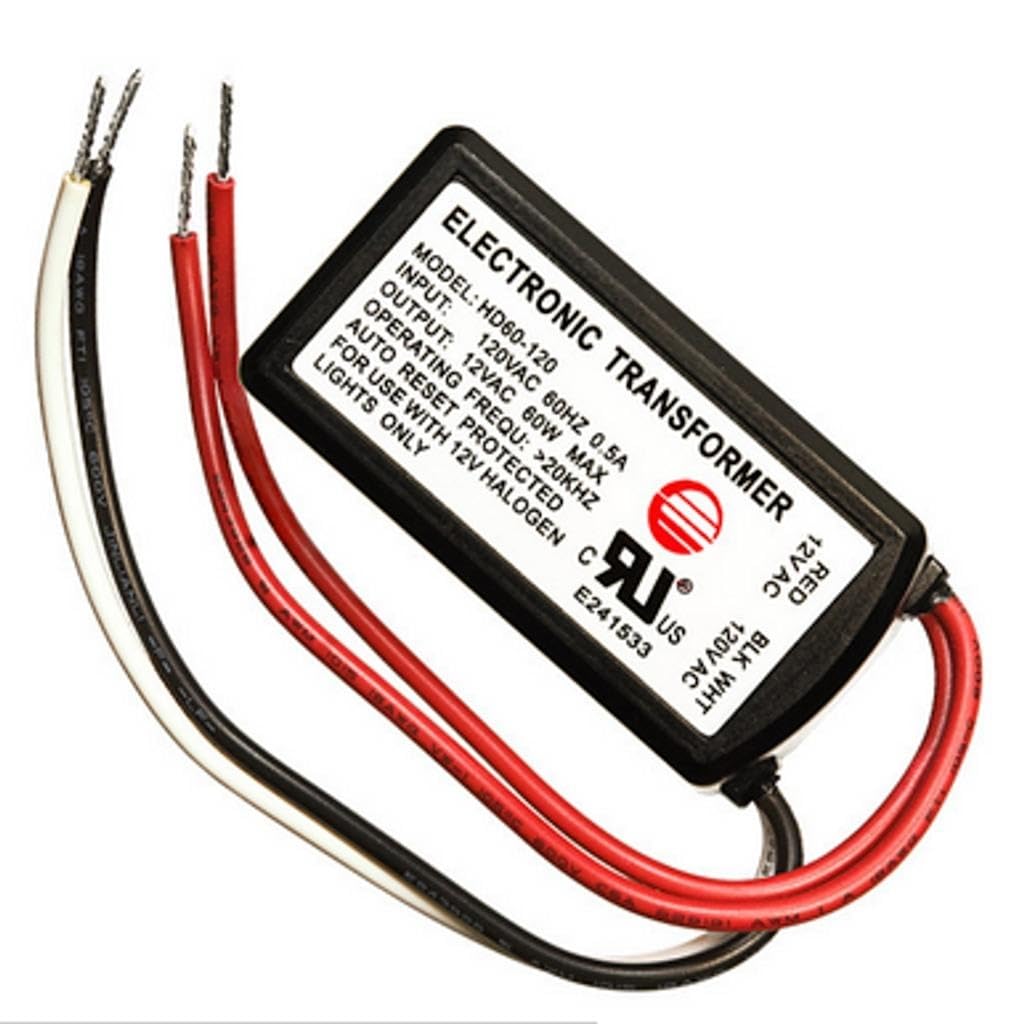
ചിത്രം 1: Amax 20537-60 Electronic Transformer. This image shows the compact design of the transformer, typically featuring input and output terminals for wiring connections. The specific terminal layout may vary, so always refer to the labels on the unit for correct wiring.
6. പ്രവർത്തന നിർദ്ദേശങ്ങൾ
The Amax 20537-60 Electronic Transformer operates automatically once properly installed and powered. When 120V AC power is supplied to its input, it will convert and provide 12V AC power to the connected low-voltage halogen lighting fixtures. There are no user controls on the transformer itself.
- Ensure the connected lighting fixtures have their own switches if individual control is desired.
- The transformer is designed for continuous operation within its specified load limits.
7. പരിപാലനം
The Amax 20537-60 Electronic Transformer requires minimal maintenance. Follow these guidelines:
- വൃത്തിയാക്കൽ: Periodically wipe the exterior of the transformer with a dry, soft cloth to remove dust. Do not use liquid cleaners or solvents.
- പരിശോധന: Annually inspect the wiring connections for any signs of wear, fraying, or loose terminals. Ensure the mounting remains secure.
- വെൻ്റിലേഷൻ: Ensure that the area around the transformer remains clear and unobstructed to allow for proper airflow and prevent heat buildup.
- ഉപയോക്തൃ-സേവനയോഗ്യമായ ഭാഗങ്ങൾ ഇല്ല: Do not attempt to open the transformer casing. There are no internal components that require user maintenance or adjustment.
8. പ്രശ്നപരിഹാരം
If you encounter issues with your Amax 20537-60 Electronic Transformer, refer to the following common problems and solutions:
| പ്രശ്നം | സാധ്യമായ കാരണം | പരിഹാരം |
|---|---|---|
| No power to lights |
|
|
| മിന്നുന്ന വിളക്കുകൾ |
|
|
| Transformer is hot to touch |
|
|
ട്രബിൾഷൂട്ടിംഗ് ഘട്ടങ്ങൾ പ്രശ്നം പരിഹരിക്കുന്നില്ലെങ്കിൽ, ഉപഭോക്തൃ പിന്തുണയെയോ യോഗ്യതയുള്ള ഒരു ഇലക്ട്രീഷ്യനെയോ ബന്ധപ്പെടുക.
9. വാറൻ്റിയും പിന്തുണയും
Amax products are manufactured to high-quality standards. For specific warranty information, please refer to the documentation provided at the time of purchase or contact Amax customer support directly. Keep your purchase receipt as proof of purchase.
For technical assistance or inquiries, please visit the Amax official website or contact their customer service department using the contact information provided with your product or on their webസൈറ്റ്.