
1. ആമുഖം
The CALEX Smart Home Indoor Ambiance Aroma Diffuser 590100500 is designed to enhance your indoor environment by improving air quality, diffusing pleasant aromas, and providing ambient lighting. This smart device integrates seamlessly into your smart home ecosystem, offering control through the Calex app, voice commands, and programmable features.
പ്രധാന സവിശേഷതകളിൽ ഇവ ഉൾപ്പെടുന്നു:
- Aroma diffusion with essential oils.
- Realistic flame effect for ambiance.
- Adjustable ambient lighting with 16 million color options.
- Smart control via Calex app (timers, programmable scenarios).
- Voice control compatibility with Google Assistant, Siri, and Amazon Alexa.
- 300ml water tank capacity with automatic shut-off.
2 സുരക്ഷാ വിവരങ്ങൾ
Please read all safety instructions before using the device to prevent injury or damage.
- Always place the diffuser on a stable, flat surface away from direct sunlight, heat sources, and electronic devices.
- Do not exceed the maximum water fill line (300ml) to prevent overflow.
- ശുദ്ധമായ ടാപ്പ് വെള്ളമോ വാറ്റിയെടുത്ത വെള്ളമോ മാത്രം ഉപയോഗിക്കുക. ചൂടുവെള്ളം ഉപയോഗിക്കരുത്.
- Only use 100% pure, water-soluble essential oils. Other oils or corrosive liquids may damage the device.
- കുട്ടികൾക്കും വളർത്തുമൃഗങ്ങൾക്കും ലഭ്യമല്ലാത്തവിധം ഉപകരണം സൂക്ഷിക്കുക.
- Do not cover the mist outlet during operation.
- Unplug the device from the power outlet before cleaning or refilling.
- The device features an automatic shut-off function when the water tank is empty, and sends a notification to your phone.
- A built-in safety configuration will cause the diffuser to flash if the remaining water in the tank needs to cool down after a maximum of 72 hours of continuous operation.
- Do not attempt to repair or modify the device yourself. Contact customer support for assistance.
3. പാക്കേജ് ഉള്ളടക്കം
പാക്കേജിൽ എല്ലാ ഇനങ്ങളും ഉണ്ടെന്ന് ഉറപ്പാക്കുക:
- CALEX Smart Home Indoor Ambiance Aroma Diffuser (Model 5901000500)
- പവർ അഡാപ്റ്റർ
- ഉപയോക്തൃ മാനുവൽ
4. ഉൽപ്പന്നം കഴിഞ്ഞുview
Familiarize yourself with the components of your aroma diffuser.
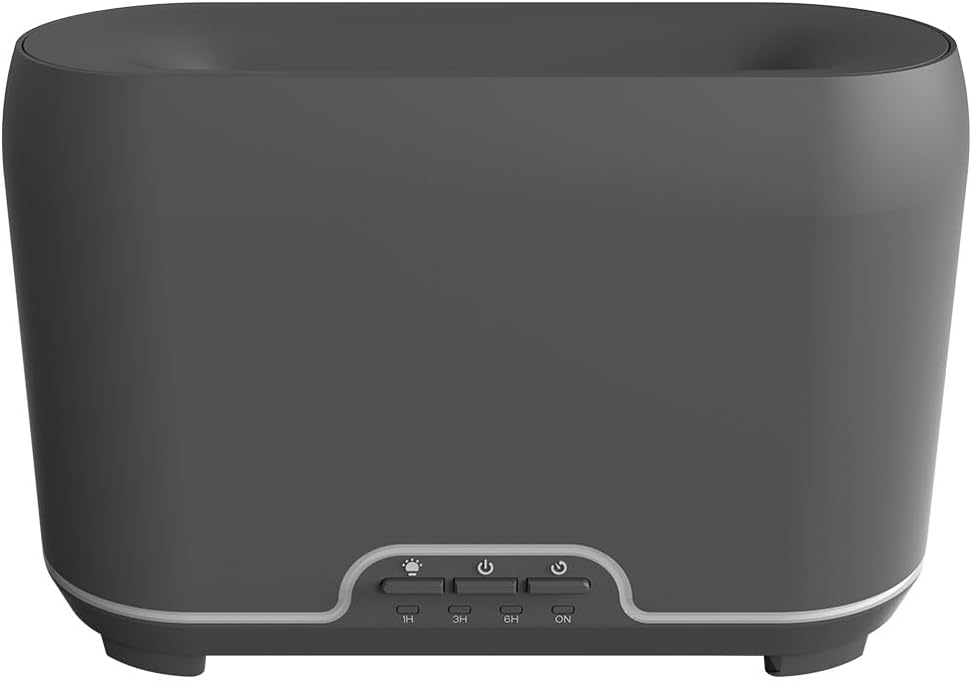
ചിത്രം: മുൻഭാഗം view of the CALEX Smart Home Aroma Diffuser, showing the control panel with buttons for light, power, and timer settings (1H, 3H, 6H, ON).

Image: The CALEX Smart Home Aroma Diffuser operating on a wooden table, displaying its ambient flame effect and mist output.
The diffuser typically consists of a water tank, an ultrasonic plate, a mist outlet, and a control panel with buttons for power, light, and timer functions. The power input port is usually located at the back or bottom of the device.
5. സജ്ജീകരണം
പ്രാരംഭ സജ്ജീകരണത്തിനായി ഈ ഘട്ടങ്ങൾ പാലിക്കുക:
- പ്ലേസ്മെൻ്റ്: പരന്നതും സുസ്ഥിരവുമായ പ്രതലത്തിൽ ഡിഫ്യൂസർ സ്ഥാപിക്കുക.
- ലിഡ് തുറക്കുക: ഡിഫ്യൂസറിന്റെ മുകളിലെ കവർ സൌമ്യമായി നീക്കം ചെയ്യുക.
- വാട്ടർ ടാങ്ക് നിറയ്ക്കുക: Fill the water tank with clean water up to the 300ml maximum fill line. Do not overfill.
- അവശ്യ എണ്ണ ചേർക്കുക: Add a few drops of your preferred essential oil directly into the water tank.
- ലിഡ് അടയ്ക്കുക: മുകളിലെ കവർ സുരക്ഷിതമായി മാറ്റിസ്ഥാപിക്കുക.
- പവർ ബന്ധിപ്പിക്കുക: Plug the power adapter into the diffuser's power input port, then plug the adapter into a wall outlet.
- Calex ആപ്പ് ഡൗൺലോഡ് ചെയ്യുക: Download the free Calex Smart app from your smartphone's app store (available for iOS and Android).
- വൈഫൈയിലേക്ക് കണക്റ്റുചെയ്യുക: Follow the in-app instructions to connect your diffuser to your home WiFi network. Ensure your WiFi is 2.4GHz.
6. പ്രവർത്തന നിർദ്ദേശങ്ങൾ
The CALEX Smart Home Aroma Diffuser can be operated via the Calex app or its integrated control buttons.
6.1 Using the Calex Smart App
The Calex app provides full control over your diffuser's functions:
- പവർ ഓൺ/ഓഫ്: Turn the diffuser on or off remotely.
- മൂടൽമഞ്ഞ് നിയന്ത്രണം: Adjust the mist output level.
- പ്രകാശ നിയന്ത്രണം: Change the ambient light color from over 16 million options, adjust brightness, and select lighting modes.
- ഫ്ലേം ഇഫക്റ്റ്: Activate or deactivate the flame effect.
- ടൈമറുകൾ: Set schedules for the diffuser to turn on or off automatically.
- Programmable Scenarios: Create custom scenarios based on time, weather, or other smart home triggers.
- അറിയിപ്പുകൾ: Receive alerts when the water tank is empty.
6.2 ശബ്ദ നിയന്ത്രണം
Integrate your diffuser with voice assistants for hands-free control:
- Google അസിസ്റ്റൻ്റ്: Link your Calex account in the Google Home app. Use commands like "Hey Google, turn on the diffuser."
- സിരി: Create custom shortcuts in the Apple Home app or through the Calex app for Siri commands.
- ആമസോൺ അലക്സ: Enable the Calex skill in the Alexa app. Use commands like "Alexa, set diffuser light to blue."
6.3 Manual Control Buttons
The control panel on the diffuser allows for basic operation:
- പവർ ബട്ടൺ: Press once to turn on/off the mist and flame effect.
- ലൈറ്റ് ബട്ടൺ: Press to cycle through light colors or turn the light on/off.
- Timer Buttons (1H, 3H, 6H, ON): Select a desired operating duration. The diffuser will automatically shut off after the selected time. 'ON' typically means continuous operation until water runs out or manually turned off.
7. പരിപാലനം
പതിവായി വൃത്തിയാക്കുന്നത് മികച്ച പ്രകടനം ഉറപ്പാക്കുകയും നിങ്ങളുടെ ഡിഫ്യൂസറിന്റെ ആയുസ്സ് വർദ്ധിപ്പിക്കുകയും ചെയ്യുന്നു.
- പ്രതിദിന ശുചീകരണം: After each use, empty any remaining water from the tank. Wipe the inside of the tank with a clean, soft cloth.
- പ്രതിവാര ശുചീകരണം: For a more thorough clean, unplug the device. Add a small amount of white vinegar (about 10ml) to the water tank and let it sit for 10-15 minutes to dissolve mineral buildup. Gently wipe the ultrasonic plate with a cotton swab or soft brush. Rinse the tank thoroughly with clean water, avoiding the air outlet.
- ബാഹ്യ ശുചീകരണം: ഡിഫ്യൂസറിന്റെ പുറംഭാഗം മൃദുവായ, ഡി-ക്ലിപ്പർ ഉപയോഗിച്ച് തുടയ്ക്കുക.amp തുണി. ഉരച്ചിലുകളുള്ള ക്ലീനറുകളോ ലായകങ്ങളോ ഉപയോഗിക്കരുത്.
- Ensure the device is completely dry before refilling or storing.
8. പ്രശ്നപരിഹാരം
നിങ്ങൾക്ക് പ്രശ്നങ്ങൾ നേരിടുകയാണെങ്കിൽ, ഇനിപ്പറയുന്ന പൊതുവായ പ്രശ്നങ്ങളും പരിഹാരങ്ങളും പരിശോധിക്കുക:
| പ്രശ്നം | സാധ്യമായ കാരണം | പരിഹാരം |
|---|---|---|
| മൂടൽമഞ്ഞോ ദുർബലമായ മൂടൽമഞ്ഞോ ഇല്ല | താഴ്ന്ന ജലനിരപ്പ് അൾട്രാസോണിക് പ്ലേറ്റ് വൃത്തികെട്ടതാണ് മൂടൽമഞ്ഞിന്റെ പുറത്തേക്കുള്ള വഴി അടഞ്ഞുപോയി | Refill water to the appropriate level. അറ്റകുറ്റപ്പണി നിർദ്ദേശങ്ങൾ അനുസരിച്ച് അൾട്രാസോണിക് പ്ലേറ്റ് വൃത്തിയാക്കുക. മൂടൽമഞ്ഞ് പുറത്തേക്ക് വരുന്നത് വ്യക്തമാണെന്ന് ഉറപ്പാക്കുക. |
| ഉപകരണം ഓണാക്കുന്നില്ല | ശക്തിയില്ല വാട്ടർ ടാങ്ക് കാലി ഉപകരണത്തിൻ്റെ തകരാർ | Check power connection and wall outlet. വാട്ടർ ടാങ്ക് വീണ്ടും നിറയ്ക്കുക. പ്രശ്നം നിലനിൽക്കുകയാണെങ്കിൽ ഉപഭോക്തൃ പിന്തുണയുമായി ബന്ധപ്പെടുക. |
| ആപ്പ് കണക്ഷൻ പ്രശ്നങ്ങൾ | തെറ്റായ വൈഫൈ പാസ്വേഡ് റൂട്ടർ വളരെ ദൂരെയാണ് 2.4GHz vs 5GHz WiFi | വൈഫൈ പാസ്വേഡ് പരിശോധിക്കുക. Move diffuser closer to the router. Ensure your router is broadcasting a 2.4GHz network and connect to it. |
| ഫ്ലേം ഇഫക്റ്റ് പ്രവർത്തിക്കുന്നില്ല | Feature deactivated in app ഉപകരണത്തിൻ്റെ തകരാർ | Check app settings to ensure flame effect is enabled. ഉപഭോക്തൃ പിന്തുണയുമായി ബന്ധപ്പെടുക. |
9 സ്പെസിഫിക്കേഷനുകൾ
| ഫീച്ചർ | സ്പെസിഫിക്കേഷൻ |
|---|---|
| മോഡൽ നമ്പർ | 5901000500 |
| ബ്രാൻഡ് | കലക്സ് |
| ശേഷി | 300 മില്ലി ലിറ്റർ |
| മെറ്റീരിയൽ | പ്ലാസ്റ്റിക് |
| ഓട്ടോ ഷട്ട്-ഓഫ് | അതെ |
| കണക്റ്റിവിറ്റി | വൈഫൈ (2.4GHz) |
| നിയന്ത്രണ രീതികൾ | Calex Smart App, Voice Control (Google Assistant, Siri, Amazon Alexa), Manual Buttons |
| ലൈറ്റ് ഓപ്ഷനുകൾ | 16 ദശലക്ഷം നിറങ്ങൾ |
| ശുപാർശ ചെയ്യുന്ന ഉപയോഗ മേഖല | Medium space |
| അന്താരാഷ്ട്ര ആർട്ടിക്കിൾ കോഡ് (EAN/UPC) | 08712879157090 |
10. വാറൻ്റിയും പിന്തുണയും
For warranty information or technical support, please refer to the documentation provided with your purchase or contact the retailer/manufacturer directly. Keep your proof of purchase for warranty claims.