
1. ആമുഖം
The IHSENO Mini WiFi Smart Switch Relay is a compact and intelligent device designed to integrate your traditional lighting and appliances into a smart home system. It operates on 2.4GHz WiFi and is compatible with the Tuya Smart Life App, allowing for remote control, voice commands via Alexa and Google Home, and intelligent scheduling.

ചിത്രം 1.1: കഴിഞ്ഞുview of the IHSENO Mini WiFi Smart Switch Relay and its packaging.
പ്രധാന സവിശേഷതകൾ:
- Mini WiFi Smart Switch: Designed for 2.4GHz WiFi, enabling whole-house intelligence through the Tuya APP.
- Tuya Smart Life App Control: Connects with other smart devices for intelligent scene linkage.
- Customize Different Scene Modes: Allows setting scenes like 'Reading' or 'Movie' and controlling various smart devices.
- Alexa & Google Home Enabled: Supports voice control for hands-free operation.
- കോംപാക്റ്റ് ഡിസൈൻ: Fits into most standard electrical boxes, even with existing wiring.
2 സുരക്ഷാ വിവരങ്ങൾ
Please read all safety instructions carefully before installation and operation. Failure to follow these instructions may result in electric shock, fire, or other hazards.
- പ്രൊഫഷണൽ ഇൻസ്റ്റാളേഷൻ ശുപാർശ ചെയ്യുന്നു: ഇലക്ട്രിക്കൽ ജോലികൾ ഒരു യോഗ്യതയുള്ള ഇലക്ട്രീഷ്യൻ നിർവഹിക്കണം.
- ഇൻസ്റ്റാളേഷന് മുമ്പ് പവർ ഓഫ് ചെയ്യുക: ഉപകരണം ഇൻസ്റ്റാൾ ചെയ്യുന്നതിനോ സർവീസ് ചെയ്യുന്നതിനോ മുമ്പ് എല്ലായ്പ്പോഴും സർക്യൂട്ട് ബ്രേക്കറിലെ വൈദ്യുതി വിച്ഛേദിക്കുക.
- ഇൻഡോർ ഉപയോഗത്തിന് മാത്രം: വരണ്ട സ്ഥലങ്ങളിൽ ഇൻഡോർ ഉപയോഗത്തിനായി ഈ ഉപകരണം ഉദ്ദേശിച്ചിട്ടുള്ളതാണ്.
- വാല്യംtagഇയും നിലവിലെ റേറ്റിംഗുകളും: നിർദ്ദിഷ്ട വോളിയം കവിയരുത്tage (AC 100-240V) and current (3 Amps) ratings.
- വയറിംഗ്: Ensure all wiring connections are secure and comply with local electrical codes. Input and output connections cannot be reversed.

Image 2.1: Safety and Certification details for the Mini Smart Switch.
3. സജ്ജീകരണവും ഇൻസ്റ്റാളേഷനും
The IHSENO Mini WiFi Smart Switch Relay is designed for easy integration into your existing electrical system. It supports both 1-way and 2-way control setups.
വയറിംഗ് ഡയഗ്രമുകൾ:
പ്രധാനപ്പെട്ടത്: Always ensure the power is OFF at the circuit breaker before performing any wiring. Input and output connections cannot be reversed.

Image 3.1: Wiring Method 1 - Direct connection to a lamp and mains power.

Image 3.2: Wiring Method 2 - Connection with a 1-way wall switch.

Image 3.3: Wiring Method 3 - Connection with a 2-way wall switch.
ആപ്പ് ജോടിയാക്കൽ:
- ഡൗൺലോഡ് ചെയ്യുക തുയ സ്മാർട്ട് or സ്മാർട്ട് ലൈഫ് നിങ്ങളുടെ സ്മാർട്ട്ഫോണിന്റെ ആപ്പ് സ്റ്റോറിൽ നിന്നുള്ള ആപ്പ്.
- നിങ്ങളുടെ അക്കൗണ്ടിലേക്ക് രജിസ്റ്റർ ചെയ്യുക അല്ലെങ്കിൽ ലോഗിൻ ചെയ്യുക.
- നിങ്ങളുടെ സ്മാർട്ട്ഫോൺ 2.4GHz വൈഫൈ നെറ്റ്വർക്കിലേക്ക് കണക്റ്റ് ചെയ്തിട്ടുണ്ടെന്ന് ഉറപ്പാക്കുക.
- Power on the smart switch. The indicator light should blink rapidly, indicating it's in pairing mode. If not, refer to the troubleshooting section for resetting the device.
- In the app, tap '+' to add a device. Select 'Electrical' > 'Switch (Wi-Fi)' or allow the app to auto-discover the device.
- ജോടിയാക്കൽ പ്രക്രിയ പൂർത്തിയാക്കാൻ ഓൺ-സ്ക്രീൻ നിർദ്ദേശങ്ങൾ പാലിക്കുക.
4. പ്രവർത്തന നിർദ്ദേശങ്ങൾ
Once installed and paired, you can control your IHSENO Mini WiFi Smart Switch Relay through various methods.
4.1. ആപ്പ് റിമോട്ട് കൺട്രോൾ
Control your connected devices from anywhere using the Tuya Smart Life App, as long as your smartphone and the switch are connected to the internet.

Image 4.1: WiFi Remote Control functionality.

Image 4.2: App Remote Control in action, showing control of a lamp.
4.2. ശബ്ദ നിയന്ത്രണം
Integrate your smart switch with Amazon Alexa or Google Assistant for convenient voice commands.
- Alexa അല്ലെങ്കിൽ Google Home ആപ്പ് തുറക്കുക.
- Link your Tuya Smart Life account to the voice assistant.
- ഉപകരണങ്ങൾ കണ്ടെത്തുക.
- Use commands like "Alexa, turn on the lamp" or "Hey Google, turn off the kitchen light."
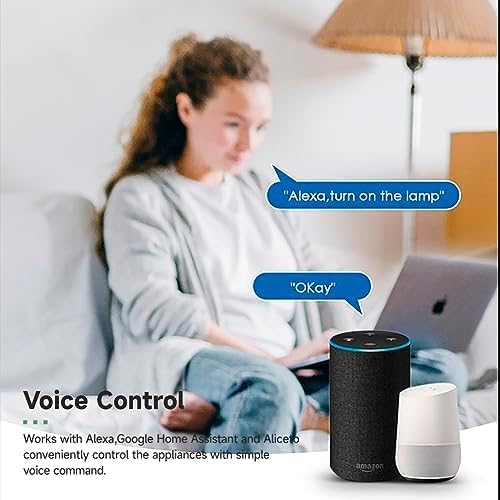
ചിത്രം 4.3: അലക്സയും ഗൂഗിൾ ഹോമും ഉപയോഗിച്ചുള്ള ശബ്ദ നിയന്ത്രണം.
4.3. Intelligent Timing and Scene Modes
Set schedules, countdowns, and create custom scene modes within the Tuya Smart Life App.
- സമയം: Schedule devices to turn on/off at specific times (e.g., 23:30 Off).
- സൈക്ലിംഗ്: Set recurring schedules (e.g., 08:00 ON Everyday).
- കൗണ്ട്ഡൗൺ: ഒരു നിശ്ചിത സമയത്തിനുശേഷം ഉപകരണം ഓഫാകുന്നതിന് ഒരു ടൈമർ സജ്ജമാക്കുക.
- സീൻ മോഡുകൾ: Combine multiple smart devices to activate with a single command or schedule (e.g., 'Movie Night' scene dims lights and turns on entertainment).
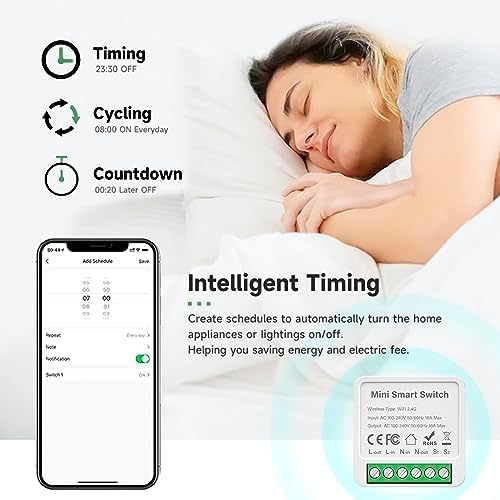
Image 4.4: Intelligent Timing features in the app.
4.4. പങ്കിടൽ പ്രവർത്തനം
Share control of your smart devices with family members through the Tuya Smart Life App.

Image 4.5: Sharing function for family members.
5. പരിപാലനം
To ensure the longevity and optimal performance of your IHSENO Mini WiFi Smart Switch Relay, follow these simple maintenance guidelines:
- വൃത്തിയാക്കൽ: ഉപകരണം വൃത്തിയാക്കാൻ മൃദുവായതും ഉണങ്ങിയതുമായ തുണി ഉപയോഗിക്കുക. ലിക്വിഡ് ക്ലീനറുകളോ എയറോസോളുകളോ ഉപയോഗിക്കരുത്.
- പരിസ്ഥിതി: Avoid exposing the device to excessive moisture, extreme temperatures, or direct sunlight.
- പരിശോധന: Periodically check wiring connections for any signs of wear or looseness.
6. പ്രശ്നപരിഹാരം
If you encounter issues with your IHSENO Mini WiFi Smart Switch Relay, refer to the following common problems and solutions:
- ഉപകരണം ജോടിയാക്കുന്നില്ല:
- നിങ്ങളുടെ വൈഫൈ നെറ്റ്വർക്ക് 2.4GHz ആണെന്ന് ഉറപ്പാക്കുക. ഉപകരണം 5GHz വൈഫൈ പിന്തുണയ്ക്കുന്നില്ല.
- Check that the device is powered on and the indicator light is blinking rapidly. If not, power cycle the device or perform a factory reset (refer to app instructions for reset procedure).
- Move the device closer to your WiFi router during pairing.
- ആപ്പിൽ ഉപകരണം ഓഫ്ലൈനാണ്:
- Verify your home WiFi network is active and has internet access.
- Check the power supply to the smart switch.
- നിങ്ങളുടെ വൈഫൈ റൂട്ടർ പുനരാരംഭിക്കുക.
- ശബ്ദ നിയന്ത്രണം പ്രവർത്തിക്കുന്നില്ല:
- Ensure your Tuya Smart Life account is correctly linked to Alexa or Google Home.
- Check the device name in the voice assistant app; ensure it's easy to pronounce and recognize.
- നിങ്ങളുടെ വോയ്സ് അസിസ്റ്റന്റ് ഉപകരണം ഇന്റർനെറ്റുമായി ബന്ധിപ്പിച്ചിട്ടുണ്ടെന്ന് ഉറപ്പാക്കുക.
- Physical switch not responding:
- Ensure all wiring connections are secure and correct according to the diagrams.
- Check if the physical switch itself is functional.
7 സ്പെസിഫിക്കേഷനുകൾ
Technical specifications for the IHSENO Mini WiFi Smart Switch Relay:

Image 7.1: Detailed product specifications.
| സ്പെസിഫിക്കേഷൻ | വിശദാംശങ്ങൾ |
|---|---|
| ബ്രാൻഡ് | IHSENO |
| മോഡൽ | B0CF1FYYBN |
| വയർലെസ് തരം | വൈഫൈ 2.4 ജി |
| ഇൻപുട്ട് വോളിയംtage | എസി 100-240V 50/60Hz |
| Putട്ട്പുട്ട് വോളിയംtage | എസി 100-240V 50/60Hz |
| Max Current Rating | 3 Amps (Note: Product image shows 16A Max, but product specifications list 3 Amps. Please verify with product packaging.) |
| മൗണ്ടിംഗ് തരം | ഉപരിതല മൗണ്ട് |
| കോൺടാക്റ്റ് മെറ്റീരിയൽ | ചെമ്പ് |
| മെറ്റീരിയൽ | PC V0 (Fireproof) |
| വലിപ്പം | 41x20x41mm (approx. 1.6*0.8*1.6 inches) |
| ഓപ്പറേഷൻ മോഡ് | (ON)-ON-OFF |
| സ്വിച്ച് തരം | 1-വഴി |
| സ്റ്റൈൽ സ്വിച്ചുചെയ്യുക | പുഷ് ബട്ടൺ |
| അപ്ലിക്കേഷൻ അനുയോജ്യത | Smart Life (Support iOS & Android) |
8. വാറൻ്റിയും പിന്തുണയും
IHSENO is committed to providing high-quality products and customer satisfaction.
If you have any questions about this product, please feel free to contact our customer service team. We aim to reply within 24 hours to assist you with any inquiries or issues.
നിർദ്ദിഷ്ട വാറന്റി നിബന്ധനകൾക്കും വ്യവസ്ഥകൾക്കും നിങ്ങളുടെ വാങ്ങൽ ഡോക്യുമെന്റേഷൻ പരിശോധിക്കുക.