
DOOGEE V30
DOOGEE V30 Rugged Smartphone User Manual
Your comprehensive guide to setting up, operating, and maintaining your DOOGEE V30.
1. ഉൽപ്പന്നം കഴിഞ്ഞുview
The DOOGEE V30 is a rugged smartphone designed for durability and high performance, featuring advanced connectivity, a powerful camera system, and a long-lasting battery.
പ്രധാന സവിശേഷതകൾ
- Built-in eSIM Global Network: Seamless global connectivity with support for multiple phone numbers and data plans.
- 6.6" FHD+ 120Hz Display: Immersive visual experience with a high refresh rate and vibrant colors.
- 108MP AI ട്രിപ്പിൾ ക്യാമറ: High-resolution main camera, 32MP front camera, 20MP night vision, and 8MP wide-angle/macro lens for versatile photography.
- 10800mAh Battery & 66W Fast Charging: Extended usage time with rapid charging capabilities.
- 360° Full Protection: IP68/IP69K and MIL-STD-810H certified for water, dust, and drop resistance.
- MediaTek Dimensity 900 Processor: Efficient performance for demanding applications and multitasking.

ചിത്രം: മുന്നിലും പിന്നിലും view of the DOOGEE V30 Rugged Smartphone, highlighting its robust design and camera module.
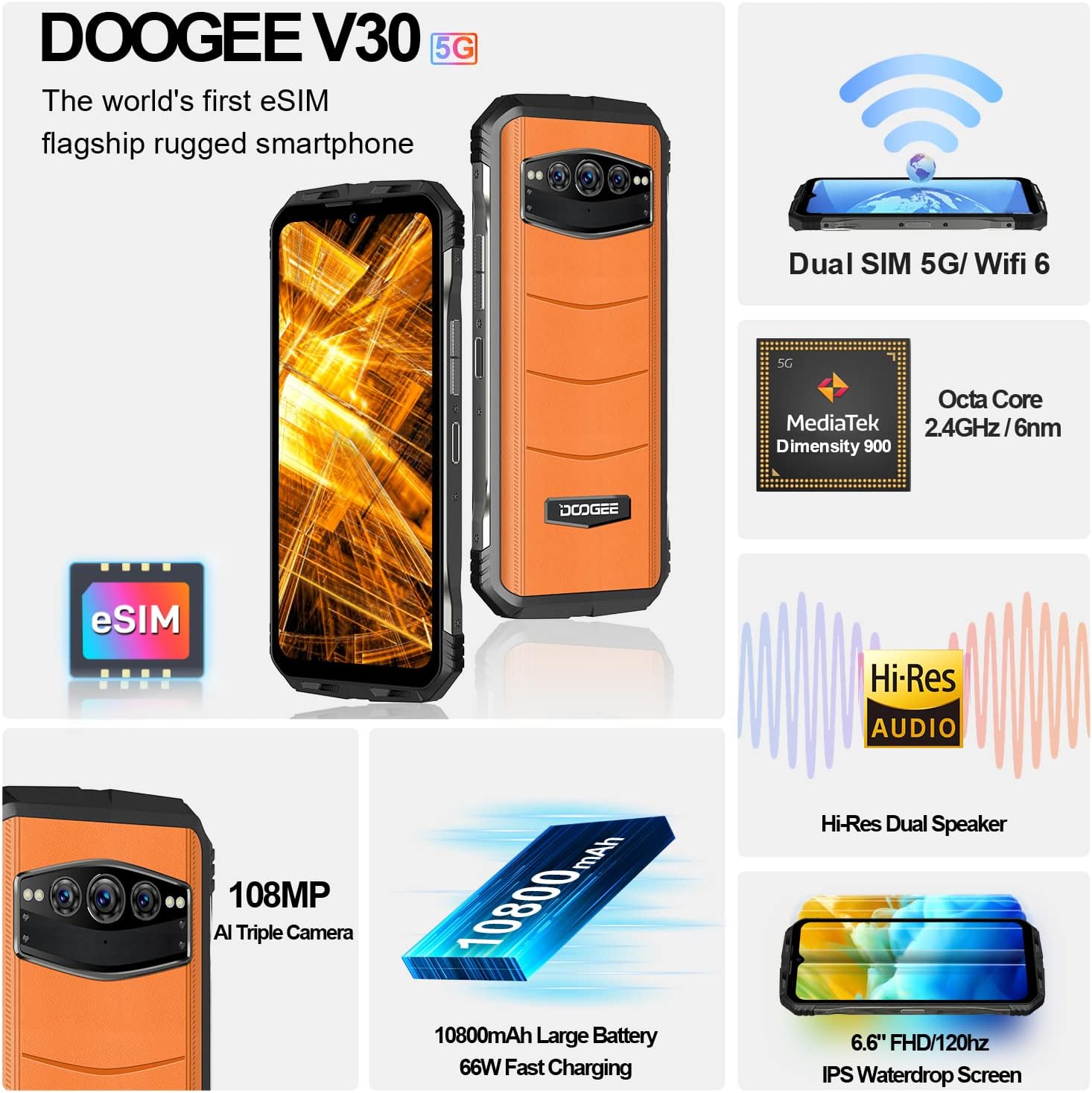
ചിത്രം: ഒരു ഓവർview of the DOOGEE V30's key features including eSIM, Dual SIM, MediaTek Dimensity 900, Hi-Res Audio, 108MP camera, 10800mAh battery, and 6.6" FHD+ display.
2. സജ്ജീകരണ ഗൈഡ്
2.1 ബോക്സിൽ എന്താണുള്ളത്
ആരംഭിക്കുന്നതിന് മുമ്പ്, എല്ലാ ഘടകങ്ങളും ഉണ്ടെന്ന് ഉറപ്പാക്കുക:
- DOOGEE V30 Unlocked Rugged Smartphone X1
- ടൈപ്പ് സി കേബിൾ x1
- 66W Fast Charger x1
- Anti-explosion film (pre-applied) x1
- Anti-explosion film x1 (spare)
2.2 SIM Card and eSIM Setup
The DOOGEE V30 supports both physical SIM cards and eSIM technology.
- Physical SIM Card Installation: Locate the SIM card tray on the side of the device. Use the provided SIM ejector tool to open the tray. Insert your Nano-SIM card(s) into the designated slots, ensuring the gold contacts face downwards. Close the tray securely.
- eSIM Activation: The DOOGEE V30 features built-in eSIM functionality. To activate an eSIM profile, navigate to Settings > Network & internet > SIMs. You can typically scan a QR code provided by your carrier or manually enter activation details. This allows for multiple phone numbers and data plans without physical SIM cards.

Image: Illustration of the DOOGEE V30's eSIM toolkit interface, showing options to scan, choose from album, or input download for eSIM activation.
2.3 പ്രാരംഭ ചാർജിംഗ്
Before first use, it is recommended to fully charge your DOOGEE V30. Use the provided 66W Fast Charger and Type C cable for optimal charging speed.
- Connect the Type C cable to the charging port at the bottom of the phone.
- Connect the other end of the cable to the 66W Fast Charger.
- ഒരു പവർ ഔട്ട്ലെറ്റിൽ ചാർജർ പ്ലഗ് ചെയ്യുക.
- The phone will indicate charging status on the screen. A full charge typically takes approximately 2 hours.

Image: Visual representation of the DOOGEE V30's 10800mAh battery capacity and 66W super fast charging, showing 50% charge in 30 minutes.
3. Operating Your DOOGEE V30
3.1 അടിസ്ഥാന നാവിഗേഷൻ
- പവർ ബട്ടൺ: Located on the side, press and hold to power on/off or restart. A short press will lock/unlock the screen.
- വോളിയം ബട്ടണുകൾ: Adjust media volume, call volume, and ringtone volume.
- ടച്ച്സ്ക്രീൻ ആംഗ്യങ്ങൾ: Swipe, tap, pinch-to-zoom for navigation and interaction with apps.
3.2 ക്യാമറ ഉപയോഗം
The DOOGEE V30 features a versatile camera system:
- 108MP AI പ്രധാന ക്യാമറ: For high-resolution photos with enhanced detail.
- 32MP Front-facing Camera: വ്യക്തമായ സെൽഫികൾക്കും വീഡിയോ കോളുകൾക്കും.
- 20MP നൈറ്റ് വിഷൻ ക്യാമറ: Utilizes infrared sensors to capture images in low-light or complete darkness.
- 8MP Wide Angle & Macro Camera: For expansive landscape shots or detailed close-ups.
To access the camera, tap the Camera icon on your home screen or app drawer. Select different modes (Photo, Video, Night Vision, Portrait, Pro, etc.) from the interface.

Image: Comparison of 48MP and 108MP image quality, demonstrating the enhanced detail of the DOOGEE V30's 108MP AI main camera.
3.3 ഡിസ്പ്ലേയും ഓഡിയോയും
Experience superior visuals and sound with your DOOGEE V30:
- 6.6" FHD+ Display: Enjoy crisp, clear visuals with 2408*1080 resolution and 401 PPI.
- 120Hz പുതുക്കൽ നിരക്ക്: Provides smoother scrolling and more fluid animations, especially noticeable in gaming and video playback.
- Dual Hi-Res Speakers: Delivers rich, immersive audio for music, videos, and calls.

Image: Visual comparison of 90Hz and 120Hz refresh rates on the DOOGEE V30's 6.6" FHD+ display, highlighting the smoother experience of 120Hz, alongside the Hi-Res Audio logo.
3.4 പ്രകടനം
The DOOGEE V30 is powered by the MediaTek Dimensity 900 processor, ensuring efficient and responsive performance. It comes with 8GB of RAM, expandable virtually by an additional 7GB, and 256GB of internal storage, expandable up to 2TB via TF card.
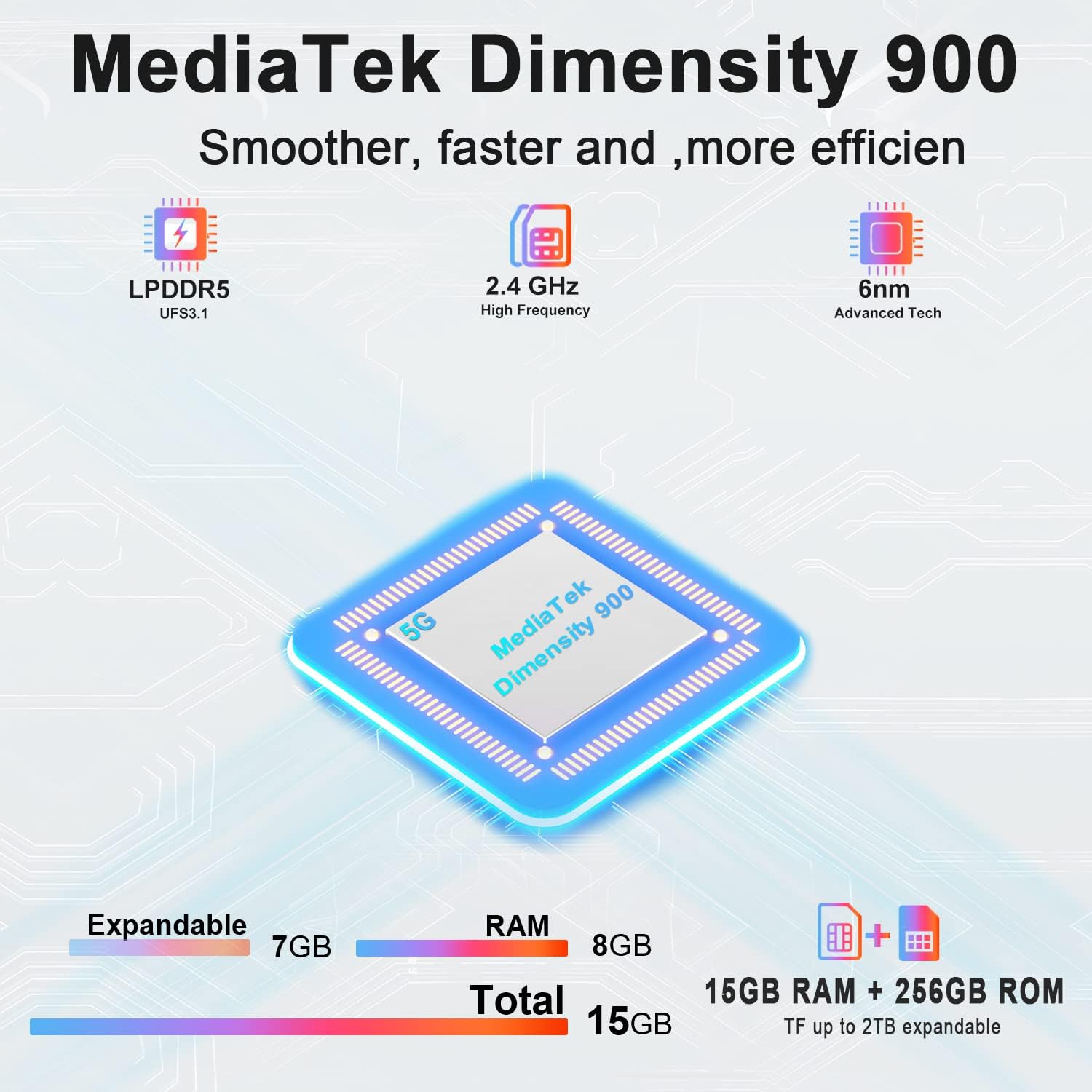
Image: Diagram illustrating the MediaTek Dimensity 900 processor's features, including LPDDR5, UFS3.1, 2.4 GHz high frequency, and 6nm advanced tech, along with the 15GB (8GB+7GB expandable) RAM and 256GB ROM.
4. പരിചരണവും പരിപാലനവും
4.1 ഈട് സവിശേഷതകൾ
The DOOGEE V30 is built to withstand harsh environments, certified with:
- IP68: 1.5 മീറ്റർ വരെ 30 മിനിറ്റ് നേരത്തേക്ക് ജല പ്രതിരോധം.
- IP69K: Resistant to high-pressure, high-temperature water jets.
- മിൽ-എസ്ടിഡി-810എച്ച്: Military-grade standard for resistance against drops, shocks, and extreme temperatures.
While rugged, avoid intentional abuse or exposing the device to conditions beyond its specified limits.

Image: Demonstrations of the DOOGEE V30's ruggedness, including its MIL-STD-810H compliance, IP68 waterproof rating (30 minutes, 1.5m deep), and IP69K dustproof rating (360°).
4.2 ക്ലീനിംഗ് നിർദ്ദേശങ്ങൾ
- സ്ക്രീനും ബോഡിയും തുടയ്ക്കാൻ മൃദുവായ, ലിന്റ് രഹിത തുണി ഉപയോഗിക്കുക.
- കഠിനമായ പാടുകൾക്ക്, ചെറുതായി dampen വെള്ളമുള്ള തുണി അല്ലെങ്കിൽ ഒരു സ്ക്രീൻ ക്ലീനർ.
- കഠിനമായ രാസവസ്തുക്കൾ, ഉരച്ചിലുകൾ ഉള്ള വസ്തുക്കൾ, അല്ലെങ്കിൽ കംപ്രസ് ചെയ്ത വായു എന്നിവ ഉപയോഗിക്കുന്നത് ഒഴിവാക്കുക.
- ആക്സസറികൾ ചാർജ് ചെയ്യുന്നതിനോ ബന്ധിപ്പിക്കുന്നതിനോ മുമ്പ് എല്ലാ പോർട്ടുകളും വരണ്ടതാണെന്ന് ഉറപ്പാക്കുക.
4.3 ബാറ്ററി കെയർ
- ഉയർന്ന താപനില (ചൂടോ തണുപ്പോ) ഒഴിവാക്കുക, കാരണം അവ ബാറ്ററിയുടെ ആയുസ്സ് കുറയ്ക്കും.
- Do not fully discharge the battery regularly; try to keep it above 20%.
- ഒറിജിനൽ അല്ലെങ്കിൽ സാക്ഷ്യപ്പെടുത്തിയ ചാർജറുകളും കേബിളുകളും മാത്രം ഉപയോഗിക്കുക.
5. പൊതുവായ പ്രശ്നങ്ങൾ പരിഹരിക്കുന്നു
| പ്രശ്നം | സാധ്യമായ കാരണം | പരിഹാരം |
|---|---|---|
| ഫോൺ ഓൺ ആകുന്നില്ല. | ബാറ്ററി ചാർജ് കുറവാണ്; സിസ്റ്റം ക്രാഷ് ആയി | Charge the phone for at least 10 minutes. Press and hold the power button for 10-15 seconds to force restart. |
| നെറ്റ്വർക്കിലേക്ക് കണക്റ്റുചെയ്യാൻ കഴിയില്ല | സിം കാർഡ് പ്രശ്നം; നെറ്റ്വർക്ക് ക്രമീകരണം; കവറേജിന് പുറത്താണ്. | Ensure SIM card is correctly inserted. Check network settings (APN). Try restarting the phone. Contact your carrier. |
| സ്ക്രീൻ പ്രതികരിക്കുന്നില്ല | Software glitch; App conflict | Force restart the phone. If issue persists, try factory reset (backup data first). |
| ബാറ്ററി പെട്ടെന്ന് തീരുന്നു | Background apps; High screen brightness; Poor signal | Close unused apps. Reduce screen brightness. Disable unnecessary features (GPS, Wi-Fi, Bluetooth). Check for app updates. |
| Camera issues (e.g., yellow filter) | Software bug; Specific camera mode | Clear camera app cache/data (Settings > Apps > Camera). Check for system updates. If a specific filter is applied, try changing camera modes or resetting camera settings. |
6 സാങ്കേതിക സവിശേഷതകൾ
| ഫീച്ചർ | സ്പെസിഫിക്കേഷൻ |
|---|---|
| മോഡലിൻ്റെ പേര് | V30 |
| ഓപ്പറേറ്റിംഗ് സിസ്റ്റം | ആൻഡ്രോയിഡ് 12.0 |
| പ്രോസസ്സർ | മീഡിയടെക് ഡൈമെൻസിറ്റി 900 (2.4 GHz സിപിയു വേഗത) |
| റാം | 8 GB (expandable with 7GB virtual RAM) |
| മെമ്മറി സ്റ്റോറേജ് കപ്പാസിറ്റി | 256 ജിബി (ടിഎഫ് കാർഡ് വഴി 2 ടിബി വരെ വികസിപ്പിക്കാം) |
| സ്ക്രീൻ വലിപ്പം | 6.58 Inches FHD+ (2408 x 1080 Resolution) |
| പുതുക്കിയ നിരക്ക് | 120Hz |
| പ്രധാന ക്യാമറ | 108MP AI Triple Camera (includes 20MP Night Vision, 8MP Wide Angle & Macro) |
| മുൻ ക്യാമറ | 32എംപി |
| ബാറ്ററി പവർ റേറ്റിംഗ് | 10800 mAh |
| ചാർജിംഗ് സമയം | Approx. 2 Hours (with 66W Fast Charger) |
| കണക്റ്റിവിറ്റി ടെക്നോളജികൾ | 5G Cellular, NFC, GPS, eSIM/Dual SIM |
| വയർലെസ് കാരിയർ | എല്ലാ കാരിയറുകൾക്കുമായി അൺലോക്കുചെയ്തു |
| ഉൽപ്പന്ന അളവുകൾ | 6.67 x 3.2 x 0.63 ഇഞ്ച് |
| ഇനത്തിൻ്റെ ഭാരം | 9.5 ഔൺസ് (270 ഗ്രാം) |
| പ്രത്യേക സവിശേഷതകൾ | eSIM/Dual SIM 5G, 108MP AI Triple Camera, 8GB+7GB Virtual Expandable RAM, Dual Band Navigation(L1+L5), 120Hz Refresh Rate |
| Durability Standards | IP68/IP69K, MIL-STD-810H |
7. വാറൻ്റിയും പിന്തുണയും
DOOGEE is committed to providing excellent customer service for your V30 Rugged Smartphone.
- വാറൻ്റി: Your DOOGEE V30 comes with a 2-year free warranty from the date of purchase. This warranty covers manufacturing defects and malfunctions under normal use.
- പണം തിരികെ നൽകാനുള്ള ഗ്യാരണ്ടി: Enjoy a 30-day money-back guarantee without reason, along with free returns.
- ഉപഭോക്തൃ പിന്തുണ: For any issues or inquiries, a professional support team is available 24/7 to assist you. Please refer to the contact information provided with your purchase or visit the official DOOGEE webപിന്തുണാ ഓപ്ഷനുകൾക്കായുള്ള സൈറ്റ്.
For more information and to explore other DOOGEE products, visit the DOOGEE Store on Amazon.
Ask a question about this manual
Ask about setup, troubleshooting, compatibility, parts, safety, or missing instructions. Manuals+ will review the question and use this page’s manual context to help answer it.