
ആമുഖം
The zelotes T30 Wired Vertical Mouse is designed to enhance comfort and reduce wrist strain during prolonged computer use. Its ergonomic vertical design promotes a natural hand and wrist posture. This manual provides essential information for setting up, operating, maintaining, and troubleshooting your new mouse.

ചിത്രം 1: മുൻ-ഇടത് view of the zelotes T30 Wired Vertical Mouse.

ചിത്രം 2: വിവിധ വശങ്ങൾ views illustrating the vertical design of the mouse.
സജ്ജമാക്കുക
The zelotes T30 Vertical Mouse is designed for simple plug-and-play operation, requiring no driver installation.
മൗസിനെ ബന്ധിപ്പിക്കുന്നു
- Locate an available USB port on your computer (Laptop, PC, Mac).
- Insert the USB connector of the zelotes T30 mouse into the USB port.
- The mouse will be automatically recognized by your operating system (Win11, Win10, Win8, Win7, Mac OS, Linux) and ready for use.
Attaching the Detachable Palm Rest
The mouse comes with a detachable palm rest for enhanced comfort. To attach it:
- Align the palm rest with the designated slots on the bottom of the mouse.
- Gently slide the palm rest into place until it clicks securely.
- Ensure the palm rest is firmly attached before use.

Figure 3: Illustration of the detachable palm rest and its attachment points.
പ്രവർത്തന നിർദ്ദേശങ്ങൾ
എർഗണോമിക് ഡിസൈനും ഗ്രിപ്പും
The vertical design of the T30 mouse positions your hand in a natural handshake posture, reducing pronation of the forearm and wrist. This design aims to alleviate discomfort associated with traditional mouse use.

Figure 4: Proper hand placement on the ergonomic vertical mouse.

ചിത്രം 5: വിശദമായി view of the humanized grip design, ensuring comfortable finger placement.
ഡിപിഐ സെൻസിറ്റിവിറ്റി ക്രമീകരിക്കുന്നു
The mouse features 4 adjustable DPI settings: 1200, 1600, 2400, and 3200 DPI. To change the sensitivity:
- Locate the DPI button on the mouse. This button is typically positioned near the scroll wheel or thumb area.
- Press the DPI button to cycle through the available sensitivity settings. Each press will switch to the next DPI level.
- The LED illumination on the mouse may change color or pattern to indicate the current DPI setting.
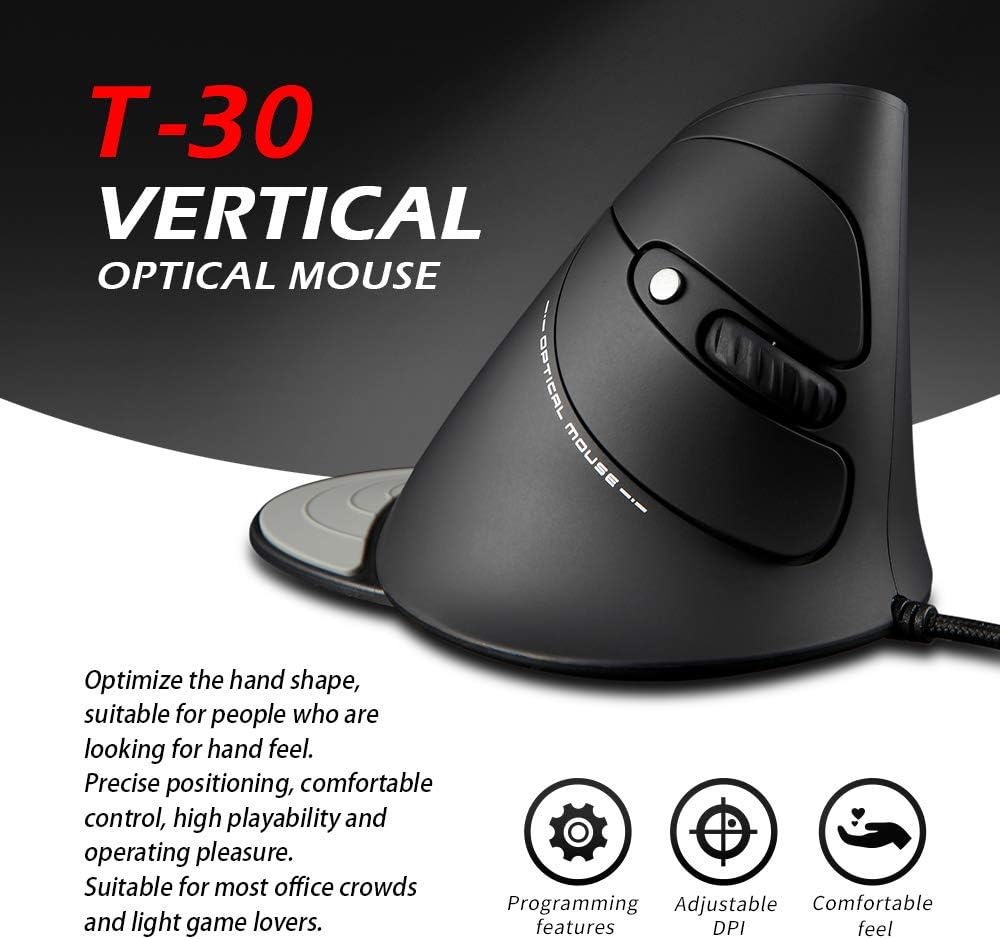
Figure 6: The T30 mouse with an emphasis on its adjustable DPI feature.
ബട്ടൺ പ്രവർത്തനങ്ങൾ
The zelotes T30 mouse is equipped with 6 buttons for various functions:
- ഇടത് ക്ലിക്ക് ബട്ടൺ: സ്റ്റാൻഡേർഡ് പ്രൈമറി ക്ലിക്ക് ഫംഗ്ഷൻ.
- റൈറ്റ് ക്ലിക്ക് ബട്ടൺ: സ്റ്റാൻഡേർഡ് സെക്കൻഡറി ക്ലിക്ക് ഫംഗ്ഷൻ.
- സ്ക്രോൾ വീൽ: For vertical scrolling. Can also be pressed for middle-click functionality.
- DPI ബട്ടൺ: Adjusts mouse sensitivity (DPI).
- ഫോർവേഡ് ബട്ടൺ: മുന്നോട്ട് നാവിഗേറ്റ് ചെയ്യുന്നു web ബ്രൗസറുകൾ അല്ലെങ്കിൽ file പര്യവേക്ഷകർ.
- ബാക്ക് ബട്ടൺ: പിന്നിലേക്ക് നാവിഗേറ്റ് ചെയ്യുന്നു web ബ്രൗസറുകൾ അല്ലെങ്കിൽ file പര്യവേക്ഷകർ.
Video 1: Demonstration of the zelotes T30 Ergonomic Vertical Mouse features and usage.
മെയിൻ്റനൻസ്
To ensure the longevity and optimal performance of your zelotes T30 mouse, follow these maintenance guidelines:
- വൃത്തിയാക്കൽ: മൗസിന്റെ പ്രതലം തുടയ്ക്കാൻ മൃദുവായതും ഉണങ്ങിയതുമായ ഒരു തുണി ഉപയോഗിക്കുക. കഠിനമായ അഴുക്കിന്, അല്പം ഡി.amp cloth can be used, but ensure no liquid enters the mouse. Avoid harsh chemicals or abrasive cleaners.
- സംഭരണം: ഉപയോഗത്തിലില്ലാത്തപ്പോൾ, കടുത്ത താപനിലയിൽ നിന്നും നേരിട്ടുള്ള സൂര്യപ്രകാശത്തിൽ നിന്നും മാറി വൃത്തിയുള്ളതും വരണ്ടതുമായ അന്തരീക്ഷത്തിൽ മൗസ് സൂക്ഷിക്കുക.
- കേബിൾ കെയർ: യുഎസ്ബി കേബിൾ അമിതമായി വളയ്ക്കുകയോ വളച്ചൊടിക്കുകയോ ചെയ്യുന്നത് ഒഴിവാക്കുക, കാരണം ഇത് ആന്തരിക വയറുകൾക്ക് കേടുവരുത്തും.
ട്രബിൾഷൂട്ടിംഗ്
If you encounter issues with your zelotes T30 mouse, refer to the following common problems and solutions:
| പ്രശ്നം | സാധ്യമായ കാരണം | പരിഹാരം |
|---|---|---|
| മൗസ് പ്രതികരിക്കുന്നില്ല | Loose USB connection, faulty USB port, operating system issue. |
|
| കഴ്സറിന്റെ ചലനം ക്രമരഹിതമോ ചാഞ്ചാട്ടമോ ആണ് | വൃത്തികെട്ട ഒപ്റ്റിക്കൽ സെൻസർ, അനുയോജ്യമല്ലാത്ത മൗസ് പാഡ് പ്രതലം. |
|
| DPI ക്രമീകരണം പ്രവർത്തിക്കുന്നില്ല | Button malfunction, temporary software glitch. |
|
സ്പെസിഫിക്കേഷനുകൾ
| ഫീച്ചർ | വിശദാംശങ്ങൾ |
|---|---|
| ബ്രാൻഡ് | zelotes |
| മോഡൽ നമ്പർ | ടി-30 |
| ഉൽപ്പന്ന അളവുകൾ | 4.33 x 3.15 x 3.27 ഇഞ്ച് |
| ഇനത്തിൻ്റെ ഭാരം | 4.2 ഔൺസ് |
| കണക്റ്റിവിറ്റി ടെക്നോളജി | യുഎസ്ബി വയർഡ് |
| മൂവ്മെന്റ് ഡിറ്റക്ഷൻ ടെക്നോളജി | ഒപ്റ്റിക്കൽ |
| ഡിപിഐ ക്രമീകരണങ്ങൾ | 1200/1600/2400/3200 ഡിപിഐ |
| ബട്ടണുകളുടെ എണ്ണം | 6 |
| പ്രത്യേക ഫീച്ചർ | Ergonomic Design, Detachable Wrist Rest, LED Illumination |
| അനുയോജ്യത | Win11, Win10, Win8, Win7, Mac OS, Linux |

Figure 7: Detailed dimensions of the zelotes T30 Vertical Mouse.
വാറൻ്റിയും പിന്തുണയും
For warranty information and technical support, please refer to the official zelotes webസൈറ്റിൽ ബന്ധപ്പെടുക അല്ലെങ്കിൽ അവരുടെ ഉപഭോക്തൃ സേവനവുമായി നേരിട്ട് ബന്ധപ്പെടുക. വാറന്റി ക്ലെയിമുകൾക്കായി നിങ്ങളുടെ വാങ്ങൽ രസീത് സൂക്ഷിക്കുക.
നിർമ്മാതാവ്: zelotes