
Auronic AU3129 12L
Auronic Electric Air Dehumidifier
Model: AU3129 12L
ആമുഖം
Thank you for choosing the Auronic Electric Air Dehumidifier. This appliance is designed to effectively remove excess moisture from the air, creating a more comfortable and healthier indoor environment. It is ideal for use in various spaces such as bathrooms, basements, and living areas, helping to prevent issues like mold, mildew, and dampness. Please read this manual thoroughly before operation to ensure proper use, maintenance, and safety.

Figure 1: Auronic Electric Air Dehumidifier (Model AU3129 12L)
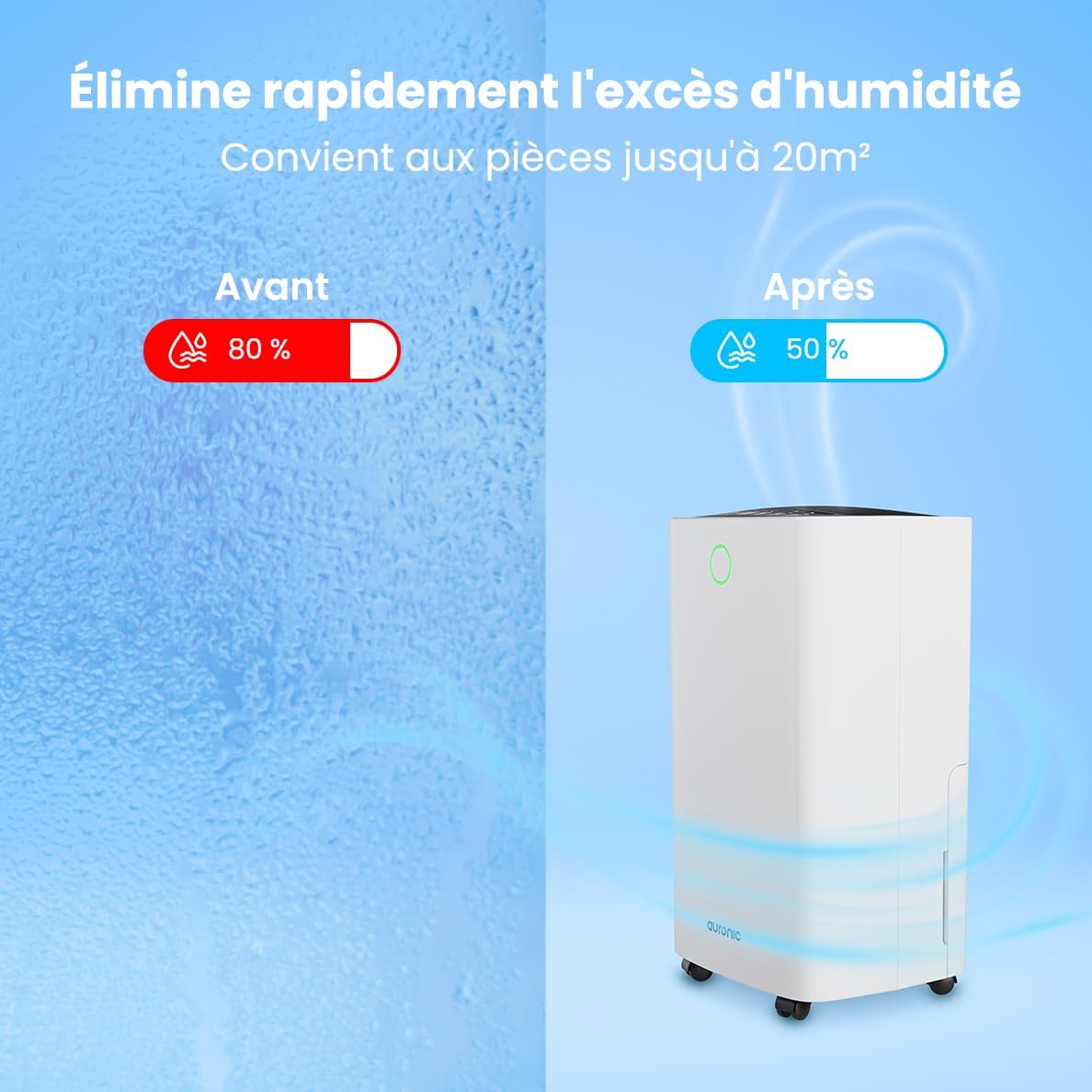
Figure 2: Humidity Reduction Effectiveness
സുരക്ഷാ വിവരങ്ങൾ
തീ, വൈദ്യുതാഘാതം അല്ലെങ്കിൽ പരിക്ക് എന്നിവ കുറയ്ക്കുന്നതിന്, എല്ലായ്പ്പോഴും ഈ അടിസ്ഥാന സുരക്ഷാ മുൻകരുതലുകൾ പാലിക്കുക:
- ഉപകരണം ഉപയോഗിക്കുന്നതിന് മുമ്പ് എല്ലാ നിർദ്ദേശങ്ങളും വായിക്കുക.
- വൈദ്യുതി വിതരണം വോള്യവുമായി പൊരുത്തപ്പെടുന്നുണ്ടെന്ന് ഉറപ്പാക്കുകtagഇ റേറ്റിംഗ് ലേബലിൽ വ്യക്തമാക്കിയിരിക്കുന്നു.
- പവർ കോർഡിനോ പ്ലഗിനോ കേടുപാടുകൾ സംഭവിച്ചാൽ ഡീഹ്യൂമിഡിഫയർ പ്രവർത്തിപ്പിക്കരുത്.
- യൂണിറ്റ് എല്ലായ്പ്പോഴും ഒരു സ്ഥിരതയുള്ള, നിരപ്പായ പ്രതലത്തിൽ സ്ഥാപിക്കുക.
- Keep the appliance at least 20 cm away from walls or other objects to ensure proper airflow.
- എയർ ഇൻലെറ്റിലേക്കോ ഔട്ട്ലെറ്റിലേക്കോ വിരലുകളോ വിദേശ വസ്തുക്കളോ ചേർക്കരുത്.
- വൃത്തിയാക്കുന്നതിനോ, നീക്കുന്നതിനോ, അല്ലെങ്കിൽ ഏതെങ്കിലും അറ്റകുറ്റപ്പണികൾ നടത്തുന്നതിനോ മുമ്പ് ഡീഹ്യൂമിഡിഫയർ അൺപ്ലഗ് ചെയ്യുക.
- വെറ്റ് അല്ലെങ്കിൽ ഡിയിൽ ഉപകരണം ഉപയോഗിക്കരുത്amp environments where water may splash.
- കുട്ടികൾക്ക് ലഭ്യമാകാതെ സൂക്ഷിക്കുക.
- If the unit has been tilted, allow it to stand upright for at least 24 hours before plugging it in.
ഉൽപ്പന്നം കഴിഞ്ഞുview
Familiarize yourself with the components of your Auronic Dehumidifier.

Figure 3: Dehumidifier Dimensions and Included Accessories

Figure 4: Easy Portability with Wheels and Handle
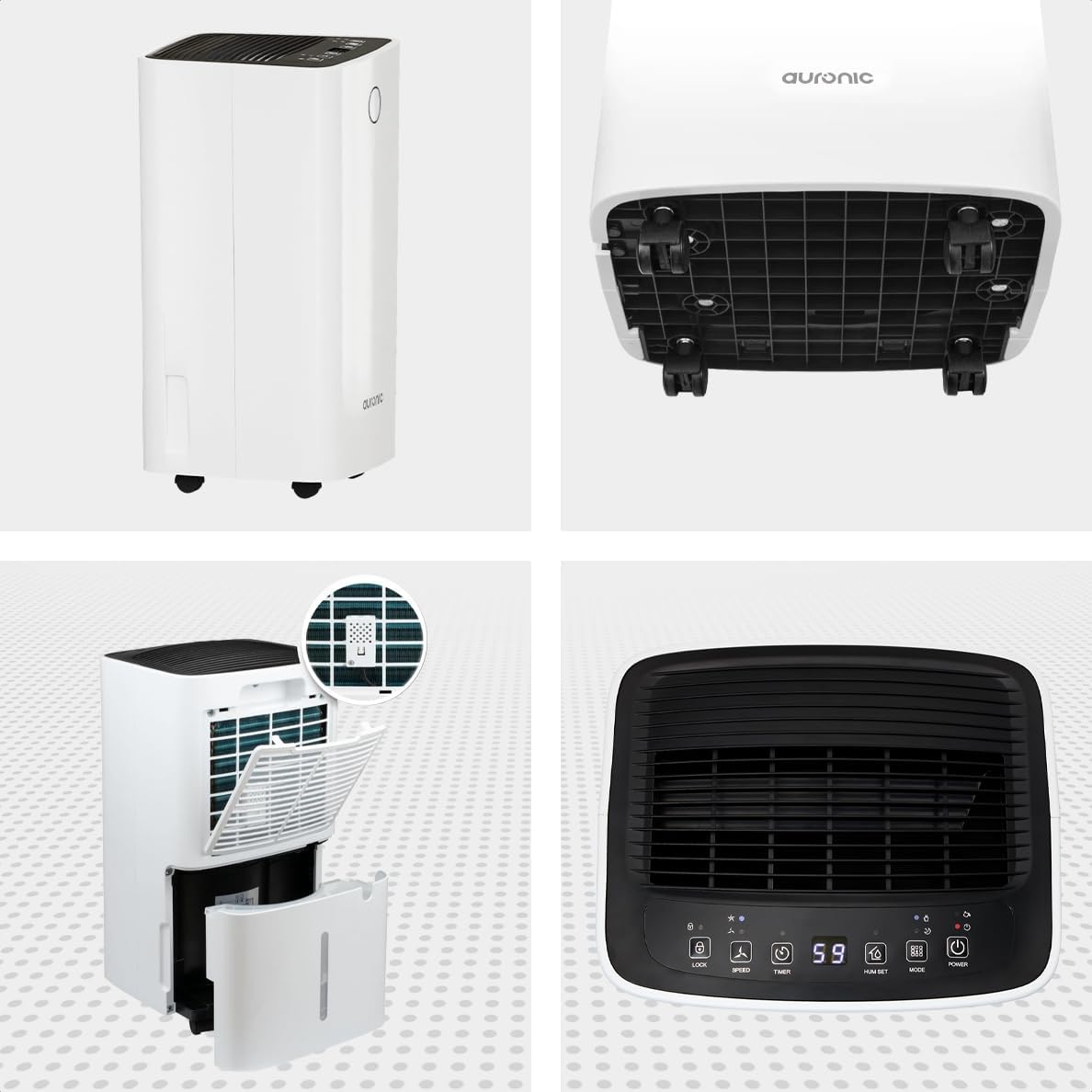
ചിത്രം 5: മൾട്ടി-ആംഗിൾ View of the Dehumidifier

ചിത്രം 6: നിയന്ത്രണ പാനൽ ഓവർview
പ്രധാന ഘടകങ്ങൾ:
- നിയന്ത്രണ പാനൽ: Intuitive interface for setting modes, humidity levels, and timer.
- എയർ ഇൻലെറ്റ്/ഔട്ട്ലെറ്റ്: Where air enters and exits the unit. Ensure these are not obstructed.
- വാട്ടർ ടാങ്ക്: Removable 2-liter tank for collecting condensed water.
- തുടർച്ചയായ ഡ്രെയിൻ ഔട്ട്ലെറ്റ്: Port for attaching a hose for continuous drainage.
- വീലുകളും ഹാൻഡിലും: എളുപ്പമുള്ള പോർട്ടബിലിറ്റിക്ക്.
- എയർ ഫിൽട്ടർ: Located at the back, helps filter dust from the air.
സജ്ജമാക്കുക
- അൺപാക്ക് ചെയ്യുന്നു: ഡീഹ്യൂമിഡിഫയർ അതിന്റെ പാക്കേജിംഗിൽ നിന്ന് ശ്രദ്ധാപൂർവ്വം നീക്കം ചെയ്യുക. ഭാവിയിലെ സംഭരണത്തിനോ ഗതാഗതത്തിനോ വേണ്ടി പാക്കേജിംഗ് സൂക്ഷിക്കുക.
- പ്ലേസ്മെൻ്റ്: Place the unit upright on a firm, level surface in the desired location. Ensure there is at least 20 cm of clear space around all sides for proper air circulation.
- പ്രാരംഭ സ്റ്റാൻഡ്ബൈ: If the unit was tilted during transport, let it stand upright for a minimum of 24 hours before plugging it in. This allows the refrigerant to settle.
- പവർ കണക്ഷൻ: ഗ്രൗണ്ടഡ് ഇലക്ട്രിക്കൽ ഔട്ട്ലെറ്റിലേക്ക് പവർ കോർഡ് പ്ലഗ് ചെയ്യുക.
- വാട്ടർ ടാങ്ക്: വാട്ടർ ടാങ്ക് യൂണിറ്റിൽ ശരിയായി ചേർത്തിട്ടുണ്ടെന്ന് ഉറപ്പാക്കുക. ടാങ്ക് നിറഞ്ഞിരിക്കുകയോ ശരിയായി സ്ഥാപിച്ചിട്ടില്ലെങ്കിലോ ഡീഹ്യുമിഡിഫയർ പ്രവർത്തിക്കില്ല.
പ്രവർത്തന നിർദ്ദേശങ്ങൾ
നിയന്ത്രണ പാനൽ പ്രവർത്തനങ്ങൾ:
| ബട്ടൺ/ഇൻഡിക്കേറ്റർ | ഫംഗ്ഷൻ |
|---|---|
| പവർ ബട്ടൺ | യൂണിറ്റ് ഓണാക്കുകയോ ഓഫാക്കുകയോ ചെയ്യുന്നു. |
| മോഡ് ബട്ടൺ | Cycles through operating modes (e.g., Dehumidify, Laundry Drying, Sleep). |
| Hum Set Button | ആവശ്യമുള്ള ഈർപ്പം നില ക്രമീകരിക്കുന്നു (ഉദാ: 40% - 80% ആർഎച്ച്). |
| ടൈമർ ബട്ടൺ | ഓട്ടോ-ഓൺ അല്ലെങ്കിൽ ഓട്ടോ-ഓഫ് ടൈമർ (12 മണിക്കൂർ വരെ) സജ്ജമാക്കുന്നു. |
| സ്പീഡ് ബട്ടൺ | Adjusts fan speed (e.g., High, Low). |
| ലോക്ക് ബട്ടൺ | Locks the control panel to prevent accidental changes. |
| Humidity Indicator LED | Changes color based on current humidity level (e.g., Blue: <45%, Green: 45-65%, Red: >65%). Figure 7: Humidity Indicator LED Explained |
പൊതുവായ പ്രവർത്തനം:
- ഓൺ ചെയ്യുക: അമർത്തുക ശക്തി button. The display will show the current room humidity.
- ആവശ്യമുള്ള ഈർപ്പം സജ്ജമാക്കുക: അമർത്തുക Hum Set button repeatedly to select your desired humidity level. The unit will operate until this level is reached, then cycle on and off to maintain it.
- മോഡ് തിരഞ്ഞെടുക്കുക: അമർത്തുക മോഡ് button to choose between different operating modes.
- ഡീഹ്യൂമിഡിഫൈ മോഡ്: Standard operation to reduce ambient humidity.
- അലക്കു ഉണക്കൽ മോഡ്: Increases fan speed and continuous operation to assist in drying clothes.

Figure 8: Using the Dehumidifier for Laundry Drying
- സ്ലീപ്പ് മോഡ്: Operates at a lower fan speed and reduced noise level for quiet nighttime use.

Figure 9: Silent Operation for Nighttime Use
- ടൈമർ സജ്ജമാക്കുക: അമർത്തുക ടൈമർ button to set an auto-off time (when the unit is on) or an auto-on time (when the unit is off).

Figure 10: Integrated Timer Function
- ഫാൻ വേഗത: ഉപയോഗിക്കുക വേഗത button to adjust the fan speed as desired.
- ചൈൽഡ് ലോക്ക്: അമർത്തിപ്പിടിക്കുക പൂട്ടുക button for 3 seconds to activate/deactivate the child lock function.
തുടർച്ചയായ ഡ്രെയിനേജ്:
For continuous operation without emptying the water tank, you can connect the included drain hose to the continuous drain outlet. Ensure the hose is sloped downwards to allow gravity drainage into a suitable receptacle or drain.

Figure 11: Continuous Drainage Setup
മെയിൻ്റനൻസ്
പതിവ് അറ്റകുറ്റപ്പണികൾ മികച്ച പ്രകടനം ഉറപ്പാക്കുകയും നിങ്ങളുടെ ഡീഹ്യൂമിഡിഫയറിന്റെ ആയുസ്സ് വർദ്ധിപ്പിക്കുകയും ചെയ്യുന്നു.
വാട്ടർ ടാങ്ക് ശൂന്യമാക്കൽ:
When the water tank is full, the unit will automatically stop operating and an indicator light will illuminate. Carefully remove the tank, empty the collected water, and reinsert it firmly until it clicks into place.

Figure 12: Removing the 2-Liter Water Tank
എയർ ഫിൽട്ടർ വൃത്തിയാക്കൽ:
ഉപയോഗവും വായുവിന്റെ ഗുണനിലവാരവും അനുസരിച്ച് എയർ ഫിൽറ്റർ രണ്ടാഴ്ച കൂടുമ്പോഴോ അതിലധികമോ തവണ വൃത്തിയാക്കണം.
- ഡീഹ്യൂമിഡിഫയർ ഓഫ് ചെയ്ത് അൺപ്ലഗ് ചെയ്യുക.
- യൂണിറ്റിന്റെ പിൻഭാഗത്ത് നിന്ന് എയർ ഫിൽട്ടർ കണ്ടെത്തി നീക്കം ചെയ്യുക.
- Clean the filter with warm, soapy water or use a vacuum cleaner to remove dust.
- വീണ്ടും ഇടുന്നതിനുമുമ്പ് ഫിൽട്ടർ നന്നായി കഴുകി പൂർണ്ണമായും വായുവിൽ ഉണങ്ങാൻ അനുവദിക്കുക.
യൂണിറ്റ് പുറംഭാഗം വൃത്തിയാക്കൽ:
ഡീഹ്യൂമിഡിഫയറിന്റെ പുറംഭാഗം മൃദുവായ, ഡി ഉപയോഗിച്ച് തുടയ്ക്കുകamp തുണി. കഠിനമായ രാസവസ്തുക്കളോ ഉരച്ചിലുകളുള്ള ക്ലീനറുകളോ ഉപയോഗിക്കരുത്.
ട്രബിൾഷൂട്ടിംഗ്
ഉപഭോക്തൃ പിന്തുണയുമായി ബന്ധപ്പെടുന്നതിന് മുമ്പ്, ഇനിപ്പറയുന്ന പൊതുവായ പ്രശ്നങ്ങളും പരിഹാരങ്ങളും പരിശോധിക്കുക:
| പ്രശ്നം | സാധ്യമായ കാരണം | പരിഹാരം |
|---|---|---|
| ഡീഹ്യൂമിഡിഫയർ ഓണാക്കുന്നില്ല. | No power, power cord loose, water tank full or improperly seated. | Check power connection, empty and reinsert water tank correctly. |
| വെള്ളം ശേഖരിച്ചിട്ടില്ല. | Room humidity too low, temperature too low, air filter clogged, continuous drain hose connected. | Check room humidity/temperature, clean air filter, ensure continuous drain hose is not connected if tank collection is desired. |
| യൂണിറ്റ് ശബ്ദമയമാണ്. | Unit not on a level surface, air filter clogged, internal component issue. | Place on a level surface, clean air filter. If noise persists, contact support. |
| Dehumidification is slow or ineffective. | Room size too large, doors/windows open, air inlets/outlets blocked, air filter dirty. | Ensure room is sealed, clear obstructions, clean air filter. |
സ്പെസിഫിക്കേഷനുകൾ
| ഫീച്ചർ | വിശദാംശങ്ങൾ |
|---|---|
| ബ്രാൻഡ് | ഔറോണിക് |
| മോഡലിൻ്റെ പേര് | Auronic Silent Low Consumption Dehumidifier |
| ഉൽപ്പന്ന അളവുകൾ (L x W x H) | 21.5 x 47 x 25.5 സെ.മീ |
| ഇനത്തിൻ്റെ ഭാരം | 11 കിലോഗ്രാം |
| ശേഷി (ഈർപ്പരഹിതമാക്കൽ) | പ്രതിദിനം 12 ലിറ്റർ |
| വാട്ടർ ടാങ്കിൻ്റെ അളവ് | 2 ലിറ്റർ |
| ശക്തി | 185 വാട്ട്സ് |
| നിറം | വെള്ള |
| പ്രത്യേക സവിശേഷതകൾ | Easy to use, Laundry Drying function, Prevents and effectively eliminates humidity, 2-liter tank, Automatic shut-off. |
| ശുപാർശ ചെയ്യുന്ന ഉപയോഗം | ആഭ്യന്തര |
വാറൻ്റിയും പിന്തുണയും
Auronic products are manufactured to the highest quality standards. For warranty information, technical support, or service inquiries, please refer to the contact details provided on your purchase receipt or visit the official Auronic website. Please have your model number (AU3129 12L) and purchase date ready when contacting support.
Ask a question about this manual
Ask about setup, troubleshooting, compatibility, parts, safety, or missing instructions. Manuals+ will review the question and use this page’s manual context to help answer it.