
ആമുഖം
Thank you for choosing the SENTRY OSH140 Wired USB-C Over-Ear Headphones. These headphones are designed to provide a high-quality audio experience with the convenience of a direct USB-C connection. Featuring 40mm drivers and studio-grade earpads for noise isolation, they deliver clear, balanced sound. The integrated inline microphone allows for hands-free communication, and the collapsible design with an included protective case ensures portability and durability.
ബോക്സിൽ എന്താണുള്ളത്
- SENTRY OSH140 Wired USB-C Over-Ear Headphones
- Deluxe Hard Case

ചിത്രം 1: മുൻഭാഗം view of SENTRY OSH140 Wired USB-C Over-Ear Headphones.

Figure 2: SENTRY OSH140 headphones showing the inline controls on the cable.

Figure 3: SENTRY OSH140 headphones folded, next to the included protective hard case.
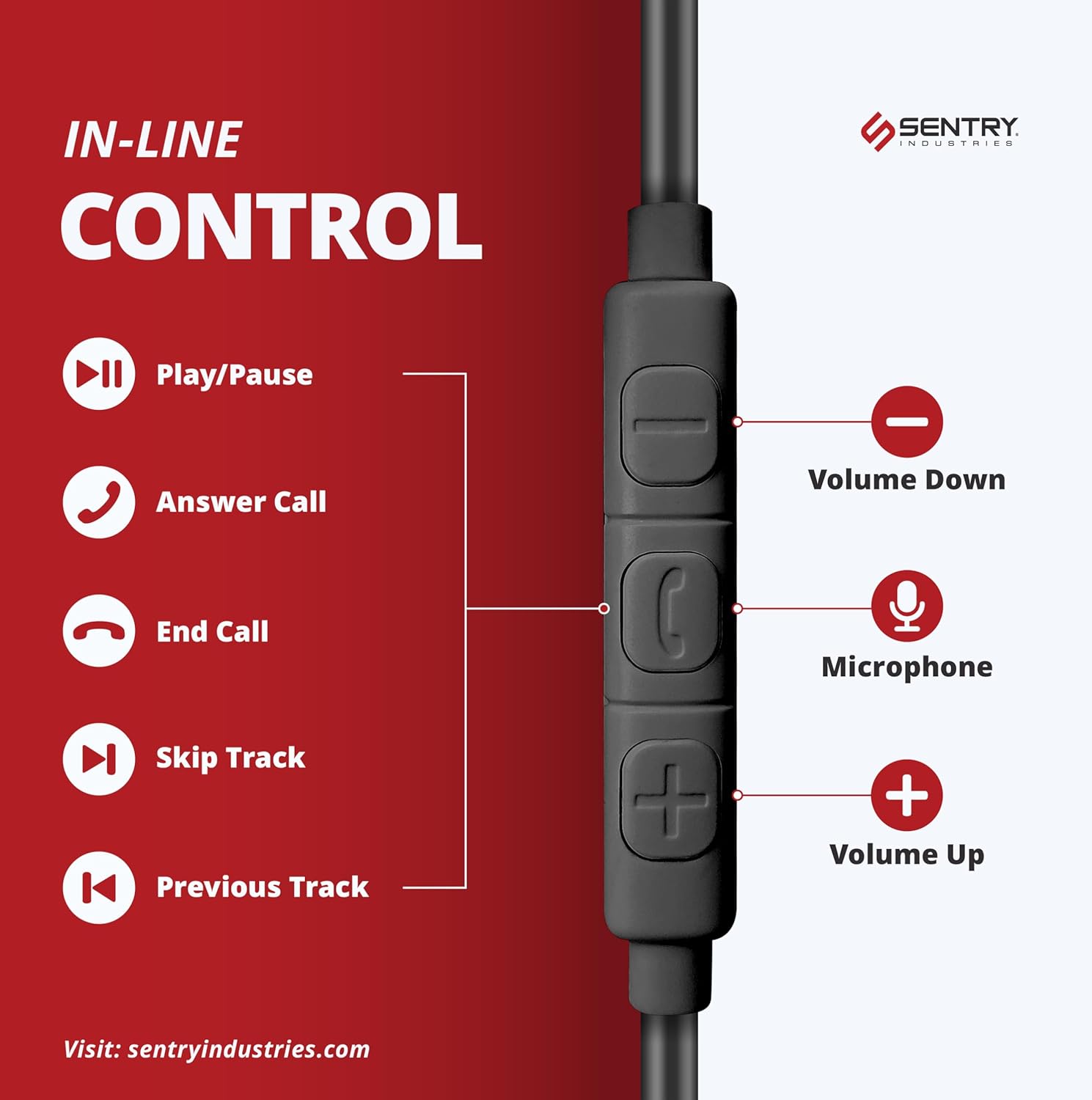
Figure 4: SENTRY OSH140 headphones neatly stored inside their deluxe hard case.
സജ്ജമാക്കുക
- അൺപാക്ക്: Carefully remove the headphones and the deluxe hard case from the packaging.
- തുറക്കുക: Gently unfold the earcups from their collapsed position until the headband is fully extended.
- ബന്ധിപ്പിക്കുക: Insert the USB-C connector of the headphone cable directly into the USB-C port of your compatible device (e.g., cellphone, desktop, Mac, iPad, Switch, MP3 player). No additional drivers or software are typically required for basic audio functionality.
- ക്രമീകരിക്കുക: Place the headphones over your ears, ensuring the soft earpads fully cover them. Adjust the headband for a comfortable and secure fit.
പ്രവർത്തന നിർദ്ദേശങ്ങൾ
The SENTRY OSH140 headphones feature an inline remote with a built-in microphone for convenient control of your audio and calls.

Figure 5: Diagram illustrating the functions of the inline control buttons.
ഓഡിയോ നിയന്ത്രണം:
- പ്ലേ/താൽക്കാലികമായി നിർത്തുക: സെന്റർ ബട്ടൺ ഒരിക്കൽ അമർത്തുക.
- അടുത്ത ട്രാക്ക്: മധ്യ ബട്ടൺ രണ്ടുതവണ വേഗത്തിൽ അമർത്തുക.
- മുമ്പത്തെ ട്രാക്ക്: മധ്യ ബട്ടൺ മൂന്ന് തവണ വേഗത്തിൽ അമർത്തുക.
- വോളിയം കൂട്ടുക: '+' ബട്ടൺ അമർത്തുക.
- വോളിയം താഴേക്ക്: '-' ബട്ടൺ അമർത്തുക.
കോൾ നിയന്ത്രണം:
- ഉത്തരം/അവസാന കോൾ: Press the center button once during an incoming call or to end an active call.
- കോൾ നിരസിക്കുക: ഇൻകമിംഗ് കോൾ വരുമ്പോൾ മധ്യ ബട്ടൺ ഏകദേശം 2 സെക്കൻഡ് അമർത്തിപ്പിടിക്കുക.
- മൈക്രോഫോൺ: The built-in microphone is automatically active during calls.
മെയിൻ്റനൻസ്
- വൃത്തിയാക്കൽ: ഹെഡ്ഫോണുകൾ വൃത്തിയാക്കാൻ മൃദുവായതും ഉണങ്ങിയതുമായ തുണി ഉപയോഗിക്കുക. ലിക്വിഡ് ക്ലീനറുകളോ സ്പ്രേകളോ ഉപയോഗിക്കരുത്.
- സംഭരണം: When not in use, fold the headphones and store them in the provided deluxe hard case to protect them from dust, scratches, and damage.
- കേബിൾ കെയർ: ആന്തരിക കേടുപാടുകൾ തടയാൻ USB-C കേബിളിൽ മൂർച്ചയുള്ള വളവുകളോ അമിതമായി വലിക്കുന്നതോ ഒഴിവാക്കുക.
- ജല പ്രതിരോധം: These headphones are not water resistant. Avoid exposure to moisture or liquids.
ട്രബിൾഷൂട്ടിംഗ്
| പ്രശ്നം | പരിഹാരം |
|---|---|
| ഹെഡ്ഫോണുകളിൽ നിന്ന് ശബ്ദമില്ല. |
|
| മൈക്രോഫോൺ പ്രവർത്തിക്കുന്നില്ല. |
|
| ശബ്ദ നിലവാരം മോശമാണ്. |
|
സ്പെസിഫിക്കേഷനുകൾ
| ഫീച്ചർ | വിശദാംശങ്ങൾ |
|---|---|
| മോഡലിൻ്റെ പേര് | OSH140 |
| കണക്റ്റിവിറ്റി ടെക്നോളജി | വയേർഡ് USB-C |
| ഹെഡ്ഫോണുകൾ ജാക്ക് | USB-C |
| ഓഡിയോ ഡ്രൈവർ തരം | ഡൈനാമിക് ഡ്രൈവർ |
| ഡ്രൈവർ വലിപ്പം | 40 മി.മീ |
| പ്രതിരോധം | 32 ഓം |
| ഫ്രീക്വൻസി പ്രതികരണം | 20 KHz (Note: The provided data states 20 KHz, which is typically the upper limit of human hearing. A full range would be 20Hz-20kHz) |
| സംവേദനക്ഷമത | 110 ഡി.ബി |
| ശബ്ദ നിയന്ത്രണം | Sound Isolation (via Studio Grade Earpads) |
| മൈക്രോഫോൺ | Inline Mic |
| നിയന്ത്രണ തരം | Media Control (Inline Remote) |
| ഇയർപീസ് ആകൃതി | ഓവർ-ഇയർ |
| മെറ്റീരിയൽ | Plastic (Headphones), Nylon (Carrying Case) |
| നിറം | കറുപ്പ് |
| ഉൽപ്പന്ന അളവുകൾ | 3.75 x 0.75 x 6.75 ഇഞ്ച് |
| ഇനത്തിൻ്റെ ഭാരം | 1.5 ഔൺസ് |
| ജല പ്രതിരോധ നില | വാട്ടർ റെസിസ്റ്റൻ്റ് അല്ല |
| അനുയോജ്യമായ ഉപകരണങ്ങൾ | Cellphones, Desktop, Mac, iPad, Switch, MP3 |
വാറൻ്റിയും പിന്തുണയും
Sentry Industries provides an extensive 90-day warranty on all products, offering free replacements within this period. For any product inquiries, technical support, or warranty claims, please contact Sentry Industries customer service through their official webഉൽപ്പന്നം വാങ്ങിയ സൈറ്റ് അല്ലെങ്കിൽ റീട്ടെയിലർ.
For additional information, please visit the ആമസോണിലെ സെൻട്രി സ്റ്റോർ.
ഉൽപ്പന്നം കഴിഞ്ഞുview വീഡിയോ
വീഡിയോ 1: ഒരു ഔദ്യോഗിക ഉൽപ്പന്നം അവസാനിച്ചുview of the Sentry OSH140 Over-Ear USB-C Headphones, provided by Amazon Videos (Seller).