
1. ആമുഖം
The PDDAXLQUE DX-CP24 is an industrial-grade RS485 to Bluetooth serial adapter designed to convert wired RS485 interface devices into wireless Bluetooth communication. This module supports communication with Android/iOS mobile devices and PCs, facilitating applications such as device debugging, parameter setting, and information querying. It is also suitable for direct device-to-device communication, offering a flexible and efficient solution for industrial control and monitoring.
2. പാക്കേജ് ഉള്ളടക്കം
- DX-CP24 Adapter x1
- Rubber Stick Antenna x1
- RJ45 Plug to 4P 5.0mm Terminal Block x1

Figure 2.1: Components included in the DX-CP24 package. This includes the main adapter unit, a detachable antenna, and a terminal block for wiring.
3 പ്രധാന സവിശേഷതകൾ
- RS485 to Wireless Conversion: Converts RS485 devices to wireless Bluetooth communication, supporting PC, iOS, and Android platforms.
- Integrated Bluetooth 5.1 BLE Module: Utilizes Renesas DA14531 chip with PA Amplifiers for stable communication.
- വിപുലീകൃത ആശയവിനിമയ ശ്രേണി: External rubber stick antenna provides visual communication distances of 90m (mobile phone), 70m (PC), and 400m (device to device).
- Modbus Protocol Support: Compatible with various Modbus protocol devices.
- Adjustable Baud Rate: Supports baud rates of 2400, 4800, 9600 (default), 19200, 38400, 57600, and 115200 bps.
- വിശാലമായ പവർ സപ്ലൈ ശ്രേണി: Operates on DC 5-36V.
- കോംപാക്റ്റ് ഡിസൈൻ: Device size is 60 * 27.8 * 16.4mm.
- വിശാലമായ പ്രവർത്തന താപനില: Functions reliably from -40 to +85°C.

Figure 3.1: Visual summary of the CP24's key technical features and specifications.
4. ഉൽപ്പന്നം കഴിഞ്ഞുview and Interfaces
The DX-CP24 adapter features several key interfaces and indicators for easy operation and monitoring:
- A+, B-: RS485 interface terminals.
- VCC, GND: Power supply interface (DC 5-36V).
- ജോലി: BLE status indicator.
- RX: Data receiving indicator light.
- TX: Data transmit indicator light.
- കീ: Button for switching baud rate.
- എന്റ്: External antenna interface.

Figure 4.1: CP24 Interface Introduction. This diagram labels the various ports and indicators on the device.
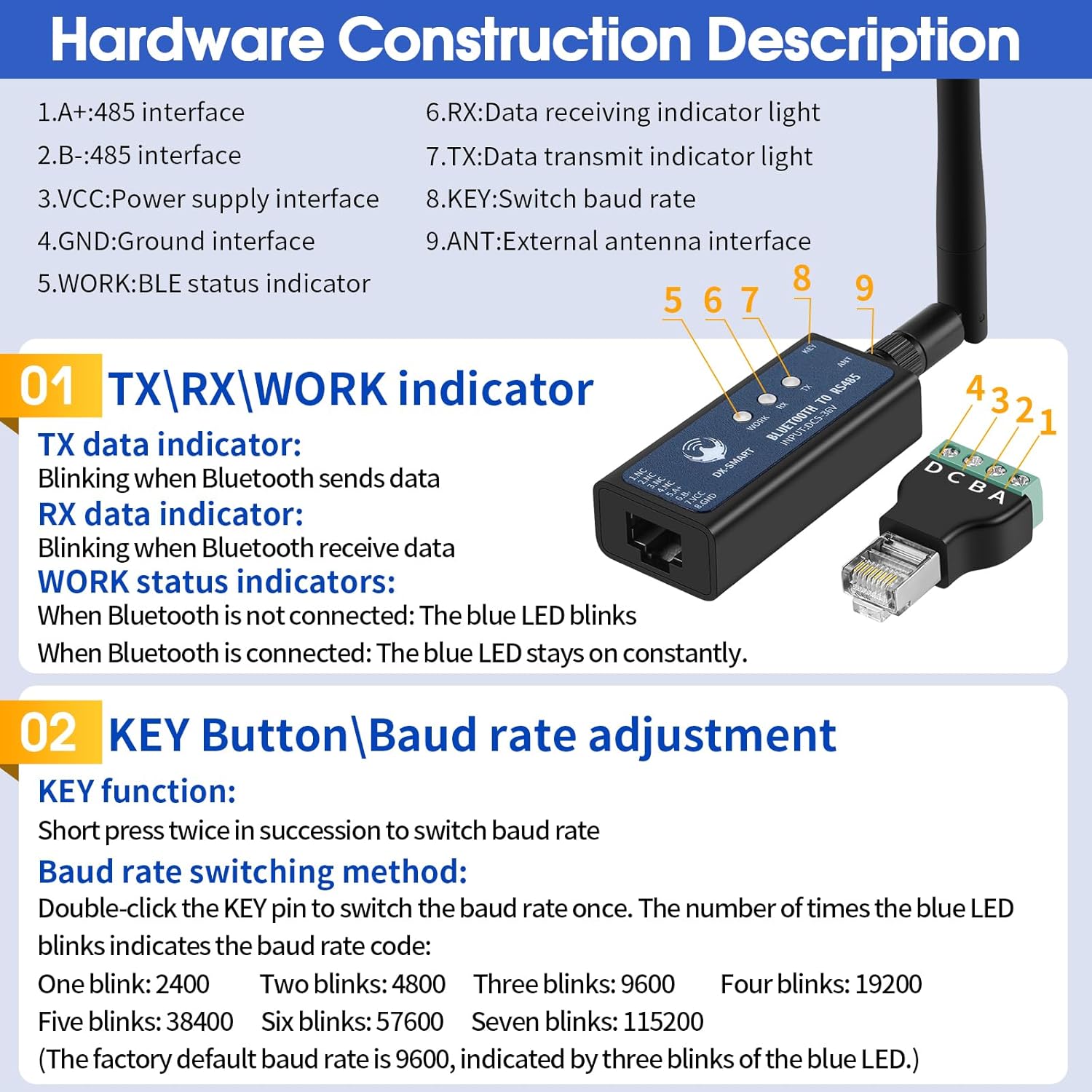
Figure 4.2: Hardware Construction Description. This image provides a closer look at the indicators and the baud rate adjustment button.
5. സജ്ജീകരണവും വയറിംഗും
5.1 Power Supply and RS485 Connection
Connect the DX-CP24 to your RS485 device and power source using the provided terminal block. Ensure correct polarity for VCC (positive) and GND (negative) within the DC 5-36V range. Connect the A+ and B- terminals to your RS485 communication lines.

Figure 5.1: Wiring Method for CP24. This diagram illustrates how to connect the power supply and RS485 devices to the adapter.
5.2 Baud Rate Adjustment
The DX-CP24 supports various baud rates. To switch the baud rate, short press the KEY button twice. The number of blue light flashes indicates the current baud rate setting:
- One flash: 2400 bps
- Two flashes: 4800 bps
- Three flashes: 9600 bps (Default)
- Four flashes: 19200 bps
- Five flashes: 38400 bps
- Six flashes: 57600 bps
- Seven flashes: 115200 bps
6. പ്രവർത്തന നിർദ്ദേശങ്ങൾ
6.1 Mobile Phone Connection (Android/iOS)
- അപ്ലിക്കേഷൻ ഡൗൺലോഡുചെയ്യുക: For iPhone, search for 'DX-SMART' in the App Store. For Android, download the package from en.szdx-smart.com.
- Connect to CP24: Connect your mobile phone to the CP24 via its Bluetooth interface.
- ആപ്പ് തുറക്കുക: Open the 'DX-SMART' app, click 'Transmission', search for Bluetooth devices, and connect.
- Once connected, you can control RS485 devices wirelessly.

Figure 6.1: Device and Mobile Phone Connection Method. This image illustrates the steps for connecting your smartphone to the DX-CP24.
6.2 PC Connection (Requires CP11 Adapter)
To communicate with a PC, a CP11 Bluetooth to USB adapter (sold separately) is required.
- ഡ്രൈവർ ഇൻസ്റ്റാളേഷൻ: Download and install the 'CH341' driver from the official webസൈറ്റ്.
- Connect CP11: Plug the CP11 adapter into your PC's USB port.
- സോഫ്റ്റ്വെയർ സജ്ജീകരണം: Open your serial port software, select the correct COM port for the CP11 adapter, and set the default parameter configuration (e.g., 9600bps/8/N/1).
- The CP11 adapter will actively search for the CP24 Bluetooth converter. A blue LED light indicates a successful connection, allowing data interaction.

Figure 6.2: About the CP11 Adapter. This image shows the CP11 adapter and its use with PC software for serial communication.
6.3 Wireless Communication Between Devices
The DX-CP24 can establish wireless communication between two RS485 devices by configuring one as a Master and the other as a Slave. This allows for remote commissioning and control without traditional wiring.

Figure 6.3: Wireless Communication Between Devices. This diagram shows how two CP24 units can communicate wirelessly in a master-slave configuration.
7. ആപ്ലിക്കേഷൻ സാഹചര്യങ്ങൾ
The DX-CP24 is versatile and can be applied in various industrial and automation settings:
- PLC Control: Remotely control PLCs and associated modules (e.g., motor modules, relay modules) via Bluetooth.
- Sensor Data Collection: Wirelessly collect data from temperature and humidity sensors.
- Inverter Debugging: Debug and set parameters for inverters using a mobile phone.
- Textile Machinery: Setting parameters for textile machines.
- Lift Controllers: Adjusting lift parameters.
- Servo Motors: Setting servo motor parameters.

Figure 7.1: Bluetooth-RS485 Conversion Applications. This image showcases diverse industrial applications for the DX-CP24.
Video 7.1: RS485 to Bluetooth Adapter in Action. This video demonstrates how the DX-CP24 converts wired RS485 systems to wireless, showing applications like PLC control, sensor data collection, and inverter debugging via mobile phone and PC.
8 സ്പെസിഫിക്കേഷനുകൾ
| ഫീച്ചർ | വിവരണം |
|---|---|
| മോഡൽ നമ്പർ | CP24 |
| ബ്രാൻഡ് | പിഡിഎക്സ്എൽക്യു |
| ഹാർഡ്വെയർ ഇന്റർഫേസ് | ബ്ലൂടൂത്ത് 5 |
| നിറം | കറുപ്പ് |
| അനുയോജ്യമായ ഉപകരണങ്ങൾ | Desktop, Smartphone, RS485 devices |
| ഡാറ്റ ലിങ്ക് പ്രോട്ടോക്കോൾ | ബ്ലൂടൂത്ത് |
| ഡാറ്റ കൈമാറ്റ നിരക്ക് | Up to 115200 bps (configurable) |
| Minimum Required OS | Android 10.0, Windows 7, iOS 8 |
| വൈദ്യുതി വിതരണം | ഡിസി ക്സനുമ്ക്സ-ക്സനുമ്ക്സവ് |
| Communication Distance (Visual) | Mobile: 90m / PC: 70m / Device to Device: 400m |
9. പ്രശ്നപരിഹാരം
If you encounter issues with your DX-CP24 adapter, consider the following common troubleshooting steps:
- പവർ ഇൻഡിക്കേറ്റർ ഇല്ല: Check the power supply connection and ensure it is within the DC 5-36V range. Verify the power source is active.
- ബ്ലൂടൂത്ത് വഴി ബന്ധിപ്പിക്കാൻ കഴിയില്ല: Ensure the DX-CP24 is powered on and within range. For mobile devices, confirm Bluetooth is enabled and the 'DX-SMART' app is correctly installed. For PC, verify the CP11 adapter is properly installed with drivers and the correct COM port is selected.
- ആശയവിനിമയ പിശകുകൾ: Verify that the baud rate setting on the DX-CP24 matches the baud rate configured in your connected device or software. Check RS485 wiring (A+ to A+, B- to B-). Ensure no other devices are interfering with the communication.
- ഇടവിട്ടുള്ള കണക്ഷൻ: Check for potential sources of interference (e.g., other wireless devices, metal obstructions). Ensure the antenna is securely attached.
- ഡാറ്റ പൊരുത്തക്കേട്: Confirm that the data bit, parity, and stop bit settings match between the DX-CP24 and the connected RS485 device.
10. വാറൻ്റിയും പിന്തുണയും
PDDAXLQUE is committed to providing high-quality products and reliable technical support. As the manufacturer, we offer comprehensive assistance for any questions or issues you may encounter with your DX-CP24 adapter. We also support OEM and ODM services.
For technical assistance, please refer to the contact information provided with your product or visit the official PDDAXLQUE website. Our team is ready to help you solve your problems in a timely manner.