
1 സുരക്ഷാ വിവരങ്ങൾ
Please read all instructions carefully before operating the CLoxks Electric Foldable Wheelchair. Failure to follow safety guidelines may result in injury or damage to the product.
- ഭാരം ശേഷി: ശുപാർശ ചെയ്യുന്ന പരമാവധി ഭാരം കവിയരുത് 100 കിലോഗ്രാം.
- ബ്രേക്കിംഗ്: The wheelchair features an automatic brake that engages when the hand leaves the controller. Always ensure the brake is functioning correctly.
- ആന്റി-ടിൽറ്റ് ഡിസൈൻ: The anti-tilt rear design enhances stability. Always ensure anti-tip wheels are properly deployed when in use.
- പരിസ്ഥിതി വ്യവസ്ഥകൾ: Avoid operating the wheelchair in extreme weather conditions or on excessively steep inclines.
- Seat Belt: Always use the integrated seat belt to prevent falling forward, especially during movement.
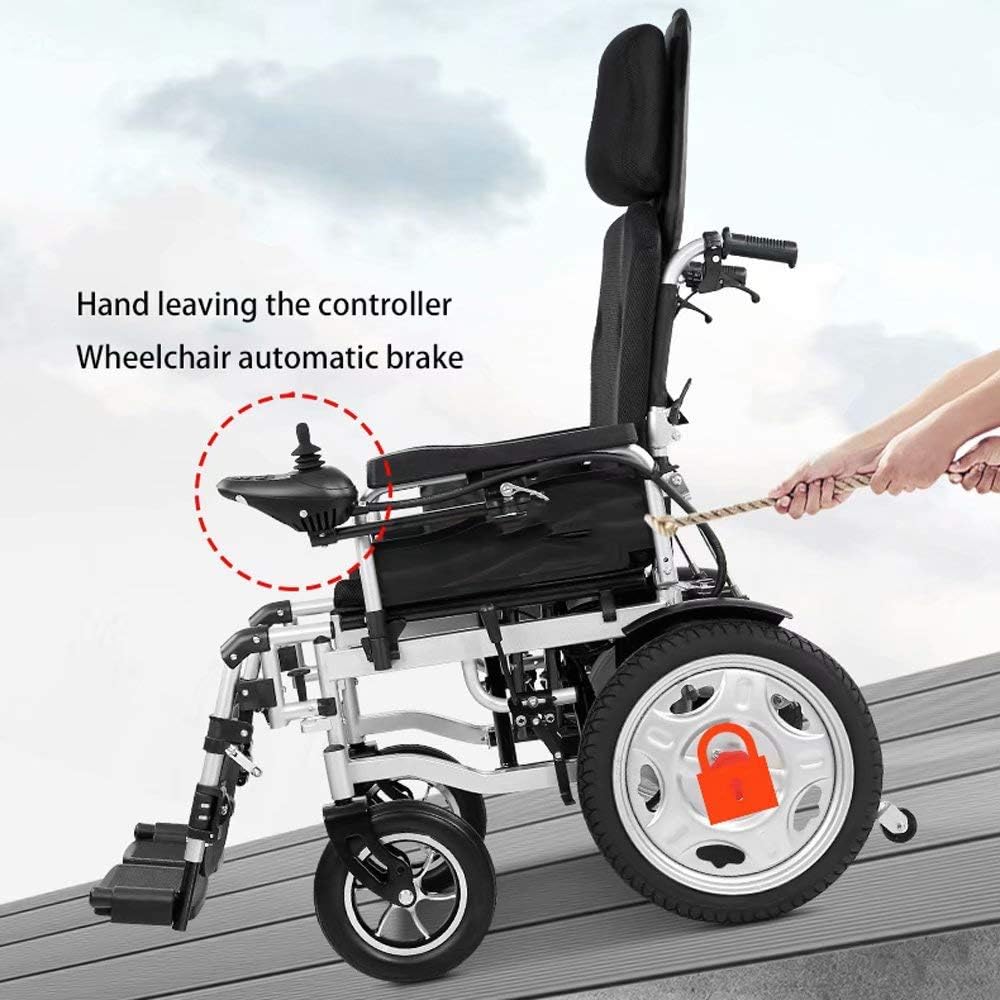
ചിത്രം 1.1: The wheelchair's automatic brake system, which engages when the user's hand is removed from the joystick controller, providing safety on inclines. A red lock icon indicates the brake is active.
2. ഉൽപ്പന്നം കഴിഞ്ഞുview
The CLoxks Electric Foldable Wheelchair is designed for individuals with limited mobility, offering comfort, portability, and ease of use. Its ergonomic design ensures comfort for extended periods.

ചിത്രം 2.1: മുൻ വശം view of the CLoxks Electric Foldable Wheelchair, showcasing its frame, seat, wheels, and joystick controller.
പ്രധാന സവിശേഷതകൾ:
- എർഗണോമിക് ഡിസൈൻ: Provides comfort for prolonged use, suitable for home, travel, and outdoor activities.
- മടക്കാവുന്നത്: Easy to carry and store, enhancing portability.
- Adjustable Seat Belt: Prevents the user from falling forward.
- ഫ്ലിപ്പ്-അപ്പ് ആംറെസ്റ്റുകൾ: Allows for easier access and transfer.
- Foldable Pedals: Enhances compactness when folded.
- 360-degree Universal Joystick: Enables precise control and quick stops.
- Anti-Tilt Rear Design: Increases stability and safety.

ചിത്രം 2.2: A user seated in the CLoxks Electric Wheelchair, demonstrating its ergonomic design and comfortable seating.
3. സജ്ജീകരണം
3.1 Unfolding the Wheelchair
- Place the folded wheelchair on a flat, stable surface.
- Gently pull the armrests outwards to begin unfolding the frame.
- Push down on the seat until it locks securely into place.
- ഉപയോഗിക്കുന്നതിന് മുമ്പ് എല്ലാ ലോക്കിംഗ് മെക്കാനിസങ്ങളും ഇടപെട്ടിട്ടുണ്ടെന്ന് ഉറപ്പാക്കുക.
3.2 കൺട്രോളർ ഘടിപ്പിക്കൽ
The joystick controller can be attached to either the left or right armrest for user convenience. Ensure it is securely fastened.
3.3 Battery Installation/Charging
Refer to the separate battery manual for detailed instructions on installation, charging, and care. Ensure the battery is fully charged before first use.
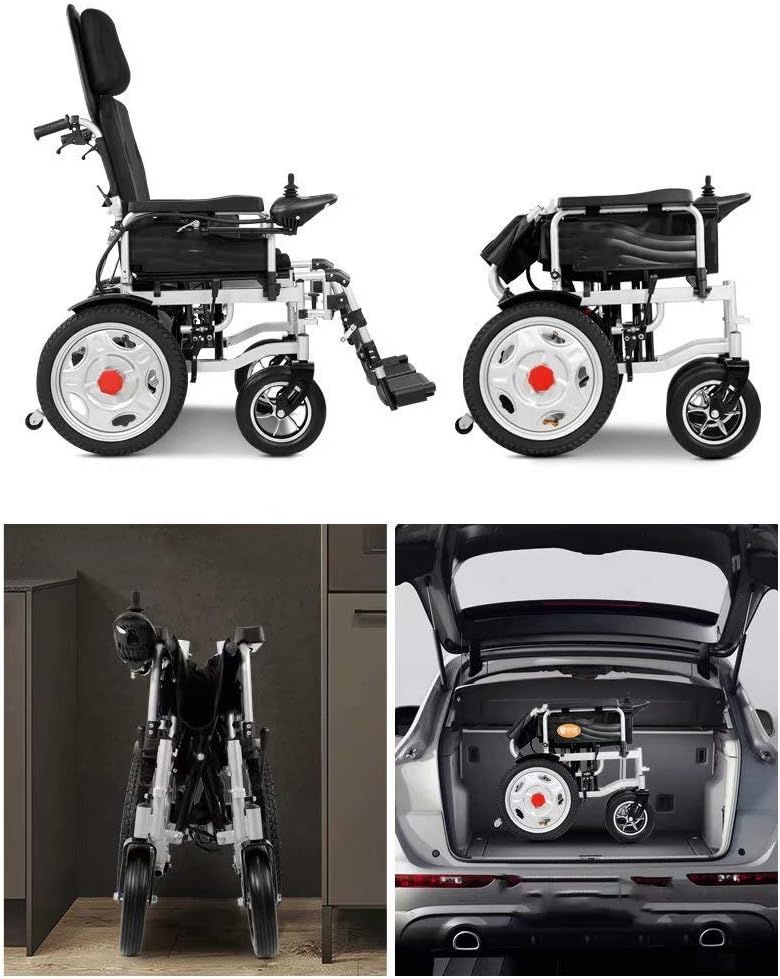
ചിത്രം 3.1: The wheelchair in its unfolded state next to its folded state, demonstrating its compact storage capability, including being placed in a car trunk.
4. പ്രവർത്തന നിർദ്ദേശങ്ങൾ
4.1 കൺട്രോളർ പ്രവർത്തനങ്ങൾ

ചിത്രം 4.1: വിശദമായി view of the 360-degree universal joystick controller, with labels for Power Display, Switch, Horn Switch, Speed Display, Acceleration Button, and Deceleration Button.
- വൈദ്യുതി സ്വിച്ച്: Press to turn the wheelchair on or off. The power display will illuminate.
- ജോയ്സ്റ്റിക്ക്: Move the 360-degree joystick in the desired direction to control movement. Releasing the joystick will engage the automatic brake.
- ആക്സിലറേഷൻ ബട്ടൺ (+): Increases the speed setting.
- ഡീസെലറേഷൻ ബട്ടൺ (-): Decreases the speed setting.
- ഹോൺ സ്വിച്ച്: ഹോൺ മുഴക്കാൻ അമർത്തുക.
4.2 Switching to Manual Mode
The wheelchair can be operated manually if needed, for example, if the battery is depleted or for assistance from a caregiver.
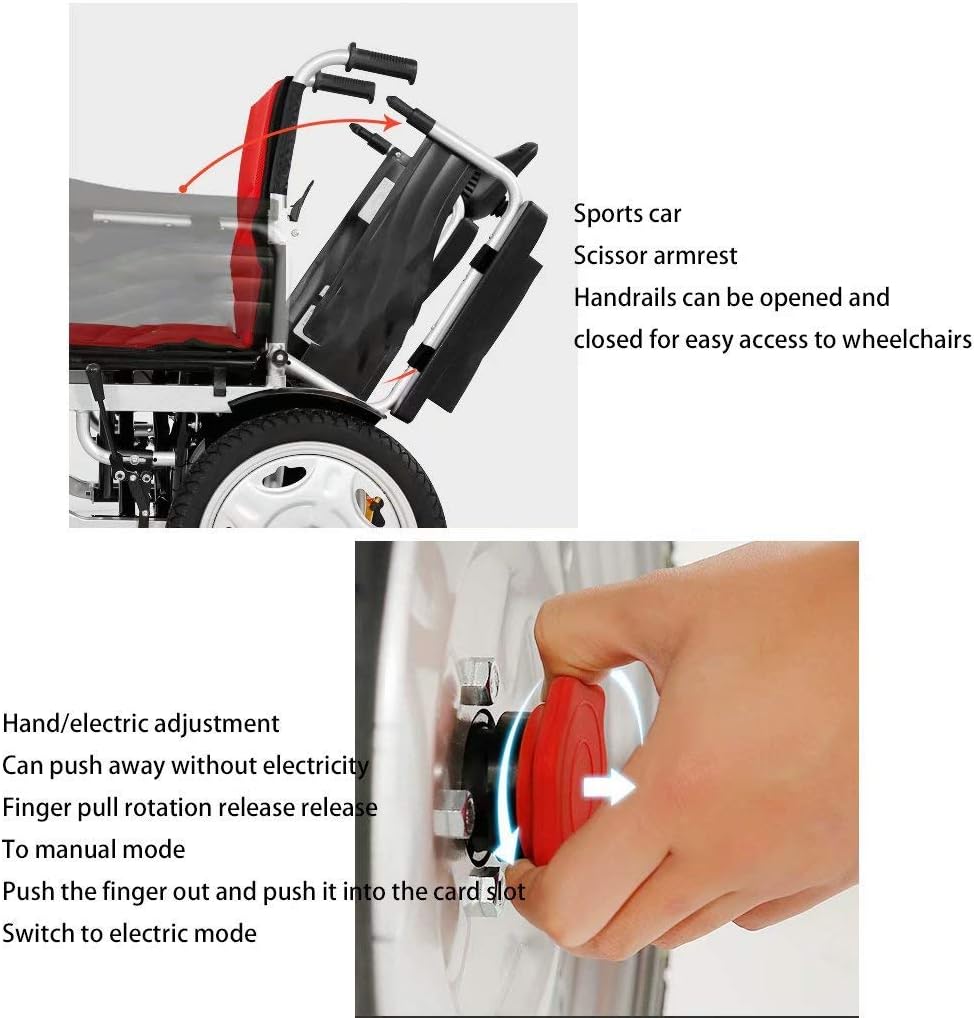
ചിത്രം 4.2: Instructions for switching between electric and manual modes. This involves pulling and rotating a red knob on the wheel hub to disengage the motor for manual pushing.
- Locate the red knob on the wheel hub.
- Pull the finger pull rotation release and push it into the card slot to switch to manual mode.
- To switch back to electric mode, reverse the process.
5. പരിപാലനം
5.1 വൃത്തിയാക്കൽ
- Wipe down the frame and seat with a damp തുണിയും മൃദുവായ ഡിറ്റർജൻ്റും.
- ഉരച്ചിലുകളോ ലായകങ്ങളോ ഉപയോഗിക്കുന്നത് ഒഴിവാക്കുക.
- എല്ലാ ഇലക്ട്രിക്കൽ ഘടകങ്ങളും വരണ്ടതാണെന്ന് ഉറപ്പാക്കുക.
5.2 ബാറ്ററി കെയർ
- ബാറ്ററിയുടെ ആയുസ്സ് വർദ്ധിപ്പിക്കുന്നതിന്, പതിവായി ഉപയോഗിക്കുന്നില്ലെങ്കിലും, പതിവായി ചാർജ് ചെയ്യുക.
- തണുത്തതും ഉണങ്ങിയതുമായ സ്ഥലത്ത് ബാറ്ററി സൂക്ഷിക്കുക.
- അങ്ങേയറ്റത്തെ താപനിലയിലേക്ക് ബാറ്ററി തുറന്നുകാട്ടരുത്.
5.3 Tire and Wheel Inspection
- Regularly check tires for wear and tear.
- Ensure all wheels rotate freely and are securely attached.
- Inspect the anti-backlash wheels for proper function.

ചിത്രം 5.1: പിൻഭാഗം view of the wheelchair highlighting the reversing voice anti-backlash wheel, which contributes to stability and safety.
6. പ്രശ്നപരിഹാരം
This section addresses common issues you might encounter with your CLoxks Electric Foldable Wheelchair.
- Wheelchair not turning on: Check if the battery is properly installed and charged. Ensure the power switch on the controller is pressed.
- Wheelchair not moving: Verify that the wheelchair is not in manual mode. Check for any obstructions around the wheels. Ensure the joystick is fully engaged in a direction.
- ക്രമരഹിതമായ ചലനം: Ensure the joystick is clean and free from debris. If the issue persists, contact customer support.
- ബ്രേക്ക് ഇടിക്കുന്നില്ല: If the automatic brake does not engage when the joystick is released, immediately cease use and contact customer support.
7 സ്പെസിഫിക്കേഷനുകൾ
| ഫീച്ചർ | സ്പെസിഫിക്കേഷൻ |
|---|---|
| ബ്രാൻഡ് | CLoxks |
| മോഡൽ | 43cm Seat Width |
| പരമാവധി ഭാരം ശുപാർശ | 100 കിലോഗ്രാം |
| ASIN | B0CFLPW4JT |
| ആദ്യ തീയതി ലഭ്യമാണ് | ഓഗസ്റ്റ് 14, 2023 |
അളവുകൾ:

ചിത്രം 7.1: Diagram illustrating the dimensions of the wheelchair: 115cm length, 60cm width, and 103cm height, with a seat height of 50cm.
- മൊത്തത്തിലുള്ള ദൈർഘ്യം: ഏകദേശം 115 സെ.മീ
- മൊത്തം വീതി: ഏകദേശം 60 സെ.മീ
- മൊത്തത്തിലുള്ള ഉയരം: ഏകദേശം 103 സെ.മീ
- സീറ്റ് ഉയരം: ഏകദേശം 50 സെ.മീ
8. വാറൻ്റിയും പിന്തുണയും
For warranty information, technical support, or service inquiries, please contact CLoxks customer service through your purchase platform or the official CLoxks website. Please have your ASIN (B0CFLPW4JT) and purchase date ready when contacting support.