
1. ആമുഖം
Welcome to the instruction manual for your new Sauder Via Executive Desk Return. This document provides essential information for the proper assembly, use, and maintenance of your product. Please read these instructions carefully before beginning assembly and retain them for future reference. Proper installation and care will ensure the longevity and optimal performance of your desk return.
2. ഉൽപ്പന്നം കഴിഞ്ഞുview
The Sauder Via Executive Desk Return is designed to seamlessly integrate with the Sauder Executive Desk 435227 or Credenza 435228, providing an elegant extension to your workspace. Its versatile design allows for attachment to either the left or right side of the main unit. Constructed with durable engineered wood and featuring a resilient melamine top surface, this desk return is built for both style and functionality in a professional environment.

Image 2.1: The Sauder Via Executive Desk Return, showcasing its Classic Cherry finish top and Soft Black accents.
3 പ്രധാന സവിശേഷതകൾ
- വൈവിധ്യമാർന്ന അറ്റാച്ച്മെന്റ്: Can be fixed to the left or right side of the Sauder Executive Desk 435227 or Credenza 435228 to create an extended or U-shaped configuration.
- ഈടുനിൽക്കുന്ന ഉപരിതലം: The melamine top surface is resistant to heat, stains, and scratches, ensuring a long-lasting, pristine appearance.
- Integrated Cord Management: Features a grommet hole on the desktop for easy organization and concealment of wires and cables, promoting a clutter-free workspace.
- ക്രമീകരിക്കാവുന്ന സ്ഥിരത: Equipped with adjustable levelers to ensure stability on uneven surfaces.
- ഗുണനിലവാരമുള്ള നിർമ്മാണം: Made from engineered wood with a Classic Cherry finish and Soft Black accents.
- അളവുകൾ: ഏകദേശം 121.6 സെ.മീ (L) x 59.6 സെ.മീ (W) x 75.6 സെ.മീ (H).

Image 3.1: Detail of the durable melamine top surface, resistant to heat, stains, and scratches.

Image 3.2: The integrated cord management grommet hole for cable organization.
4. സജ്ജീകരണവും അസംബ്ലിയും
Assembly of the Sauder Via Executive Desk Return is required. Please ensure you have adequate space and the necessary tools before beginning. It is recommended to assemble the unit on a soft, clean surface to prevent scratches. Follow the detailed assembly instructions provided in the separate assembly guide included with your product packaging. This manual focuses on the general aspects of the product.
The desk return is designed to be securely attached to either the left or right side of the compatible Sauder Executive Desk (Model 435227) or Credenza (Model 435228). Ensure all connections are tightened according to the assembly instructions for stability.
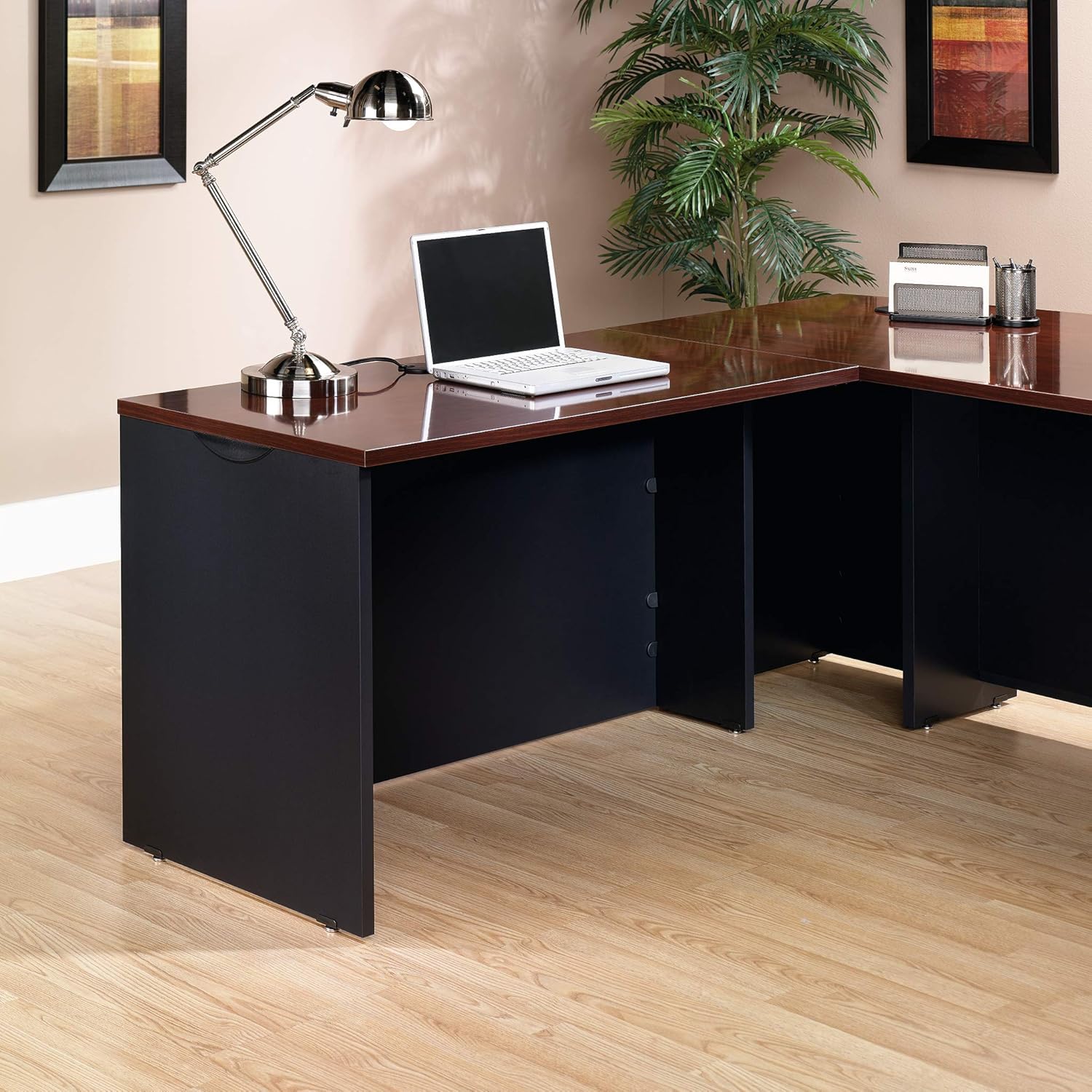
Image 4.1: The desk return integrated with a main desk, forming an extended workspace.

Image 4.2: Dimensional drawing showing the measurements of the desk return.
5. ഓപ്പറേഷൻ
Once assembled and attached, the Sauder Via Executive Desk Return functions as an extension of your primary desk or credenza, providing additional surface area for your work. Utilize the integrated cord management grommet to route and organize power cords and data cables for electronic devices, maintaining a tidy and efficient workspace.
6. പരിചരണവും പരിപാലനവും
To maintain the appearance and durability of your Sauder Via Executive Desk Return, follow these care instructions:
- വൃത്തിയാക്കൽ: മൃദുവായ, ഡി ഉപയോഗിച്ച് ഉപരിതലങ്ങൾ തുടയ്ക്കുകamp cloth. For tougher spots, use a mild, non-abrasive cleaner. Avoid harsh chemicals, abrasive cleaners, or polishes that may damage the finish.
- ചോർച്ച: Promptly wipe up any spills to prevent staining or damage to the surface.
- സംരക്ഷണം: Use coasters under beverages and protective pads under hot items or objects with sharp edges to prevent marks and scratches.
- ഫാസ്റ്റനറുകൾ: എല്ലാ സ്ക്രൂകളും ഫാസ്റ്റനറുകളും ഇറുകിയതായി ഉറപ്പാക്കാൻ ഇടയ്ക്കിടെ പരിശോധിക്കുക. ഘടനാപരമായ സമഗ്രത നിലനിർത്താൻ ആവശ്യമെങ്കിൽ വീണ്ടും മുറുക്കുക.
7. പ്രശ്നപരിഹാരം
Most issues with your desk return can be resolved with simple adjustments:
- അസ്ഥിരത/ചലനം: Check that the adjustable levelers on the bottom of the desk return are properly adjusted to compensate for uneven flooring. Ensure all assembly fasteners are securely tightened.
- ഉപരിതല നാശം: While the melamine surface is resistant, extreme heat or sharp objects can cause damage. Refer to the care and maintenance section for prevention tips.
- അറ്റാച്ചുചെയ്യാനുള്ള ബുദ്ധിമുട്ട്: Ensure you are attempting to attach the return to a compatible Sauder Executive Desk (435227) or Credenza (435228). Verify that all alignment pins and connection points are correctly positioned as per the assembly guide.
8. ഉൽപ്പന്ന സവിശേഷതകൾ
| ആട്രിബ്യൂട്ട് | വിശദാംശങ്ങൾ |
|---|---|
| ബ്രാൻഡ് | Sauder |
| മോഡൽ നമ്പർ | 435188 |
| നിറം | Classic Cherry |
| അളവുകൾ (L x W x H) | 121.59 cm x 59.61 cm x 75.59 cm (47.87 in x 23.47 in x 29.76 in) |
| ഭാരം | 37.19 കി.ഗ്രാം (82 പൗണ്ട്) |
| മെറ്റീരിയൽ | Engineered Wood with Melamine Top |
| പ്രത്യേക ഫീച്ചർ | ക്രമീകരിക്കാവുന്ന ലെവലറുകൾ |
9. വാറണ്ടിയും ഉപഭോക്തൃ പിന്തുണയും
Your Sauder Via Executive Desk Return is backed by a 5 വർഷത്തെ പരിമിത വാറൻ്റി. This warranty covers defects in materials and workmanship under normal use. For specific details regarding warranty coverage, claims, or to obtain replacement parts, please refer to the warranty information included with your product or visit the official Sauder webസൈറ്റ്.
For further assistance, technical support, or inquiries, please contact Sauder customer service. Contact information can typically be found on the Sauder webസൈറ്റ് അല്ലെങ്കിൽ നിങ്ങളുടെ ഉൽപ്പന്ന പാക്കേജിംഗിനുള്ളിൽ.

Image 9.1: Sauder's commitment to customer support.