
Fixwal B0CFQM1CQ4
Fixwal Nightstands Set of 2 with Charging Station User Manual
ബ്രാൻഡ്: Fixwal | മോഡൽ: B0CFQM1CQ4
1. ആമുഖം
Thank you for choosing the Fixwal Nightstands Set of 2 with Charging Station. These versatile nightstands are designed to enhance your bedroom or living space with convenient storage and integrated charging capabilities. Featuring a modern farmhouse aesthetic with a walnut gray finish, they offer a practical solution for keeping your essentials organized and devices powered.
This manual provides detailed instructions for assembly, operation, maintenance, and troubleshooting to ensure you get the most out of your new nightstands. Please read it thoroughly before assembly and use.

Image 1.1: Fixwal Nightstands in a bedroom setting.
2 പ്രധാനപ്പെട്ട സുരക്ഷാ വിവരങ്ങൾ
WARNING: Always assemble the table using the provided tools and instructions. Ensure adjustable feet are properly installed and tightened to maintain stability. Do not overload the table as it may tip over. Keep the table away from heat sources and never leave flammable materials on or near it.
- Do not exceed the maximum load capacity of the shelves and drawer.
- ഉപയോഗിക്കുന്നതിന് മുമ്പ് എല്ലാ സ്ക്രൂകളും ഫാസ്റ്റനറുകളും സുരക്ഷിതമായി മുറുക്കിയിട്ടുണ്ടെന്ന് ഉറപ്പാക്കുക. ഇടയ്ക്കിടെ പരിശോധിച്ച് ആവശ്യാനുസരണം വീണ്ടും മുറുക്കുക.
- ശ്വാസംമുട്ടൽ അപകടങ്ങൾ തടയാൻ അസംബ്ലി സമയത്ത് ചെറിയ ഭാഗങ്ങൾ കുട്ടികളിൽ നിന്ന് അകറ്റി നിർത്തുക.
- Place the nightstand on a flat, stable surface to prevent tipping.
- Do not expose the charging station to liquids.
3. ഉൽപ്പന്ന സവിശേഷതകൾ
- ഇന്റഗ്രേറ്റഡ് ചാർജിംഗ് സ്റ്റേഷൻ: Equipped with 2 standard AC outlets (120V/12A) and 2 USB ports (5V/2A) for convenient charging of multiple devices. The power cord is 4.92 feet long.
- 3-ടയർ സംഭരണം: നൽകുന്നു ample space with a top surface, an open middle shelf, and a lower shelf.
- Adjustable Fabric Drawer: Features a durable fabric drawer with MDF wood reinforcement, offering flexible storage. The drawer's position can be customized during assembly.
- ദൃഢമായ നിർമ്മാണം: Made with engineered wood and a metal frame for durability and stability.
- ക്രമീകരിക്കാവുന്ന പാദങ്ങൾ: Ensures stability on uneven floors and protects your flooring from scratches.
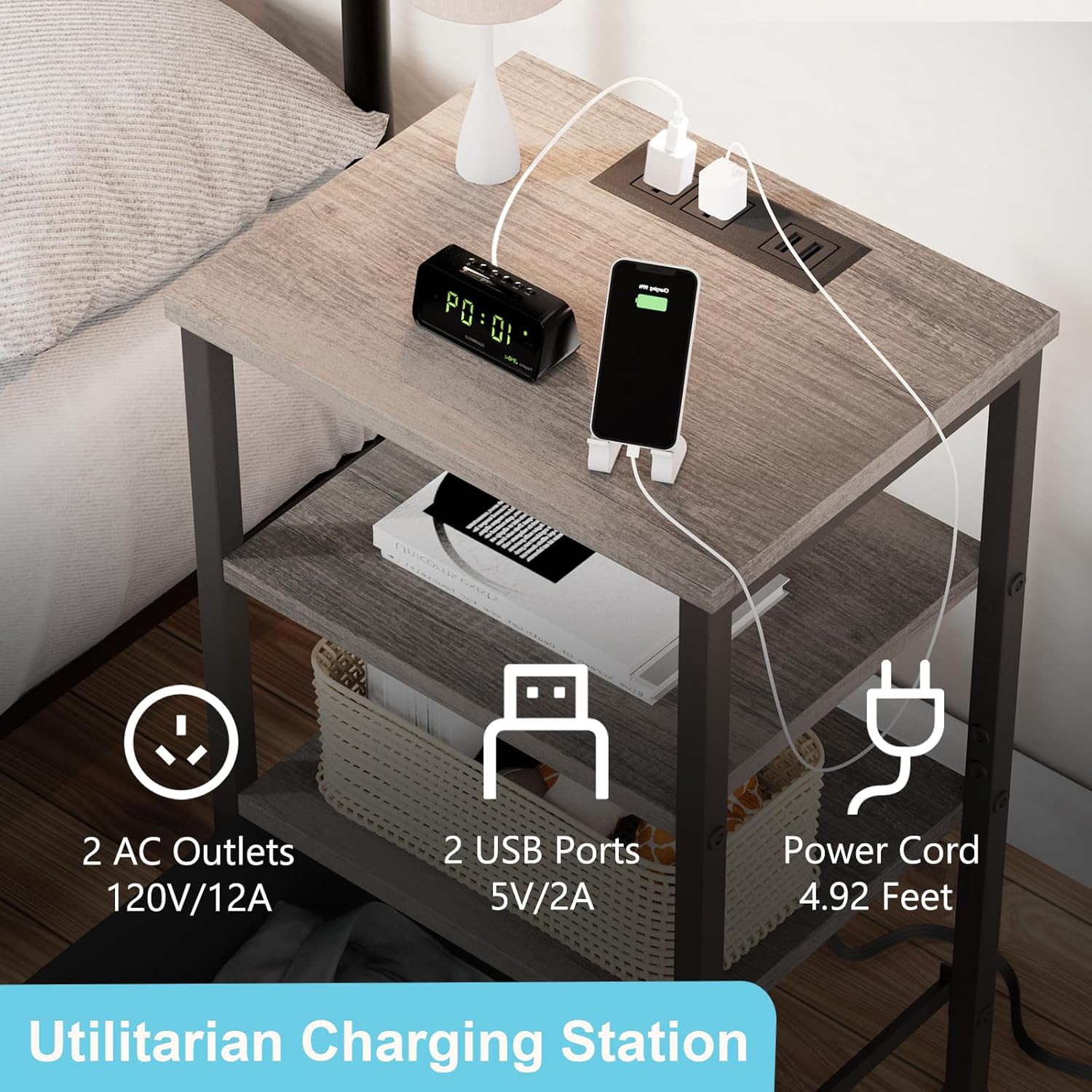
Image 3.1: Detail of the Utilitarian Charging Station.

Image 3.2: Construction details of the Fabric Drawer with MDF Wood.
4. അസംബ്ലി നിർദ്ദേശങ്ങൾ
Assembly is straightforward and typically takes less than 30 minutes per nightstand. A screwdriver is recommended for assembly.
4.1. നിങ്ങൾ ആരംഭിക്കുന്നതിന് മുമ്പ്
- എല്ലാ ഘടകങ്ങളും അൺപാക്ക് ചെയ്ത് പാർട്സ് ലിസ്റ്റ് അനുസരിച്ച് പരിശോധിക്കുക (ഈ മാനുവലിൽ നൽകിയിട്ടില്ല, പാക്കേജിംഗ് കാണുക).
- Ensure you have a clean, flat surface for assembly.
- Keep all hardware organized to avoid loss.
4.2. അസംബ്ലി ഘട്ടങ്ങൾ (പൊതു ഗൈഡ്)
- Attach the adjustable feet to the bottom of the metal frame legs. Ensure they are securely tightened.
- Assemble the main metal frame structure according to the diagrams provided in your product packaging.
- Install the wooden shelves into the designated slots on the frame.
- ഡ്രോയർ ഇൻസ്റ്റാളേഷൻ: Decide the desired position for the fabric drawer (middle, bottom, top level, or lower level) before installing the corresponding shelf. The nightstand offers four available installation combinations for the drawer.
- Insert the fabric drawer into its designated slot.
- Install the top panel with the integrated charging station. Connect the power cord as instructed.
- Once assembled, gently shake the nightstand to ensure all connections are secure and it is stable. Adjust the feet if necessary to level the unit.
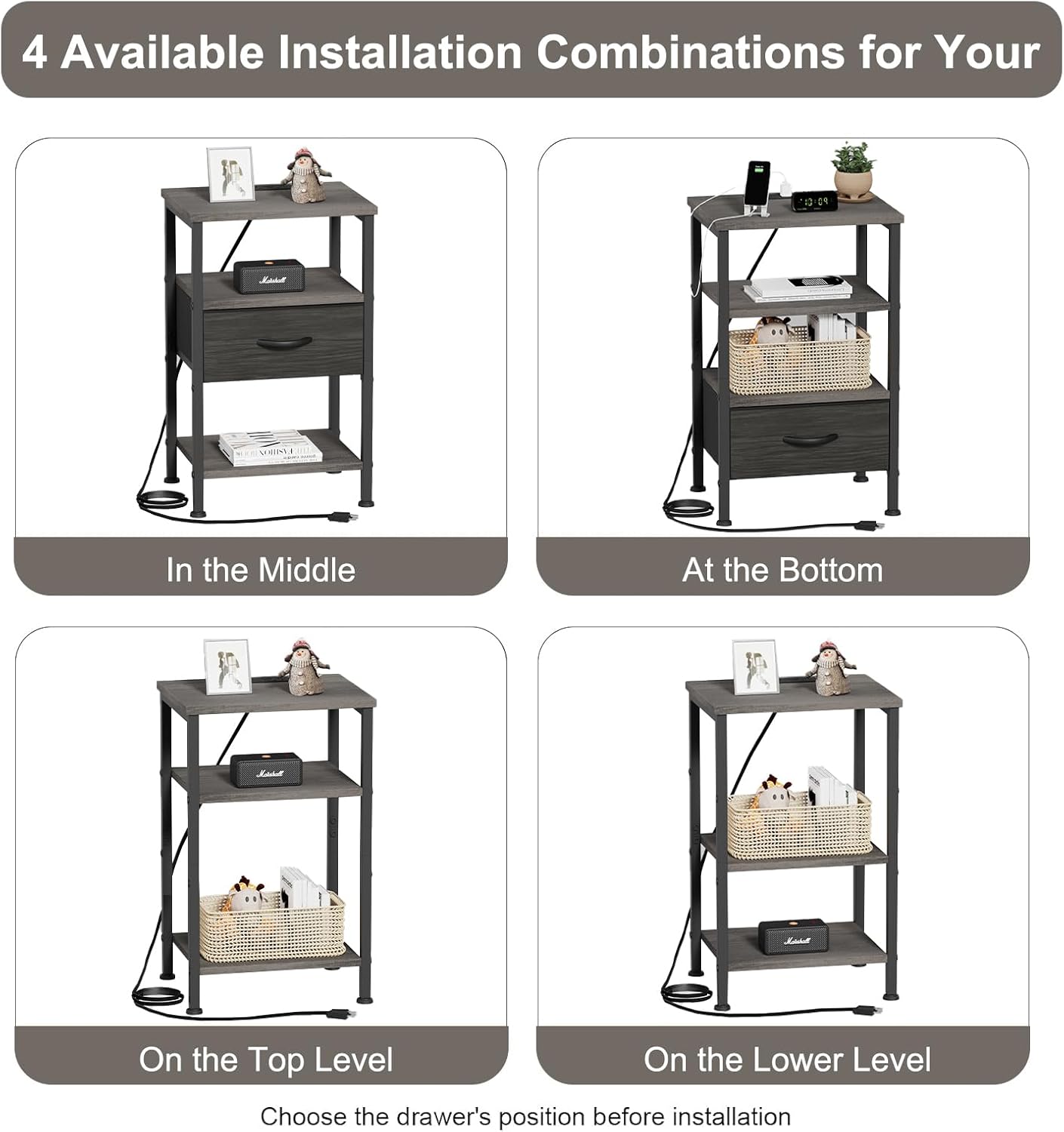
Image 4.1: Available Installation Combinations for the Fabric Drawer.

Image 4.2: Detail of the adjustable foot for leveling.
5. പ്രവർത്തന നിർദ്ദേശങ്ങൾ
5.1. ചാർജിംഗ് സ്റ്റേഷൻ ഉപയോഗിക്കുന്നത്
- നൈറ്റ്സ്റ്റാൻഡിലെ പവർ കോർഡ് ഒരു സാധാരണ മതിൽ ഔട്ട്ലെറ്റിൽ പ്ലഗ് ചെയ്യുക.
- To charge devices, plug your device's power adapter into one of the two AC outlets or connect your USB charging cable directly to one of the two USB ports.
- The charging station allows for simultaneous charging of multiple devices, such as laptops, phones, tablets, and smartwatches.
- Ensure that the total power draw of connected devices does not exceed the station's capacity (120V/12A for AC, 5V/2A for USB).

Image 5.1: Charging multiple devices simultaneously.
5.2. Utilizing Storage
- Use the top surface for lamps, alarm clocks, or frequently accessed items.
- The open shelves are ideal for books, decorative items, or small storage baskets.
- The fabric drawer provides concealed storage for personal items, keeping your space tidy.
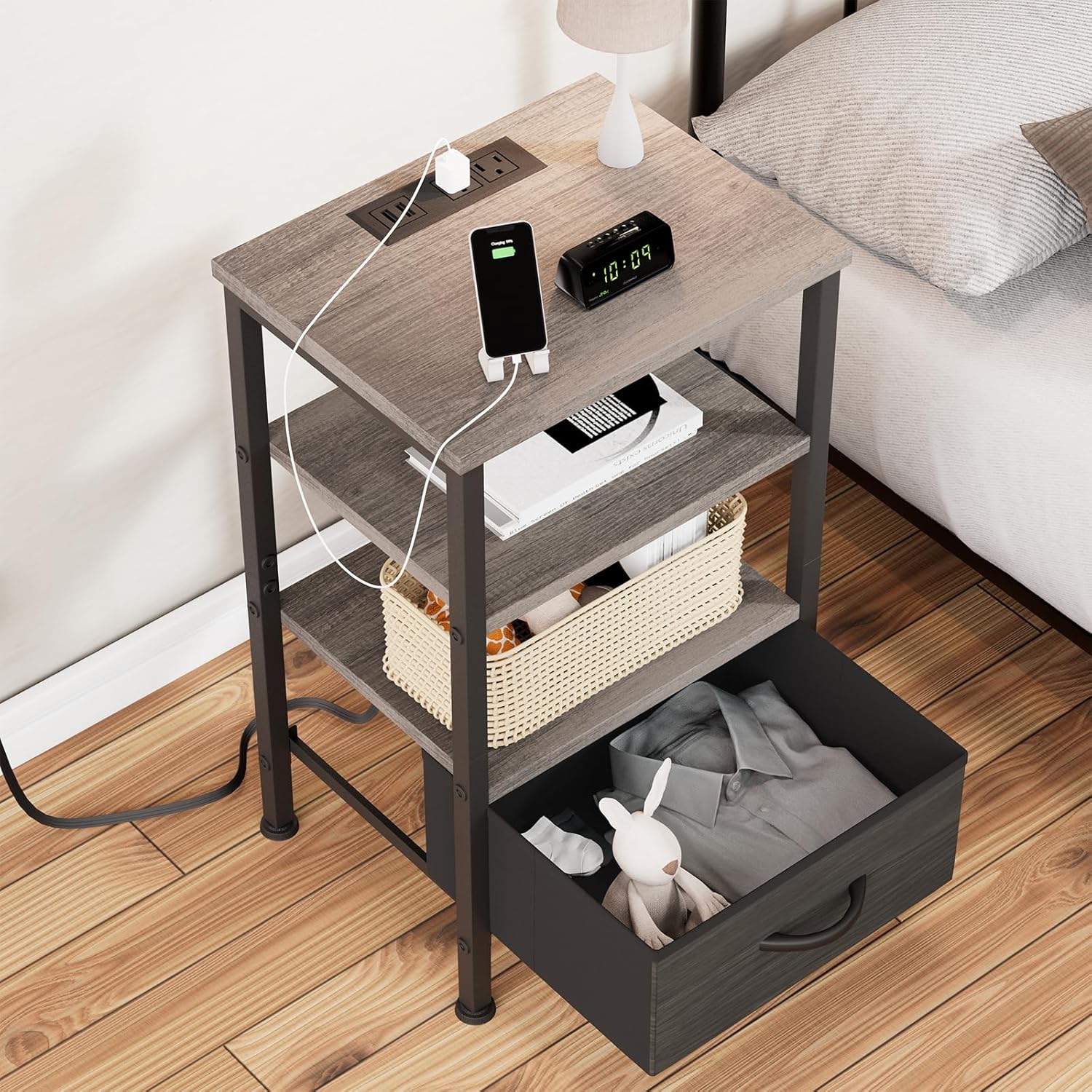
Image 5.2: Nightstand with open drawer and charging phone.
6. പരിചരണവും പരിപാലനവും
- വൃത്തിയാക്കൽ: മൃദുവായ, ഡി ഉപയോഗിച്ച് ഉപരിതലങ്ങൾ തുടയ്ക്കുകamp തുണി. കഠിനമായ രാസവസ്തുക്കളോ അബ്രാസീവ് ക്ലീനറുകളോ ഒഴിവാക്കുക, കാരണം അവ ഫിനിഷിന് കേടുവരുത്തും.
- ചോർച്ച: Immediately wipe up any spills to prevent moisture damage, especially around the charging station. The charging station is not waterproof.
- ഡ്രോയർ കെയർ: The fabric drawer can be spot cleaned with a mild detergent if necessary. Do not machine wash.
- സ്ഥിരത പരിശോധന: Periodically check all screws and connections to ensure they remain tight. Re-tighten if any looseness is detected.
- പ്ലേസ്മെൻ്റ്: വളച്ചൊടിക്കൽ അല്ലെങ്കിൽ നിറം മാറൽ തടയാൻ നൈറ്റ്സ്റ്റാൻഡ് നേരിട്ട് സൂര്യപ്രകാശത്തിലോ താപ സ്രോതസ്സുകൾക്ക് സമീപമോ വയ്ക്കുന്നത് ഒഴിവാക്കുക.
7. പ്രശ്നപരിഹാരം
7.1. സ്ഥിരത പ്രശ്നങ്ങൾ
- പ്രശ്നം: Nightstand wobbles or is uneven.
- പരിഹാരം: Adjust the leveling feet at the bottom of the legs until the nightstand is stable on the floor. Ensure all assembly screws are tightened.
7.2. ചാർജിംഗ് സ്റ്റേഷൻ പ്രവർത്തിക്കുന്നില്ല.
- പ്രശ്നം: Devices are not charging when plugged into the outlets or USB ports.
- പരിഹാരം:
- Ensure the nightstand's main power cord is securely plugged into a functioning wall outlet.
- വാൾ ഔട്ട്ലെറ്റിന് തന്നെ വൈദ്യുതി ലഭിക്കുന്നുണ്ടോ എന്ന് പരിശോധിക്കുക (മറ്റൊരു ഉപകരണം ഉപയോഗിച്ച് പരിശോധിക്കുക).
- Verify that your device's charging cable and adapter are working correctly.
- Do not overload the charging station. Unplug some devices if too many are connected.
7.3. Drawer Issues
- പ്രശ്നം: Fabric drawer does not slide smoothly or is difficult to open/close.
- പരിഹാരം: Ensure the drawer is correctly inserted into its designated slot and not overloaded. Check for any obstructions.
8. ഉൽപ്പന്ന സവിശേഷതകൾ
| സ്പെസിഫിക്കേഷൻ | വിശദാംശങ്ങൾ |
|---|---|
| ബ്രാൻഡ് | Fixwal |
| മോഡൽ | B0CFQM1CQ4 |
| അളവുകൾ (L x W x H) | 15.74 ഇഞ്ച് x, 11.81 ഇഞ്ച് x, 23.81 ഇഞ്ച് |
| ഇനത്തിൻ്റെ ഭാരം | 10.84 കിലോഗ്രാം |
| മികച്ച മെറ്റീരിയൽ തരം | എഞ്ചിനീയറിംഗ് വുഡ് |
| ഫ്രെയിം മെറ്റീരിയൽ തരം | എഞ്ചിനീയറിംഗ് വുഡ്, മെറ്റൽ |
| അടിസ്ഥാന മെറ്റീരിയൽ | ഇരുമ്പ് |
| നിറം | Walnut Gray |
| ഡ്രോയറുകളുടെ എണ്ണം | 1 (തുണി) |
| എസി lets ട്ട്ലെറ്റുകൾ | 2 (120V/12A) |
| USB പോർട്ടുകൾ | 2 (5V/2A) |
| പവർ കോർഡ് നീളം | 4.92 അടി |
| അസംബ്ലിക്ക് ശുപാർശ ചെയ്യുന്ന ഉപകരണങ്ങൾ | സ്ക്രീൻ ഡ്രൈവർ |

ചിത്രം 8.1: ഉൽപ്പന്ന അളവുകൾ.
9. വാറൻ്റിയും പിന്തുണയും
9.1. വാറൻ്റി വിവരങ്ങൾ
Fixwal products are manufactured with quality and durability in mind. For specific warranty details, please refer to the warranty card included with your product packaging or visit the official Fixwal brand store.
9.2. ഉപഭോക്തൃ പിന്തുണ
If you have any questions, require assistance with assembly, or encounter any issues with your Fixwal Nightstands, please do not hesitate to contact our customer support team. You can find contact information on the Fixwal brand store or through your purchase platform.
Visit the official Fixwal Store: Fixwal Store on Amazon
Ask a question about this manual
Ask about setup, troubleshooting, compatibility, parts, safety, or missing instructions. Manuals+ will review the question and use this page’s manual context to help answer it.