
Vorago BSP-500-V2
വോറാഗോ BSP-500-V2 ബ്ലൂടൂത്ത് സ്പീക്കർ ഉപയോക്തൃ മാനുവൽ
മോഡൽ: BSP-500-V2
ബ്രാൻഡ്: വോറാഗോ
1. ഉൽപ്പന്നം കഴിഞ്ഞുview
The Vorago BSP-500-V2 is a portable Bluetooth speaker designed for robust performance and durability. It features IPX5 water resistance, making it suitable for various environments, including outdoor adventures and parties. This manual provides detailed instructions for setting up, operating, and maintaining your speaker.
പ്രധാന സവിശേഷതകൾ:
- True Wireless Stereo (TWS) Connectivity: Connect two BSP-500-V2 speakers for an immersive stereo sound experience.
- വിപുലീകരിച്ച ബാറ്ററി ലൈഫ്: Enjoy up to 7 hours of music playback at 70% volume, thanks to its 2000 mAh battery.
- യുഎസ്ബി ടൈപ്പ്-സി ചാർജിംഗ്: Convenient and modern USB-C port for charging.
- ബഹുമുഖ കണക്റ്റിവിറ്റി: Supports Bluetooth for wireless streaming and a 3.5mm auxiliary input for wired connections.
- IPX5 ജല പ്രതിരോധം: Protected against low-pressure water jets from any direction.
പാക്കേജ് ഉള്ളടക്കം:
- Vorago BSP-500-V2 ബ്ലൂടൂത്ത് സ്പീക്കർ
- യുഎസ്ബി ടൈപ്പ്-സി ചാർജിംഗ് കേബിൾ
- 3.5 എംഎം ഓഡിയോ കേബിൾ
- ഉപയോക്തൃ മാനുവൽ (ഈ പ്രമാണം)
ഉൽപ്പന്ന ഡയഗ്രം:

ചിത്രം 1.1: മുൻഭാഗം view of the Vorago BSP-500-V2 Bluetooth speaker, showcasing its mesh grille and central Vorago logo.

ചിത്രം 1.2: കോണാകൃതിയിലുള്ളത് view of the speaker, highlighting its robust, rectangular design and integrated carrying strap.

ചിത്രം 1.3: മുകളിൽ view showing the control panel with power, volume down, play/pause, and volume up buttons.
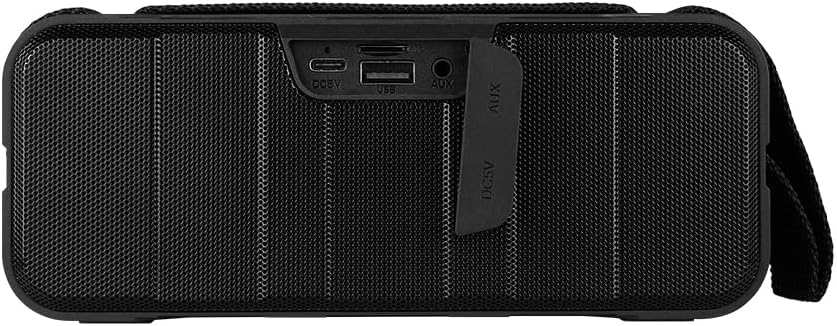
ചിത്രം 1.4: പിൻഭാഗം view of the speaker, showing the protective flap covering the input ports.

Figure 1.5: Close-up of the input ports, including DC 5V (USB-C), USB-A, and AUX (3.5mm) inputs, protected by a rubber cover.
2 സുരക്ഷാ വിവരങ്ങൾ
- സ്പീക്കറിനെ തീവ്രമായ താപനിലയിൽ (ചൂടോ തണുപ്പോ) തുറന്നുകാട്ടരുത്.
- സ്പീക്കറെ ശക്തമായ ആഘാതങ്ങൾക്ക് വിധേയമാക്കുകയോ താഴെയിടുകയോ ചെയ്യുന്നത് ഒഴിവാക്കുക.
- നേരിട്ടുള്ള സൂര്യപ്രകാശത്തിൽ നിന്നും താപ സ്രോതസ്സുകളിൽ നിന്നും സ്പീക്കറിനെ അകറ്റി നിർത്തുക.
- സ്പീക്കർ സ്വയം ഡിസ്അസംബ്ലിംഗ് ചെയ്യുകയോ നന്നാക്കുകയോ പരിഷ്കരിക്കുകയോ ചെയ്യരുത്. ഇത് വാറന്റി അസാധുവാക്കും.
- Ensure the port cover is securely closed when using the speaker near water to maintain IPX5 water resistance.
- Do not immerse the speaker in water. IPX5 rating protects against splashes and light rain, not submersion.
- Use only the provided charging cable or a certified USB Type-C cable for charging.
- മൃദുവായതും ഉണങ്ങിയതുമായ തുണി ഉപയോഗിച്ച് സ്പീക്കർ വൃത്തിയാക്കുക. അബ്രസീവ് ക്ലീനറുകളോ ലായകങ്ങളോ ഉപയോഗിക്കരുത്.
3. സജ്ജീകരണം
3.1 സ്പീക്കർ ചാർജ് ചെയ്യുന്നു
- Open the protective rubber cover on the rear of the speaker to access the charging port.
- Connect the USB Type-C end of the charging cable to the speaker's DC 5V port.
- USB കേബിളിന്റെ മറ്റേ അറ്റം ഒരു USB പവർ അഡാപ്റ്ററുമായി (ഉൾപ്പെടുത്തിയിട്ടില്ല) അല്ലെങ്കിൽ ഒരു കമ്പ്യൂട്ടറിന്റെ USB പോർട്ടുമായി ബന്ധിപ്പിക്കുക.
- ചാർജ് ചെയ്യുമ്പോൾ ചാർജിംഗ് ഇൻഡിക്കേറ്റർ ലൈറ്റ് പ്രകാശിക്കുകയും പൂർണ്ണമായി ചാർജ് ചെയ്യുമ്പോൾ ഓഫാകുകയും ചെയ്യും.
- Once charging is complete, securely close the protective rubber cover to maintain water resistance.
3.2 പവർ ഓൺ/ഓഫ്
- പവർ ഓണാക്കാൻ: അമർത്തിപ്പിടിക്കുക പവർ ബട്ടൺ on the top panel for approximately 3 seconds until you hear an audible prompt.
- പവർ ഓഫ് ചെയ്യാൻ: അമർത്തിപ്പിടിക്കുക പവർ ബട്ടൺ for approximately 3 seconds until you hear an audible prompt.
3.3 ബ്ലൂടൂത്ത് ജോടിയാക്കൽ
- Ensure the speaker is powered on. It will automatically enter Bluetooth pairing mode, indicated by a flashing LED light.
- നിങ്ങളുടെ ഉപകരണത്തിൽ (സ്മാർട്ട്ഫോൺ, ടാബ്ലെറ്റ്, ലാപ്ടോപ്പ്), ബ്ലൂടൂത്ത് പ്രവർത്തനക്ഷമമാക്കി ലഭ്യമായ ഉപകരണങ്ങൾക്കായി തിരയുക.
- Select "BSP-500-V2" from the list of found devices.
- Once successfully paired, the speaker will emit an audible confirmation, and the LED light will stop flashing and remain solid.
- ഉപകരണം പരിധിക്കുള്ളിലായിരിക്കുകയും ബ്ലൂടൂത്ത് പ്രവർത്തനക്ഷമമാക്കുകയും ചെയ്താൽ, സ്പീക്കർ ഓണാക്കുമ്പോൾ അവസാനം ജോടിയാക്കിയ ഉപകരണത്തിലേക്ക് യാന്ത്രികമായി വീണ്ടും കണക്റ്റുചെയ്യും.
3.4 ട്രൂ വയർലെസ് സ്റ്റീരിയോ (TWS) ജോടിയാക്കൽ
TWS allows you to connect two BSP-500-V2 speakers together for a true stereo sound experience.
- Ensure both BSP-500-V2 speakers are powered on and not connected to any other Bluetooth device.
- On one of the speakers (this will be the primary speaker), double-press the പ്ലേ/താൽക്കാലികമായി നിർത്തുക ബട്ടൺ. The speaker will enter TWS pairing mode.
- The two speakers will automatically search for and connect to each other. You will hear an audible confirmation once they are successfully paired.
- Once TWS is established, connect your device to the primary speaker via Bluetooth as described in Section 3.3.
- To disconnect TWS, double-press the പ്ലേ/താൽക്കാലികമായി നിർത്തുക ബട്ടൺ ഒന്നുകിൽ സ്പീക്കറിൽ.
3.5 ഓക്സിലറി (AUX) കണക്ഷൻ
For devices without Bluetooth, you can use the 3.5mm audio cable.
- Open the protective rubber cover on the rear of the speaker.
- Connect one end of the 3.5mm audio cable to the speaker's AUX port.
- കേബിളിന്റെ മറ്റേ അറ്റം നിങ്ങളുടെ ഉപകരണത്തിന്റെ ഓഡിയോ ഔട്ട്പുട്ട് ജാക്കുമായി ബന്ധിപ്പിക്കുക.
- സ്പീക്കർ സ്വയമേവ AUX മോഡിലേക്ക് മാറും.
- Once disconnected, securely close the protective rubber cover.
4. പ്രവർത്തന നിർദ്ദേശങ്ങൾ
4.1 ബട്ടൺ പ്രവർത്തനങ്ങൾ:
| ബട്ടൺ | ഫംഗ്ഷൻ (ഷോർട്ട് പ്രസ്സ്) | പ്രവർത്തനം (ലോംഗ് പ്രസ്സ്) |
|---|---|---|
| പവർ ബട്ടൺ | N/A | പവർ ഓൺ/ഓഫ് |
| വോളിയം ഡൗൺ ബട്ടൺ | വോളിയം കുറയ്ക്കുക | മുമ്പത്തെ ട്രാക്ക് |
| പ്ലേ/താൽക്കാലികമായി നിർത്തുക ബട്ടൺ | സംഗീതം പ്ലേ ചെയ്യുക/താൽക്കാലികമായി നിർത്തുക, കോൾ സ്വീകരിക്കുക/അവസാനിപ്പിക്കുക | Reject Call, Double-press for TWS Pairing |
| വോളിയം കൂട്ടുക ബട്ടൺ | വോളിയം കൂട്ടുക | അടുത്ത ട്രാക്ക് |
5. പരിപാലനം
- വൃത്തിയാക്കൽ: Use a soft, dry, lint-free cloth to clean the speaker's surface. For stubborn dirt, slightly dampതുണിയിൽ വെള്ളം ഒഴിക്കുക. കഠിനമായ രാസവസ്തുക്കളോ, ക്ലീനിംഗ് ലായകങ്ങളോ, ശക്തമായ ഡിറ്റർജന്റുകളോ ഉപയോഗിക്കരുത്.
- വാട്ടർ റെസിസ്റ്റൻസ് കെയർ: Always ensure the rubber port cover on the back of the speaker is fully and securely sealed when using the speaker outdoors or near water. This maintains its IPX5 water resistance. After exposure to water, wipe the speaker dry before opening the port cover for charging or auxiliary connections.
- സംഭരണം: When not in use for extended periods, store the speaker in a cool, dry place, away from direct sunlight and extreme temperatures. It is recommended to charge the speaker fully before storing and to recharge it every few months to maintain battery health.
- ബാറ്ററി കെയർ: To prolong battery life, avoid fully discharging the battery frequently. Charge the speaker when the low battery indicator is active.
6. പ്രശ്നപരിഹാരം
| പ്രശ്നം | സാധ്യമായ കാരണം | പരിഹാരം |
|---|---|---|
| സ്പീക്കർ പവർ ഓൺ ചെയ്യുന്നില്ല. | കുറഞ്ഞ ബാറ്ററി. | നൽകിയിരിക്കുന്ന യുഎസ്ബി ടൈപ്പ്-സി കേബിൾ ഉപയോഗിച്ച് സ്പീക്കർ പൂർണ്ണമായും ചാർജ് ചെയ്യുക. |
| ബ്ലൂടൂത്ത് വഴി ജോടിയാക്കാൻ കഴിയില്ല. | Speaker is not in pairing mode; Device's Bluetooth is off; Speaker is already connected to another device; Device is too far from speaker. | Ensure speaker is powered on and flashing (pairing mode). Turn on Bluetooth on your device. Disconnect from other devices. Move device closer to speaker (within 10 meters). |
| ശബ്ദമില്ല അല്ലെങ്കിൽ കുറഞ്ഞ ശബ്ദമില്ല. | Volume too low on speaker or device; Incorrect input mode; Speaker not connected. | Increase volume on both speaker and connected device. Ensure correct mode (Bluetooth or AUX) is active. Verify successful Bluetooth pairing or AUX cable connection. |
| ശബ്ദ വികൃതത. | Volume too high; Device too far from speaker; Interference. | Reduce volume on speaker and/or device. Move device closer to speaker. Avoid obstacles between speaker and device. |
| TWS ജോടിയാക്കൽ പരാജയപ്പെടുന്നു. | Speakers are already paired to a device; Speakers are too far apart. | Ensure both speakers are disconnected from any Bluetooth devices. Place speakers close to each other during TWS pairing. |
7 സ്പെസിഫിക്കേഷനുകൾ
| ഫീച്ചർ | വിശദാംശങ്ങൾ |
|---|---|
| മോഡലിൻ്റെ പേര് | BSP-500-V2 |
| സ്പീക്കർ തരം | മൾട്ടിമീഡിയ |
| പ്രത്യേക ഫീച്ചർ | ബ്ലൂടൂത്ത് |
| ശുപാർശ ചെയ്യുന്ന ഉപയോഗം | For music players |
| അനുയോജ്യമായ ഉപകരണങ്ങൾ | ലാപ്ടോപ്പ്, എംപി3 പ്ലെയർ, സ്മാർട്ട്ഫോൺ, ടാബ്ലെറ്റ് |
| കൺട്രോളർ തരം | ബട്ടൺ |
| സറൗണ്ട് സൗണ്ട് ചാനൽ കോൺഫിഗറേഷൻ | 5.0 |
| ബാറ്ററി ലൈഫ് | 7 മണിക്കൂർ |
| ഘടകങ്ങൾ ഉൾപ്പെടുത്തിയിട്ടുണ്ട് | സ്പീക്കർ |
| ഉൽപ്പന്ന അളവുകൾ | 5D x 15W x 18H സെന്റീമീറ്റർ |
| ഉൽപ്പന്ന ഭാരം | 1 കിലോഗ്രാം |
| വാട്ടർപ്രൂഫ് | അതെ (IPX5) |
| ബാറ്ററി ശേഷി | 2000 mAh |
| Ampജീവിത തരം | സജീവമാണ് |
| പവർ ഉറവിടം | ബാറ്ററി |
| ഫ്രീക്വൻസി പ്രതികരണം | 180 Hz |
| കണക്റ്റിവിറ്റി ടെക്നോളജി | ബ്ലൂടൂത്ത് |
| ഓഡിയോ put ട്ട്പുട്ട് മോഡ് | സ്റ്റീരിയോ |
| മൗണ്ടിംഗ് തരം | ടേബിൾടോപ്പ് മൗണ്ട് |
8. വാറൻ്റിയും പിന്തുണയും
The Vorago BSP-500-V2 Bluetooth Speaker comes with a limited warranty. Please refer to the warranty card included with your product for specific terms and conditions, or visit the official Vorago webകൂടുതൽ വിവരങ്ങൾക്ക് സൈറ്റ്.
For technical support, troubleshooting assistance, or warranty claims, please contact Vorago customer service through their official channels. You can find more information and contact details on the Vorago Brand Store on Amazon അല്ലെങ്കിൽ അവരുടെ ഉദ്യോഗസ്ഥൻ webസൈറ്റ്.
വാറന്റി ആവശ്യങ്ങൾക്കായി നിങ്ങളുടെ വാങ്ങിയതിന്റെ തെളിവ് സൂക്ഷിക്കുക.
Ask a question about this manual
Ask about setup, troubleshooting, compatibility, parts, safety, or missing instructions. Manuals+ will review the question and use this page’s manual context to help answer it.