
GR3PLUS
GROUNDTECH GR3 Plus Deep Seeking 3D Metal Detector User Manual
Model: GR3PLUS
ആമുഖം
The GROUNDTECH GR3 Plus is a compact, lightweight 3D ground scanner designed for deep seeking metal detection. This device utilizes advanced technology to provide 3D visualization of scan data, helping users identify buried treasures with detailed information on metal type, size, and depth.
This manual provides essential information for the proper setup, operation, maintenance, and troubleshooting of your GR3 Plus metal detector.
ഉൽപ്പന്ന ഘടകങ്ങൾ
- GR3 Plus Device (Stick-shaped probe)
- ഉപയോക്തൃ മാനുവൽ
- ആവശ്യമായ ബാറ്ററികൾ
- Access to 3D Analysis Application (Android/iOS compatible)

Figure 1: The GROUNDTECH GR3 Plus device, a black stick-shaped probe with a digital display on the handle.
സജ്ജമാക്കുക
- ബാറ്ററി ഇൻസ്റ്റാളേഷൻ: The GR3 Plus is battery powered. Ensure fresh batteries are correctly installed according to the markings inside the battery compartment. Refer to the "Important Battery Information" section for safety guidelines.
- അപേക്ഷ ഡൗൺലോഡ്: Download the official 3D analysis application from your device's app store (available for Android and iOS tablets and smartphones).
- ഉപകരണ ജോടിയാക്കൽ: Follow the on-screen instructions within the application to pair your GR3 Plus device with your smartphone or tablet via Bluetooth. Ensure your mobile device's Bluetooth is enabled.
- പ്രാരംഭ കാലിബ്രേഷൻ: Once paired, the application may prompt for an initial calibration. Follow the instructions to calibrate the device for optimal performance in your scanning environment.
പ്രവർത്തന നിർദ്ദേശങ്ങൾ
The GR3 Plus is designed for ease of use, providing superior deep seeking technology for treasure hunting and archaeological exploration.
- പവർ ഓൺ: Press and hold the power button on the GR3 Plus device until the indicator lights illuminate.
- സ്കാൻ ആരംഭിക്കുക: Within the 3D analysis application, select the "Start Scan" option. The application will guide you through the scanning process.
- Ground Scanning: Hold the stick-shaped probe upright and walk slowly over the area you wish to scan. Maintain a consistent distance from the ground. The device will automatically collect ground measurement data.
- ഡാറ്റ ദൃശ്യവൽക്കരണം: The collected data is transmitted to your paired mobile device and visualized as 3D graphics within the application. This allows for detailed analysis of the scanned area.
- ഫലങ്ങൾ വിശകലനം ചെയ്യുന്നു: Use the tools provided in the 3D analysis app to interpret the graphics. The app can help identify the type of metal, estimated size, and depth of buried objects.
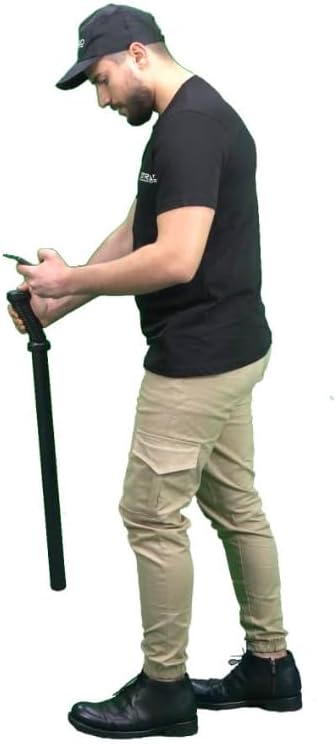
Figure 2: A user operating the GR3 Plus device, holding the probe and interacting with the analysis application on a smartphone.
മെയിൻ്റനൻസ്
- വൃത്തിയാക്കൽ: Wipe the device with a soft, dry cloth after each use. Avoid using abrasive cleaners or solvents.
- സംഭരണം: Store the GR3 Plus in a cool, dry place away from direct sunlight and extreme temperatures. If storing for extended periods, remove the batteries.
- സോഫ്റ്റ്വെയർ അപ്ഡേറ്റുകൾ: Regularly check for updates to the 3D analysis application to ensure optimal performance and access to new features.
പ്രധാനപ്പെട്ട ബാറ്ററി വിവരങ്ങൾ
Proper battery handling is crucial for safety and device longevity:
- Keep batteries away from heat, sparks, and open flames.
- ഷോർട്ട് സർക്യൂട്ടുകൾ ഒഴിവാക്കുക.
- പ്രാദേശിക നിയന്ത്രണങ്ങൾ അനുസരിച്ച് ബാറ്ററികൾ നീക്കം ചെയ്യുക.
- ശക്തമായ കാന്തികക്ഷേത്രങ്ങൾ ഒഴിവാക്കുക.
- കുട്ടികളിൽ നിന്നും വളർത്തുമൃഗങ്ങളിൽ നിന്നും ബാറ്ററികൾ സൂക്ഷിക്കുക.
ട്രബിൾഷൂട്ടിംഗ്
| പ്രശ്നം | സാധ്യമായ കാരണം | പരിഹാരം |
|---|---|---|
| ഉപകരണം പവർ ഓണാക്കുന്നില്ല. | കുറഞ്ഞതോ ഡെഡ് ബാറ്ററികളോ; തെറ്റായ ബാറ്ററി ഇൻസ്റ്റാളേഷൻ. | Replace batteries with fresh ones. Ensure batteries are inserted with correct polarity. |
| Cannot connect to the mobile application. | Bluetooth is off; device not in pairing mode; app not updated. | Ensure Bluetooth is enabled on your mobile device. Restart both the GR3 Plus and your mobile device. Check for app updates. |
| Inconsistent signal or no signal during scan. | Improper scanning technique; environmental interference; calibration needed. | Ensure consistent movement and distance from the ground. Avoid areas with strong electromagnetic interference. Perform a recalibration through the app. |
| 3D visualization issues in the app. | Outdated app version; insufficient mobile device resources. | Update the 3D analysis application. Close other demanding applications on your mobile device. |
സ്പെസിഫിക്കേഷനുകൾ
| ഫീച്ചർ | വിശദാംശങ്ങൾ |
|---|---|
| ബ്രാൻഡ് | ജനറിക് |
| മോഡൽ നമ്പർ | GR3PLUS |
| നിറം | കറുപ്പ് |
| പവർ ഉറവിടം | ബാറ്ററി പവർ |
| മെറ്റീരിയൽ | ലോഹം |
| ഇനത്തിൻ്റെ ഭാരം | 5 പൗണ്ട് (ഏകദേശം 2.27 കിലോഗ്രാം) |
| ക്രമീകരിക്കാവുന്ന നീളം | അതെ |
| അന്താരാഷ്ട്ര സംരക്ഷണ റേറ്റിംഗ് | IP54 |
| പ്രവർത്തന ആവൃത്തി | 1 KHz |
| ശുപാർശ ചെയ്യുന്ന ഉപയോഗങ്ങൾ | മെറ്റൽ ഡിറ്റക്ഷൻ |
| ഡിസ്പ്ലേ തരം | ഡിജിറ്റൽ |
| നിർമ്മാതാവ് | കോൺറാഡ് |
വാറൻ്റിയും പിന്തുണയും
For technical support, inquiries, or warranty information regarding your GROUNDTECH GR3 Plus, please contact the seller, Detector Power. Their customer service team is available to provide detailed information and assistance.
Note: Specific warranty terms and conditions may vary. Please refer to your purchase documentation or contact the seller directly for precise details.
Ask a question about this manual
Ask about setup, troubleshooting, compatibility, parts, safety, or missing instructions. Manuals+ will review the question and use this page’s manual context to help answer it.