
1. ഉൽപ്പന്നം കഴിഞ്ഞുview
The Otcboimo Smart WiFi Wireless Relay Switch Module (Model TYWB4CH-D1) is a 4-channel smart relay designed for remote control of home appliances. It supports both AC/DC 7-32V and USB 5V power input, offering flexible integration into various setups. This module features dry contact/passive output, meaning it does not supply voltage to the connected appliance directly; an external power source is required for the appliance. It is compatible with Tuya/Smart Life applications, Amazon Alexa, and Google Home for voice and remote control.
The module supports three working modes: Self-locking, Interlocking, and Inching, catering to diverse automation needs. It also includes a timing function for scheduled operations and RF433MHz control capability.

Image 1.1: Otcboimo 4-Channel Smart WiFi Relay Module showing input (Micro USB 5V or DC/AC 7-32V) and output terminals (NC, COM, NO), along with the reset switch and manual control buttons (K1, K2, K3, K4).
2 സുരക്ഷാ വിവരങ്ങൾ
- വൈദ്യുതി വിച്ഛേദിക്കൽ: Always disconnect power to the circuit before installing, wiring, or performing any maintenance on the module.
- വാല്യംtagഇ അനുയോജ്യത: ഇൻപുട്ട് വോളിയം ഉറപ്പാക്കുകtage (USB 5V or AC/DC 7-32V) matches the module's specifications. Do not exceed the maximum current rating of 10A per channel or 16A total.
- ഡ്രൈ കോൺടാക്റ്റ് ഔട്ട്പുട്ട്: Remember that the output is dry contact (passive). Connected appliances require their own power supply.
- പ്രൊഫഷണൽ ഇൻസ്റ്റാളേഷൻ: വയറിംഗ് അല്ലെങ്കിൽ ഇലക്ട്രിക്കൽ കണക്ഷനുകളെക്കുറിച്ച് നിങ്ങൾക്ക് ഉറപ്പില്ലെങ്കിൽ, യോഗ്യതയുള്ള ഒരു ഇലക്ട്രീഷ്യനെ സമീപിക്കുക.
- പരിസ്ഥിതി വ്യവസ്ഥകൾ: Operate the module within the specified working temperature range of -20°C to 70°C. Avoid exposure to moisture or extreme temperatures.
3. സജ്ജീകരണവും ഇൻസ്റ്റാളേഷനും
3.1 പവർ സപ്ലൈ
The module can be powered via two methods:
- USB 5V: Connect a standard Micro USB 5V power adapter to the USB port.
- AC/DC 7-32V: Connect a 7-32V AC or DC power source to the screw terminal input labeled "7-32V".
3.2 ആപ്പ് ഇൻസ്റ്റാളേഷനും ജോടിയാക്കലും
- ഡൗൺലോഡ് ചെയ്യുക തുയ സ്മാർട്ട് or സ്മാർട്ട് ലൈഫ് നിങ്ങളുടെ മൊബൈൽ ഉപകരണത്തിന്റെ ആപ്പ് സ്റ്റോറിൽ നിന്നുള്ള ആപ്പ് (iOS, Android എന്നിവയിൽ ലഭ്യമാണ്).
- നിങ്ങളുടെ അക്കൗണ്ടിലേക്ക് രജിസ്റ്റർ ചെയ്യുക അല്ലെങ്കിൽ ലോഗിൻ ചെയ്യുക.
- Ensure your mobile device is connected to a 2.4GHz Wi-Fi network. The module is not compatible with 5.0GHz networks.
- Power on the relay module.
- In the app, tap the "+" icon to add a device.
- Follow the in-app instructions to put the device into pairing mode. This usually involves pressing and holding the "Reset Switch" or "PF pairing button" on the module until the Wi-Fi indicator light blinks rapidly.
- Select the device type (e.g., "Switch" or "Relay") and confirm the blinking indicator.
- Enter your Wi-Fi network password and proceed with the pairing process.
- Once successfully added, you can rename the device and individual channels within the app.
4. Operating Modes and Control
4.1 Self-Locking Mode
In Self-locking mode, each relay acts as an independent switch. Pressing the button (physical or in-app) turns the relay ON, and pressing it again turns it OFF. This mode is suitable for controlling individual lights or appliances.

Image 4.1: Wiring diagram illustrating Self-Locking Mode. Input can be USB 5V or DC/AC 7-32V. The output circuit is shown controlling four light bulbs, with each relay acting independently. The circuit within the relay supports AC 0-250V 10A / DC 0-30V 10A.
4.2 Interlocking Mode
In Interlocking mode, only one relay can be ON at a time. When one relay is activated, any previously active relay in the group will automatically turn OFF. This mode is ideal for applications where only one state should be active, such as controlling a motor's forward/reverse direction.
Setting Interlocking Mode via App:
- Open the Tuya/Smart Life app and navigate to your device.
- Tap on the "Setting" icon (usually a gear icon) at the bottom of the screen.
- Select "Interlock set" from the options.
- Tap "Add" to create a new interlock group.
- Select the switches (relays) you want to include in the interlock group (e.g., Switch 1, Switch 2, Switch 3, Switch 4).
- Tap "Save" to apply the settings.
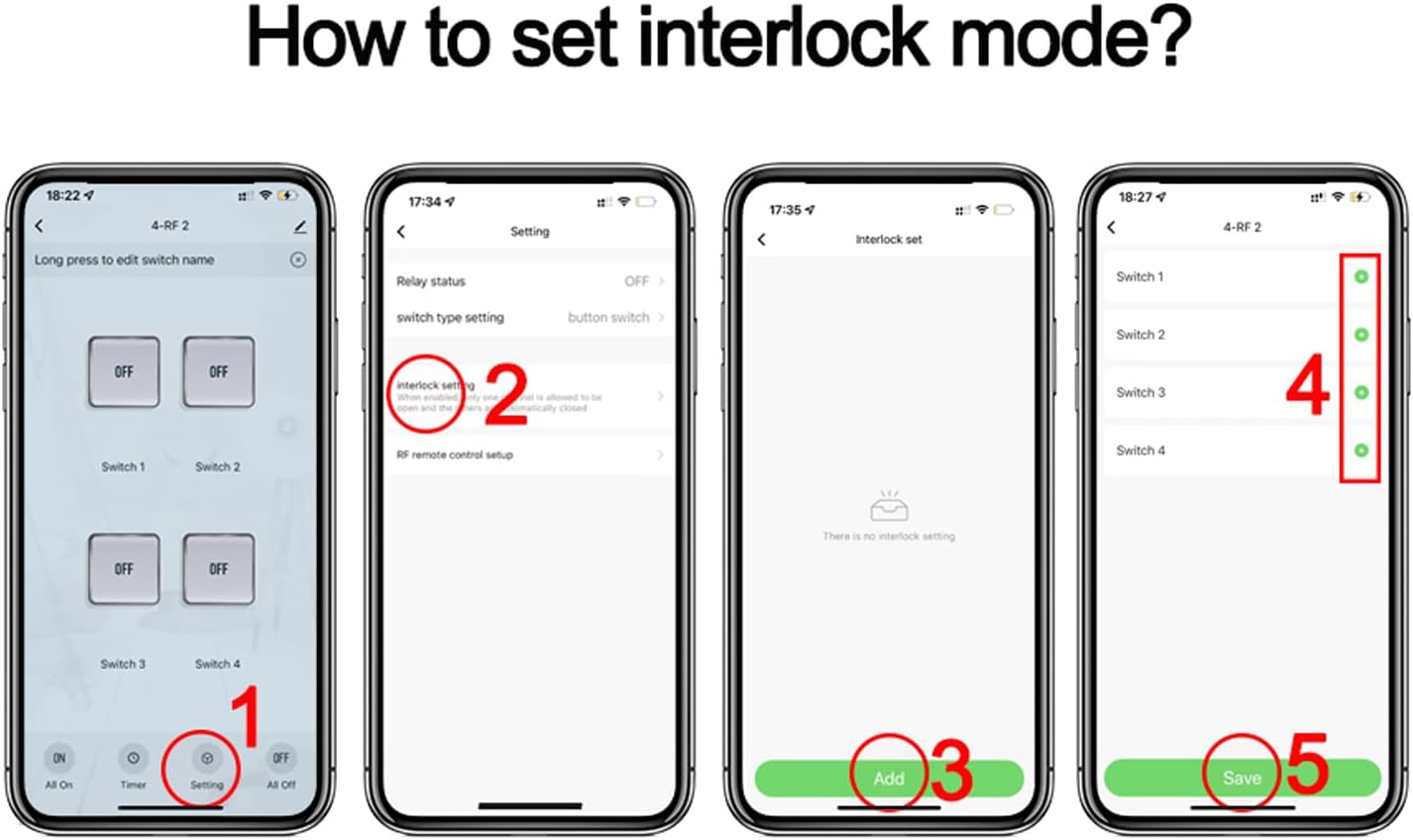
Image 4.2: Step-by-step guide within the Smart Life app to configure Interlocking Mode. This involves navigating to settings, selecting 'Interlock set', adding switches to the group, and saving the configuration.

Image 4.3: Wiring diagram for Interlock Mode. The left diagram shows controlling an AC motor with 85-250V input. The right diagram shows controlling a DC motor with 7-32V input. Note: Only one motor can run at a time in this configuration.
4.3 Inching Mode (Momentary)
In Inching mode, the relay turns ON for a set duration (e.g., 0.5 to 3600 seconds) and then automatically turns OFF. This is useful for momentary actions like opening a gate, triggering a garage door, or pulsing a signal.
Setting Inching Mode via App:
- Open the Tuya/Smart Life app and navigate to your device.
- Tap on the "Timer" icon at the bottom of the screen.
- Select the specific switch (relay) you want to configure.
- Tap on the "Inching" tab (often represented by a clock icon).
- Enable the inching function and set the desired duration (e.g., 03 seconds).

Image 4.4: Step-by-step guide within the Smart Life app to configure Inching Mode. This involves accessing the timer settings, selecting a switch, enabling inching, and setting the duration.

Image 4.5: Application diagram for Inching Mode, showing the relay module connected to a remote control receiver (JY-KA4) and controlling devices such as an exit button, a rolling shutter, and a computer. This illustrates its use for momentary actions.
4.4 റിമോട്ട് കൺട്രോൾ ഓപ്ഷനുകൾ
- ആപ്പ് റിമോട്ട് കൺട്രോൾ: Control connected appliances from anywhere using the Tuya Smart or Smart Life app on your smartphone, provided the module has an internet connection (2.4GHz Wi-Fi).
- RF433 നിയന്ത്രണം: The module supports RF433MHz frequency, allowing control via a compatible RF433MHz remote controller (sold separately).
- ശബ്ദ നിയന്ത്രണം: Integrate with Amazon Alexa or Google Assistant to control appliances using voice commands.

Image 4.6: Diagram demonstrating simple voice control. A user speaks a command to an Alexa device, which communicates with the smart relay module to control a connected light.
4.5 വിപുലമായ സവിശേഷതകൾ
- സമയ പ്രവർത്തനം: Set schedules, timers, and countdowns within the app to automatically turn appliances ON/OFF at specified times. Each channel can have its own schedule.
- പങ്കിടൽ നിയന്ത്രണം: Share control of the module with family members through the Tuya/Smart Life app, allowing multiple users to manage connected devices.
- ഗ്രൂപ്പ് നിയന്ത്രണം: Create groups of smart devices within the app to control multiple devices simultaneously with a single command.
- സീൻ ലിങ്കേജ്: Create smart scenes to automate actions based on various conditions such as departure/home mode, temperature, humidity, or other smart device statuses.
5. വയറിംഗ് ഡയഗ്രമുകൾ
The Otcboimo Smart WiFi Wireless Relay Switch Module provides dry contact outputs. This means the relay acts as a switch that opens or closes a circuit, but it does not provide power to the connected device. You must supply power to the appliance separately.
Refer to the specific mode diagrams (Self-Locking, Interlocking, Inching) in Section 4 for detailed wiring examples. Always ensure power is disconnected before making any wiring changes.
6. പരിപാലനം
- വൃത്തിയാക്കൽ: Use a soft, dry cloth to clean the module. Do not use liquid cleaners or aerosols.
- ഫേംവെയർ അപ്ഡേറ്റുകൾ: Periodically check the Tuya/Smart Life app for available firmware updates to ensure optimal performance and security.
- പരിസ്ഥിതി സംരക്ഷണം: Keep the module away from water, excessive heat, and direct sunlight.
7. പ്രശ്നപരിഹാരം
- മൊഡ്യൂൾ ഓണാക്കുന്നില്ല: Verify the power supply connection (USB 5V or AC/DC 7-32V) and ensure the power source is active.
- ആപ്പുമായി ജോടിയാക്കാൻ കഴിയുന്നില്ല:
- നിങ്ങളുടെ ഫോൺ 2.4GHz വൈഫൈ നെറ്റ്വർക്കിലേക്ക് കണക്റ്റുചെയ്തിട്ടുണ്ടെന്ന് ഉറപ്പാക്കുക.
- Confirm the module's Wi-Fi indicator is blinking rapidly (pairing mode). If not, press and hold the reset button.
- Check Wi-Fi signal strength. The module should be within close proximity to your router.
- നിങ്ങളുടെ റൂട്ടർ പുനരാരംഭിച്ച് വീണ്ടും ജോടിയാക്കാൻ ശ്രമിക്കുക.
- Appliance Not Responding:
- Check the wiring connections to the appliance and ensure they are secure.
- Verify that the appliance has its own power supply and is functioning correctly.
- Confirm the relay is switching ON/OFF in the app.
- ശബ്ദ നിയന്ത്രണം പ്രവർത്തിക്കുന്നില്ല:
- Ensure the module is successfully linked to your Alexa or Google Home account via the Tuya/Smart Life app.
- Check the device name in Alexa/Google Home; it should match the name set in the Tuya/Smart Life app.
- Verify your voice assistant device has an active internet connection.
8 സ്പെസിഫിക്കേഷനുകൾ
| പരാമീറ്റർ | മൂല്യം |
|---|---|
| മോഡൽ | TYWB4CH-D1 |
| ഇൻപുട്ട് വോളിയംtage | DC/AC 7-32V or USB 5V |
| പരമാവധി കറന്റ് (ഓരോ ഗാങ്ങിനും) | 10എ |
| Max. Load (total) | 3500W / 16A / 4 gangs |
| വയർലെസ് കണക്റ്റിവിറ്റി | WiFi 2.4GHz (IEEE802.11 b/g/n) + Bluetooth |
| പ്രവർത്തന താപനില | -20°C മുതൽ 70°C വരെ |
| അളവുകൾ (L x W x H) | 81 x 76 x 28 മിമി |
| ബന്ധപ്പെടാനുള്ള തരം | സാധാരണയായി അടച്ചിരിക്കുന്നു (NC) |
| നിയന്ത്രണ രീതി | Remote (App), Voice (Alexa, Google Home) |
| മെറ്റീരിയൽ | പ്ലാസ്റ്റിക് |
| അന്താരാഷ്ട്ര സംരക്ഷണ റേറ്റിംഗ് | IP30 |

Image 8.1: Detailed product parameters including input voltage (DC/AC 7-32V, USB 5V), max current (10A/gang), max load (16A/4gang), wireless type (WiFi 2.4GHz), working temperature (-20°C to 70°C), and dimensions (81*76*28mm).
9. വാറൻ്റിയും പിന്തുണയും
For warranty information and technical support, please refer to the documentation provided with your purchase or contact the manufacturer directly through their official webസൈറ്റ് അല്ലെങ്കിൽ ഉപഭോക്തൃ സേവന ചാനലുകൾ. വാറന്റി ക്ലെയിമുകൾക്കായി നിങ്ങളുടെ വാങ്ങൽ രസീത് സൂക്ഷിക്കുക.


