
റുമെൻ H1
RUIMEN Smart Watch User Manual
മോഡൽ: H1
ആമുഖം
Welcome to the RUIMEN Smart Watch user manual. This guide will assist you in setting up, operating, and maintaining your new smartwatch. The RUIMEN Smart Watch is designed to enhance your daily life with features like Bluetooth calling, comprehensive fitness tracking, and smart notifications. Please read this manual carefully to ensure optimal performance and longevity of your device.
ബോക്സിൽ എന്താണുള്ളത്
Upon opening your RUIMEN Smart Watch package, you should find the following items:
- RUIMEN Smart Watch (main unit)
- ചാർജിംഗ് കേബിൾ
- ഉപയോക്തൃ മാനുവൽ
- Two Watch Bands (one pre-attached, one extra replacement band)

Image: The RUIMEN Smart Watch, charging cable, and an extra watch band, as typically found in the product packaging.
സജ്ജമാക്കുക
പ്രാരംഭ ചാർജിംഗ്
Before first use, fully charge your RUIMEN Smart Watch. Connect the charging cable to the watch's charging points and a USB power source. A full charge typically takes approximately 2.5 hours.
App Installation & Pairing
To unlock the full potential of your smartwatch, you need to install the companion app and pair it with your smartphone. The watch is compatible with iOS 9.0/Android 5.0 and Bluetooth 5.0 or above.
- Download the 'GloryFit' app from your phone's app store (App Store for iOS, Google Play Store for Android).
- Ensure Bluetooth is activated on your smartphone.
- Open the 'GloryFit' app and follow the on-screen prompts to add a new device. You may need to scan the QR code displayed on your watch's screen to initiate pairing.
- നിങ്ങളുടെ ഫോണിലും വാച്ചിലും ജോടിയാക്കൽ അഭ്യർത്ഥന സ്ഥിരീകരിക്കുക.
- Once paired, enable the desired functions and permissions within the app.

Image: A visual guide illustrating the five steps to connect the smartwatch to your phone via the GloryFit app, including QR code scanning and Bluetooth pairing.
Bluetooth Calling Function Setup
To enable the call answering and making features directly from your watch:
- നിങ്ങളുടെ ഫോണിൽ, ബ്ലൂടൂത്ത് ക്രമീകരണങ്ങളിലേക്ക് പോകുക.
- Locate and connect to the device named 'H1(ID-43B1)' or similar, which is separate from the main app connection.
- Once connected, the call icon on your watch will light up, indicating the calling function is active.
- You can now make and answer calls directly from your watch.

Image: The smartwatch screen showing an incoming call notification and various app notification icons, demonstrating its communication capabilities.
നിങ്ങളുടെ സ്മാർട്ട് വാച്ച് പ്രവർത്തിപ്പിക്കുന്നു
കോളുകൾ ഉണ്ടാക്കുകയും ഉത്തരം നൽകുകയും ചെയ്യുന്നു
Once the Bluetooth calling function is set up, you can make and answer calls directly from your wrist. The watch features a built-in speaker and microphone for clear communication, ideal for when your phone is not immediately accessible.

Image: A person interacting with the smartwatch to answer an incoming call, highlighting the convenience of the built-in speaker and microphone.
സന്ദേശ അറിയിപ്പുകൾ
Receive real-time notifications for SMS, emails, and various social media apps (e.g., Facebook, WhatsApp, Twitter) directly on your watch. This allows you to stay informed without needing to check your phone constantly.

Image: The smartwatch screen showing notifications from different messaging and social media applications, demonstrating its notification capabilities.
വാച്ച് ഫെയ്സുകൾ ഇഷ്ടാനുസൃതമാക്കുന്നു
Personalize your smartwatch with over 100 watch faces available through the app. You can also upload your own photos to create unique watch faces that express your personal style.

ചിത്രം: സ്മാർട്ട് വാച്ച് ഷോക്asing a personalized watch face with a photo, alongside the app interface for selecting and customizing watch dials.
സംഗീത നിയന്ത്രണം
Control music playback on your smartphone directly from your watch. Play, pause, skip tracks, and adjust volume without needing to take out your phone.
റിമോട്ട് ക്യാമറ
Use your smartwatch as a remote shutter for your phone's camera, making it easier to capture group photos or selfies from a distance.
കാലാവസ്ഥാ പ്രവചനം
Access real-time weather forecasts directly on your watch, helping you plan your day effectively.
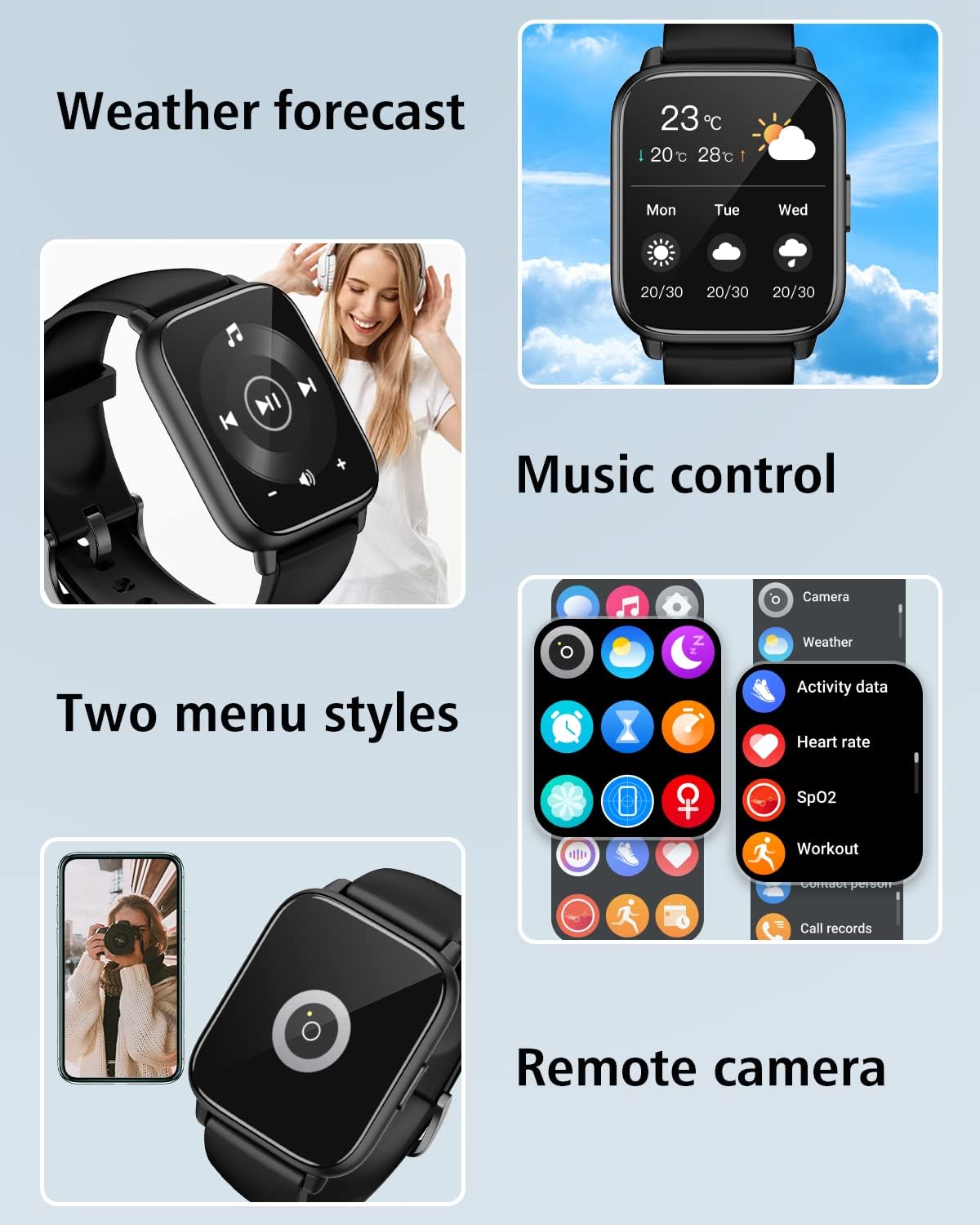
Image: The smartwatch screen showing the weather forecast, music control interface, and an icon for remote camera functionality.
Other Practical Tools
The RUIMEN Smart Watch is equipped with several other practical tools for daily convenience:
- അലാറം ക്ലോക്കുകൾ: Set multiple alarms to manage your schedule.
- ടൈമർ: A convenient countdown timer for various activities.
- ഉദാസീനമായ ഓർമ്മപ്പെടുത്തൽ: നിഷ്ക്രിയത്വ കാലയളവിനുശേഷം നീങ്ങാൻ അലേർട്ടുകൾ നേടുക.
- വാച്ച്/ഫോൺ കണ്ടെത്തുക: Locate your watch or phone if misplaced within Bluetooth range.
ആരോഗ്യം, ഫിറ്റ്നസ് ട്രാക്കിംഗ്
All-Day Fitness Tracking
The smartwatch accurately tracks your daily activity, including steps taken, distance covered, and calories burned, providing a comprehensive overview of your movement throughout the day.

Image: The smartwatch screen showing activity tracking data, including icons for calories, distance, and steps, indicating comprehensive fitness monitoring.
സ്പോർട്സ് മോഡുകൾ
With over 100 sports modes supported by the app, the RUIMEN Smart Watch can track a wide variety of activities, from running and cycling to more specific sports, providing detailed insights into your workouts.

Image: A graphic illustrating over 100 sport modes available on the smartwatch, with icons representing different activities like running, cycling, and swimming.
ഹൃദയമിടിപ്പ് നിരീക്ഷണം
The watch continuously measures your heart rate, allowing you to monitor your cardiovascular health and optimize your exercise intensity.

Image: The smartwatch screen showing real-time heart rate data (top) and blood oxygen saturation (bottom), indicating continuous health monitoring.
രക്ത ഓക്സിജൻ നിരീക്ഷണം
Monitor your blood oxygen levels (SpO2) to gain insights into your respiratory health and overall well-being.
ഉറക്ക നിരീക്ഷണം
The smartwatch tracks your sleep patterns, including deep sleep, light sleep, REM sleep, and awake time, providing a detailed analysis of your sleep quality.

Image: The smartwatch app interface showing a detailed breakdown of sleep stages, including deep sleep, light sleep, and REM, along with total sleep duration.
ശ്വസന പരിശീലനം
Utilize the guided breathing training feature to help you relax and manage stress, promoting a calm state of mind.

Image: The smartwatch displaying a breathing exercise interface, alongside a voice assistant feature, indicating tools for well-being and convenience.
മെയിൻ്റനൻസ്
ബാറ്ററി ലൈഫും ചാർജിംഗും
The RUIMEN Smart Watch offers impressive battery performance, with up to 30 days of standby time and 7 days of regular usage on a single 2.5-hour charge. To charge, align the magnetic charging pins with the contacts on the back of the watch.

Image: A diagram showing the dimensions of the smartwatch and visual indicators for its long battery life, including standby time and normal use duration.
വാട്ടർപ്രൂഫ് റേറ്റിംഗ്
The watch has an IP68 waterproof rating, meaning it is resistant to dust and can withstand immersion in water up to 1.5 meters for 30 minutes. This makes it suitable for daily activities like hand washing, showering, and light rain exposure. Avoid hot water, saunas, or diving.

Image: A close-up of a person's wrist wearing the smartwatch while washing hands, demonstrating its water resistance.
ശുചീകരണവും പരിചരണവും
To keep your smartwatch in optimal condition, regularly clean the watch body and bands with a soft, dry cloth. If necessary, use a slightly damp തുണിയും വീര്യം കുറഞ്ഞ സോപ്പും ഉപയോഗിച്ച് നന്നായി ഉണക്കുക. കഠിനമായ രാസവസ്തുക്കളോ ഉരച്ചിലുകളോ ഉള്ള വസ്തുക്കൾ ഒഴിവാക്കുക.
വാച്ച് ബാൻഡുകൾ മാറ്റുന്നു
Your RUIMEN Smart Watch comes with two bands, allowing you to change them to suit different occasions or preferences. The bands feature quick-release pins for easy attachment and removal.

Image: An illustration showing multiple color variations of the smartwatch and highlighting that each package includes two interchangeable bands.
ട്രബിൾഷൂട്ടിംഗ്
If you encounter any issues with your RUIMEN Smart Watch, please refer to the following common solutions:
| പ്രശ്നം | സാധ്യമായ പരിഹാരം |
|---|---|
| വാച്ച് ഓണാകില്ല | വാച്ച് പൂർണ്ണമായും ചാർജ് ചെയ്തിട്ടുണ്ടെന്ന് ഉറപ്പാക്കുക. കുറഞ്ഞത് 30 മിനിറ്റെങ്കിലും ചാർജറുമായി ബന്ധിപ്പിക്കുക. |
| ഫോണുമായി ജോടിയാക്കാൻ കഴിയില്ല | Make sure Bluetooth is enabled on your phone and the watch. Restart both devices. Ensure the app is installed and you are pairing through the app. |
| ബ്ലൂടൂത്ത് കോളിംഗ് പ്രവർത്തിക്കുന്നില്ല | Check if the 'H1(ID-43B1)' device is connected in your phone's Bluetooth settings, separate from the app connection. Restart the watch and phone. |
| അറിയിപ്പുകൾ ലഭിച്ചിട്ടില്ല | Ensure the watch is connected to the app. Check app permissions on your phone to allow notifications. Verify notification settings within the GloryFit app. |
| കൃത്യമല്ലാത്ത ഫിറ്റ്നസ് ഡാറ്റ | Ensure the watch is worn snugly on your wrist. Calibrate steps in the app if available. Ensure personal information (height, weight) is accurate in the app. |
| ചെറിയ ബാറ്ററി ലൈഫ് | Reduce screen brightness, turn off unnecessary notifications, and limit continuous heart rate monitoring if not needed. Ensure proper charging. |
സ്പെസിഫിക്കേഷനുകൾ
Detailed technical specifications for the RUIMEN Smart Watch:
| ഫീച്ചർ | വിശദാംശങ്ങൾ |
|---|---|
| സ്ക്രീൻ വലിപ്പം | 1.85 ഇഞ്ച് |
| ഡിസ്പ്ലേ തരം | HD ടച്ച് സ്ക്രീൻ |
| കണക്റ്റിവിറ്റി | ബ്ലൂടൂത്ത് 5.0 |
| ബാറ്ററി ശേഷി | 300 മില്ലിamp മണിക്കൂർ (ലിഥിയം പോളിമർ) |
| ബാറ്ററി ലൈഫ് (സാധാരണ ഉപയോഗം) | 7 ദിവസം വരെ |
| ബാറ്ററി ലൈഫ് (സ്റ്റാൻഡ്ബൈ) | 30 ദിവസം വരെ |
| ചാർജിംഗ് സമയം | ഏകദേശം 2.5 മണിക്കൂർ |
| വാട്ടർപ്രൂഫ് റേറ്റിംഗ് | IP68 |
| മെമ്മറി സ്റ്റോറേജ് കപ്പാസിറ്റി | 128 MB |
| ഓപ്പറേറ്റിംഗ് സിസ്റ്റം അനുയോജ്യത | iOS 9.0+, Android 5.0+ |
| ഇനത്തിൻ്റെ ഭാരം | 4.6 ഔൺസ് |
| അളവുകൾ | 10.63 x 3.35 x 0.67 ഇഞ്ച് (പാക്കേജ്) |
| ജിപിഎസ് | GPS ഇല്ല |
വാറൻ്റിയും പിന്തുണയും
RUIMEN stands behind the quality of its products. Your Smart Watch comes with a 1 വർഷത്തെ വാറൻ്റി വാങ്ങിയ തീയതി മുതൽ. ഈ വാറന്റി നിർമ്മാണ വൈകല്യങ്ങൾ ഉൾക്കൊള്ളുകയും നിങ്ങളുടെ ഉൽപ്പന്നം ഉദ്ദേശിച്ച രീതിയിൽ പ്രവർത്തിക്കുന്നുവെന്ന് ഉറപ്പാക്കുകയും ചെയ്യുന്നു.
For any technical assistance or inquiries, RUIMEN provides ആജീവനാന്ത സാങ്കേതിക പിന്തുണ. Please refer to the contact information provided in your product packaging or visit the official RUIMEN webഉപഭോക്തൃ സേവന വിശദാംശങ്ങൾക്കായുള്ള സൈറ്റ്.

Image: A graphic highlighting key benefits of choosing RUIMEN, including superior quality, user-centric design, value for money, eco-friendly commitment, 24/7 customer support, 1-year warranty, and lifetime technical support.
Ask a question about this manual
Ask about setup, troubleshooting, compatibility, parts, safety, or missing instructions. Manuals+ will review the question and use this page’s manual context to help answer it.