
ആമുഖം
Thank you for choosing the Vivitar Singimals Kids Karaoke Speaker. This manual provides essential information for the safe and effective use of your new karaoke speaker. Please read it thoroughly before operation and retain it for future reference.
ബോക്സിൽ എന്താണുള്ളത്:
- Singimals Kids Karaoke Speaker (Asher The Fox)
- വയർഡ് മൈക്രോഫോൺ
- ചാർജിംഗ് കേബിൾ
- ഉപയോക്തൃ മാനുവൽ
ഉൽപ്പന്നം കഴിഞ്ഞുview
The Vivitar Singimals Kids Karaoke Speaker is designed for interactive fun, featuring a 5W speaker, Bluetooth v5.1 connectivity, and multicolor LED lighting. It offers up to 12 hours of playtime on a single charge.
പ്രധാന സവിശേഷതകൾ:
- 5W സ്പീക്കർ: Delivers clear and crisp audio for an engaging karaoke experience.
- ബ്ലൂടൂത്ത് v5.1: Ensures stable and efficient wireless connection to compatible devices.
- 12-മണിക്കൂർ കളിസമയം: Enjoy extended entertainment with the built-in rechargeable battery.
- മൾട്ടികളർ എൽഇഡി ലൈറ്റിംഗ്: Dynamic lights that pulse and dance to the music, enhancing the performance atmosphere.
- പോർട്ടബിൾ ഡിസൈൻ: Compact and lightweight for easy transport and use anywhere.
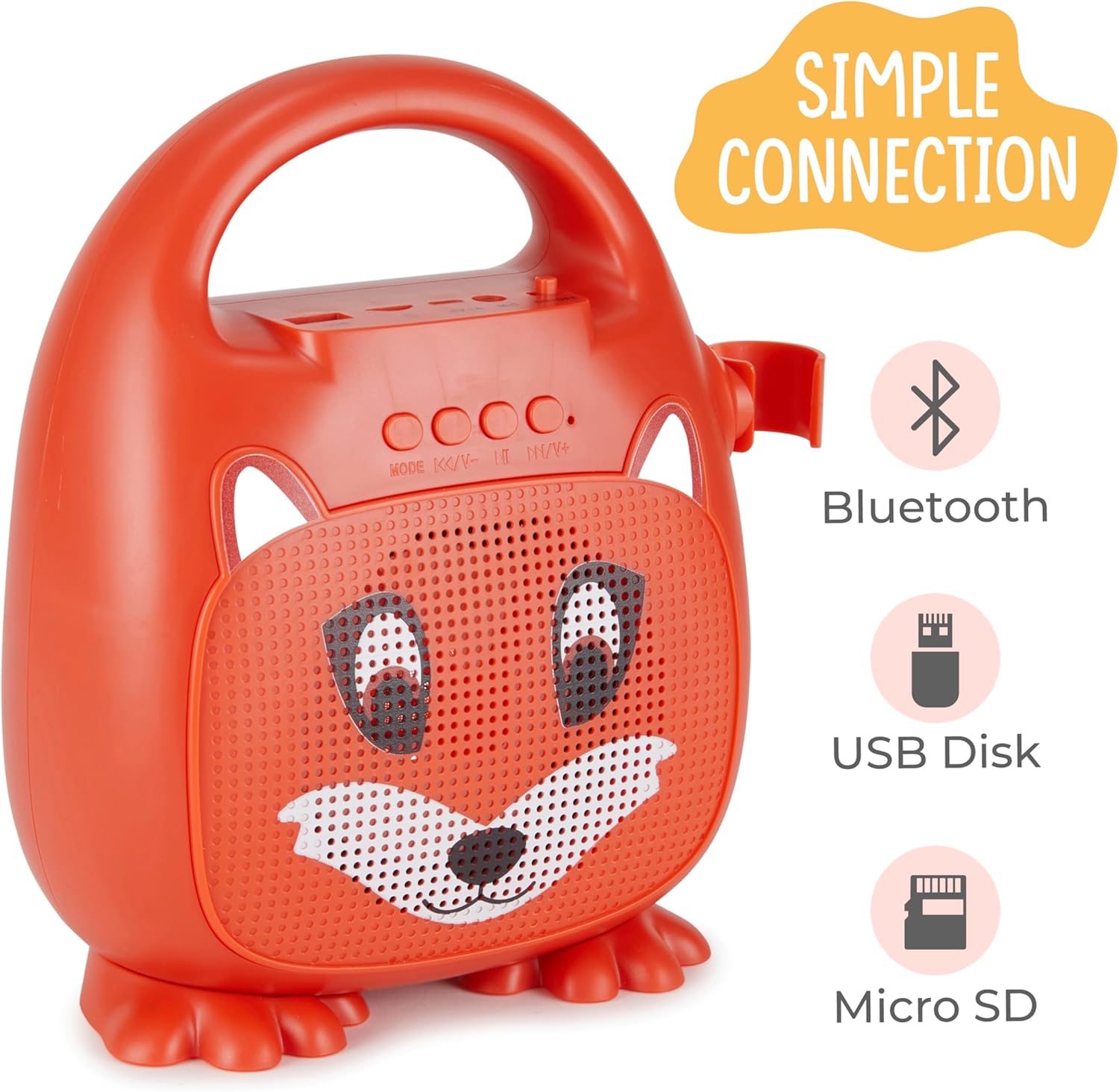
ചിത്രം 1: മുൻഭാഗം view of the Singimals Kids Karaoke Speaker (Asher The Fox).
സജ്ജമാക്കുക
1. സ്പീക്കറെ ചുമതലപ്പെടുത്തൽ:
Before first use, fully charge the speaker. Connect the provided charging cable to the speaker's charging port (usually labeled "5V 1A" or similar) and the other end to a USB power adapter (not included) or a computer's USB port. The charging indicator light will show the charging status.
2. മൈക്രോഫോൺ ബന്ധിപ്പിക്കുന്നു:
Insert the microphone's plug into the MIC input port on the speaker. Ensure the microphone's ON/OFF switch is in the 'ON' position when in use.

Figure 2: Wired Microphone with ON/OFF switch.
3. പവർ ഓൺ/ഓഫ്:
Locate the ON/OFF switch on the speaker. Slide it to the 'ON' position to power on the device. Slide it to 'OFF' to power down.
4. ബ്ലൂടൂത്ത് ജോടിയാക്കൽ:
- Power on the karaoke speaker. It will automatically enter Bluetooth pairing mode, indicated by a flashing LED light.
- നിങ്ങളുടെ സ്മാർട്ട്ഫോണിലോ മറ്റ് ബ്ലൂടൂത്ത് പ്രവർത്തനക്ഷമമാക്കിയ ഉപകരണത്തിലോ, ബ്ലൂടൂത്ത് ക്രമീകരണങ്ങളിലേക്ക് പോകുക.
- ഇതിനായി തിരയുക available devices and select "Singimals" (or similar name) from the list.
- Once connected, the LED indicator on the speaker will stop flashing and remain solid, and you may hear an audible confirmation.
5. USB Disk and Micro SD Card Playback:
ഒരു യുഎസ്ബി ഫ്ലാഷ് ഡ്രൈവ് അല്ലെങ്കിൽ മൈക്രോ എസ്ഡി കാർഡ് (പ്രീ-ലോഡ് ചെയ്ത ഓഡിയോ ഉപയോഗിച്ച്) ഇടുക files) into the respective ports on the speaker. The speaker will automatically detect the media and begin playback. Use the 'MODE' button to switch between input sources (Bluetooth, USB, Micro SD).

Figure 3: Control panel and input ports.
പ്രവർത്തന നിർദ്ദേശങ്ങൾ
നിയന്ത്രണ ബട്ടണുകൾ:
| ബട്ടൺ | ഫംഗ്ഷൻ |
|---|---|
| മോഡ് | Switches between input modes (Bluetooth, USB, Micro SD). |
| മുമ്പത്തെ ട്രാക്ക് / വോളിയം ഡൗൺ | മുമ്പത്തെ ട്രാക്കിനായി ഹ്രസ്വമായി അമർത്തുക. ശബ്ദം കുറയ്ക്കാൻ ദീർഘനേരം അമർത്തുക. |
| പ്ലേ / താൽക്കാലികമായി നിർത്തുക | നിലവിലെ ഓഡിയോ ട്രാക്ക് പ്ലേ ചെയ്യുകയോ താൽക്കാലികമായി നിർത്തുകയോ ചെയ്യുന്നു. |
| അടുത്ത ട്രാക്ക് / വോളിയം അപ്പ് | അടുത്ത ട്രാക്കിനായി ഷോർട്ട് പ്രസ്സ് ചെയ്യുക. വോളിയം കൂട്ടാൻ ദീർഘനേരം അമർത്തുക. |
LED ലൈറ്റിംഗ്:
The speaker features multicolor LED lights that illuminate the speaker grille. These lights automatically pulse and change colors with the music. There is no separate control for the LED lighting; it operates automatically when the speaker is on.
മെയിൻ്റനൻസ്
- വൃത്തിയാക്കൽ: Wipe the speaker and microphone with a soft, dry cloth. Do not use abrasive cleaners or solvents.
- സംഭരണം: നേരിട്ടുള്ള സൂര്യപ്രകാശത്തിൽ നിന്നും കടുത്ത താപനിലയിൽ നിന്നും മാറി തണുത്തതും വരണ്ടതുമായ സ്ഥലത്ത് ഉപകരണം സൂക്ഷിക്കുക.
- ബാറ്ററി കെയർ: To prolong battery life, charge the speaker regularly, even if not in frequent use. Avoid fully discharging the battery for extended periods.
- വാട്ടർ എക്സ്പോഷർ: ഈ ഉപകരണം വാട്ടർപ്രൂഫ് അല്ല. വെള്ളത്തിൽ നിന്നും ഈർപ്പത്തിൽ നിന്നും അകറ്റി നിർത്തുക.
ട്രബിൾഷൂട്ടിംഗ്
| പ്രശ്നം | പരിഹാരം |
|---|---|
| സ്പീക്കർ ഓണാക്കുന്നില്ല. | Ensure the ON/OFF switch is in the 'ON' position. Charge the speaker if the battery is depleted. |
| മൈക്രോഫോണിൽ നിന്ന് ശബ്ദമില്ല. | Check if the microphone is securely plugged into the MIC port. Ensure the microphone's ON/OFF switch is in the 'ON' position. |
| ബ്ലൂടൂത്ത് വഴി ജോടിയാക്കാൻ കഴിയില്ല. | Ensure the speaker is in Bluetooth mode (flashing LED). Turn off and on Bluetooth on your device. Move your device closer to the speaker. |
| മോശം ശബ്ദ നിലവാരം. | Ensure the audio source is of good quality. Adjust the volume on both the speaker and the connected device. Check for obstructions around the speaker grille. |
സ്പെസിഫിക്കേഷനുകൾ
| ഫീച്ചർ | വിശദാംശങ്ങൾ |
|---|---|
| ബ്രാൻഡ് | വിവാതാർ |
| മോഡൽ നമ്പർ | SNG200-FOX |
| കണക്റ്റിവിറ്റി ടെക്നോളജി | ബ്ലൂടൂത്ത് |
| ബ്ലൂടൂത്ത് പതിപ്പ് | v5.1 |
| ഔട്ട്പുട്ട് വാട്ട്tage | 5 വാട്ട്സ് |
| പവർ ഉറവിടം | ബാറ്ററി പവർ |
| ഇനത്തിന്റെ അളവുകൾ (L x W x H) | 4.72 x 8.7 x 9.25 ഇഞ്ച് |
| ഇനത്തിൻ്റെ ഭാരം | 0.94 കിലോഗ്രാം |
| മെറ്റീരിയൽ | പ്ലാസ്റ്റിക് |
| ഓഡിയോ ഇൻപുട്ട് | Microphone, USB, Micro SD |
സുരക്ഷാ വിവരങ്ങൾ
- ഉപകരണത്തെ തീവ്രമായ താപനിലയിലോ, നേരിട്ടുള്ള സൂര്യപ്രകാശത്തിലോ, ഉയർന്ന ആർദ്രതയിലോ തുറന്നുകാട്ടരുത്.
- ഉപകരണം വെള്ളത്തിൽ നിന്നും മറ്റ് ദ്രാവകങ്ങളിൽ നിന്നും അകറ്റി നിർത്തുക.
- ഉപകരണം വേർപെടുത്താനോ പരിഷ്ക്കരിക്കാനോ ശ്രമിക്കരുത്. ഇത് വാറന്റി അസാധുവാക്കുകയും കേടുപാടുകൾക്ക് കാരണമാവുകയും ചെയ്തേക്കാം.
- നൽകിയിരിക്കുന്ന ചാർജിംഗ് കേബിൾ മാത്രം ഉപയോഗിക്കുക.
- Supervise young children during use to ensure safe operation.
- കേൾവിക്ക് കേടുപാടുകൾ സംഭവിക്കാതിരിക്കാൻ ഉയർന്ന ശബ്ദത്തിൽ ദീർഘനേരം കേൾക്കുന്നത് ഒഴിവാക്കുക.
വാറൻ്റിയും പിന്തുണയും
For warranty information and customer support, please refer to the warranty card included with your product or visit the official Vivitar webസൈറ്റ്. വാങ്ങിയതിന്റെ തെളിവായി നിങ്ങളുടെ വാങ്ങൽ രസീത് സൂക്ഷിക്കുക.
നിർമ്മാതാവ്: സക്കർ ഇന്റർനാഷണൽ, ഇൻക്.