
1. ആമുഖം
The VBESTLIFE Mini Wireless Keyboard with Touchpad Mouse is a versatile input device designed for seamless control of various systems. This rechargeable 2.4 GHz wireless keyboard features 83 keys and an integrated touchpad, making it ideal for home entertainment, gaming, HTPC control, mobile device operation, and classroom instruction.
Its compact and pocket-sized design, combined with a highly sensitive touchpad and QWERTY keyboard, offers a convenient and efficient user experience. The device supports both English and Russian input methods and includes dedicated multimedia and game controls. An integrated rechargeable battery ensures extended standby time, suitable for a wide range of devices and scenarios.

Image 1.1: The VBESTLIFE Mini Wireless Keyboard, highlighting its use for home entertainment and gaming.

Image 1.2: The 83-key wireless keyboard with its integrated touchpad, shown in a home entertainment setup.
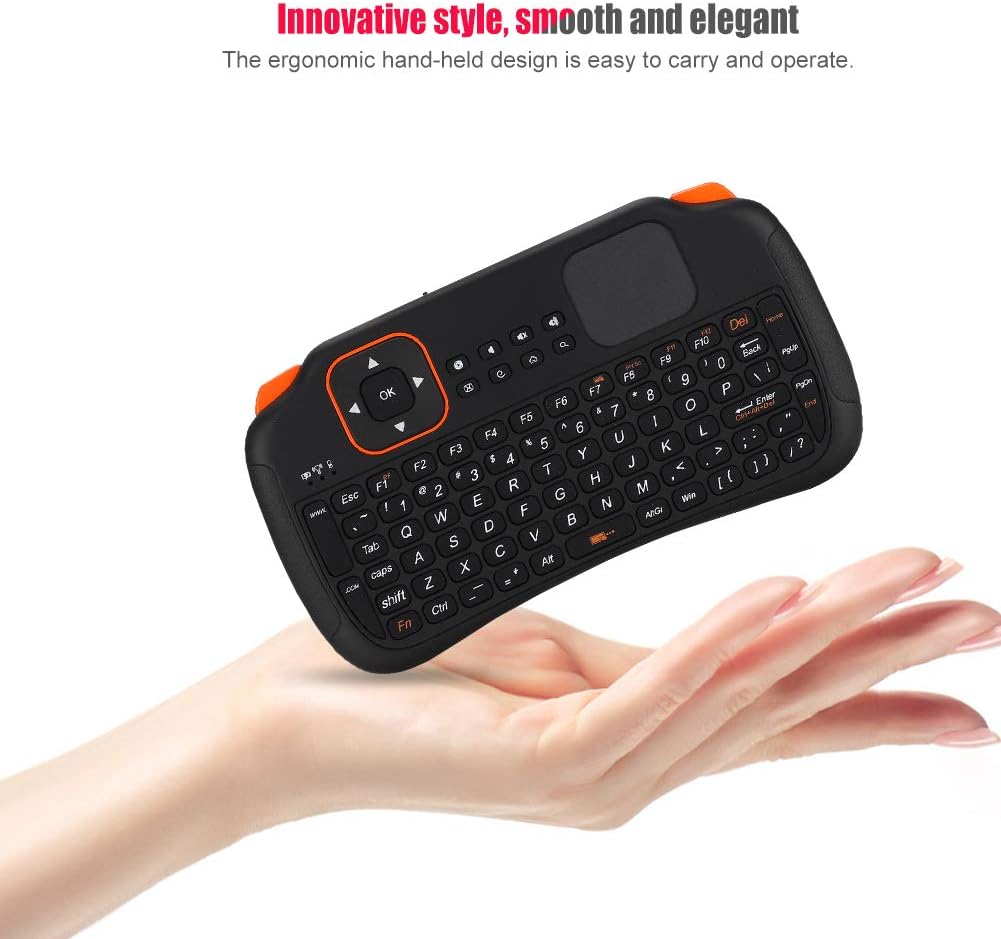
Image 1.3: The ergonomic and portable design of the keyboard, easily held in one hand.
2. പാക്കേജ് ഉള്ളടക്കം
താഴെ ലിസ്റ്റ് ചെയ്തിരിക്കുന്ന എല്ലാ ഇനങ്ങളും നിങ്ങളുടെ പാക്കേജിൽ ഉൾപ്പെടുത്തിയിട്ടുണ്ടെന്ന് ദയവായി പരിശോധിക്കുക:
- 1 x Mini Wireless Keyboard with Touchpad Mouse
- 1 x USB ചാർജിംഗ് കേബിൾ
- 1 x ഉപയോക്തൃ മാനുവൽ
- 1 x USB Receiver (built-in within the keyboard's battery compartment)
- 1 x Lithium-ion Battery (built-in)

Image 2.1: The keyboard shown with its included USB charging cable.
3. സജ്ജീകരണ നിർദ്ദേശങ്ങൾ
- Insert/Check Battery: The keyboard comes with a built-in lithium-ion battery. To access the USB receiver, locate the battery compartment on the back of the keyboard. Open the cover and ensure the battery is correctly seated. The USB receiver is stored here for convenience.
- USB റിസീവർ ബന്ധിപ്പിക്കുക: Remove the USB receiver from its storage slot. Plug the USB receiver into an available USB port on your PC, TV box, HTPC, or other compatible device.
- പവർ ഓൺ: Locate the power switch on the keyboard (usually on the side or top edge). Slide the switch to the 'ON' position. An indicator light should illuminate briefly, signaling that the keyboard is powered on and attempting to connect.
- ചാർജിംഗ്: Before first use, or when the battery is low, connect the keyboard to a USB power source using the provided USB charging cable. The charging indicator light will show the charging status.

Image 3.1: The battery compartment, revealing the built-in battery and the USB receiver.
4. പ്രവർത്തന നിർദ്ദേശങ്ങൾ
4.1. Basic Keyboard and Touchpad Use
The keyboard features a standard QWERTY layout with 83 keys. The integrated touchpad functions like a traditional mouse, allowing for cursor movement and clicking. Use single-finger gestures for basic navigation.

Image 4.1: Hands demonstrating the use of the keyboard and touchpad.
4.2. Multimedia Controls
Dedicated multimedia control keys are integrated into the keyboard for easy access to functions such as volume adjustment, play/pause, and track skipping. Refer to the key labels for specific functions.
4.3 അനുയോജ്യത
This keyboard is compatible with devices that support a standard USB keyboard. This includes laptops, PCs, TV boxes, Xbox360, and PS3. It supports operating systems such as Mac OS and Windows XP (and newer versions).

Image 4.2: Using the keyboard to control a TV, demonstrating its application in home entertainment.

Image 4.3: A visual representation of the keyboard's broad compatibility with different devices.
4.4. Backlight Demonstration
The keyboard features a backlight with multiple color options. This video demonstrates how to cycle through the different backlight colors, enhancing visibility in low-light conditions.
Video 4.1: Demonstration of the keyboard's backlight color changing feature.
5. പരിപാലനം
- വൃത്തിയാക്കൽ: Use a soft, dry cloth to clean the surface of the keyboard and touchpad. For stubborn dirt, a slightly damp ഉപകരണത്തിനുള്ളിൽ ദ്രാവകം പ്രവേശിക്കുന്നില്ലെന്ന് ഉറപ്പാക്കാൻ വീര്യം കുറഞ്ഞ സോപ്പുള്ള തുണി ഉപയോഗിക്കാം.
- സംഭരണം: Store the keyboard in a cool, dry place away from direct sunlight and extreme temperatures. When not in use for extended periods, ensure the power switch is in the 'OFF' position to conserve battery life.
- ബാറ്ററി കെയർ: Avoid fully discharging the battery frequently. Charge the keyboard regularly to maintain optimal battery health.
6. പ്രശ്നപരിഹാരം
- ഉപകരണം പ്രതികരിക്കുന്നില്ല:
- കീബോർഡ് ഓണാണെന്ന് ഉറപ്പാക്കുക.
- Check if the USB receiver is securely plugged into the device.
- Verify that the keyboard battery is charged. Connect the charging cable if necessary.
- നിങ്ങളുടെ ഉപകരണത്തിലെ മറ്റൊരു USB പോർട്ടിലേക്ക് USB റിസീവർ പ്ലഗ് ചെയ്യാൻ ശ്രമിക്കുക.
- കഴ്സർ ചലനം ക്രമരഹിതമാണ്:
- ഏതെങ്കിലും അഴുക്കോ അവശിഷ്ടങ്ങളോ നീക്കം ചെയ്യാൻ ടച്ച്പാഡ് ഉപരിതലം വൃത്തിയാക്കുക.
- Ensure your fingers are dry and clean when using the touchpad.
- ഹ്രസ്വ ബാറ്ററി ലൈഫ്:
- ഉപയോഗിക്കുന്നതിന് മുമ്പ് കീബോർഡ് പൂർണ്ണമായും ചാർജ് ചെയ്തിട്ടുണ്ടെന്ന് ഉറപ്പാക്കുക.
- Turn off the keyboard when not in use to conserve power.
7 സ്പെസിഫിക്കേഷനുകൾ
| ഫീച്ചർ | വിശദാംശങ്ങൾ |
|---|---|
| ബ്രാൻഡ് | VBESTLIFE |
| മോഡൽ നമ്പർ | VBESTLIFE32i7ocq4hg |
| നിറം | കറുപ്പ് |
| കണക്റ്റിവിറ്റി ടെക്നോളജി | റേഡിയോ ഫ്രീക്വൻസി (2.4 GHz വയർലെസ്) |
| പ്രത്യേക സവിശേഷതകൾ | Portable, Integrated Touchpad |
| അനുയോജ്യമായ ഉപകരണങ്ങൾ | Laptop, PC, TV Box, Xbox360, PS3 |
| കീബോർഡ് വിവരണം | Traditional QWERTY |
| ശുപാർശ ചെയ്യുന്ന ഉപയോഗങ്ങൾ | General Use, Gaming, Multimedia Control |
| പവർ ഉറവിടം | Battery-Powered (Built-in Lithium-ion) |
| കീകളുടെ എണ്ണം | 83 |
| ഓപ്പറേറ്റിംഗ് സിസ്റ്റം | Mac OS, Windows XP (and newer) |
| കൈ ഓറിയൻ്റേഷൻ | ഉഭയകക്ഷി |
| പാക്കേജ് അളവുകൾ | 18.1 x 8.4 x 2.5 സെ.മീ |
| ഇനത്തിൻ്റെ ഭാരം | 134 ഗ്രാം |
| മാതൃരാജ്യം | ചൈന |
8. വാറൻ്റിയും പിന്തുണയും
For warranty information and technical support, please refer to the documentation provided with your purchase or contact VBESTLIFE customer service through their official channels. Keep your proof of purchase for warranty claims.