
ആമുഖം
The MILLENNIUM M815 ChessGenius PRO is an intelligent chess computer designed for players of all levels, from beginners to advanced. It serves as a comprehensive chess trainer, offering various training options and adaptable difficulty levels to enhance your chess skills. This manual provides essential information for setting up, operating, and maintaining your ChessGenius PRO.
സുരക്ഷാ വിവരങ്ങൾ
മുന്നറിയിപ്പ്:
- 4 വയസ്സിന് താഴെയുള്ള കുട്ടികൾക്ക് അനുയോജ്യമല്ല.
- മുതിർന്നവരുടെ മേൽനോട്ടത്തിൽ മാത്രമേ ഉപയോഗിക്കാവൂ.
ബോക്സിൽ എന്താണുള്ളത്
Upon unpacking your MILLENNIUM M815 ChessGenius PRO, please ensure all components are present:
- Electronic Chess Board
- 34 Chess Pieces (including 2 extra queens)
- സ്റ്റോറേജ് ബാഗ്
- ദ്രുത ആരംഭ ഗൈഡ്
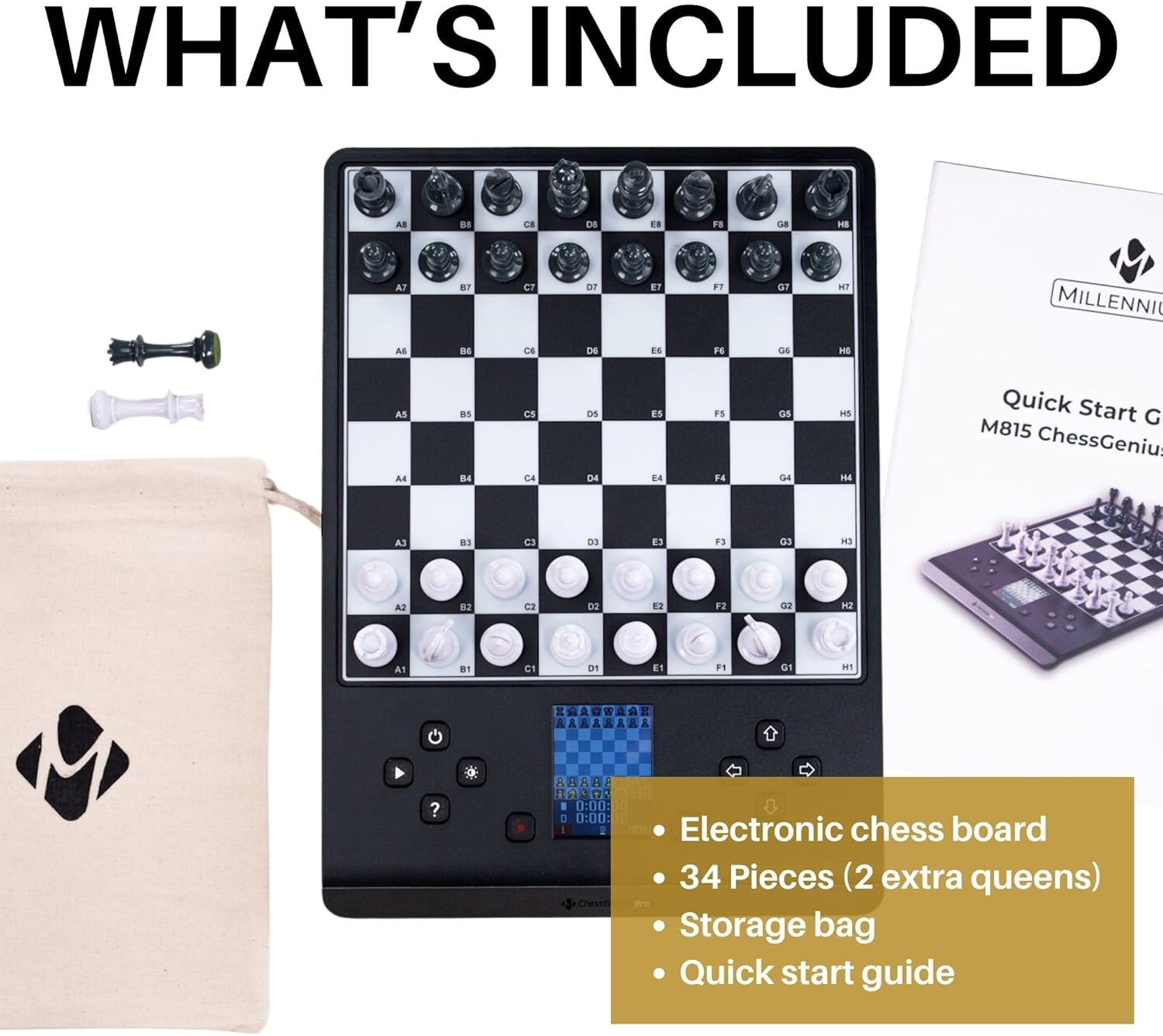
Figure 1: Included components of the ChessGenius PRO. The package contains the electronic chess board, a full set of chess pieces with two additional queens, a fabric storage bag for the pieces, and a quick start guide.
സജ്ജമാക്കുക
ഉപകരണം പവർ ചെയ്യുന്നു
The ChessGenius PRO can be powered by batteries for portability or an optional AC adapter for continuous play.
ബാറ്ററി ഇൻസ്റ്റാളേഷൻ
- Locate the battery compartment on the underside of the chess board.
- ബാറ്ററി കമ്പാർട്ട്മെൻ്റ് കവർ തുറക്കുക.
- Insert 4 x AA/LR06 batteries (not included), ensuring correct polarity (+/-).
- ബാറ്ററി കമ്പാർട്ട്മെൻ്റ് കവർ സുരക്ഷിതമായി അടയ്ക്കുക.
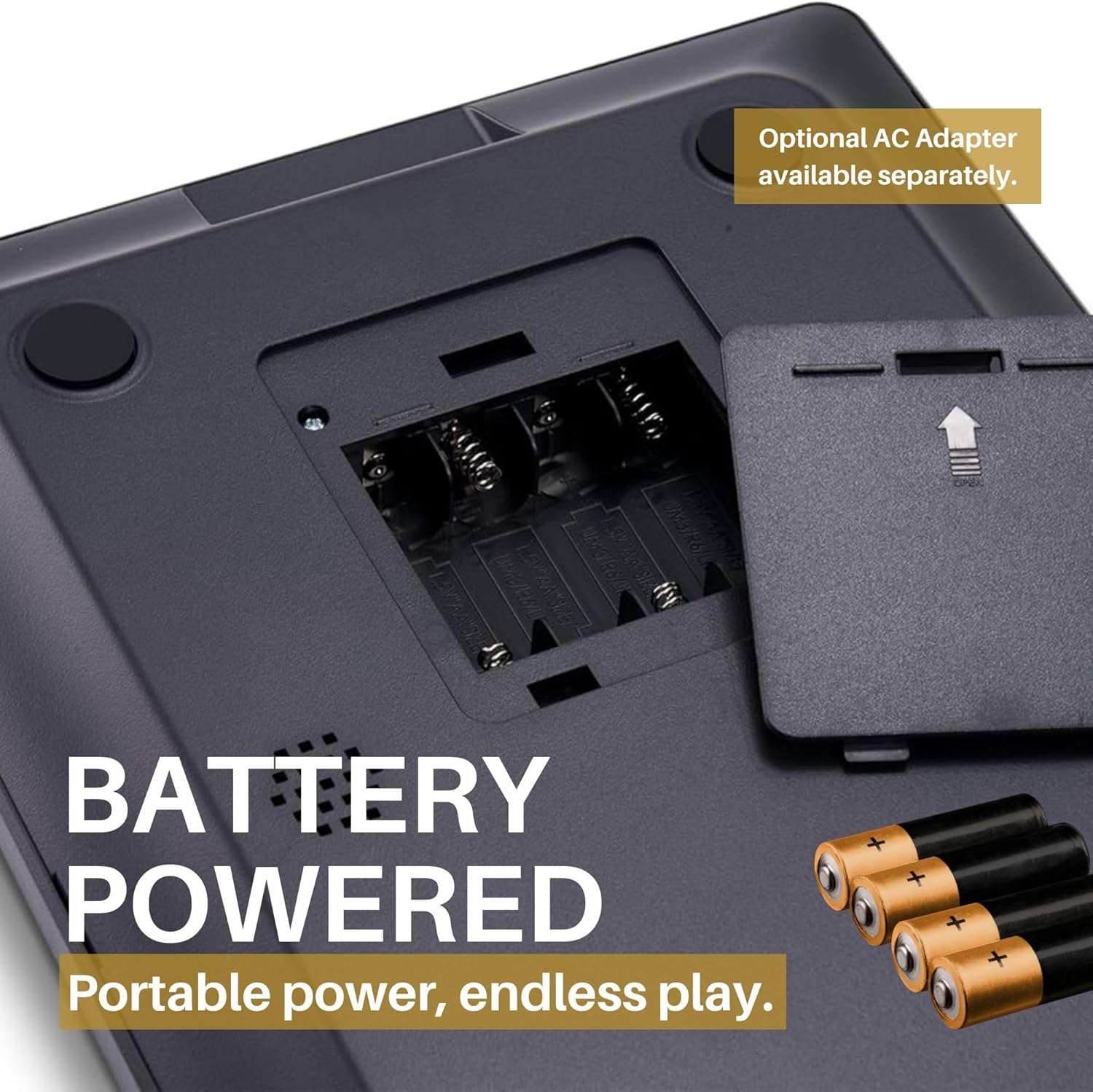
Figure 2: Battery compartment. The device requires four AA/LR06 batteries for operation, which are not included in the package. Ensure correct battery orientation during installation.
Using an AC Adapter (Optional)
An optional AC adapter can be purchased separately for direct power from a wall outlet. Connect the adapter to the designated port on the device.

Figure 3: Power flexibility. The ChessGenius PRO can be powered by 4 AA/LR06 batteries for portable use or via an optional AC adapter for home use.
Placing the Chess Pieces
Place the magnetic chess pieces on their starting positions on the board. The magnetic base ensures pieces remain stable during play, even when moving the board.

Figure 4: Magnetic pieces. The chess pieces are magnetic, ensuring they stay firmly in position on the board during play or transport.
പ്രവർത്തന നിർദ്ദേശങ്ങൾ
ഒരു ഗെയിം ആരംഭിക്കുന്നു
The intuitive menus and the dedicated PLAY button allow for quick game initiation. You can choose to play as White, Black, engage in a 2-player mode, or set up a game from a specific position.

Figure 5: Intuitive controls. The ChessGenius PRO features an intuitive menu system and a dedicated PLAY button for easy game setup and navigation.
ഡിസ്പ്ലേ മനസ്സിലാക്കുന്നു
The integrated LCD color display shows your moves, the current board state, and provides visual cues for various functions.

Figure 6: LCD color display. The display provides clear visual feedback on the game state and prompts for your next move.
Playing Against the Computer
The AI adapts to your playing level, offering a realistic training partner with a playing strength of up to 2200 ELO. You can adjust the difficulty to match your skill, from beginner to master.

Figure 7: Practice strategies. The ChessGenius PRO allows users to practice and develop their chess strategies against an adaptive AI opponent.
ടു-പ്ലെയർ മോഡ്
In two-player mode, the computer acts as an arbiter, ensuring adherence to chess rules. This is ideal for playing with a friend while still benefiting from the computer's rule enforcement.

Figure 8: Game modes. The ChessGenius PRO supports playing against the computer and a two-player mode where the computer enforces rules.
Features and Training Options
The ChessGenius PRO is equipped with various features to assist and train players:
- Move Suggestions: Receive hints for optimal moves.
- Bad Move Warnings: The computer alerts you to potentially poor moves, helping you learn from mistakes.
- Take-back Options: Undo moves to explore different strategies or correct errors.
- സഹായ ബട്ടൺ: Press the '?' button to get assistance or suggestions during a game.
- Opening Names Display: The screen can display the names of chess openings as they occur, aiding in learning opening theory.

Figure 9: Help function. The '?' button provides immediate assistance and suggestions during gameplay.

Figure 10: AI learning functions. The ChessGenius PRO acts as a chess trainer, providing warnings for bad moves, suggesting optimal moves, and displaying opening names to optimize playing technique.
മെയിൻ്റനൻസ്
To ensure the longevity and optimal performance of your ChessGenius PRO, follow these maintenance guidelines:
- വൃത്തിയാക്കൽ: Wipe the board and pieces with a soft, dry cloth. Avoid using abrasive cleaners or solvents.
- സംഭരണം: When not in use, store the chess pieces in the provided storage bag to prevent loss and damage. Keep the device in a cool, dry place away from direct sunlight and extreme temperatures.
- ബാറ്ററി കെയർ: If the device will not be used for an extended period, remove the batteries to prevent leakage and potential damage to the electronics.
ട്രബിൾഷൂട്ടിംഗ്
This section addresses common issues you might encounter with your ChessGenius PRO.
| പ്രശ്നം | സാധ്യമായ കാരണം | പരിഹാരം |
|---|---|---|
| ഉപകരണം ഓണാക്കില്ല. |
|
|
| Pieces do not register on the board. |
|
|
| ഡിസ്പ്ലേ മങ്ങിയതോ വായിക്കാൻ കഴിയാത്തതോ ആണ്. |
|
|
സ്പെസിഫിക്കേഷനുകൾ
| ബ്രാൻഡ് | മില്ലേനിയം |
| മോഡൽ | M815 ChessGenius Pro 2024 |
| ശുപാർശ ചെയ്യുന്ന പ്രായം | 3 years and up (Manufacturer recommended) |
| കളിക്കാരുടെ എണ്ണം | 2 |
| ഭാഷകൾ | Spanish, English, Polish, German, Portuguese, French, Italian |
| പവർ ഉറവിടം | 4 x AA/LR06 batteries (not included) or optional AC adapter |
| പ്രധാന മെറ്റീരിയൽ | പ്ലാസ്റ്റിക് |
| നിറം | കറുപ്പ് |
| ഉൽപ്പന്ന അളവുകൾ | 30L x 22W സെന്റീമീറ്റർ |
വാറൻ്റിയും പിന്തുണയും
MILLENNIUM products are designed for durability and performance. For any issues or inquiries, please refer to the following information:
- സ്പെയർ പാർട്സ് ലഭ്യത: വാങ്ങിയ തീയതി മുതൽ 1 വർഷത്തേക്ക് സ്പെയർ പാർട്സ് ലഭ്യമാണ്.
- ഉപഭോക്തൃ പിന്തുണ: For technical assistance or warranty claims, please contact MILLENNIUM customer support through their official webസൈറ്റ് അല്ലെങ്കിൽ ഉൽപ്പന്ന പാക്കേജിംഗിൽ നൽകിയിരിക്കുന്ന ബന്ധപ്പെടാനുള്ള വിവരങ്ങൾ.
ഔദ്യോഗിക ഉൽപ്പന്ന വീഡിയോകൾ
ഈ ഉൽപ്പന്നത്തിന്റെ ഔദ്യോഗിക വീഡിയോകൾ വിൽപ്പനക്കാരനിൽ നിന്ന് ഇപ്പോൾ ലഭ്യമല്ല.