
1. ആമുഖം
Thank you for choosing the FOREVER TWE-110 EARP Bluetooth Earbuds. These earbuds are designed to provide a high-quality audio experience with wireless freedom and intuitive controls. This manual will guide you through the setup, operation, and maintenance of your new earbuds.
2 സുരക്ഷാ വിവരങ്ങൾ
- ഇയർബഡുകളോ ചാർജിംഗ് കേസോ ഉയർന്ന താപനിലയിലോ ഈർപ്പത്തിലോ ദ്രാവകങ്ങളിലോ തുറന്നുകാട്ടരുത്.
- ഉപകരണം താഴെയിടുകയോ, അടിക്കുകയോ, വേർപെടുത്തുകയോ ചെയ്യുന്നത് ഒഴിവാക്കുക.
- കുട്ടികൾക്ക് ലഭ്യമാകാതെ സൂക്ഷിക്കുക.
- നൽകിയിരിക്കുന്ന ചാർജിംഗ് കേബിളോ സാക്ഷ്യപ്പെടുത്തിയ തത്തുല്യമായതോ മാത്രം ഉപയോഗിക്കുക.
- ഉയർന്ന ശബ്ദത്തിൽ ദീർഘനേരം കേൾക്കുന്നത് കേൾവിക്ക് കേടുപാടുകൾ വരുത്തിയേക്കാം. മിതമായ അളവിൽ ശബ്ദം ക്രമീകരിക്കുക.
3. പാക്കേജ് ഉള്ളടക്കം
നിങ്ങളുടെ പാക്കേജിൽ എല്ലാ ഇനങ്ങളും ഉണ്ടോ എന്ന് ദയവായി പരിശോധിക്കുക:
- FOREVER TWE-110 EARP Bluetooth Earbuds (Left and Right)
- ചാർജിംഗ് കേസ്
- യുഎസ്ബി ചാർജിംഗ് കേബിൾ
- ഉപയോക്തൃ മാനുവൽ
4. ഉൽപ്പന്നം കഴിഞ്ഞുview
Familiarize yourself with the components of your FOREVER TWE-110 EARP earbuds and charging case.
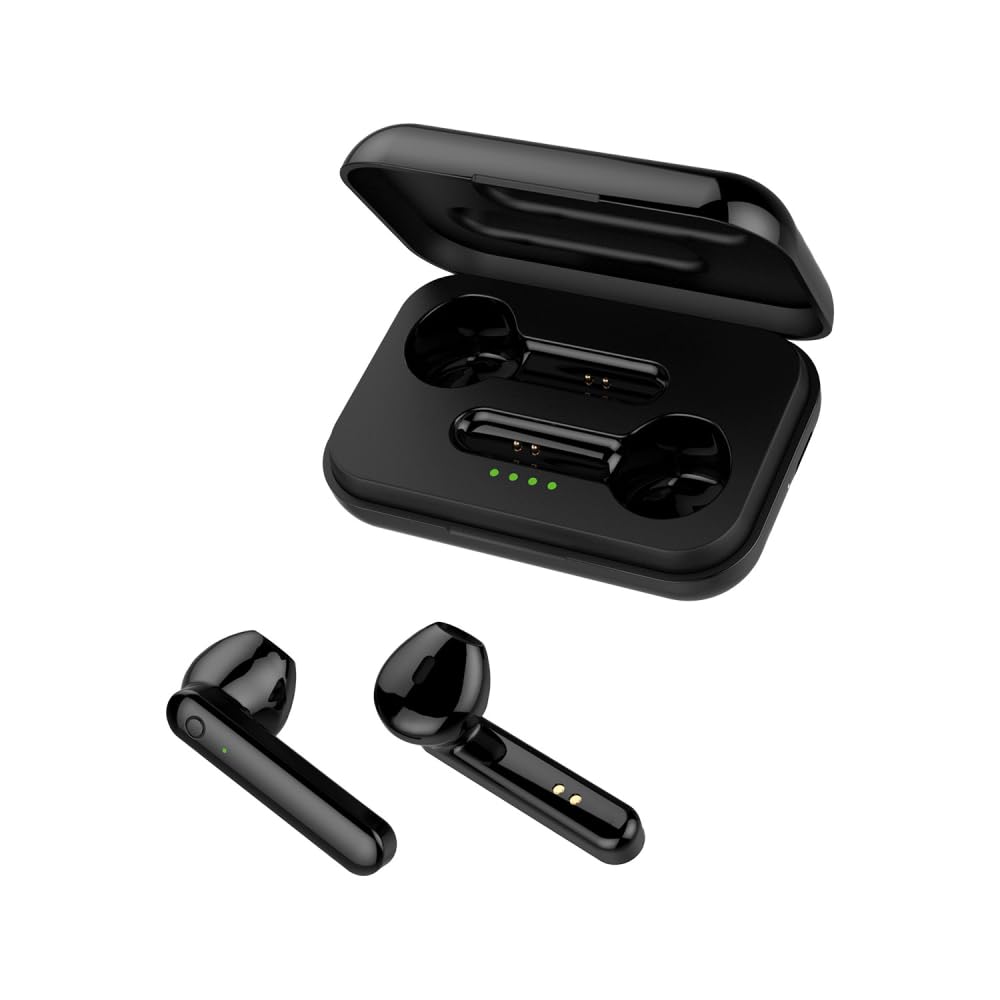
Image: FOREVER TWE-110 EARP Bluetooth Earbuds and Charging Case. This image displays the two black earbuds positioned above their matching black charging case, illustrating the complete product set.

Image: FOREVER TWE-110 EARP earbuds inside the open charging case, showing LED indicators. The image shows the black earbuds nestled in their open charging case, with small green LED lights visible, indicating charging status or battery level.

Image: Infographic highlighting features like sound quality, automatic pairing, 9-hour battery life, and LED indicators for FOREVER TWE-110 EARP. This graphic visually represents key features of the earbuds, including excellent sound quality, automatic power on/off and pairing, up to 9 hours of autonomy with the case, and LED battery level display.
5. സജ്ജീകരണം
5.1 ഇയർബഡുകളും കേസും ചാർജ് ചെയ്യുന്നു
ആദ്യമായി ഉപയോഗിക്കുന്നതിന് മുമ്പ്, ഇയർബഡുകളും ചാർജിംഗ് കേസും പൂർണ്ണമായും ചാർജ് ചെയ്യുക.
- ഇയർബഡുകൾ ചാർജിംഗ് കേസിൽ വയ്ക്കുക. അവ ശരിയായി സ്ഥാപിച്ചിട്ടുണ്ടെന്ന് ഉറപ്പാക്കുക.
- USB ചാർജിംഗ് കേബിൾ കേസിലെ ചാർജിംഗ് പോർട്ടിലേക്കും ഒരു USB പവർ സ്രോതസ്സിലേക്കും (ഉദാ: കമ്പ്യൂട്ടർ, വാൾ അഡാപ്റ്റർ) ബന്ധിപ്പിക്കുക.
- The LED indicators on the case will show the charging status. Once fully charged, the indicators may turn solid or turn off, depending on the model.
- Charging time is approximately 3 hours for a full charge of the case and earbuds.
5.2 ഒരു ബ്ലൂടൂത്ത് ഉപകരണവുമായി ജോടിയാക്കൽ
The earbuds use Bluetooth 5.1 for stable wireless connectivity.
- ചാർജിംഗ് കേസ് തുറക്കുക. ഇയർബഡുകൾ സ്വയമേവ ഓണാകുകയും ജോടിയാക്കൽ മോഡിലേക്ക് മാറുകയും ചെയ്യും. ഒരു ഇയർബഡിലെ LED ഇൻഡിക്കേറ്റർ മിന്നിമറയും, അത് ജോടിയാക്കാൻ തയ്യാറാണെന്ന് സൂചിപ്പിക്കുന്നു.
- നിങ്ങളുടെ ഉപകരണത്തിൽ (സ്മാർട്ട്ഫോൺ, ടാബ്ലെറ്റ്, ലാപ്ടോപ്പ്), ബ്ലൂടൂത്ത് പ്രവർത്തനക്ഷമമാക്കുക.
- ഇതിനായി തിരയുക available Bluetooth devices. You should see "TWE-110" in the list.
- Select "TWE-110" to connect. Once connected, the LED indicator on the earbud will stop flashing.
- ഉപകരണത്തിൽ ബ്ലൂടൂത്ത് പ്രവർത്തനക്ഷമമാക്കിയിട്ടുണ്ടെങ്കിൽ, കേസിൽ നിന്ന് പുറത്തെടുക്കുമ്പോൾ ഇയർബഡുകൾ അവസാനം ജോടിയാക്കിയ ഉപകരണവുമായി യാന്ത്രികമായി വീണ്ടും കണക്റ്റുചെയ്യും.

Image: Smartphone displaying Bluetooth settings connected to 'TWE-110', next to a pink FOREVER TWE-110 EARP charging case, illustrating Bluetooth 5.1 connectivity. This image shows a smartphone screen with Bluetooth settings open, indicating a successful connection to 'TWE-110', positioned beside an open pink charging case with earbuds inside.
6. പ്രവർത്തന നിർദ്ദേശങ്ങൾ
6.1 പവർ ഓൺ/ഓഫ്
- പവർ ഓൺ: ചാർജിംഗ് കെയ്സ് തുറക്കുക, ഇയർബഡുകൾ സ്വയമേവ ഓണാകും.
- പവർ ഓഫ്: ഇയർബഡുകൾ തിരികെ ചാർജിംഗ് കെയ്സിലേക്ക് വയ്ക്കുക, ലിഡ് അടയ്ക്കുക. അവ യാന്ത്രികമായി ഓഫാകുകയും ചാർജ് ചെയ്യാൻ തുടങ്ങുകയും ചെയ്യും.
6.2 ടച്ച് നിയന്ത്രണങ്ങൾ
The TWE-110 EARP earbuds feature intuitive touch controls on each earbud.
| ഫംഗ്ഷൻ | ആക്ഷൻ |
|---|---|
| സംഗീതം പ്ലേ ചെയ്യുക/താൽക്കാലികമായി നിർത്തുക | ഏതെങ്കിലും ഇയർബഡിൽ ഒറ്റ ടാപ്പ് ചെയ്യുക |
| അടുത്ത ട്രാക്ക് | വലതുവശത്തെ ഇയർബഡിൽ രണ്ടുതവണ ടാപ്പ് ചെയ്യുക |
| മുമ്പത്തെ ട്രാക്ക് | ഇടതുവശത്തെ ഇയർബഡിൽ രണ്ടുതവണ ടാപ്പ് ചെയ്യുക |
| ഉത്തരം / കോൾ അവസാനിപ്പിക്കുക | ഏതെങ്കിലും ഇയർബഡിൽ ഒറ്റ ടാപ്പ് ചെയ്യുക |
| കോൾ നിരസിക്കുക | ഏതെങ്കിലും ഇയർബഡിൽ 2 സെക്കൻഡ് അമർത്തിപ്പിടിക്കുക |
| വോയ്സ് അസിസ്റ്റൻ്റ് സജീവമാക്കുക | ഇയർബഡുകളിലൊന്നിൽ മൂന്ന് തവണ ടാപ്പ് ചെയ്യുക |

Image: Black FOREVER TWE-110 EARP earbuds and charging case, with green sound waves, indicating hands-free calling. This image features the black earbuds and their case, with visual cues of sound waves emanating from the earbuds, symbolizing their hands-free calling capability.
7. പരിപാലനം
7.1 വൃത്തിയാക്കൽ
- മൃദുവായതും ഉണങ്ങിയതും ലിന്റ് രഹിതവുമായ ഒരു തുണി ഉപയോഗിച്ച് ഇയർബഡുകളും ചാർജിംഗ് കെയ്സും സൌമ്യമായി തുടയ്ക്കുക.
- അബ്രാസീവ് ക്ലീനറുകൾ, ആൽക്കഹോൾ, കെമിക്കൽ ലായകങ്ങൾ എന്നിവ ഉപയോഗിക്കരുത്.
- ചാർജിംഗ് കോൺടാക്റ്റുകൾ വൃത്തിയുള്ളതും അവശിഷ്ടങ്ങൾ ഇല്ലാത്തതുമാണെന്ന് ഉറപ്പാക്കുക.
7.2 സംഭരണം
When not in use, store the earbuds in their charging case to protect them and keep them charged. Store in a cool, dry place away from direct sunlight.
8. പ്രശ്നപരിഹാരം
നിങ്ങൾക്ക് പ്രശ്നങ്ങൾ നേരിടുകയാണെങ്കിൽ, ഇനിപ്പറയുന്ന പൊതുവായ പരിഹാരങ്ങൾ പരിശോധിക്കുക:
- ഇയർബഡുകൾ ജോടിയാക്കുന്നില്ല: Ensure both earbuds are out of the case and in pairing mode. Turn off and on your device's Bluetooth. Try resetting the earbuds (refer to manufacturer's webആവശ്യമെങ്കിൽ നിർദ്ദിഷ്ട റീസെറ്റ് നിർദ്ദേശങ്ങൾക്കായി സൈറ്റ്).
- ശബ്ദമില്ല: Check the volume on your device and on the earbuds. Ensure the earbuds are properly connected to your device.
- ചാർജിംഗ് പ്രശ്നങ്ങൾ: ചാർജിംഗ് കേബിൾ സുരക്ഷിതമായി ബന്ധിപ്പിച്ചിട്ടുണ്ടെന്നും പവർ സ്രോതസ്സ് സജീവമാണെന്നും ഉറപ്പാക്കുക. ഇയർബഡുകളിലെയും കെയ്സിലെയും ചാർജിംഗ് കോൺടാക്റ്റുകൾ വൃത്തിയാക്കുക.
- ഇടവിട്ടുള്ള കണക്ഷൻ: Ensure there are no obstructions between the earbuds and your device. Move closer to your device. Avoid environments with strong electromagnetic interference.
9 സ്പെസിഫിക്കേഷനുകൾ
| ഫീച്ചർ | വിശദാംശങ്ങൾ |
|---|---|
| മോഡലിൻ്റെ പേര് | TWE-110 |
| ബ്രാൻഡ് | എന്നേക്കും |
| കണക്റ്റിവിറ്റി ടെക്നോളജി | വയർലെസ്സ് (ബ്ലൂടൂത്ത് 5.1) |
| ചെവി പ്ലേസ്മെൻ്റ് | ഇൻ-ഇയർ |
| നിയന്ത്രണ രീതി | സ്പർശിക്കുക |
| പ്രത്യേക സവിശേഷതകൾ | Touch Control, Built-in Microphone |
| റീചാർജ് ചെയ്യാവുന്ന ബാറ്ററി | Yes (1 Lithium-ion included) |
| ചാർജിംഗ് സമയം | ഏകദേശം 3 മണിക്കൂർ |
| Operating Time (Earbuds) | 3 മണിക്കൂർ വരെ |
| Operating Time (with Charging Case) | 9 മണിക്കൂർ വരെ |
| അനുയോജ്യമായ ഉപകരണങ്ങൾ | Smart Speaker, Motorcycle, Computer, Laptop, Car Audio System, Tablet, Mobile Phone, Television |
| മെറ്റീരിയൽ | Faux Leather (referring to case finish or accents) |
10. വാറൻ്റിയും പിന്തുണയും
10.1 വാറൻ്റി വിവരങ്ങൾ
FOREVER products are covered by a manufacturer's warranty. Please refer to the warranty card included in your package or visit the official FOREVER webവിശദമായ വാറന്റി നിബന്ധനകൾക്കും വ്യവസ്ഥകൾക്കും സൈറ്റ് സന്ദർശിക്കുക. വാറന്റി ക്ലെയിമുകൾക്കായി നിങ്ങളുടെ വാങ്ങലിന്റെ തെളിവ് സൂക്ഷിക്കുക.
10.2 ഉപഭോക്തൃ പിന്തുണ
For technical assistance, troubleshooting, or product inquiries, please contact FOREVER customer support through their official webസൈറ്റ് അല്ലെങ്കിൽ നിങ്ങളുടെ ഉൽപ്പന്ന പാക്കേജിംഗിൽ നൽകിയിരിക്കുന്ന ബന്ധപ്പെടാനുള്ള വിവരങ്ങൾ.