
1. ആമുഖം
The SMARTGEN HGM410N Generator Controller is an advanced unit designed for single genset automation and monitoring. It integrates digital, intelligent, and network technologies to provide comprehensive control over generator sets. This controller facilitates automatic start/stop, precise data measurement, robust alarm protection, and remote control capabilities. With its 132x64 LCD display and multi-language interface, the HGM410N offers a reliable and user-friendly solution for various automatic genset control systems.
2 പ്രധാന സവിശേഷതകൾ
- Control & Protection: Provides automatic start/stop functionality for the genset and ATS (Auto Transfer Switch) control with comprehensive fault indication and protection.
- ഡിസ്പ്ലേ: Features a 132x64 LCD with backlight, offering selectable language interfaces including Chinese, English, Spanish, Turkish, Russian, and French. Operation is managed via push-buttons.
- ഈട്: Equipped with a silicon panel and pushbuttons, ensuring reliable operation in both high and low-temperature environments.
- സിസ്റ്റം അനുയോജ്യത: Compatible with 3-phase 4-wire, 3-phase 3-wire, single phase 2-wire, and 2-phase 3-wire systems, supporting voltage 120/240V and frequency 50/60Hz.
- Data Measurement: Collects and displays critical parameters including 3-phase voltage, current, power, and frequency for both the generator and mains.
3. സജ്ജീകരണവും ഇൻസ്റ്റാളേഷനും
Proper installation is crucial for the safe and effective operation of the HGM410N controller. Ensure all power sources are disconnected before beginning installation.
3.1 ഫിസിക്കൽ ഇൻസ്റ്റലേഷൻ
Mount the controller in a secure, dry location, protected from excessive vibration and extreme temperatures. Ensure adequate ventilation around the unit.
3.2 ഇലക്ട്രിക്കൽ കണക്ഷനുകൾ
Refer to the wiring diagram below for detailed connection instructions. All wiring should be performed by qualified personnel in accordance with local electrical codes and standards. Pay close attention to power supply, generator voltage/current inputs, auxiliary inputs/outputs, and sensor connections.

പിൻഭാഗം view of the SmartGen HGM410N Generator Controller showing wiring terminals and USB port. This view highlights the various terminal blocks for electrical connections, including inputs for sensors, outputs for control signals, and the power supply. A USB port is also visible for PC connectivity and parameter configuration.
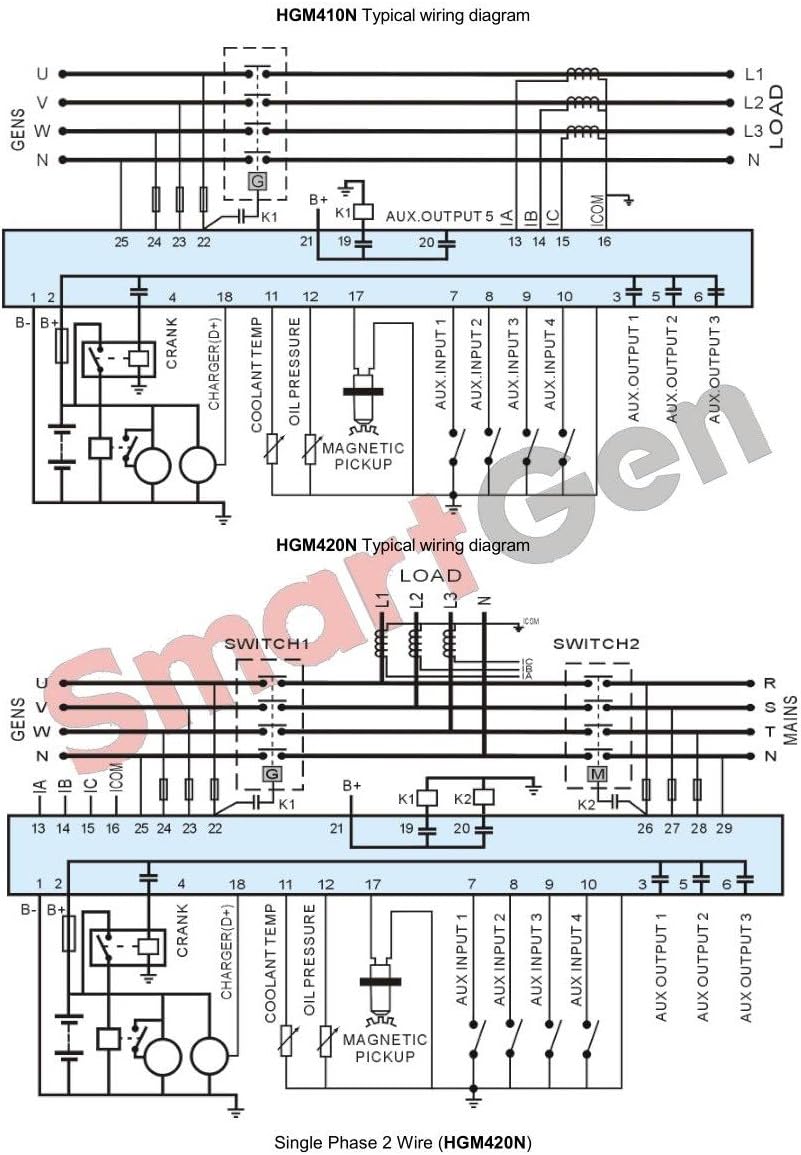
Typical wiring diagram for SmartGen HGM410N and HGM420N generator controllers. This detailed diagram illustrates the typical wiring connections for the HGM410N and HGM420N controllers. It includes connections for the generator, mains AC voltage, auxiliary inputs and outputs, magnetic pickup, oil pressure, coolant temperature sensors, and battery charging. This diagram is essential for proper installation and integration into a genset system.
4. പ്രവർത്തന നിർദ്ദേശങ്ങൾ
The HGM410N controller offers intuitive operation through its front panel buttons and LCD display.

ഫ്രണ്ട് view of the SmartGen HGM410N Generator Controller with LCD display and control buttons. This image shows the front panel of the HGM410N controller, featuring a 132x64 LCD screen that displays operational data such as voltage, frequency, power, and RPM. Below the screen are navigation buttons, a settings button, and dedicated buttons for Stop, Auto, Manual, and Start functions.
4.1 പവർ ഓൺ/ഓഫ്
- പവർ ഓൺ: Ensure the controller is correctly wired to the battery supply. The LCD will illuminate upon power application.
- പവർ ഓഫ്: Disconnect the battery supply.
4.2 ഓപ്പറേറ്റിംഗ് മോഡുകൾ
- മാനുവൽ മോഡ്: അമർത്തുക മാനുവൽ button. In this mode, the generator can be started and stopped manually using the ആരംഭിക്കുക ഒപ്പം നിർത്തുക ബട്ടണുകൾ.
- യാന്ത്രിക മോഡ്: അമർത്തുക ഓട്ടോ button. The controller will automatically start and stop the generator based on configured parameters (e.g., remote start signal, mains failure).
- സ്റ്റോപ്പ് മോഡ്: അമർത്തുക നിർത്തുക button. This will stop the generator and reset any alarms.
4.3 ഡിസ്പ്ലേ നാവിഗേറ്റ് ചെയ്യൽ
ഉപയോഗിക്കുക Up ഒപ്പം താഴേക്ക് arrow buttons to scroll through various measurement pages on the LCD, displaying parameters such as voltage, current, frequency, power, and engine status.
4.4 പാരാമീറ്റർ കോൺഫിഗറേഷൻ
Parameters can be configured directly from the front panel using the ക്രമീകരണങ്ങൾ button and navigation keys, or via a PC connected through the USB interface. Refer to the detailed programming manual for specific parameter settings.
5. പരിപാലനം
Regular maintenance ensures the longevity and reliable operation of your HGM410N controller.
- വൃത്തിയാക്കൽ: Periodically clean the controller's front panel with a soft, dry cloth. Avoid using abrasive cleaners or solvents.
- പരിസ്ഥിതി പരിശോധന: Ensure the operating environment remains within specified temperature and humidity ranges. Protect the unit from direct sunlight, excessive dust, and moisture.
- വയറിംഗ് പരിശോധന: Annually inspect all wiring connections for tightness and signs of corrosion or damage. Re-tighten connections as necessary.
- ഫേംവെയർ അപ്ഡേറ്റുകൾ: നിർമ്മാതാവ് പരിശോധിക്കുക webപ്രകടനം മെച്ചപ്പെടുത്തുന്നതോ പുതിയ സവിശേഷതകൾ ചേർക്കുന്നതോ ആയ ലഭ്യമായ ഏതെങ്കിലും ഫേംവെയർ അപ്ഡേറ്റുകൾക്കായുള്ള സൈറ്റ്.
6. പ്രശ്നപരിഹാരം
പൊതുവായ പ്രശ്നങ്ങൾക്കുള്ള മാർഗ്ഗനിർദ്ദേശം ഈ വിഭാഗം നൽകുന്നു. സങ്കീർണ്ണമായ പ്രശ്നങ്ങൾക്ക്, സാങ്കേതിക പിന്തുണയുമായി ബന്ധപ്പെടുക.
- കൺട്രോളർ ഓണാക്കുന്നില്ല: Check the battery connections and ensure the power supply voltage is within the specified range. Verify fuse integrity.
- Generator Fails to Start: Confirm the controller is in Manual or Auto mode. Check for active alarms on the LCD. Verify fuel level, battery charge, and engine stop solenoid operation. Review wiring connections according to the diagram.
- തെറ്റായ വായനകൾ: Ensure all sensor and CT (Current Transformer) connections are correct and securely fastened. Verify sensor types and calibration settings in the controller's parameters.
- അലാറം സൂചന: When an alarm occurs, the LCD will display an alarm message. Consult the detailed product manual for a complete list of alarm codes and their corresponding troubleshooting steps. Address the root cause of the alarm before clearing it.
7 സ്പെസിഫിക്കേഷനുകൾ
| പരാമീറ്റർ | മൂല്യം |
|---|---|
| ബ്രാൻഡ് | SMARTGEN |
| മോഡൽ | HGM410N |
| ഇനത്തിൻ്റെ ഭാരം | 0.26 കിലോഗ്രാം |
| യു.പി.സി | 636601331498 |
| നിർമ്മാതാവ് | SMARTGEN |
| പ്രദർശിപ്പിക്കുക | 132x64 LCD with backlight |
| സിസ്റ്റം അനുയോജ്യത | 3-phase 4-wire, 3-phase 3-wire, single phase 2-wire, 2-phase 3-wire (120/240V, 50/60Hz) |
8. വാറൻ്റിയും പിന്തുണയും
For warranty information, technical support, or service inquiries, please contact SMARTGEN or your authorized distributor. Keep your purchase receipt and product model number (HGM410N) available when contacting support.
കൂടുതൽ വിവരങ്ങളും ബന്ധപ്പെടാനുള്ള വിശദാംശങ്ങളും ഔദ്യോഗിക വെബ്സൈറ്റിൽ ലഭ്യമാണ്. SmartGen-America webസൈറ്റ്.