
ആമുഖം
This manual provides comprehensive instructions for the setup, operation, maintenance, and troubleshooting of your HEXGAMING ULTRA ONE Wireless Controller. This controller is designed for use with Xbox Series X|S, Xbox One, and Windows 7/8/10, offering advanced features such as remappable back buttons, digital hair triggers, and interchangeable thumbsticks.
1. സജ്ജീകരണം
1.1 പാക്കേജ് ഉള്ളടക്കം
- HEXGAMING ULTRA ONE Wireless Controller
- 6-in-1 Interchangeable Thumbsticks (various heights and designs)
- ഉപയോക്തൃ മാനുവൽ
കുറിപ്പ്: The controller does not include a USB cable or batteries. Batteries (AA) are required for wireless operation.

Image: Contents of the HEXGAMING ULTRA ONE Controller package, including the controller, interchangeable thumbsticks, and the product box.
1.2 കൺട്രോളർ ഓവർview
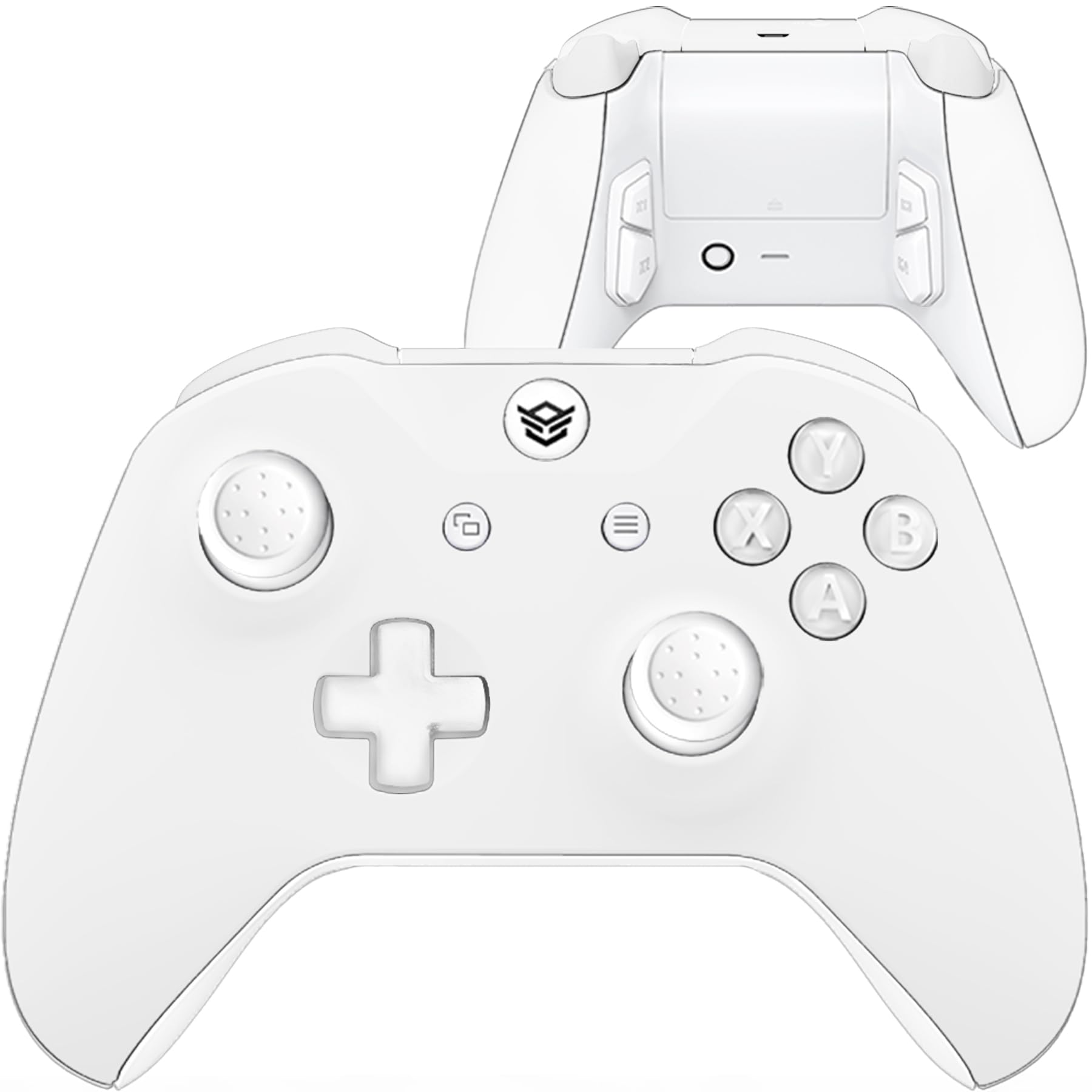
ചിത്രം: മുൻഭാഗം view of the HEXGAMING ULTRA ONE Wireless Controller.

ചിത്രം: പിന്നിലേക്ക് view of the HEXGAMING ULTRA ONE Wireless Controller, highlighting the remappable back buttons.
1.3 കൺട്രോളർ ബന്ധിപ്പിക്കുന്നു
The HEXGAMING ULTRA ONE controller supports both wireless and wired connections.
Wireless Connection (Xbox Consoles & PC)
- Insert fresh AA batteries into the controller's battery compartment.
- Press and hold the Xbox button on the controller to turn it on.
- Press the Pair button on your Xbox console or PC wireless adapter.
- Press and hold the Pair button on the top of the controller until the Xbox button flashes rapidly.
- Once the Xbox button on the controller glows solid, the connection is established.
Wired Connection (PC)
Connect a compatible USB-C cable (not included) from the controller to your PC. The controller will automatically be recognized and can be used for gameplay.
2. പ്രവർത്തന നിർദ്ദേശങ്ങൾ
2.1 Remappable Back Buttons
The controller features four remappable back buttons (P1, P2, P3, P4) and supports up to 6 different remapping profileഎസ്. ഈ പ്രോfiles allow you to assign various controller inputs to the back buttons for enhanced gameplay flexibility.
Available Mapping Options:
- എ, ബി, എക്സ്, വൈ ബട്ടണുകൾ
- R3 (Right Stick Click), L3 (Left Stick Click)
- UP, DOWN, LEFT, RIGHT on the D-pad
- LB (Left Bumper), RB (Right Bumper)
- LT (Left Trigger), RT (Right Trigger)
Refer to the official HEXGAMING guide at hexgaming.com/guide for detailed instructions on how to set up and switch between remapping profiles.

Image: Diagram showing the remappable back buttons and profile ഇൻഡിക്കേറ്റർ ലൈറ്റ്.
2.2 Interchangeable Thumbsticks
The controller includes a 6-in-1 interchangeable thumbstick system, allowing you to customize your control experience. This system offers 3 different heights and 2 ergonomic thumb grip designs (domed or concave).
Thumbstick Types:
- Concave Regular: Designed for quicker movement.
- Concave Long: Provides higher accuracy.
- Domed Medium: Offers a balanced feel.
- Domed Long: For extended reach and precision.
To change a thumbstick, gently pull the current thumbstick upwards to remove it, then align and push down the desired thumbstick until it clicks into place.

Image: Available interchangeable thumbstick options.
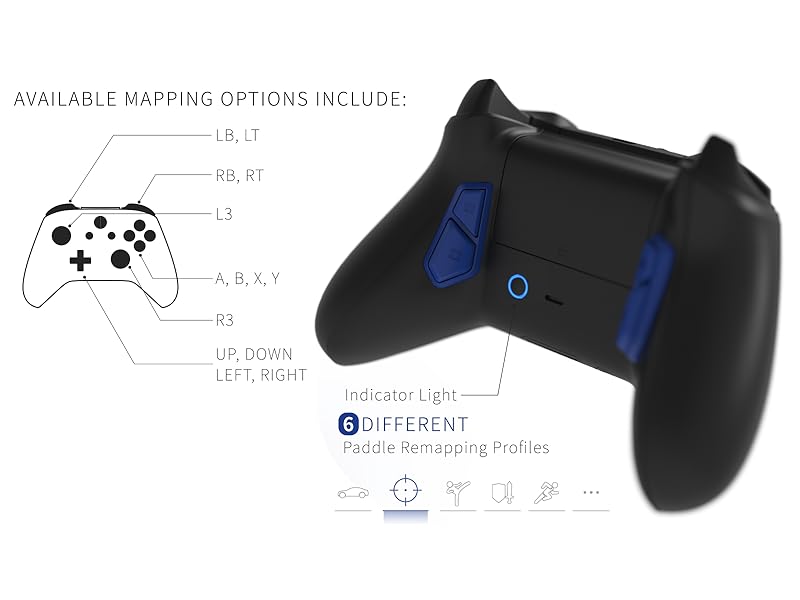
Image: Comparison of concave regular and concave long thumbsticks.
2.3 Digital Trigger Mechanisms (Hair Triggers)
The ULTRA ONE controller features digital trigger mechanisms that reduce the triggers' active distance to approximately 1.5mm. This allows for quicker response times in games where rapid trigger presses are crucial.
കുറിപ്പ്: Due to the reduced travel distance, these digital triggers may not be ideal for games that require analog trigger input, such as some racing games where partial trigger presses control acceleration.

Image: Illustration of the 1.5mm active distance for digital triggers.
3. പരിപാലനം
3.1 ക്ലീനിംഗ് നിർദ്ദേശങ്ങൾ
To maintain the appearance and functionality of your controller, follow these cleaning guidelines:
- Clean the plastic surfaces with a wipe dampened with less than 70% alcohol.
- After cleaning, place the controller in a well-ventilated area to dry completely.
- ചെയ്യരുത് spray water or alcohol directly onto the product surface.
- ചെയ്യരുത് use any other organic solvents for cleaning, as they may damage the controller's finish.

Image: Visual guide for cleaning plastic products.
4. പ്രശ്നപരിഹാരം
4.1 കണക്ഷൻ പ്രശ്നങ്ങൾ
- No Power/Not Connecting: Ensure fresh AA batteries are correctly inserted or connect the controller via a USB-C cable.
- ഇടവിട്ടുള്ള കണക്ഷൻ: Try re-pairing the controller with your console or PC. Ensure there are no significant obstructions or sources of wireless interference between the controller and the receiver.
- PC Connection Problems: Verify that your PC's Bluetooth or wireless adapter drivers are up to date. Try connecting with a different USB port or cable.
4.2 Button or Trigger Malfunctions
- Sticking Buttons/Triggers: Check for any visible debris or foreign objects around the buttons or triggers. Gently clean the area as per the maintenance instructions.
- Unresponsive Input: Ensure the controller is properly connected and powered. If using remappable buttons, verify the profile ക്രമീകരണങ്ങൾ.
If troubleshooting steps do not resolve the issue, please contact HEXGAMING customer support for further assistance.
5 സ്പെസിഫിക്കേഷനുകൾ
| മോഡലിൻ്റെ പേര് | ULTRA ONE Wireless Controller |
| ASIN | B0CGRJ33FV |
| അനുയോജ്യത | Xbox Series X|S, Xbox One, Windows 7/8/10 |
| ഉൽപ്പന്ന അളവുകൾ | 6.97 x 6.89 x 2.87 ഇഞ്ച് |
| ഇനത്തിൻ്റെ ഭാരം | 8.5 ഔൺസ് |
| നിർമ്മാതാവ് | ഹെക്സ് ഗെയിമിംഗ് |
| ആദ്യ തീയതി ലഭ്യമാണ് | ഓഗസ്റ്റ് 28, 2023 |
6. വാറൻ്റി വിവരങ്ങൾ
The HEXGAMING ULTRA ONE Wireless Controller is covered by a manufacturer's warranty. For specific details regarding warranty duration, coverage, and claims process, please refer to the official HEXGAMING webസൈറ്റിൽ പ്രവേശിക്കുക അല്ലെങ്കിൽ അവരുടെ ഉപഭോക്തൃ പിന്തുണയുമായി നേരിട്ട് ബന്ധപ്പെടുക.
Extended protection plans may be available for purchase separately from various retailers. These plans are distinct from the manufacturer's warranty.
7. പിന്തുണ
For additional assistance, frequently asked questions, and video guides, please visit the official HEXGAMING support resources:
- Knowledge Base and Video Guides: hexgaming.com/guide
- പതിവായി ചോദിക്കുന്ന ചോദ്യങ്ങൾ (FAQ): hexgaming.com/faq
You can also reach out to HEXGAMING customer service through their webവ്യക്തിഗതമാക്കിയ പിന്തുണയ്ക്കുള്ള സൈറ്റ്.