
DYL-CHX
User Manual: Aligator S5550 Duo Phone Case with Tempered Glass Screen Protector
Model: DYL-CHX
1. ഉൽപ്പന്നം കഴിഞ്ഞുview
This user manual provides instructions for the DYL-CHX phone case, designed for the ALIGATOR S5550 Duo, which includes a tempered glass screen protector. The case offers robust protection with a combination of hard PC and soft silicone, featuring shock-absorbing airbags and a versatile ring support.

ചിത്രം 1: ഓവർview of the DYL-CHX phone case, including the integrated ring stand and the accompanying tempered glass screen protector.
2. എന്താണ് ഉൾപ്പെടുത്തിയിരിക്കുന്നത്
പാക്കേജ് തുറക്കുമ്പോൾ, എല്ലാ ഘടകങ്ങളും അവിടെ ഉണ്ടെന്ന് ഉറപ്പാക്കുക:
- 1 x DYL-CHX Phone Case for ALIGATOR S5550 Duo
- 1 x ടെമ്പർഡ് ഗ്ലാസ് സ്ക്രീൻ പ്രൊട്ടക്ടർ
Note: The adhesive metal finger ring support is integrated with the case.
3. ഇൻസ്റ്റാളേഷൻ ഗൈഡ്
3.1. Installing the Phone Case
- Ensure your ALIGATOR S5550 Duo phone is clean and free of dust or debris.
- കേസിന്റെ മൃദുവായ സിലിക്കൺ ഫ്രെയിമുമായി ഫോൺ സൌമ്യമായി വിന്യസിക്കുക.
- Press the phone firmly into the case, ensuring all corners and edges are securely seated within the frame. The flexible silicone will allow for a snug fit.
- എല്ലാ പോർട്ടുകളും, ബട്ടണുകളും, ക്യാമറ കട്ടൗട്ടുകളും നിങ്ങളുടെ ഫോണുമായി ശരിയായി വിന്യസിച്ചിട്ടുണ്ടെന്ന് ഉറപ്പാക്കുക.
3.2. Installing the Tempered Glass Screen Protector
For optimal adhesion and clarity, follow these steps carefully:
- സ്ക്രീൻ വൃത്തിയാക്കുക: Use a microfiber cloth to thoroughly clean your phone's screen, removing all dust, fingerprints, and smudges. Ensure the screen is completely dry.
- പ്രൊട്ടക്ടർ വിന്യസിക്കുക: Carefully align the tempered glass screen protector with your phone's screen. Pay attention to the cutouts for the speaker, camera, and home button (if applicable).
- പ്രയോഗിക്കുക: Once aligned, gently lower the protector onto the screen. It will begin to adhere automatically.
- കുമിളകൾ നീക്കം ചെയ്യുക: If any air bubbles appear, gently push them towards the edges of the screen using a soft cloth or a credit card wrapped in a cloth.

Figure 2: Key features of the tempered glass screen protector, including 9H hardness, perfect adhesion, shatterproof design, case compatibility, 99.9% super transparency, and anti-fingerprint properties.

Figure 3: Illustration demonstrating the scratch-proof capabilities of the tempered glass screen protector against sharp objects.
4. Key Features and Operating Instructions
4.1. Dual-Layer Protection
The DYL-CHX case features a 2-in-1 design combining a hard PC (Polycarbonate) back panel with a soft silicone frame. This construction provides robust protection against drops and impacts.

Figure 4: Depiction of the case's shockproof design, highlighting the four-corner thickening and integrated shock airbags for enhanced impact absorption.
4.2. Silver Reflective Plating Style
The case incorporates a silver reflective plating style on its back, which offers different visual effects depending on the viewing angle. The back panel is constructed with four layers: a solid PC base, an ultra-high definition pattern layer, a special process layer, and a clear, scratch-resistant surface layer, providing a frosted, delicate, and fingerprint-free feel.

ചിത്രം 5: ക്ലോസപ്പ് view illustrating the silver reflective plating style and the multi-layered construction of the case's back panel.
4.3. Integrated Ring Support
The case features an adhesive metal finger ring support that can be rotated 360 degrees. This ring serves multiple functions:
- സുരക്ഷിതമായ പിടി: Insert your finger through the ring for a more secure hold on your phone, reducing the risk of accidental drops.
- കിക്ക്സ്റ്റാൻഡ് ഫംഗ്ഷൻ: Rotate the ring to prop up your phone in landscape or portrait orientation for hands-free viewing of videos or video calls.
- ഒരു കൈ പ്രവർത്തനം: The ring allows for easier reach across the screen, improving one-handed usability.
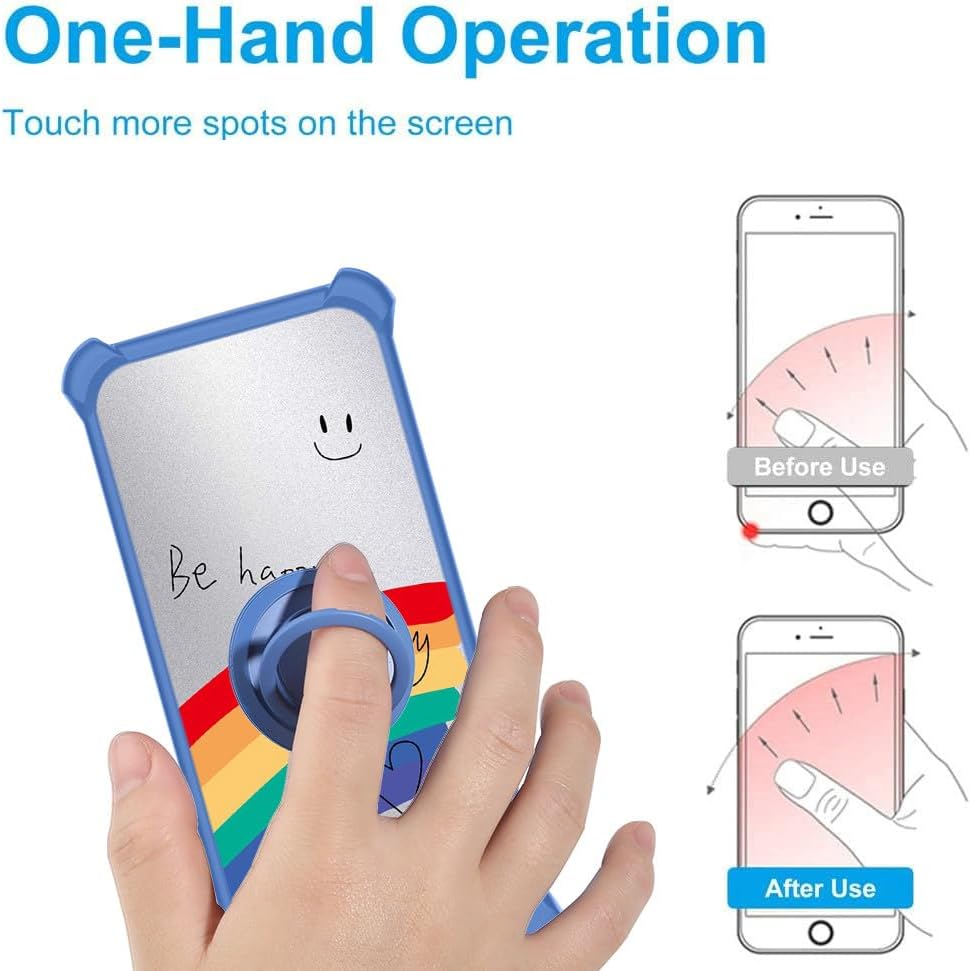
Figure 6: Demonstration of how the integrated ring support facilitates comfortable one-hand operation and extended screen reach.
4.4. Magnetic Car Mount Compatibility
The metal ring on the back of the case is designed to be compatible with magnetic car mounts. Simply attach your phone (with the case) to a magnetic car mount for convenient navigation or hands-free calling while driving.
പ്രധാന കുറിപ്പ്: This product does not include a magnetic car mount. Wireless charging is not supported when using the case with the integrated metal ring.

Figure 7: Illustration of the case's compatibility with magnetic car mounts, utilizing the metal ring for secure attachment.
5. പരിചരണവും പരിപാലനവും
- കേസ് വൃത്തിയാക്കൽ: കേസ് പതിവായി മൃദുവായ, ഡി-ടൈപ്പ് ഉപയോഗിച്ച് തുടയ്ക്കുക.amp cloth to remove dust and smudges. For stubborn dirt, a mild soap solution can be used, followed by wiping with a clean, damp cloth and air drying.
- സ്ക്രീൻ പ്രൊട്ടക്ടർ വൃത്തിയാക്കൽ: Use a microfiber cloth to clean the tempered glass. For fingerprints or smudges, a screen cleaner spray designed for electronics can be used.
- കഠിനമായ രാസവസ്തുക്കൾ ഒഴിവാക്കുക: Do not use abrasive cleaners, solvents, or harsh chemicals on the case or screen protector, as these can damage the materials and finishes.
- തീവ്രമായ താപനില ഒഴിവാക്കുക: Do not expose the product to extreme heat or cold, as this may affect its material integrity.
6. പ്രശ്നപരിഹാരം
| പ്രശ്നം | സാധ്യമായ കാരണം | പരിഹാരം |
|---|---|---|
| കേസ് ശരിയായി യോജിക്കുന്നില്ല. | Incorrect phone model or improper installation. | Ensure your phone is an ALIGATOR S5550 Duo. Re-align and gently press the phone into the case, ensuring all corners are seated. |
| Air bubbles under screen protector. | Dust particles or improper application. | Carefully lift one edge of the protector and re-apply after ensuring the screen is dust-free. Use a soft cloth to push bubbles towards the edges. |
| Ring support feels loose. | Normal wear or adhesive issue. | The ring is designed for rotation. If the adhesive base feels loose, ensure it is firmly pressed onto the case. |
| Phone not charging wirelessly with case on. | Metal ring interferes with wireless charging. | The integrated metal ring prevents wireless charging. Remove the case for wireless charging. |
7. ഉൽപ്പന്ന സവിശേഷതകൾ
| ഫീച്ചർ | വിശദാംശങ്ങൾ |
|---|---|
| ഉൽപ്പന്ന മോഡൽ | DYL-CHX |
| അനുയോജ്യമായ ഫോൺ മോഡൽ | ALIGATOR S5550 Duo |
| മെറ്റീരിയൽ | Hard PC back panel, Soft Silicone frame, Metal support finger ring |
| നിറം | Silver Reflect Light (DYL-CHX) |
| പ്രത്യേക സവിശേഷതകൾ | 360 Rotating Ring, Finger ring support, Car bracket magnetic suction compatibility, Shock Airbags |
| ഉൽപ്പന്ന അളവുകൾ | 0.39 x 0.39 x 0.39 ഇഞ്ച് |
| ഇനത്തിൻ്റെ ഭാരം | 2.46 ഔൺസ് |
| നിർമ്മാതാവ് | ജനറിക് |
| മാതൃരാജ്യം | ചൈന |
8. വാറൻ്റിയും പിന്തുണയും
This product is manufactured by Generic. For any issues or inquiries regarding the product, please refer to the retailer's return and support policies where the product was purchased. Standard return policies typically allow for returns within a specified period if the product is defective or not as described.
As a generic brand product, specific manufacturer warranty details are not provided. Please retain your proof of purchase for any potential support claims.
Ask a question about this manual
Ask about setup, troubleshooting, compatibility, parts, safety, or missing instructions. Manuals+ will review the question and use this page’s manual context to help answer it.