
Surge Gamepad Pro (Pillars of Creation)
Surge Gamepad Pro (Pillars of Creation)
Wireless Pro Controller Instruction Manual
Model: Gamepad Pro (Pillars of Creation) | Brand: Surge
ആമുഖം
This manual provides detailed instructions for the setup, operation, maintenance, and troubleshooting of your new Surge Gamepad Pro (Pillars of Creation) Wireless Controller. Designed for multi-platform compatibility, this controller offers advanced features including dynamic lighting, programmable macro buttons, rumble vibration, and motion controls to enhance your gaming experience.
ഉൽപ്പന്നം കഴിഞ്ഞുview
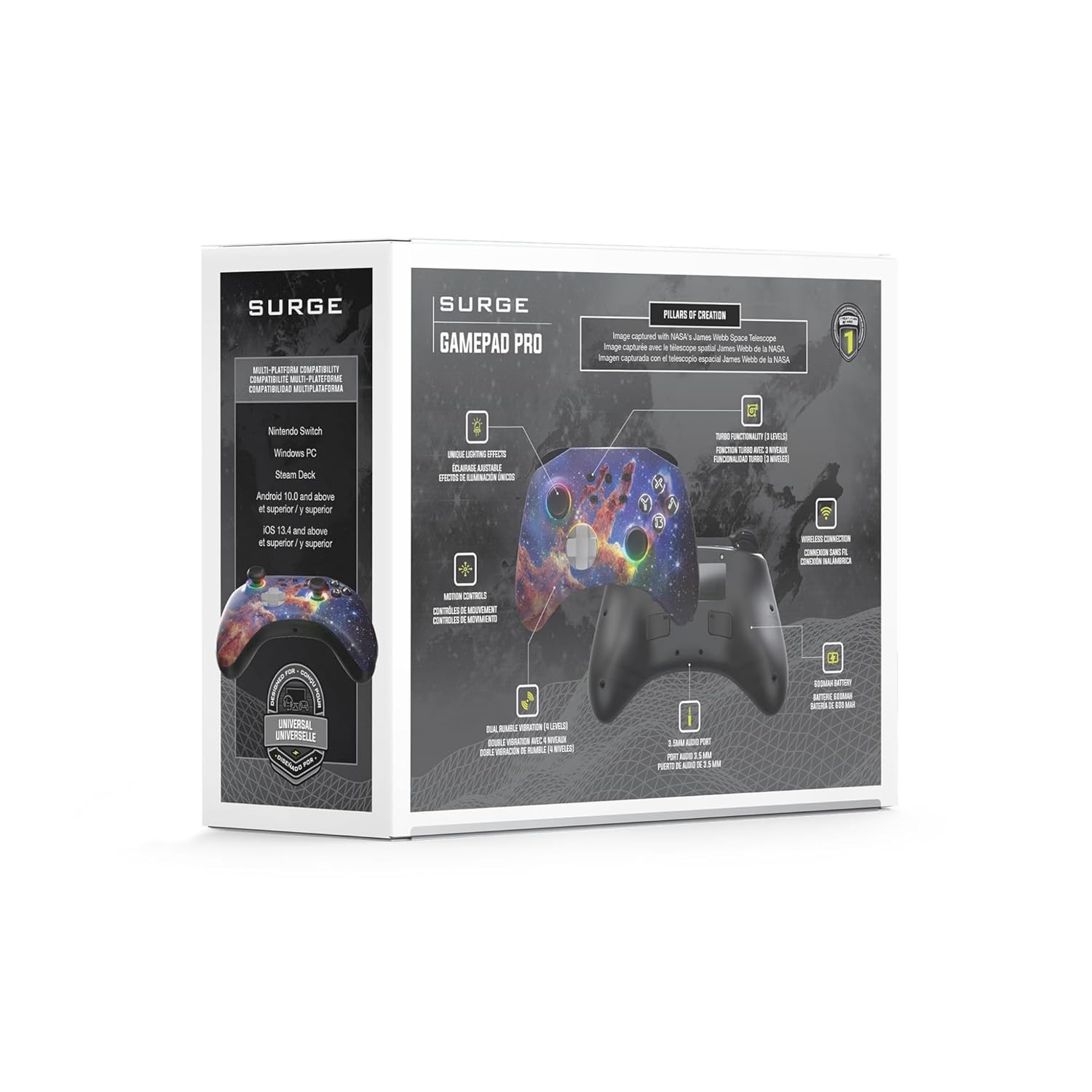
The Surge Gamepad Pro is engineered for extended gameplay and immersive experiences. Key features include:
- 600mAh ബാറ്ററി: Enjoy up to 18 hours of gameplay on a single charge.
- മൾട്ടി-പ്ലാറ്റ്ഫോം അനുയോജ്യത: Seamlessly connect with Nintendo Switch, Windows PC, Steam Deck, Android 10.0+, and iOS 13.4+ devices.
- Translucent Shell: A unique semi-transparent design with dynamic LED rings creates a captivating visual effect.
- 3 Dynamic Lighting Modes: Choose from Aurora wave pattern, breathing effect, and stick follow for stunning visuals.
- ക്രമീകരിക്കാവുന്ന LED ലൈറ്റിംഗ്: Customize your controller's look with 8 color options and independent intensity control for button and thumbstick LEDs.
- പ്രോഗ്രാം ചെയ്യാവുന്ന മാക്രോ ബട്ടണുകൾ: Two rear macro buttons allow for custom button combinations.
- റംബിൾ വൈബ്രേഷൻ: Four levels of dual rumble vibration provide immersive feedback.
- ചലന നിയന്ത്രണങ്ങൾ: Integrated 6-axis motion control for enhanced gameplay.
- 3.5എംഎം ഓഡിയോ പോർട്ട്: Connect your headset directly to the controller for audio.

ഫ്രണ്ട് view of the Surge Gamepad Pro (Pillars of Creation) Wireless Controller, showcasing its unique cosmic design and illuminated thumbsticks.

പിൻഭാഗം view of the controller, highlighting the programmable macro buttons (MR and ML) and the USB-C charging port.

An illustrative graphic demonstrating the 8 available LED colors and 3 dynamic lighting modes (Aurora Wave, Breathing Effect, Stick Follow) of the controller.
A graphic detailing key specifications: two macro buttons, a 20-foot wireless play range, and a 600mAh rechargeable battery.
ഔദ്യോഗിക ഉൽപ്പന്ന വീഡിയോകൾ
Video demonstrating the "Aurora Wave" lighting mode on the Surge Gamepad Pro, showcasing the dynamic color transitions around the thumbsticks and buttons.
Video illustrating the "Stick Follow" lighting mode, where the LED colors change in response to thumbstick movements.
സജ്ജമാക്കുക
കൺട്രോളർ ചാർജ് ചെയ്യുന്നു
Before first use, fully charge the controller using the provided USB-C cable. Connect the USB-C end to the controller's charging port (located on the top edge) and the USB-A end to a compatible USB power source (e.g., console, PC, USB wall adapter). The LED indicators will show charging status and turn off when fully charged.
ഉപകരണങ്ങളുമായി ജോടിയാക്കുന്നു
The Surge Gamepad Pro supports Bluetooth connectivity across multiple platforms:
- നിൻ്റെൻഡോ സ്വിച്ച്: From the HOME Menu, select "Controllers" > "Change Grip/Order". While the screen is displaying "Press L + R on the controller", press and hold the SYNC button on the top of the Gamepad Pro until the player LEDs begin to flash. Once paired, the player LED(s) corresponding to the controller number will remain lit.
- Windows PC / Steam Deck: Ensure your PC or Steam Deck has Bluetooth enabled. Go to Bluetooth settings and select "Add a device". Press and hold the SYNC button on the controller until it appears in the list of available devices. Select "Surge Gamepad Pro" to pair.
- Android / iOS Devices: Enable Bluetooth on your mobile device. Press and hold the SYNC button on the controller. Select "Surge Gamepad Pro" from the Bluetooth device list on your phone or tablet to connect.
പ്രവർത്തന നിർദ്ദേശങ്ങൾ
Adjusting LED Lighting
The controller features customizable LED lighting. Use the dedicated lighting control buttons (refer to the controller diagram in the packaging) to cycle through 8 color options and 3 dynamic lighting modes (Aurora Wave, Breathing Effect, Stick Follow). You can also adjust the intensity or turn off the button and thumbstick LEDs independently.
Programming Macro Buttons
The two rear macro buttons (MR and ML) can be programmed to execute complex button sequences. Refer to the detailed programming instructions in the full user manual (usually included in the product packaging) for specific steps on how to record and assign macros.
Turbo Settings and Rumble Vibration
The controller offers 3 adjustable turbo settings for rapid-fire input and 4 levels of dual rumble vibration for enhanced haptic feedback. Consult the full user manual for instructions on how to adjust these settings to your preference.
മെയിൻ്റനൻസ്
To ensure the longevity and optimal performance of your Surge Gamepad Pro:
- മൃദുവായതും ഉണങ്ങിയതുമായ തുണി ഉപയോഗിച്ച് കൺട്രോളർ പതിവായി വൃത്തിയാക്കുക. കഠിനമായ രാസവസ്തുക്കളോ ഉരച്ചിലുകളോ ഉള്ള വസ്തുക്കൾ ഉപയോഗിക്കുന്നത് ഒഴിവാക്കുക.
- കൺട്രോളർ നേരിട്ട് സൂര്യപ്രകാശം ഏൽക്കാത്തതും തീവ്രമായ താപനില ഏൽക്കാത്തതുമായ ഒരു തണുത്ത വരണ്ട സ്ഥലത്ത് സൂക്ഷിക്കുക.
- കൺട്രോളർ താഴെയിടുന്നത് ഒഴിവാക്കുക അല്ലെങ്കിൽ ശക്തമായ ആഘാതങ്ങൾക്ക് വിധേയമാക്കുക.
- Do not attempt to disassemble or modify the controller, as this will void the warranty.
ട്രബിൾഷൂട്ടിംഗ്
If you encounter issues with your Surge Gamepad Pro, try the following steps:
- കൺട്രോളർ കണക്റ്റുചെയ്യുന്നില്ല: Ensure Bluetooth is enabled on your device. Try re-pairing the controller by holding the SYNC button. Make sure the controller is charged.
- ഇൻപുട്ട് ലാഗ് അല്ലെങ്കിൽ വിച്ഛേദിക്കൽ: Move closer to your device to reduce interference. Ensure no other strong wireless signals are present nearby.
- ബട്ടണുകൾ പ്രതികരിക്കുന്നില്ല: Check if the controller is fully charged. Try resetting the controller (refer to the full manual for reset procedure, if available).
- LEDs not working: Ensure the lighting features are enabled and not set to minimum intensity.
For persistent issues, please refer to the official Surge support resources or contact customer service.
സ്പെസിഫിക്കേഷനുകൾ
| ഫീച്ചർ | വിശദാംശങ്ങൾ |
|---|---|
| ബ്രാൻഡ് | കുതിച്ചുചാട്ടം |
| മോഡൽ | Gamepad Pro (Pillars of Creation) |
| ASIN | B0CHZ6NHT4 |
| ബാറ്ററി ശേഷി | 600mAh ലിഥിയം |
| ബാറ്ററി ലൈഫ് | 18 മണിക്കൂർ വരെ |
| കണക്റ്റിവിറ്റി | Bluetooth (up to 20ft wireless range) |
| അനുയോജ്യത | Nintendo Switch, Windows PC, Steam Deck, Android 10.0+, iOS 13.4+ |
| ചലന നിയന്ത്രണം | 6-axis motion control |
| വൈബ്രേഷൻ | Dual rumble (4 levels) |
| ഓഡിയോ പോർട്ട് | 3.5 മി.മീ |
| ഉൽപ്പന്ന അളവുകൾ | 5.91 x 4.72 x 2.76 ഇഞ്ച് |
| ഇനത്തിൻ്റെ ഭാരം | 0.63 ഔൺസ് |
| മാതൃരാജ്യം | ചൈന |
വാറൻ്റിയും പിന്തുണയും
For warranty information, product registration, or technical support, please visit the official Surge website or contact their customer service. You can find more products and information at the Surge Store on Amazon.
ഏതെങ്കിലും വാറന്റി ക്ലെയിമുകൾക്കായി നിങ്ങളുടെ വാങ്ങിയതിന്റെ തെളിവ് സൂക്ഷിക്കുക.
Ask a question about this manual
Ask about setup, troubleshooting, compatibility, parts, safety, or missing instructions. Manuals+ will review the question and use this page’s manual context to help answer it.