
1. ആമുഖം
വാങ്ങിയതിന് നന്ദി.asing the WUYJTIF X20 Handheld Game Console. This manual provides essential information for setting up, operating, and maintaining your device. Please read it thoroughly to ensure proper use and to maximize your gaming experience.
The X20 console features a 5.1-inch high-definition LCD screen, supports external controllers for two-player mode, offers TV HD output, and comes with thousands of built-in classic games. It also functions as a multimedia device for music, video, e-books, and image viewing.
2. ഉൽപ്പന്നം കഴിഞ്ഞുview
The WUYJTIF X20 Handheld Game Console is designed for portable entertainment. Familiarize yourself with its components:
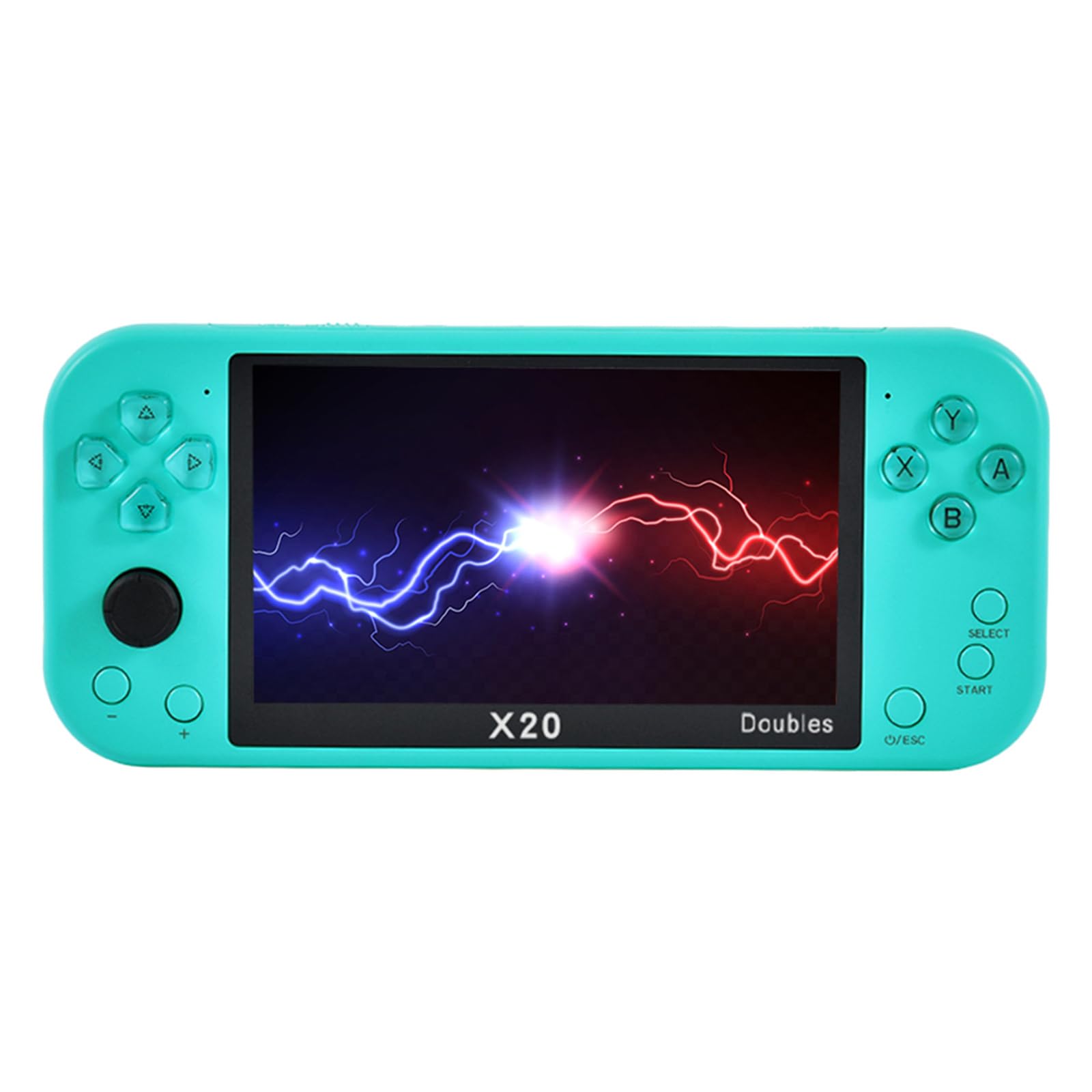
ചിത്രം 2.1: മുൻഭാഗം view of the X20 Handheld Game Console displaying a game.
2.1. Console Layout
- 5.1-ഇഞ്ച് LCD സ്ക്രീൻ: High-definition display for games and multimedia.
- ദിശാസൂചന പാഡ് (ഡി-പാഡ്): For movement and menu navigation.
- ആക്ഷൻ ബട്ടണുകൾ (A, B, X, Y): ഗെയിമിനുള്ളിലെ പ്രവർത്തനങ്ങൾക്ക്.
- ആരംഭിക്കുക/തിരഞ്ഞെടുക്കുക ബട്ടണുകൾ: For game control and menu options.
- അനലോഗ് സ്റ്റിക്ക്: For precise movement in supported games.
- Shoulder Buttons (L1, R1, L2, R2): Located on the top edge for additional game controls.
- പവർ ബട്ടൺ: To turn the console on/off.
- വോളിയം നിയന്ത്രണങ്ങൾ: To adjust audio output.
- HDMI ഔട്ട്പുട്ട് പോർട്ട്: For connecting to a television.
- യുഎസ്ബി ചാർജിംഗ് പോർട്ട്: ഉപകരണം ചാർജ് ചെയ്യുന്നതിനായി.
- ടിഎഫ് കാർഡ് സ്ലോട്ട്: For memory expansion.
- ഹെഡ്ഫോൺ ജാക്ക്: സ്വകാര്യ ഓഡിയോ ശ്രവണത്തിനായി.

ചിത്രം 2.2: വിശദമായി view of the X20 console's controls and interface.
3. സജ്ജീകരണം
3.1. പ്രാരംഭ ചാർജിംഗ്
Before first use, fully charge the console. Connect the provided USB cable to the console's charging port and a compatible USB power adapter (not included) or a computer's USB port. The charging indicator will show the charging status and turn off when fully charged.
3.2. പവർ ഓൺ/ഓഫ്
- പവർ ഓൺ ചെയ്യാൻ: സ്ക്രീൻ പ്രകാശിക്കുന്നത് വരെ പവർ ബട്ടൺ അമർത്തിപ്പിടിക്കുക.
- പവർ ഓഫ് ചെയ്യാൻ: ഒരു പവർ-ഓഫ് പ്രോംപ്റ്റ് ദൃശ്യമാകുന്നതുവരെ പവർ ബട്ടൺ അമർത്തിപ്പിടിക്കുക, തുടർന്ന് സ്ഥിരീകരിക്കുക.
3.3. Inserting a TF Card (Optional)
The console has 8GB of built-in memory. To expand storage for more games or media, insert a TF (microSD) card (up to 32GB, not included) into the TF card slot. Ensure the console is powered off before inserting or removing the card.
4. പ്രവർത്തന നിർദ്ദേശങ്ങൾ
4.1. മെനു നാവിഗേറ്റ് ചെയ്യുന്നു
Use the Directional Pad or Analog Stick to navigate through the main menu options. Press the 'A' button to select an option and 'B' or 'O/ESC' to go back.
4.2. ഗെയിമുകൾ കളിക്കൽ
The console supports various game formats including PS1, MAME, GBA, GBC, GB, NES, SFC, FC, SMD, and MD. To play a game:
- From the main menu, select the "Games" or "Emulator" option.
- Browse through the list of available games.
- Select a game and press 'A' to launch it.
- During gameplay, use the D-Pad, Analog Stick, and action buttons for control.
4.2.1. Saving and Loading Game Progress
The console supports one-click archiving. During gameplay, press the 'SELECT' button to access the in-game menu, which typically includes options to save or load your game state. Follow the on-screen prompts.
4.3. Two-Player Mode
Enhance your gaming experience by connecting external 2.4G wireless or wired handles (not included) for two-player mode. This allows for simultaneous play with a friend or family member.
- Ensure the console is powered on.
- Connect the external handle(s) to the console's USB port (for wired) or follow the handle's instructions for wireless pairing.
- Launch a game that supports two-player mode.
- The console should automatically detect the connected handles. Refer to the specific game's instructions for activating two-player mode.

Figure 4.1: Feature icons, including support for two-person duels.
4.4. TV HD Output
Connect your X20 console to a television for a larger screen gaming experience. The console supports HDMI-Compatible HD TV output.
- Ensure both the console and the TV are powered off.
- Connect one end of an HDMI cable (not included) to the console's HDMI output port.
- നിങ്ങളുടെ ടെലിവിഷനിലെ ഒരു HDMI ഇൻപുട്ട് പോർട്ടിലേക്ക് HDMI കേബിളിന്റെ മറ്റേ അറ്റം ബന്ധിപ്പിക്കുക.
- Power on your TV and select the correct HDMI input source using your TV remote.
- Power on the X20 console. The game interface should now be displayed on your TV.
4.5. മൾട്ടിമീഡിയ പ്രവർത്തനങ്ങൾ
The X20 console offers several multimedia capabilities:
- സംഗീത പ്ലേബാക്ക്: Supports MP3, WMA, DGG, AAC, WAV, APE, and FLAC formats. Select the "Music" option from the main menu.
- വീഡിയോ പ്ലേബാക്ക്: Supports RM, RMVB, AVI, FLV formats. Select the "Video" option from the main menu.
- ഇ-ബുക്ക് വായന: Supports TXT e-books with a unique bookmark function. Select the "E-book" option.
- Image Browsing: Supports JPEG, BMP, GIF, TIF, PNG image formats. Select the "Picture" option.
5. പരിപാലനം
Proper care will extend the life of your X20 console:
- വൃത്തിയാക്കൽ: Use a soft, dry cloth to clean the console's exterior. Do not use liquid cleaners or abrasive materials.
- സ്ക്രീൻ കെയർ: Use a microfiber cloth specifically designed for electronics to clean the screen. Avoid pressing hard on the screen.
- സംഭരണം: Store the console in a cool, dry place away from direct sunlight, extreme temperatures, and high humidity.
- ബാറ്ററി: To maintain battery health, avoid fully discharging the battery frequently. If storing for an extended period, charge the battery to about 50% every few months.
- തുള്ളികൾ ഒഴിവാക്കുക: The console is made of plastic; avoid dropping it to prevent damage.
6. പ്രശ്നപരിഹാരം
If you encounter issues with your X20 console, refer to the following common problems and solutions:
| പ്രശ്നം | സാധ്യമായ കാരണം | പരിഹാരം |
|---|---|---|
| കൺസോൾ ഓണാകുന്നില്ല. | ബാറ്ററി കുറവാണ്; ഉപകരണം ഫ്രീസുചെയ്തു. | Charge the console for at least 30 minutes. If still unresponsive, try pressing and holding the Power button for 10-15 seconds to force a restart. |
| ഗെയിം മരവിപ്പിക്കുകയോ തകരുകയോ ചെയ്യുന്നു. | Software glitch; corrupted game file. | Restart the console. Try a different game. Ensure your TF card (if used) is not corrupted. |
| No display on TV via HDMI. | Incorrect TV input; faulty cable; console not in TV output mode. | Ensure the TV is set to the correct HDMI input. Check the HDMI cable connection. Restart both the console and TV. |
| External controller not working. | Controller not paired/connected; game does not support external controllers. | Ensure the 2.4G controller is properly connected or paired according to its instructions. Verify the game supports external controllers. |
| Sound issues (no sound/distorted). | Volume too low; headphone issue; software glitch. | Adjust the volume. Test with/without headphones. Restart the console. |
7 സ്പെസിഫിക്കേഷനുകൾ
- മോഡൽ: X20
- സ്ക്രീൻ: 5.1-ഇഞ്ച് ഹൈ-ഡെഫനിഷൻ എൽസിഡി
- ബിൽറ്റ്-ഇൻ മെമ്മറി: 8 ജിബി
- വികസിപ്പിക്കാവുന്ന മെമ്മറി: 32 ജിബി വരെ ടിഎഫ് കാർഡ് പിന്തുണയ്ക്കുന്നു
- Supported Game Formats: PS1, MAME, GBA, GBC, GB, NES, SFC, FC, SMD, MD
- വീഡിയോ ഔട്ട്പുട്ട്: HDMI-Compatible HD TV Output
- ഓഡിയോ ഫോർമാറ്റുകൾ: MP3, WMA, DGG, AAC, WAV, APE, FLAC
- വീഡിയോ ഫോർമാറ്റുകൾ: RM, RMVB, AVI, FLV
- ഇമേജ് ഫോർമാറ്റുകൾ: JPEG, BMP, GIF, TIF, PNG
- E-book Format: ടെക്സ്റ്റ്
- ഊർജ്ജ സ്രോതസ്സ്: ബാറ്ററി പവർ
- മെറ്റീരിയൽ: പ്ലാസ്റ്റിക്
- ഉൽപ്പന്ന അളവുകൾ: Approximately 1 x 1 x 1 inches (Note: This dimension seems generic, please refer to product packaging for exact measurements.)
- നിർമ്മാതാവ്: WUYJTIF
- ശുപാർശ ചെയ്യുന്ന പ്രായം: 4 വർഷവും അതിൽ കൂടുതലും
Figure 7.1: Representation of the console's internal processing chip.
8. വാറൻ്റിയും പിന്തുണയും
For warranty information, technical support, or service inquiries, please contact the manufacturer, WUYJTIF, or your retailer. Keep your purchase receipt as proof of purchase.
Manufacturer: WUYJTIF