
1. ആമുഖം
This user manual provides comprehensive instructions for the Generic Openstage 15T Digital Telephone (Lava), model HCPLT103. It covers essential information regarding product features, setup, operation, maintenance, and troubleshooting to ensure optimal performance and longevity of your device. The Openstage 15T is designed for efficient communication in various office environments, compatible with HiPath telephone systems and available for TDM, HFA, or SIP environments.
2. ഉൽപ്പന്നം കഴിഞ്ഞുview
The Openstage 15T Digital Telephone is a robust communication device featuring a clear LCD display and intuitive controls. Below are its key features and visual representations.
പ്രധാന സവിശേഷതകൾ:
- 3 menu keys for easy navigation.
- 8 free programmable keys for customized functions.
- 2 fixed function keys for common operations.
- Volume keys (Loudspeaker/+/-) for audio control.
- LCD 2 line graphic display for clear information display.
- Full duplex, hands-free telephone with integrated microphone and speaker.
ഉൽപ്പന്ന ചിത്രങ്ങൾ:
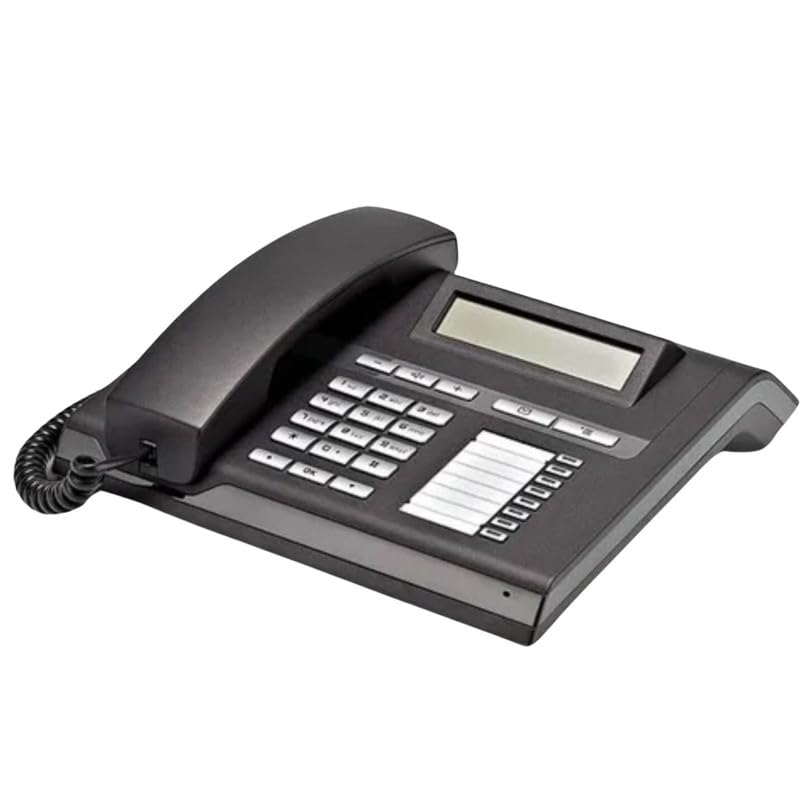
ചിത്രം 2.1: ഫ്രണ്ട്-ആംഗിൾ view of the Openstage 15T Digital Telephone, showcasing its keypad, display, and handset.
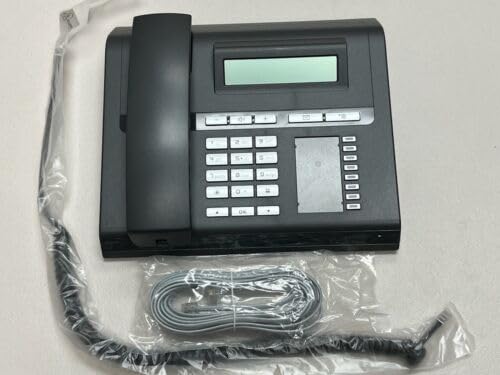
ചിത്രം 2.2: മുകളിൽ നിന്ന് താഴേക്ക് view of the Openstage 15T Digital Telephone, showing the phone alongside its coiled handset cord and a straight line cord, still in their protective packaging.
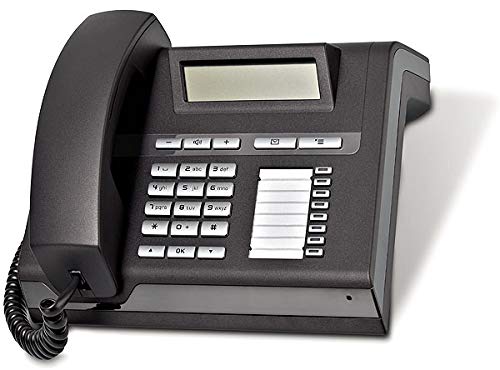
Figure 2.3: Side-angled view of the Openstage 15T Digital Telephone, highlighting the ergonomic design of the handset and the layout of the function keys next to the display.
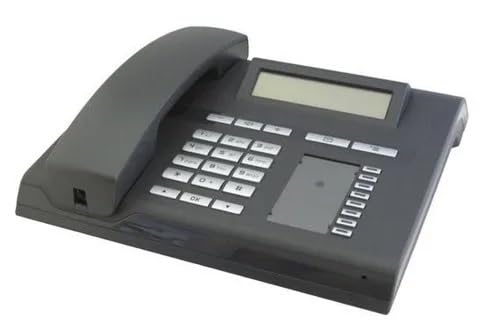
Figure 2.4: Another side-angled perspective of the Openstage 15T Digital Telephone, providing a clear view of the numeric keypad and the blank area for programmable key labels.
3. സജ്ജീകരണം
Follow these steps to set up your Openstage 15T Digital Telephone:
- ഉപകരണം അൺപാക്ക് ചെയ്യുക: Carefully remove the telephone and all accessories from the packaging. Ensure all components listed in "What's in the Box" (Telephone) are present.
- ഹാൻഡ്സെറ്റ് ബന്ധിപ്പിക്കുക: Plug one end of the coiled handset cord into the handset and the other end into the designated port on the telephone base.
- നെറ്റ്വർക്കിലേക്ക് കണക്റ്റുചെയ്യുക: Connect the telephone line cord from the telephone's line port to your PSTN landline network wall jack. The Openstage 15T is designed to operate within a HiPath 4000 environment as a TDM telephone and is compatible with HiPath telephone systems for TDM, HFA, or SIP environments.
- പവർ കണക്ഷൻ: The phone is battery powered. Ensure the battery is correctly inserted and charged if applicable.
- പ്ലേസ്മെൻ്റ്: Place the telephone on a stable, flat surface or mount it on a wall using the integrated wall mount feature.
4. പ്രവർത്തന നിർദ്ദേശങ്ങൾ
This section outlines the basic operation of your Openstage 15T Digital Telephone.
കോളുകൾ ചെയ്യലും സ്വീകരിക്കലും:
- ഒരു കോൾ ചെയ്യാൻ: Lift the handset or press the speakerphone button. Dial the desired number using the numeric keypad.
- ഒരു കോൾ സ്വീകരിക്കുന്നതിന്: ഫോൺ റിംഗ് ചെയ്യുമ്പോൾ ഹാൻഡ്സെറ്റ് ഉയർത്തുക അല്ലെങ്കിൽ സ്പീക്കർഫോൺ ബട്ടൺ അമർത്തുക.
- ഒരു കോൾ അവസാനിപ്പിക്കുന്നു: Replace the handset or press the speakerphone button again.
Using Function Keys:
- മെനു കീകൾ: Use the 3 dedicated menu keys to navigate through the phone's settings and options displayed on the LCD.
- പ്രോഗ്രാമബിൾ കീകൾ: The 8 free programmable keys can be configured for speed dialing, feature access, or other custom functions as per your system's configuration. Consult your system administrator for programming details.
- സ്ഥിരമായ പ്രവർത്തന കീകൾ: Utilize the 2 fixed function keys for pre-assigned common actions (e.g., Mute, Redial). Refer to the key labels for their specific functions.
- വോളിയം കീകൾ: Adjust the loudspeaker volume or handset volume during a call using the dedicated Volume keys (+/-).
LCD ഡിസ്പ്ലേ:
The 2-line graphic LCD display shows caller ID, call duration, menu options, and system messages. Navigate menus using the menu keys and the numeric keypad for input.
5. പരിപാലനം
ശരിയായ അറ്റകുറ്റപ്പണി നിങ്ങളുടെ ടെലിഫോണിന്റെ ദീർഘായുസ്സും മികച്ച പ്രകടനവും ഉറപ്പാക്കുന്നു.
- വൃത്തിയാക്കൽ: ഫോണിന്റെ പ്രതലവും ഡിസ്പ്ലേയും വൃത്തിയാക്കാൻ മൃദുവായതും ഉണങ്ങിയതും ലിന്റ് രഹിതവുമായ ഒരു തുണി ഉപയോഗിക്കുക. കഠിനമായ പാടുകൾക്ക്, ചെറുതായി dampതുണിയിൽ വെള്ളം ഒഴിക്കുക. കഠിനമായ രാസവസ്തുക്കൾ, അബ്രസീവ് ക്ലീനറുകൾ അല്ലെങ്കിൽ ലായകങ്ങൾ ഉപയോഗിക്കുന്നത് ഒഴിവാക്കുക.
- പരിസ്ഥിതി: Keep the telephone away from direct sunlight, excessive heat, humidity, and dust. Do not expose it to liquids.
- ചരടുകൾ: ഇടയ്ക്കിടെ എല്ലാ കമ്പികള്ക്കും കേടുപാടുകള് ഉണ്ടോ അല്ലെങ്കിൽ പൊട്ടുന്നുണ്ടോ എന്ന് പരിശോധിക്കുക. കേടായ കമ്പികള് ഉടന് തന്നെ മാറ്റി സ്ഥാപിക്കുക.
6. പ്രശ്നപരിഹാരം
If you encounter issues with your Openstage 15T Digital Telephone, refer to the following common problems and solutions:
| പ്രശ്നം | സാധ്യമായ കാരണം | പരിഹാരം |
|---|---|---|
| ഡയൽ ടോൺ ഇല്ല. | ടെലിഫോൺ ലൈൻ ബന്ധിപ്പിച്ചിട്ടില്ല അല്ലെങ്കിൽ തകരാറിലായി. | Ensure the telephone line cord is securely connected to both the phone and the wall jack. Test with another phone if possible. |
| ഡിസ്പ്ലേ ശൂന്യമാണ്. | No power or display settings. | Check battery power. If applicable, ensure the phone is receiving power. Adjust display contrast/brightness via menu settings. |
| വിളിക്കുന്നയാൾക്ക് കേൾക്കാൻ കഴിയുന്നില്ല / വിളിക്കുന്നയാൾക്ക് ഞാൻ പറയുന്നത് കേൾക്കാൻ കഴിയുന്നില്ല. | Volume too low, mute activated, or faulty connection. | Adjust volume using the volume keys. Check if the mute function is active. Ensure handset and line cords are properly connected. |
| കീകൾ പ്രതികരിക്കുന്നില്ല. | താൽക്കാലിക സോഫ്റ്റ്വെയർ തകരാർ അല്ലെങ്കിൽ ഭൗതിക ക്ഷതം. | Disconnect the phone from the line for a few minutes, then reconnect. If the problem persists, contact customer support. |
If the problem persists after trying these solutions, please contact your service provider or the manufacturer's support for further assistance.
7 സ്പെസിഫിക്കേഷനുകൾ
| ഫീച്ചർ | വിശദാംശങ്ങൾ |
|---|---|
| ബ്രാൻഡ് | ജനറിക് |
| മോഡൽ | HCPLT103 |
| ഉൽപ്പന്ന അളവുകൾ | 25.4 x 25.4 x 25.4 സെ.മീ |
| അനുയോജ്യമായ ഉപകരണങ്ങൾ | PSTN Landline Networks |
| മൌണ്ടിംഗ് ഹാർഡ്വെയർ | ടെലിഫോൺ |
| ഇനങ്ങളുടെ എണ്ണം | 1 |
| ഡിസ്പ്ലേ ടെക്നോളജി | എൽസിഡി |
| ഡിസ്പ്ലേ തരം | ഡിസ്പ്ലേ ഉപയോഗിച്ച് |
| പവർ ഉറവിടം | ബാറ്ററി പവർ |
| മെറ്റീരിയൽ | പ്ലാസ്റ്റിക് |
| മൗണ്ടിംഗ് തരം | മതിൽ മൗണ്ട് |
| മാതൃരാജ്യം | ഇന്ത്യ |
| നിറം | കറുപ്പ് |
8. വാറൻ്റിയും പിന്തുണയും
This product is manufactured by Third Party. For specific warranty information, please refer to the documentation included with your purchase or contact the manufacturer directly. Extended warranty plans may be available for purchase separately.
For technical support or service inquiries, please contact the seller or manufacturer. Keep your purchase receipt and product model number (HCPLT103) handy when seeking support.