
VEEZOOM Q26
VEEZOOM Q26 Indoor Security Camera User Manual
മോഡൽ: ക്യു 26
1. ആമുഖം
This manual provides comprehensive instructions for the installation, operation, and maintenance of your VEEZOOM Q26 Indoor Security Camera. Please read this manual thoroughly before using the product to ensure proper function and safety. Keep this manual for future reference.
The VEEZOOM Q26 is a 3MP indoor IP camera designed for home security and monitoring. It features person, motion, and sound detection, full-color night vision, two-way audio, and flexible storage options. The camera connects via 2.4 GHz Wi-Fi.
2. ഉൽപ്പന്നം കഴിഞ്ഞുview
2.1 പ്രധാന സവിശേഷതകൾ
- High Definition 3MP Camera: വ്യക്തവും വിശദവുമായ വീഡിയോ foo പകർത്തുന്നുtage.
- 90° Viewഇൻ ആംഗിൾ: വിശാലമായ ഒരു ഫീൽഡ് നൽകുന്നു view സമഗ്രമായ നിരീക്ഷണത്തിനായി.
- വിപുലമായ കണ്ടെത്തൽ: Includes person, motion, and sound detection with real-time alerts.
- പൂർണ്ണ വർണ്ണ രാത്രി ദർശനം: Equipped with 2 IR LEDs for clear full-color images up to 5 meters (16 ft) in low light conditions.
- ടു-വേ ഓഡിയോ: ബിൽറ്റ്-ഇൻ മൈക്രോഫോണും സ്പീക്കറും വിദൂര ആശയവിനിമയം അനുവദിക്കുന്നു.
- ഫ്ലെക്സിബിൾ സ്റ്റോറേജ്: Supports local storage via Micro-SD card (up to 128GB, not included) and optional cloud storage.
- 2.4 GHz വൈ-ഫൈ കണക്റ്റിവിറ്റി: Connects wirelessly to your home network (5 GHz Wi-Fi is not supported).
2.2 പാക്കേജ് ഉള്ളടക്കം
- VEEZOOM Q26 Indoor Security Camera
- പവർ അഡാപ്റ്റർ (ചാർജർ)
- മൌണ്ടിംഗ് ബ്രാക്കറ്റ്
- ഉപയോക്തൃ മാനുവൽ (ഈ പ്രമാണം)
2.3 ക്യാമറ ഘടകങ്ങൾ
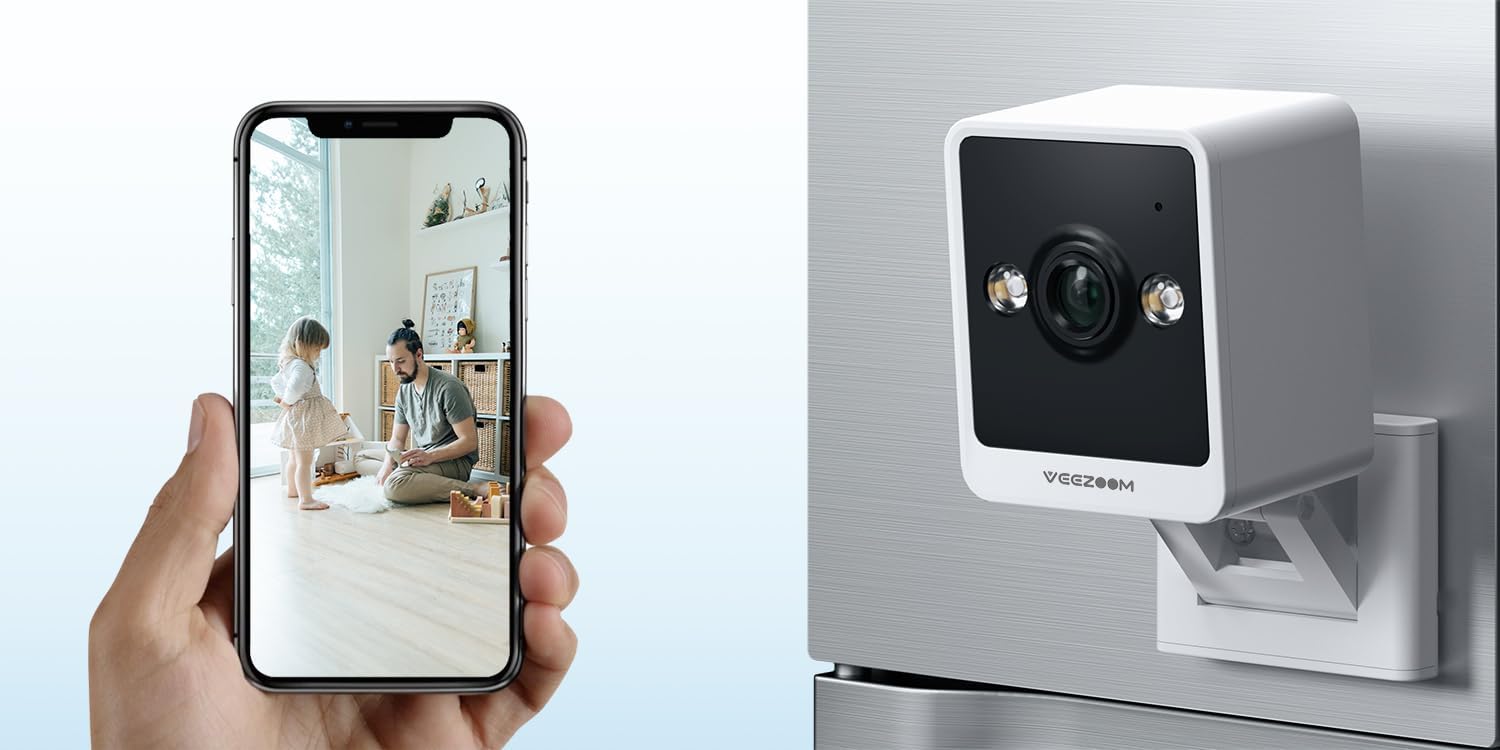
Image 2.3.1: VEEZOOM Q26 Camera and Live View on Smartphone. This image illustrates the compact design of the VEEZOOM Q26 camera and its capability to provide a live video feed directly to a smartphone application.

ചിത്രം 2.3.2: കഴിഞ്ഞുview of VEEZOOM Q26 Key Features. This graphic highlights the main functionalities of the camera, including instant alerts, 2.4GHz WiFi support, color night vision, flexible storage options, 24/7 live view, and two-way audio communication.
3. സജ്ജീകരണം
3.1 നിങ്ങൾ ആരംഭിക്കുന്നതിന് മുമ്പ്
- നിങ്ങളുടെ വൈഫൈ നെറ്റ്വർക്ക് 2.4 GHz ആണെന്ന് ഉറപ്പാക്കുക. ക്യാമറ 5 GHz വൈഫൈ പിന്തുണയ്ക്കുന്നില്ല.
- നിങ്ങളുടെ വൈഫൈ നെറ്റ്വർക്ക് നാമവും (SSID) പാസ്വേഡും തയ്യാറായി വയ്ക്കുക.
- Download the recommended mobile application (refer to the packaging or quick start guide for the specific app name).
- If using local storage, insert a Micro-SD card (up to 128GB, not included) into the camera's SD card slot.
3.2 ഇൻസ്റ്റലേഷൻ ഘട്ടങ്ങൾ
- പവർ ഓൺ: Connect the camera to a power source using the provided power adapter. The camera will power on and indicate its status (e.g., flashing LED).
- ആപ്പ് ഇൻസ്റ്റാളേഷൻ: Download and install the designated mobile application on your smartphone.
- അക്കൗണ്ട് രജിസ്ട്രേഷൻ: ആപ്പ് തുറന്ന് ഒരു പുതിയ അക്കൗണ്ട് രജിസ്റ്റർ ചെയ്യുക അല്ലെങ്കിൽ നിങ്ങൾക്ക് ഇതിനകം അക്കൗണ്ട് ഉണ്ടെങ്കിൽ ലോഗിൻ ചെയ്യുക.
- ഉപകരണം ചേർക്കുക: Follow the in-app instructions to add your VEEZOOM Q26 camera. This typically involves scanning a QR code on the camera or selecting the device type manually.
- Wi-Fi കണക്ഷൻ: Input your 2.4 GHz Wi-Fi network details when prompted by the app. Ensure your phone is connected to the same 2.4 GHz network during setup.
- മൗണ്ടിംഗ്:
- The camera features a magnetic base for easy attachment to metallic surfaces.
- Alternatively, use the included bracket for wall mounting. Position the camera in a location that provides the desired viewing angle and is within range of your Wi-Fi signal.

Image 3.2.1: Magnetic Mounting Feature. This image demonstrates the VEEZOOM Q26's magnetic base, allowing for easy, drill-free installation on suitable surfaces, contrasting it with traditional security cameras that require drilling.

Image 3.2.2: Versatile Mounting Options. This image displays various ways to mount the VEEZOOM Q26 camera, including using its bracket for shelf placement or wall mounting, and its magnetic capability for attachment to metal surfaces.
4. പ്രവർത്തന നിർദ്ദേശങ്ങൾ
4.1 തത്സമയം View
Once the camera is successfully connected, open the mobile application and select your camera from the device list to access the live video feed. You can view തത്സമയ footagഇന്റർനെറ്റ് കണക്ഷനുള്ള എവിടെ നിന്നും ഇ.

Image 4.1.1: Live Monitoring via Smartphone. This image demonstrates the ability to view തത്സമയംtage from the VEEZOOM Q26 camera on a smartphone, allowing users to monitor their environment, such as a sleeping baby, at any time.
4.2 ചലനവും ശബ്ദ ഡിറ്റക്ഷനും
The camera is equipped with advanced detection capabilities. When motion, a person, or sound is detected, the camera will record video and send real-time alerts to your smartphone via the app. You can customize detection sensitivity and alert settings within the application.
4.3 ടു-വേ ഓഡിയോ
To use the two-way audio feature, access the live view in the app. Locate the microphone icon to speak through the camera's speaker and the speaker icon to listen to audio from the camera's environment. This allows for communication with individuals near the camera.
4.4 നൈറ്റ് വിഷൻ
The VEEZOOM Q26 automatically switches to night vision mode in low-light conditions. With its 2 IR LEDs, it provides clear full-color images up to 5 meters (16 ft) in complete darkness, ensuring continuous monitoring.
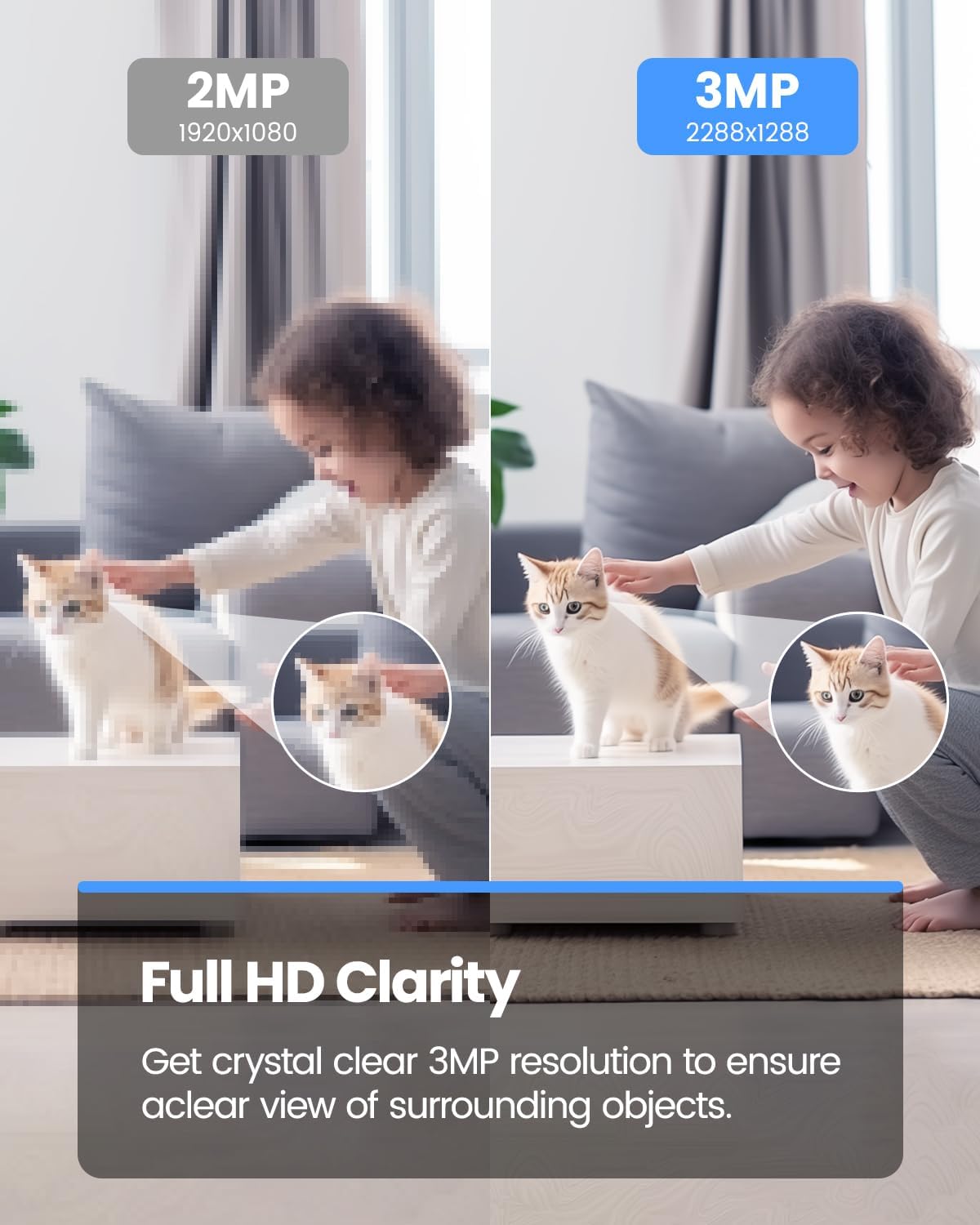
Image 4.4.1: 3MP Resolution Clarity. This image visually compares the clarity of a 3MP resolution image (VEEZOOM Q26) against a 2MP resolution image, demonstrating the enhanced detail and sharpness provided by the 3MP sensor.
4.5 സംഭരണ ഓപ്ഷനുകൾ
- മൈക്രോ-എസ്ഡി കാർഡ്: Insert a Micro-SD card (up to 128GB, not included) into the designated slot for local video recording. The camera will automatically record events or continuous footage based on your settings.
- ക്ലൗഡ് സംഭരണം: The camera supports optional cloud storage services. Refer to the mobile application for details on subscription plans and activation.
5. പരിപാലനം
- വൃത്തിയാക്കൽ: Gently wipe the camera lens and body with a soft, dry cloth. Do not use liquid cleaners or abrasive materials.
- ഫേംവെയർ അപ്ഡേറ്റുകൾ: Regularly check the mobile application for available firmware updates. Keeping your camera's firmware updated ensures optimal performance and security.
- SD കാർഡ് മാനേജുമെന്റ്: If using a Micro-SD card, periodically review ഒപ്പം റെക്കോർഡ് ചെയ്ത foo നിയന്ത്രിക്കുകtagഇ. പ്രകടന പ്രശ്നങ്ങൾ ഉണ്ടായാൽ ആപ്പിലൂടെ SD കാർഡ് ഫോർമാറ്റ് ചെയ്യുക.
- പവർ സൈക്കിൾ: If the camera becomes unresponsive, disconnect it from the power source for 10 seconds, then reconnect it.
6. പ്രശ്നപരിഹാരം
| പ്രശ്നം | സാധ്യമായ കാരണം | പരിഹാരം |
|---|---|---|
| ക്യാമറ വൈഫൈയിലേക്ക് കണക്റ്റുചെയ്യുന്നതിൽ പരാജയപ്പെടുന്നു. | Incorrect Wi-Fi password; 5 GHz Wi-Fi network used; camera too far from router; weak Wi-Fi signal. |
|
| തത്സമയം ഇല്ല view or offline status in app. | No internet connection; camera powered off; app issue. |
|
| Motion/sound alerts not received. | App notifications disabled; detection sensitivity too low; incorrect detection zone settings. |
|
| മോശം ഇമേജ് നിലവാരം. | ലെൻസ് വൃത്തികേടാണ്; വെളിച്ചക്കുറവ്; നെറ്റ്വർക്ക് ബാൻഡ്വിഡ്ത്ത് പ്രശ്നങ്ങൾ. |
|
7 സ്പെസിഫിക്കേഷനുകൾ
| ഫീച്ചർ | വിശദാംശങ്ങൾ |
|---|---|
| മോഡൽ | Q26 |
| ബ്രാൻഡ് | വീസൂം |
| റെസലൂഷൻ | 3 എം.പി |
| Viewing ആംഗിൾ | 90 ഡിഗ്രി |
| നൈറ്റ് വിഷൻ | Full-color, up to 5m (16 ft) with 2 IR LEDs |
| കണക്റ്റിവിറ്റി | വയർലെസ്സ് (വൈ-ഫൈ 2.4 GHz മാത്രം) |
| ഓഡിയോ | ടു-വേ ഓഡിയോ (ബിൽറ്റ്-ഇൻ മൈക്രോഫോണും സ്പീക്കറും) |
| കണ്ടെത്തൽ | Person, Motion, Sound detection |
| സംഭരണം | Micro-SD card (up to 128GB, not included), Cloud Storage (optional) |
| പവർ ഉറവിടം | Electric with cord (5 Volt) |
| ഇൻസ്റ്റലേഷൻ തരം | Magnetic, Wall Mount (with bracket) |
| ഉപയോഗ പരിസ്ഥിതി | ഇൻഡോർ |
| ഉൾപ്പെടുത്തിയ ഘടകങ്ങൾ | ചാർജർ |
| അളവുകൾ (പാക്കേജ്) | 10.2 x 8.5 x 6.9 സെ.മീ; 215 ഗ്രാം |
8. വാറൻ്റി വിവരങ്ങൾ
Warranty information for the VEEZOOM Q26 Indoor Security Camera is not explicitly specified in the provided product details. Please refer to the product packaging or contact VEEZOOM customer support for warranty terms and conditions.
9. പിന്തുണ
For technical support, troubleshooting assistance, or further inquiries regarding your VEEZOOM Q26 camera, please refer to the official VEEZOOM website or contact their customer service department. Contact details are typically available on the product packaging or within the mobile application's 'About' or 'Help' section.
Ask a question about this manual
Ask about setup, troubleshooting, compatibility, parts, safety, or missing instructions. Manuals+ will review the question and use this page’s manual context to help answer it.