
LMT-M-F8-hei
Bluetooth Earphone Wireless Headphone Touch Control M-F8 User Manual
Model: M-F8 (LMT-M-F8-hei)
ബ്രാൻഡ്: ജനറിക്
ആമുഖം
വാങ്ങിയതിന് നന്ദി.asing the Generic M-F8 Bluetooth Earphones. These wireless headphones are designed to provide a superior audio experience with powerful bass, clear vocals, and crisp highs, thanks to advanced chip technology and high-intensity magnetic drivers. Featuring intuitive touch controls and an ergonomic design, they offer comfort and convenience for various activities. Please read this manual carefully before using the product to ensure proper operation and to maximize its lifespan.
പ്രധാനപ്പെട്ട സുരക്ഷാ വിവരങ്ങൾ
Please read and follow these safety guidelines to prevent damage to the device or injury to yourself:
- Do not expose the earphones to extreme temperatures, humidity, or corrosive substances.
- ഉപകരണം താഴെയിടുകയോ, അടിക്കുകയോ, വേർപെടുത്തുകയോ ചെയ്യുന്നത് ഒഴിവാക്കുക.
- കുട്ടികൾക്കും വളർത്തുമൃഗങ്ങൾക്കും ലഭ്യമാകാതെ സൂക്ഷിക്കുക.
- Do not use the earphones while driving or in situations where you need to be aware of your surroundings.
- Clean the earphones with a soft, dry cloth only. Do not use liquids or abrasive cleaners.
- പ്രാദേശിക ചട്ടങ്ങൾക്കനുസൃതമായി ഉൽപ്പന്നം ഉത്തരവാദിത്തത്തോടെ വിനിയോഗിക്കുക.
പാക്കേജ് ഉള്ളടക്കം
പാക്കേജിൽ എല്ലാ ഇനങ്ങളും ഉണ്ടെന്ന് ഉറപ്പാക്കുക:
- Generic M-F8 Bluetooth Earphones (Left and Right)
- ചാർജിംഗ് കേസ്
- യുഎസ്ബി ചാർജിംഗ് കേബിൾ
- ഉപയോക്തൃ മാനുവൽ
- Multiple sizes of ear tips (typically 3 sizes)
ഉൽപ്പന്നം കഴിഞ്ഞുview
The M-F8 earphones feature an ergonomic design with ear hooks for a secure and comfortable fit. Each earbud includes a touch control area and an LED indicator.

This image displays the black Generic M-F8 Bluetooth Earphone, highlighting its ear hook design for secure wear and a visible blue LED indicator on the earbud body.
സജ്ജമാക്കുക
1. ഇയർഫോണുകളും കേസും ചാർജ് ചെയ്യുന്നു
ആദ്യ ഉപയോഗത്തിന് മുമ്പ്, ഇയർഫോണുകളും ചാർജിംഗ് കേസും പൂർണ്ണമായും ചാർജ് ചെയ്യുക.
- യുഎസ്ബി ചാർജിംഗ് കേബിൾ കേസിലെ ചാർജിംഗ് പോർട്ടിലേക്കും ഒരു പവർ സ്രോതസ്സിലേക്കും (ഉദാ: കമ്പ്യൂട്ടർ യുഎസ്ബി പോർട്ട്, വാൾ അഡാപ്റ്റർ) ബന്ധിപ്പിക്കുക.
- ചാർജിംഗ് കേസിലെ ഇൻഡിക്കേറ്റർ ലൈറ്റുകൾ ചാർജിംഗ് നില കാണിക്കും.
- ഇയർഫോണുകൾ ചാർജിംഗ് കേസിൽ വയ്ക്കുക. അവ സ്വയമേവ ചാർജ് ചെയ്യാൻ തുടങ്ങും.
- A full charge typically takes approximately 1.5 hours for the case and earphones.

This image illustrates the M-F8 earphone and its charging case, indicating battery life and charging times: 1.5 hours for a full charge, 20 hours of continuous use, and 200 hours of standby time.
2. നിങ്ങളുടെ ഉപകരണവുമായി ജോടിയാക്കുന്നു
The M-F8 earphones feature one-step auto pairing for convenience.
- നിങ്ങളുടെ ഉപകരണത്തിന്റെ ബ്ലൂടൂത്ത് ഓണാക്കിയിട്ടുണ്ടെന്ന് ഉറപ്പാക്കുക.
- ചാർജിംഗ് കേസ് തുറന്ന് രണ്ട് ഇയർഫോണുകളും പുറത്തെടുക്കുക. അവ യാന്ത്രികമായി ഓണാകുകയും ജോടിയാക്കൽ മോഡിലേക്ക് പ്രവേശിക്കുകയും ചെയ്യും.
- On your device's Bluetooth settings, search for "M-F8" or a similar name and select it to connect.
- Once connected, you will hear a confirmation tone, and the earphone's LED indicator may change.
- After the initial pairing, the earphones will automatically connect to the last paired device when taken out of the case.

This image shows the M-F8 earphone next to a smartphone, illustrating the automatic connection process via Bluetooth after initial pairing.
പ്രവർത്തന നിർദ്ദേശങ്ങൾ
1. ഇയർഫോണുകൾ ധരിക്കൽ
The M-F8 earphones are designed for a secure and comfortable fit, especially during movement.
- ഇടത് (L) ഉം വലത് (R) ഉം ഇയർഫോണുകൾ തിരിച്ചറിയുക.
- Gently place the earbud into your ear canal and rotate it slightly to ensure the ear hook sits comfortably and securely over your ear.
- Adjust the earphone until it feels snug and stable without causing pressure.

This image shows a person wearing the M-F8 earphone, highlighting its ergonomic design that ensures a comfortable and secure fit within the ear.

ഈ ചിത്രം ഒരു ക്ലോസ്-അപ്പ് നൽകുന്നു view of the M-F8 earphone's ergonomic design, emphasizing how it is shaped to fit securely around the ear and prevent accidental drops.
2. ടച്ച് നിയന്ത്രണങ്ങൾ
Each earbud features a touch-sensitive area for easy control of music and calls.
| ആക്ഷൻ | ഫംഗ്ഷൻ |
|---|---|
| ഒറ്റ ടാപ്പ് | സംഗീതം പ്ലേ ചെയ്യുക/താൽക്കാലികമായി നിർത്തുക |
| ഡബിൾ ടാപ്പ് (വലത് ഇയർബഡ്) | അടുത്ത ട്രാക്ക് |
| ഡബിൾ ടാപ്പ് (ഇടത് ഇയർബഡ്) | ഉത്തരം / കോൾ അവസാനിപ്പിക്കുക |
| ട്രിപ്പിൾ ടാപ്പ് (വലത് ഇയർബഡ്) | മുമ്പത്തെ ട്രാക്ക് |
| ട്രിപ്പിൾ ടാപ്പ് (ഇടത് ഇയർബഡ്) | വോയ്സ് അസിസ്റ്റൻ്റ് സജീവമാക്കുക |
| ദീർഘനേരം അമർത്തുക (2 സെക്കൻഡ്) | കോൾ നിരസിക്കുക |
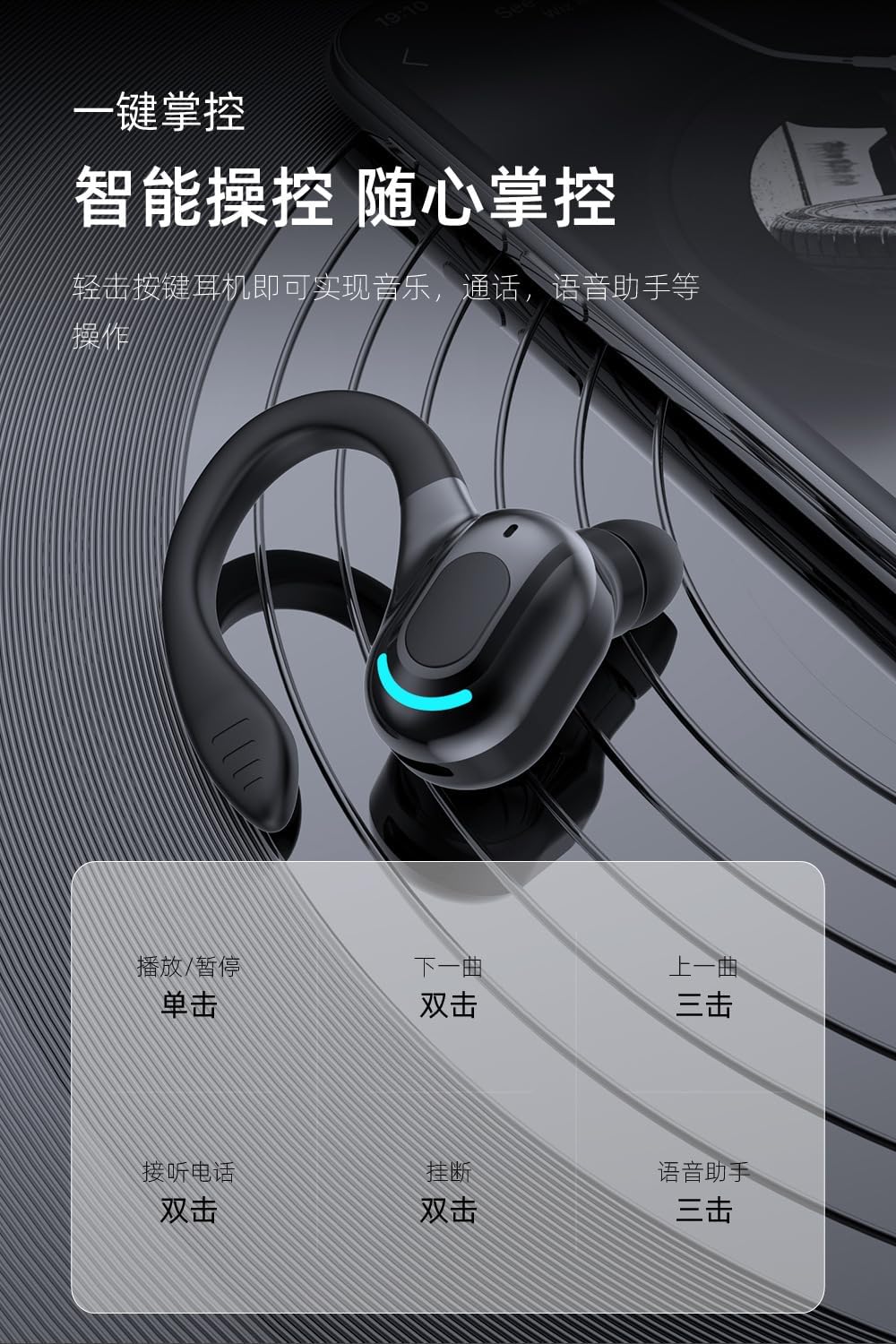
This image provides a visual guide to the M-F8 earphone's touch controls, detailing actions like single tap for play/pause, double tap for next track or answering calls, and triple tap for previous track or voice assistant activation.
മെയിൻ്റനൻസ്
To ensure the longevity and optimal performance of your M-F8 earphones, follow these maintenance tips:
- വൃത്തിയാക്കൽ: ഇയർബഡുകൾ, ഇയർ ടിപ്പുകൾ, ചാർജിംഗ് കോൺടാക്റ്റുകൾ എന്നിവ മൃദുവായതും ഉണങ്ങിയതും ലിന്റ് രഹിതവുമായ തുണി ഉപയോഗിച്ച് പതിവായി വൃത്തിയാക്കുക. കഠിനമായ രാസവസ്തുക്കളോ ഉരച്ചിലുകളോ ഉള്ള വസ്തുക്കൾ ഉപയോഗിക്കരുത്.
- സംഭരണം: ഉപയോഗത്തിലില്ലാത്തപ്പോൾ, പൊടിയിൽ നിന്നും കേടുപാടുകളിൽ നിന്നും സംരക്ഷിക്കാൻ ഇയർഫോണുകൾ അവയുടെ ചാർജിംഗ് കേസിൽ സൂക്ഷിക്കുക.
- ബാറ്ററി കെയർ: Avoid fully discharging the battery frequently. Charge the earphones regularly, even if not used for extended periods, to maintain battery health.
- വെള്ളം ഒഴിവാക്കുക: While designed for active use, avoid submerging the earphones in water or exposing them to heavy rain.
ട്രബിൾഷൂട്ടിംഗ്
If you encounter issues with your M-F8 earphones, refer to the following common problems and solutions:
| പ്രശ്നം | സാധ്യമായ പരിഹാരം |
|---|---|
| ഇയർഫോണുകൾ ജോടിയാക്കുന്നില്ല | Ensure earphones are charged. Turn off and on Bluetooth on your device. Forget "M-F8" from your device's Bluetooth list and re-pair. |
| ഒരു ഇയർബഡ് മാത്രമേ പ്രവർത്തിക്കൂ | രണ്ട് ഇയർബഡുകളും ചാർജിംഗ് കെയ്സിലേക്ക് തിരികെ വയ്ക്കുക, ലിഡ് അടയ്ക്കുക, കുറച്ച് നിമിഷങ്ങൾ കാത്തിരിക്കുക, തുടർന്ന് അവ വീണ്ടും പുറത്തെടുക്കുക. രണ്ടും ചാർജ് ചെയ്തിട്ടുണ്ടെന്ന് ഉറപ്പാക്കുക. |
| ശബ്ദമോ കുറഞ്ഞ വോളിയമോ ഇല്ല | Check the volume on both your device and the earphones. Ensure the earphones are properly connected. Clean any debris from the earbud mesh. |
| ചാർജിംഗ് പ്രശ്നങ്ങൾ | Ensure the charging cable is securely connected. Clean the charging contacts on both the earphones and the case. Try a different charging cable or power source. |
| Poor call quality / Noise reduction | Ensure the microphone is not obstructed. Move closer to your connected device. The earphones feature intelligent noise reduction for clearer calls. |

This image visually represents the noise reduction capabilities of the M-F8 earphone, showing a comparison of sound waves before and after noise cancellation, indicating improved clarity.
സ്പെസിഫിക്കേഷനുകൾ
Technical specifications for the Generic M-F8 Bluetooth Earphones:
- ബ്രാൻഡ്: ജനറിക്
- മോഡൽ: M-F8 (LMT-M-F8-hei)
- കണക്റ്റിവിറ്റി: ബ്ലൂടൂത്ത് 5.2
- വാല്യംtage: 5 വോൾട്ട് (DC)
- ബാറ്ററി ലൈഫ് (ഇയർബഡുകൾ): Approximately 20 hours (single use)
- സ്റ്റാൻഡ്ബൈ സമയം: ഏകദേശം 200 മണിക്കൂർ
- ചാർജിംഗ് സമയം: ഏകദേശം 1.5 മണിക്കൂർ
- വയർലെസ് ശ്രേണി: 10 മീറ്റർ വരെ (33 അടി)
- ഫീച്ചറുകൾ: Touch Control, Auto Pairing, HiFi Sound, Noise Reduction, Ergonomic Design

This image highlights the Bluetooth 5.2 upgrade for the M-F8 earphone, emphasizing low latency, stable signal, and efficient power consumption, along with a transmission distance of 25 meters.
വാറൻ്റിയും പിന്തുണയും
For warranty information or technical support, please refer to the retailer or contact the manufacturer directly. Keep your purchase receipt as proof of purchase.
For further assistance, please visit the official Generic webസൈറ്റ് അല്ലെങ്കിൽ അവരുടെ ഉപഭോക്തൃ സേവനവുമായി ബന്ധപ്പെടുക.
Ask a question about this manual
Ask about setup, troubleshooting, compatibility, parts, safety, or missing instructions. Manuals+ will review the question and use this page’s manual context to help answer it.