
1. ആമുഖം
This manual provides detailed instructions for the installation, operation, and maintenance of your Fookoo HD Single Wireless Backup Camera. This camera is designed to be an add-on or replacement for existing Fookoo Wireless Backup Camera Systems, specifically models DW7Y5, DW7Y503, DW7Y504, and DW5. Please read this manual thoroughly before use to ensure proper functionality and safety.
2 സുരക്ഷാ വിവരങ്ങൾ
- Ensure all connections are secure before operating your vehicle.
- ക്യാമറ വേർപെടുത്താനോ പരിഷ്ക്കരിക്കാനോ ശ്രമിക്കരുത്. ഇത് വാറന്റി അസാധുവാക്കുകയും കേടുപാടുകൾ വരുത്തുകയും ചെയ്തേക്കാം.
- Always follow local traffic laws and regulations. The backup camera is an aid and should not replace careful driving.
- Keep the camera lens clean for optimal image clarity.
3. ഉൽപ്പന്നം കഴിഞ്ഞുview
The Fookoo HD Single Wireless Backup Camera provides a clear, wide-angle view to assist with vehicle maneuvering. It features a robust, waterproof design and infrared night vision for reliable performance in various conditions.
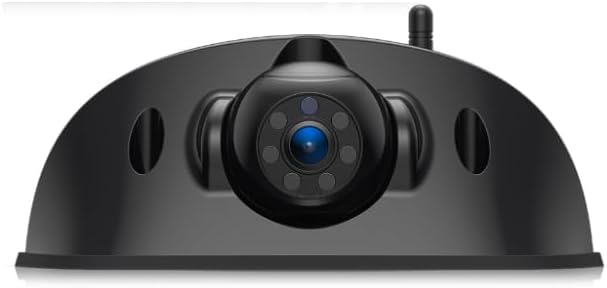
ചിത്രം 3.1: Fookoo HD Single Wireless Backup Camera. This image shows the front view of the camera with its central lens and antenna.
പ്രധാന സവിശേഷതകൾ:
- അനുയോജ്യത: Designed for Fookoo Wireless Backup Camera Systems DW7Y5, DW7Y503, DW7Y504, DW5.
- HD പിൻഭാഗംview ക്യാമറ: Provides high-definition video feed.
- IP69 വാട്ടർപ്രൂഫ് റേറ്റിംഗ്: Ensures durability and performance in harsh weather conditions.
- 120-ഡിഗ്രി Viewഇൻ ആംഗിൾ: വിശാലമായ ഫീൽഡ് വാഗ്ദാനം ചെയ്യുന്നു view മെച്ചപ്പെട്ട സുരക്ഷയ്ക്കായി.
- ഇൻഫ്രാറെഡ് നൈറ്റ് വിഷൻ: Equipped with 6 infrared lights and a light sensor for automatic activation in low light, providing clear images up to 20 feet.
- ക്രമീകരിക്കാവുന്ന ലെൻസ്: Allows for 90-degree up and down adjustment to optimize the viewing ആംഗിൾ.
- 2.4GHz Wireless Signal: Ensures real-time image transfer to the monitor with minimal delay.
- Furrion Pre-wired Adapted: Designed for easy installation on Furrion pre-wired mounts.

ചിത്രം 3.2: Diagram illustrating key features: Adjustable Lens, Waterproof Camera, Furrion Pre-wired Adapted, and IR Night Vision.
4. സജ്ജീകരണവും ഇൻസ്റ്റാളേഷനും
This camera is designed for straightforward installation, particularly on vehicles equipped with a Furrion pre-wired mount. Ensure your existing Fookoo system is compatible (models DW7Y5, DW7Y503, DW7Y504, DW5).
4.1 ക്യാമറ മൗണ്ടിംഗ്
- Locate the Furrion pre-wired mount on your vehicle (typically at the rear).
- Align the Fookoo camera with the pre-wired mount.
- Secure the camera using the provided screws or mounting hardware. Ensure it is firmly attached to withstand vehicle movement and vibrations.

ചിത്രം 4.1: The Fookoo camera mounted on the rear of a vehicle, demonstrating its intended installation location.
4.2 പവർ കണക്ഷൻ
- Connect the camera's power cord directly to the Furrion pre-wired connection point.
- Alternatively, if not using a pre-wired setup, connect the power cord to a suitable 12V DC power supply on your vehicle, ensuring proper polarity.
- Once powered, the camera will automatically attempt to pair with your compatible Fookoo monitor.

ചിത്രം 4.2: An RV illustrating the typical location of a Furrion pre-wired mount for easy camera installation.
5. പ്രവർത്തന നിർദ്ദേശങ്ങൾ
5.1 Initial Power-Up and Pairing
- After installation and power connection, turn on your Fookoo monitor.
- The camera should automatically connect to the monitor. If no image appears, refer to the troubleshooting section or the manual for your specific Fookoo monitor system for pairing instructions.
5.2 Adjusting the Camera Lens
The camera lens can be manually adjusted 90 degrees up or down to achieve the optimal viewing angle for your vehicle and preferences.
- With the camera powered on and displaying on your monitor, gently rotate the camera lens housing up or down.
- Observe the monitor to find the best angle that provides a clear view നിങ്ങളുടെ വാഹനത്തിന് പിന്നിലെ പ്രദേശം.
- Avoid forcing the lens beyond its natural range of motion.

ചിത്രം 5.1: Illustration of the adjustable camera lens, showing how the viewing angle can be changed from top to middle to bottom for optimal visibility.
5.3 Night Vision Functionality
The camera is equipped with 6 infrared (IR) lights and a light sensor. In low-light conditions, the sensor will automatically activate the IR lights, providing enhanced visibility for night operation.
6. പരിപാലനം
- ലെൻസ് വൃത്തിയാക്കൽ: ക്യാമറ ലെൻസ് പതിവായി മൃദുവായ, ഡി-ടച്ച് ഉപയോഗിച്ച് വൃത്തിയാക്കുക.amp അഴുക്ക്, പൊടി, വെള്ളം എന്നിവ നീക്കം ചെയ്യാൻ തുണി ഉപയോഗിക്കുക. ലെൻസിൽ പോറൽ വീഴ്ത്താൻ സാധ്യതയുള്ള ഉരച്ചിലുകൾ ഉണ്ടാക്കുന്ന ക്ലീനറുകൾ ഒഴിവാക്കുക.
- കണക്ഷനുകൾ പരിശോധിക്കുന്നു: എല്ലാ കേബിൾ കണക്ഷനുകളും സുരക്ഷിതമാണെന്നും നാശമോ കേടുപാടുകളോ ഇല്ലാത്തതാണെന്നും ഉറപ്പാക്കാൻ ഇടയ്ക്കിടെ പരിശോധിക്കുക.
- ഭവന പരിശോധന: Check the camera housing for any signs of damage or cracks that could compromise its waterproof integrity.
7. പ്രശ്നപരിഹാരം
| പ്രശ്നം | സാധ്യമായ കാരണം | പരിഹാരം |
|---|---|---|
| മോണിറ്ററിൽ ചിത്രമില്ല | No power to camera; Camera not paired; Loose connection. | Check power supply and connections. Refer to your monitor's manual for pairing instructions. |
| മങ്ങിയതോ വികലമായതോ ആയ ചിത്രം | Dirty lens; Incorrect lens adjustment; Interference. | Clean the camera lens. Adjust the lens angle. Ensure no strong wireless interference sources are nearby. |
| രാത്രി കാഴ്ച പ്രവർത്തിക്കുന്നില്ല | Light sensor obstructed; IR lights malfunction. | Ensure the light sensor is clear. Contact support if IR lights do not activate in darkness. |
| ഇടവിട്ടുള്ള സിഗ്നൽ | Weak signal due to distance or obstruction; Antenna issue. | Ensure the camera and monitor antennas are unobstructed. Check antenna connection on the camera. |
| Camera not compatible | Incorrect system model. | Verify your Fookoo Wireless Backup Camera System model is DW7Y5, DW7Y503, DW7Y504, or DW5. |
8 സ്പെസിഫിക്കേഷനുകൾ
- ബ്രാൻഡ്: Fookoo
- മോഡൽ: DW7Y5 (Compatible with DW7Y5, DW7Y503, DW7Y504, DW5 systems)
- ഉൽപ്പന്ന അളവുകൾ: 6.7"L x 2.7"W x 2.8"H
- ഇനത്തിൻ്റെ ഭാരം: 13.4 ഔൺസ്
- വാട്ടർപ്രൂഫ് റേറ്റിംഗ്: IP69
- Viewഇൻ ആംഗിൾ: 120 ഡിഗ്രി
- രാത്രി കാഴ്ച: 6 Infrared Lights, automatic activation
- വയർലെസ് ഫ്രീക്വൻസി: 2.4GHz
- ഇൻസ്റ്റലേഷൻ തരം: Surface Mount (Furrion Pre-wired Adapted)
- അനുയോജ്യമായ ഉപകരണങ്ങൾ: Fookoo Monitors (DW7Y5, DW7Y503, DW7Y504, DW5 systems)

ചിത്രം 8.1: Detailed diagram of the Fookoo camera highlighting dimensions, antenna location, light sensor, adjustable lens, and power cord connection.
9. വാറൻ്റിയും പിന്തുണയും
Fookoo products are designed for reliability and performance. For warranty information, technical support, or assistance with your product, please refer to the warranty card included with your original Fookoo Wireless Backup Camera System or visit the official Fookoo website. You may also contact the seller directly for support.