DZiTech J8 Pro Wireless Earbuds User Manual
Model: J8 | Brand: Generic
1. ആമുഖം
Thank you for choosing the DZiTech J8 Pro Wireless Earbuds. This manual provides essential information for setting up, operating, and maintaining your earbuds to ensure optimal performance and longevity. Please read this manual thoroughly before using the product.

Image 1.1: The DZiTech J8 Pro Wireless Earbuds, black and orange, resting in their open charging case, displaying a 100% charge on the LED screen.
2. ബോക്സിൽ എന്താണുള്ളത്?
എല്ലാ ഇനങ്ങളും ഉണ്ടെന്ന് ഉറപ്പാക്കാൻ പാക്കേജ് ഉള്ളടക്കങ്ങൾ പരിശോധിക്കുക:
- DZiTech J8 Pro Wireless Earbuds (Left and Right)
- ചാർജിംഗ് കേസ്
- യുഎസ്ബി ചാർജിംഗ് കേബിൾ
- 3 Sets of Gel Tips (S, M, L)
- ഉപയോക്തൃ മാനുവൽ (ഈ പ്രമാണം)
3. ഉൽപ്പന്ന സവിശേഷതകൾ
The DZiTech J8 Pro Earbuds are designed to provide a superior audio experience with advanced features:
- ANC (സജീവ നോയ്സ് റദ്ദാക്കൽ): ആഴത്തിലുള്ള ശ്രവണത്തിനായി ആംബിയന്റ് നോയ്സ് കുറയ്ക്കുന്നു.
- ENC (Environmental Noise Cancellation): Enhances call clarity by suppressing background noise during calls.
- Double Noise Cancelling: Combines ANC and ENC for comprehensive noise reduction.
- ബ്ലൂടൂത്ത് 5.3: Provides stable, fast, and efficient wireless connectivity.
- Music / Game Dual Mode: Optimize audio performance for either music listening or gaming with low latency.
- 38dB Deep Noise Reduction: Significant reduction in unwanted sounds.
- Up to 38 Hours Total Usage Time: ചാർജിംഗ് കേസിനൊപ്പം ബാറ്ററി ലൈഫ് വർദ്ധിപ്പിച്ചു.
- LED Built-in Power Display: Conveniently shows battery levels of the case and earbuds.
- വെള്ളത്തെ പ്രതിരോധിക്കുന്ന: Designed to withstand splashes and sweat.
- ടച്ച് നിയന്ത്രണം: Intuitive control over music, calls, and modes.

Image 3.1: The earbuds and charging case highlighting features like binaural noise reduction and intelligent automatic connection, with ANC+ENC capabilities.

Image 3.2: A close-up of the earbuds emphasizing enhanced in-ear bass, doubled sound quality, powerful bass, large metal diaphragm, and strong, transparent sound.
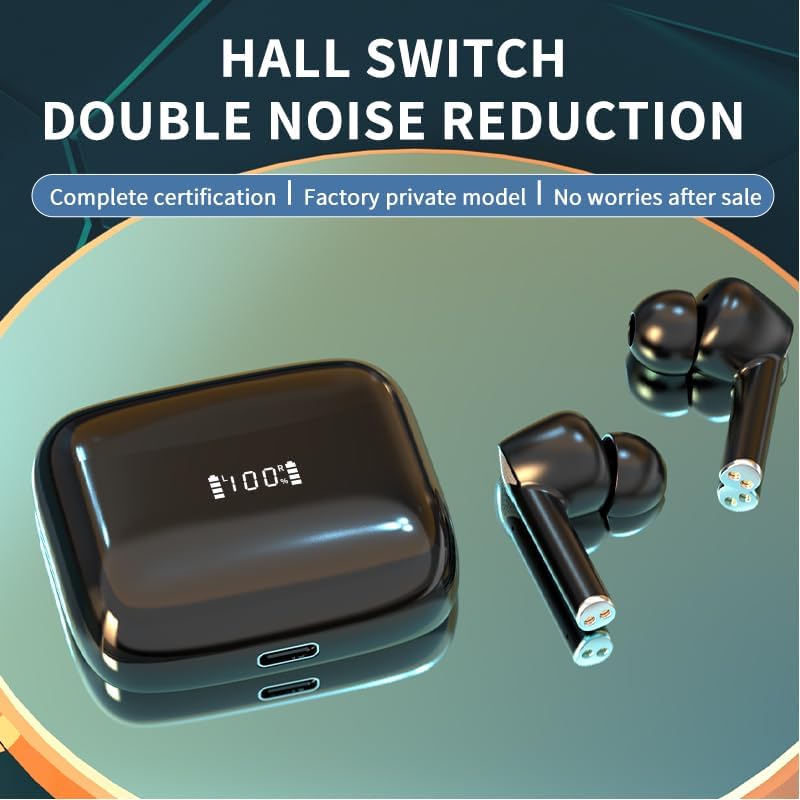
Image 3.3: The earbuds and case illustrating the Hall Switch feature for double noise reduction, ensuring complete certification and a factory private model.

Image 3.4: The earbuds and charging case with a large "36H" indicating the maximum usage time, highlighting the long battery life for all-day enjoyment with music/game dual mode and 38dB deep noise reduction.

Image 3.5: The earbuds and charging case showcasing the LED built-in display, indicating 100% charge, and emphasizing 38dB deep noise reduction and Game/Music Dual Mode.
4. സജ്ജീകരണം
4.1. ഇയർബഡുകളും കേസും ചാർജ് ചെയ്യുന്നു
ആദ്യമായി ഉപയോഗിക്കുന്നതിന് മുമ്പ്, ഇയർബഡുകളും ചാർജിംഗ് കേസും പൂർണ്ണമായും ചാർജ് ചെയ്യുക.
- ഇയർബഡുകൾ ചാർജിംഗ് കേസിൽ വയ്ക്കുക. അവ ശരിയായി സ്ഥാപിച്ചിട്ടുണ്ടെന്ന് ഉറപ്പാക്കുക.
- USB ചാർജിംഗ് കേബിൾ കേസിലെ ചാർജിംഗ് പോർട്ടിലേക്കും മറ്റേ അറ്റം ഒരു USB പവർ സ്രോതസ്സിലേക്കും (ഉദാ: കമ്പ്യൂട്ടർ, വാൾ അഡാപ്റ്റർ) ബന്ധിപ്പിക്കുക.
- The LED display on the case will indicate the charging status. A full charge takes approximately 1 hour.
4.2. നിങ്ങളുടെ ഉപകരണവുമായി ജോടിയാക്കുന്നു
ചാർജിംഗ് കേസിൽ നിന്ന് പുറത്തെടുക്കുമ്പോൾ ഇയർബഡുകൾ യാന്ത്രികമായി പെയറിംഗ് മോഡിലേക്ക് പ്രവേശിക്കും.
- ചാർജിംഗ് കെയ്സ് തുറന്ന് രണ്ട് ഇയർബഡുകളും നീക്കം ചെയ്യുക. അവ സ്വയമേവ ഓണാകുകയും പരസ്പരം ജോടിയാക്കാൻ ശ്രമിക്കുകയും ചെയ്യും.
- നിങ്ങളുടെ ഉപകരണത്തിൽ (സ്മാർട്ട്ഫോൺ, ടാബ്ലെറ്റ്, കമ്പ്യൂട്ടർ), ബ്ലൂടൂത്ത് പ്രവർത്തനക്ഷമമാക്കുക.
- ഇതിനായി തിരയുക "J8 Pro" or "DZiTech J8 Pro" in the list of available Bluetooth devices.
- Select "J8 Pro" to connect. Once connected, you will hear a confirmation tone.
- ഉപകരണത്തിൽ ബ്ലൂടൂത്ത് പ്രവർത്തനക്ഷമമാക്കിയിട്ടുണ്ടെങ്കിൽ, കേസിൽ നിന്ന് നീക്കം ചെയ്യുമ്പോൾ ഇയർബഡുകൾ അവസാനമായി ജോടിയാക്കിയ ഉപകരണവുമായി യാന്ത്രികമായി വീണ്ടും കണക്റ്റുചെയ്യും.
4.3. ശരിയായ ചെവി നുറുങ്ങുകൾ തിരഞ്ഞെടുക്കൽ
Selecting the correct size of gel tips is crucial for comfort, sound quality, and effective noise cancellation.
- Try all three sizes (S, M, L) included in the package.
- A good fit will create a seal in your ear canal, providing better bass response and noise isolation.
5. പ്രവർത്തന നിർദ്ദേശങ്ങൾ
The DZiTech J8 Pro Earbuds feature intuitive touch controls. The control area is located on the outer surface of each earbud.
5.1. പവർ ഓൺ/ഓഫ്
- പവർ ഓൺ: Open the charging case, and the earbuds will automatically power on. Alternatively, long-press the touch area for 3 seconds.
- പവർ ഓഫ്: Place the earbuds back into the charging case and close the lid. They will automatically power off. Alternatively, long-press the touch area for 5 seconds.
5.2. സംഗീത പ്ലേബാക്ക് നിയന്ത്രണം
- പ്ലേ/താൽക്കാലികമായി നിർത്തുക: ഇയർബഡുകളിൽ ഏതെങ്കിലുമൊന്നിൽ ഒറ്റ ടാപ്പ് ചെയ്യുക.
- അടുത്ത ട്രാക്ക്: വലതുവശത്തെ ഇയർബഡിൽ രണ്ടുതവണ ടാപ്പ് ചെയ്യുക.
- മുമ്പത്തെ ട്രാക്ക്: ഇടതുവശത്തെ ഇയർബഡിൽ രണ്ടുതവണ ടാപ്പ് ചെയ്യുക.
5.3. കോൾ മാനേജ്മെന്റ്
- ഉത്തരം/അവസാന കോൾ: ഇയർബഡുകളിൽ ഏതെങ്കിലുമൊന്നിൽ ഒറ്റ ടാപ്പ് ചെയ്യുക.
- കോൾ നിരസിക്കുക: Long-press on either earbud for 2 seconds.
5.4. Noise Control Modes (ANC/ENC)
- സ്വിച്ച് മോഡുകൾ: Triple tap on the left earbud to cycle through ANC (Active Noise Cancellation), Transparency Mode, and Normal Mode.
- ENC (Environmental Noise Cancellation) is automatically active during calls to enhance voice clarity.
5.5. Game / Music Dual Mode
- സ്വിച്ച് മോഡുകൾ: Triple tap on the right earbud to switch between Music Mode and Game Mode. Game Mode offers lower latency for a better gaming experience.
5.6. വോയ്സ് അസിസ്റ്റൻ്റ്
- വോയ്സ് അസിസ്റ്റന്റിനെ സജീവമാക്കുക: Long-press on either earbud for 2 seconds (when not on a call).
5.7. വോളിയം നിയന്ത്രണം
- വോളിയം കൂട്ടുക: Tap and hold on the right earbud.
- വോളിയം താഴേക്ക്: Tap and hold on the left earbud.
6. പരിപാലനം
ശരിയായ അറ്റകുറ്റപ്പണി നിങ്ങളുടെ ഇയർബഡുകളുടെ ദീർഘായുസ്സും മികച്ച പ്രകടനവും ഉറപ്പാക്കുന്നു.
- വൃത്തിയാക്കൽ: ഇയർബഡുകളും ചാർജിംഗ് കെയ്സും മൃദുവായതും ഉണങ്ങിയതും ലിന്റ് രഹിതവുമായ തുണി ഉപയോഗിച്ച് പതിവായി വൃത്തിയാക്കുക. അബ്രാസീവ് ക്ലീനറുകളോ ലായകങ്ങളോ ഉപയോഗിക്കരുത്.
- ചെവി ടിപ്പുകൾ: Remove and clean the ear tips periodically with water and mild soap. Ensure they are completely dry before reattaching.
- ചാർജിംഗ് കോൺടാക്റ്റുകൾ: If charging issues occur, gently clean the charging contacts on both the earbuds and the case with a cotton swab.
- സംഭരണം: ഉപയോഗത്തിലില്ലാത്തപ്പോൾ, ഇയർബഡുകൾ സംരക്ഷിക്കുന്നതിനും ചാർജ്ജ് ചെയ്ത നിലയിൽ നിലനിർത്തുന്നതിനും അവ ചാർജിംഗ് കേസിൽ സൂക്ഷിക്കുക.
- തീവ്രമായ അവസ്ഥകൾ ഒഴിവാക്കുക: Do not expose the earbuds to extreme temperatures, humidity, or direct sunlight. While water resistant, avoid submerging them in water.
7. പ്രശ്നപരിഹാരം
If you encounter issues with your DZiTech J8 Pro Earbuds, try the following solutions:
| പ്രശ്നം | സാധ്യമായ പരിഹാരം |
|---|---|
| ഇയർബഡുകൾ ഉപകരണവുമായി ജോടിയാക്കുന്നില്ല. |
|
| ഒരു ഇയർബഡ് മാത്രമാണ് പ്രവർത്തിക്കുന്നത്. |
|
| ശബ്ദമില്ല അല്ലെങ്കിൽ കുറഞ്ഞ ശബ്ദമില്ല. |
|
| ചാർജിംഗ് കേസ് ചാർജ് ചെയ്യുന്നില്ല. |
|
8 സ്പെസിഫിക്കേഷനുകൾ
| ഫീച്ചർ | വിശദാംശങ്ങൾ |
|---|---|
| മോഡലിൻ്റെ പേര് | J8 Pro വയർലെസ് ഇയർബഡുകൾ |
| കണക്റ്റിവിറ്റി ടെക്നോളജി | വയർലെസ്, ബ്ലൂടൂത്ത് 5.3 |
| ബ്ലൂടൂത്ത് പതിപ്പ് | 5.3 |
| ശബ്ദ നിയന്ത്രണം | Active Noise Cancellation (ANC), Environmental Noise Cancellation (ENC), Sound Isolation |
| സംവേദനക്ഷമത | 38 ഡി.ബി |
| ബാറ്ററി ലൈഫ് (ഇയർബഡുകൾ) | Up to 5 Hours (per charge) |
| ആകെ ഉപയോഗ സമയം (കേസിനൊപ്പം) | 38 മണിക്കൂർ വരെ |
| ചാർജിംഗ് സമയം | Approx. 1 Hour (earbuds and case) |
| ജല പ്രതിരോധ നില | വെള്ളത്തെ പ്രതിരോധിക്കുന്ന |
| നിയന്ത്രണ രീതി | ടച്ച് നിയന്ത്രണം |
| ഇനത്തിൻ്റെ ഭാരം | 4.2 Ounces (total package) |
| ഉൾപ്പെടുത്തിയ ഘടകങ്ങൾ | Earbuds, Charging Case, USB Cable, 3 Sets Gel Tips |
| മെറ്റീരിയൽ | പ്ലാസ്റ്റിക് |
| അനുയോജ്യമായ ഉപകരണങ്ങൾ | Cellphones, Tablets, Desktops, Car Audio Systems, Music Production Equipment |
| ശുപാർശ ചെയ്യുന്ന ഉപയോഗങ്ങൾ | Calling, Running, Exercising, Gaming, Music, Sport |
9. വാറൻ്റിയും പിന്തുണയും
This product comes with a standard manufacturer's warranty. For specific warranty details, please refer to the warranty card included in your package or contact the seller/manufacturer directly.
If you require further assistance or have questions not covered in this manual, please contact our customer support team. Please have your product model number (J8) and purchase information ready when contacting support.