
FOREVER MATB-100
FOREVER MATB-100 Wireless Power Bank User Manual
Model: MATB-100
1. ആമുഖം
Thank you for choosing the FOREVER MATB-100 Wireless Power Bank. This device is designed to provide convenient and efficient charging for your mobile devices, featuring both wired and wireless charging capabilities. Please read this manual carefully before using the product to ensure safe and optimal performance.
2 പ്രധാന സവിശേഷതകൾ
- ബഹുമുഖ ചാർജിംഗ്: Supports simultaneous charging of three devices via wireless induction, USB-A, and USB-C ports.
- LED സൂചകം: A practical LED display accurately shows the current battery level of the power bank.
- Smart Magnetic Grip: Features a special magnetic grip to stabilize your phone with the power bank, allowing hands-free use during charging.
- ഉയർന്ന ശേഷി: Equipped with a 10,000 mAh battery, providing multiple recharges for your devices.
- ഫാസ്റ്റ് ചാർജിംഗ്: Supports Power Delivery (PD) and Quick Charge (QC) technologies for rapid charging.
- സംയോജിത കിക്ക്സ്റ്റാൻഡ്: Allows the power bank to function as a stand for your phone while charging.
3. ഉൽപ്പന്നം കഴിഞ്ഞുview
Familiarize yourself with the components of your FOREVER MATB-100 Wireless Power Bank.

ചിത്രം 3.1: മുന്നിലും പിന്നിലും view of the FOREVER MATB-100 Wireless Power Bank, highlighting the wireless charging pad and the integrated kickstand.

ചിത്രം 3.2: വശം view of the power bank, illustrating the USB-A output port, USB-C input/output port, and the LED battery level indicators.

ചിത്രം 3.3: The power bank magnetically attached to the back of a smartphone, demonstrating the secure magnetic grip feature.

ചിത്രം 3.4: Diagram showing the dimensions of the power bank: approximately 10.8 cm in length and 6.8 cm in width.
ഘടകങ്ങൾ:
- Wireless Charging Pad (with magnetic alignment)
- LED ബാറ്ററി ലെവൽ ഇൻഡിക്കേറ്റർ
- പവർ ബട്ടൺ
- USB-A putട്ട്പുട്ട് പോർട്ട്
- USB-C ഇൻപുട്ട്/ഔട്ട്പുട്ട് പോർട്ട്
- സംയോജിത കിക്ക്സ്റ്റാൻഡ്
4. സജ്ജീകരണവും പ്രാരംഭ ചാർജും
4.1 പവർ ബാങ്ക് ചാർജ് ചെയ്യുന്നു
Before first use, fully charge your FOREVER MATB-100 Power Bank.
- നൽകിയിരിക്കുന്ന USB-C കേബിൾ പവർ ബാങ്കിലെ USB-C പോർട്ടിലേക്ക് ബന്ധിപ്പിക്കുക.
- Connect the other end of the USB-C cable to a compatible USB wall adapter (not included). For optimal charging speed, use a Power Delivery (PD) compatible adapter.
- The LED indicators will illuminate to show the charging progress. When all LEDs are solid, the power bank is fully charged.
കുറിപ്പ്: The power bank can be charged using the USB-C port. It is recommended to fully charge the power bank every three months if not in regular use to maintain battery health.
5. പ്രവർത്തന നിർദ്ദേശങ്ങൾ
5.1 ബാറ്ററി നില പരിശോധിക്കുന്നു
Press the power button once to check the remaining battery level. The LED indicators will light up, with each LED representing approximately 25% of the battery capacity.
5.2 വയർലെസ് ചാർജിംഗ്
The MATB-100 supports wireless charging for compatible devices, including MagSafe-enabled iPhones and other Qi-compatible smartphones.
- പവർ ബാങ്ക് ആവശ്യത്തിന് ചാർജ്ജ് ചെയ്തിട്ടുണ്ടെന്ന് ഉറപ്പാക്കുക.
- Place your wireless charging compatible device onto the wireless charging pad of the power bank. For MagSafe-enabled devices, the power bank will magnetically align.
- The device should begin charging automatically. If not, press the power button on the power bank to activate wireless charging.
- The LED indicators on the power bank may show charging status.
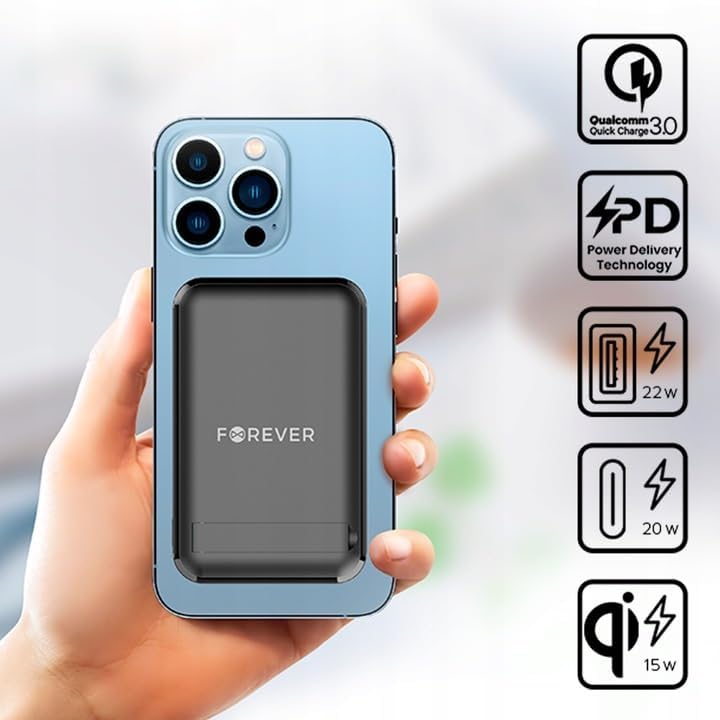
ചിത്രം 5.1: A smartphone attached to the power bank, illustrating wireless charging in progress and icons representing Quick Charge, Power Delivery, and various wattagഇ ഔട്ട്പുട്ടുകൾ.
നുറുങ്ങ്: Use the integrated kickstand to prop up your phone while it charges wirelessly, allowing for comfortable viewing.
5.3 Wired Charging (USB-A and USB-C)
The power bank can charge devices via its USB-A and USB-C ports.
- പവർ ബാങ്ക് ആവശ്യത്തിന് ചാർജ്ജ് ചെയ്തിട്ടുണ്ടെന്ന് ഉറപ്പാക്കുക.
- Connect one end of a compatible charging cable to your device and the other end to either the USB-A or USB-C output port on the power bank.
- The device should begin charging automatically. If not, press the power button on the power bank.

ചിത്രം 5.2: A smartphone connected to the power bank via a USB-C cable, demonstrating wired charging.
കുറിപ്പ്: The USB-C port functions as both an input for charging the power bank and an output for charging other devices. The USB-A port is an output only.
5.4 ഒരേസമയം ചാർജ് ചെയ്യൽ
The FOREVER MATB-100 can charge up to three devices simultaneously (one wirelessly, one via USB-A, and one via USB-C). The total output power will be distributed among the connected devices.
6. പരിചരണവും പരിപാലനവും
- Keep the power bank dry. Moisture can damage the internal circuitry.
- തീവ്രമായ ഊഷ്മാവിൽ (ചൂടും തണുപ്പും) തുറന്നുകാട്ടരുത്.
- ശക്തമായ ആഘാതങ്ങൾക്ക് പവർബാങ്ക് വീഴ്ത്തുകയോ വിധേയമാക്കുകയോ ചെയ്യരുത്.
- Clean the surface with a soft, dry cloth. Do not use harsh chemicals or abrasive cleaners.
- നേരിട്ടുള്ള സൂര്യപ്രകാശത്തിൽ നിന്ന് തണുത്തതും വരണ്ടതുമായ സ്ഥലത്ത് സൂക്ഷിക്കുക.
- If not used for extended periods, charge the power bank at least once every three months to prolong battery life.
7. പ്രശ്നപരിഹാരം
7.1 പവർ ബാങ്ക് ചാർജ് ചെയ്യുന്നില്ല
- Ensure the USB-C cable is securely connected to both the power bank and the wall adapter.
- വാൾ അഡാപ്റ്റർ ശരിയായി പ്രവർത്തിക്കുന്നുണ്ടെന്നും ഒരു ലൈവ് പവർ ഔട്ട്ലെറ്റിൽ പ്ലഗ് ചെയ്തിട്ടുണ്ടെന്നും പരിശോധിക്കുക.
- Try using a different USB-C cable and/or wall adapter.
7.2 പവർ ബാങ്കിൽ നിന്ന് ഉപകരണം ചാർജ് ചെയ്യുന്നില്ല.
- Check the power bank's battery level. If it's low, recharge the power bank.
- ചാർജിംഗ് സജീവമാക്കാൻ പവർ ബാങ്കിലെ പവർ ബട്ടൺ അമർത്തുക.
- For wired charging, ensure the cable is securely connected to both the power bank and your device. Try a different cable or port.
- For wireless charging, ensure your device is properly aligned on the charging pad and is wireless charging compatible. Remove any thick cases that might interfere.
- Ensure there are no metallic objects between the power bank and your device during wireless charging.
7.3 സ്ലോ ചാർജിംഗ്
- ഉയർന്ന നിലവാരമുള്ളതും അനുയോജ്യവുമായ ചാർജിംഗ് കേബിൾ ഉപയോഗിക്കുന്നുണ്ടെന്ന് ഉറപ്പാക്കുക.
- For wired charging, ensure your device supports Quick Charge (QC) or Power Delivery (PD) if you expect fast charging speeds.
- For wireless charging, ensure your device supports fast wireless charging and is correctly aligned.
- Charging multiple devices simultaneously may reduce the charging speed for each individual device.
8 സ്പെസിഫിക്കേഷനുകൾ
| മോഡലിൻ്റെ പേര് | MATB-100 |
| ബ്രാൻഡ് | എന്നേക്കും |
| ബാറ്ററി ശേഷി | 10000 mAh (മില്ലിampഒരു മണിക്കൂർ) |
| ബാറ്ററി കോമ്പോസിഷൻ | ലിഥിയം-അയൺ |
| കണക്റ്റർ തരം | യുഎസ്ബി ടൈപ്പ് എ, യുഎസ്ബി ടൈപ്പ് സി |
| പ്രത്യേക ഫീച്ചർ | Wireless Charging, Magnetic Grip, Integrated Kickstand |
| വാല്യംtage | 5 Volts (Output) |
| തുറമുഖങ്ങളുടെ എണ്ണം | 2 (USB-A, USB-C) + Wireless Charging |
| അനുയോജ്യമായ ഉപകരണങ്ങൾ | Smartphones (including MagSafe compatible), Tablets, Headphones, Smartwatches |
| അളവുകൾ (L x W x H) | 10.8 സെ.മീ x 6.8 സെ.മീ x 2 സെ.മീ (ഏകദേശം) |
| Max Wireless Output | 15W |
| Max USB-A Output | 22.5W (Quick Charge) |
| Max USB-C Output | 20W (പവർ ഡെലിവറി) |
9 സുരക്ഷാ വിവരങ്ങൾ
- ബാറ്ററി പായ്ക്ക് വേർപെടുത്തുകയോ തുറക്കുകയോ കീറുകയോ ചെയ്യരുത്.
- പവർ ബാങ്ക് ചൂടിലോ തീയിലോ ഏൽക്കരുത്. നേരിട്ട് സൂര്യപ്രകാശം ഏൽക്കുന്നിടത്ത് സൂക്ഷിക്കുന്നത് ഒഴിവാക്കുക.
- Do not short-circuit the power bank. Do not store battery packs haphazardly in a box or drawer where they may short-circuit each other or be short-circuited by conductive materials.
- പവർ ബാങ്കിനെ മെക്കാനിക്കൽ ഷോക്കിന് വിധേയമാക്കരുത്.
- In the event of a battery leak, do not allow the liquid to come into contact with the skin or eyes. If contact has been made, wash the affected area with copious amounts of water and seek medical advice.
- പവർ ബാങ്ക് കുട്ടികൾക്ക് ലഭ്യമാകാതെ സൂക്ഷിക്കുക.
- കുട്ടികൾ പവർ ബാങ്ക് ഉപയോഗിക്കുമ്പോൾ മേൽനോട്ടം വഹിക്കുക.
- ഉപകരണങ്ങളുടെ ഉപയോഗത്തിനായി പ്രത്യേകം നൽകിയിട്ടുള്ള ചാർജർ അല്ലാതെ മറ്റൊന്നും ഉപയോഗിക്കരുത്.
- Dispose of the power bank properly according to local regulations. Do not dispose of with household waste.
10. വാറൻ്റിയും പിന്തുണയും
For warranty information and technical support, please refer to the documentation provided with your purchase or contact the FOREVER customer service department. Keep your proof of purchase for warranty claims.
For further assistance, you may visit the official FOREVER webസൈറ്റ് അല്ലെങ്കിൽ നിങ്ങളുടെ റീട്ടെയിലറെ ബന്ധപ്പെടുക.
Ask a question about this manual
Ask about setup, troubleshooting, compatibility, parts, safety, or missing instructions. Manuals+ will review the question and use this page’s manual context to help answer it.