
1. ആമുഖം
Thank you for choosing the RadioShack TWS Bluetooth Wireless Earbuds, Model 100128651 (Snow). These earbuds are designed to provide a high-quality, wireless audio experience with convenience and comfort. This manual will guide you through the setup, operation, and maintenance of your new earbuds.
2. പാക്കേജ് ഉള്ളടക്കം
നിങ്ങളുടെ പാക്കേജിൽ എല്ലാ ഇനങ്ങളും ഉണ്ടെന്ന് ഉറപ്പാക്കുക:
- RadioShack TWS Bluetooth Wireless Earbuds (Left and Right)
- ചാർജിംഗ് കേസ്
- യുഎസ്ബി ടൈപ്പ്-സി ചാർജിംഗ് കേബിൾ
- ഒന്നിലധികം വലിപ്പത്തിലുള്ള ചെവി നുറുങ്ങുകൾ

3. ഉൽപ്പന്നം കഴിഞ്ഞുview
Familiarize yourself with the components of your RadioShack TWS Bluetooth Wireless Earbuds.
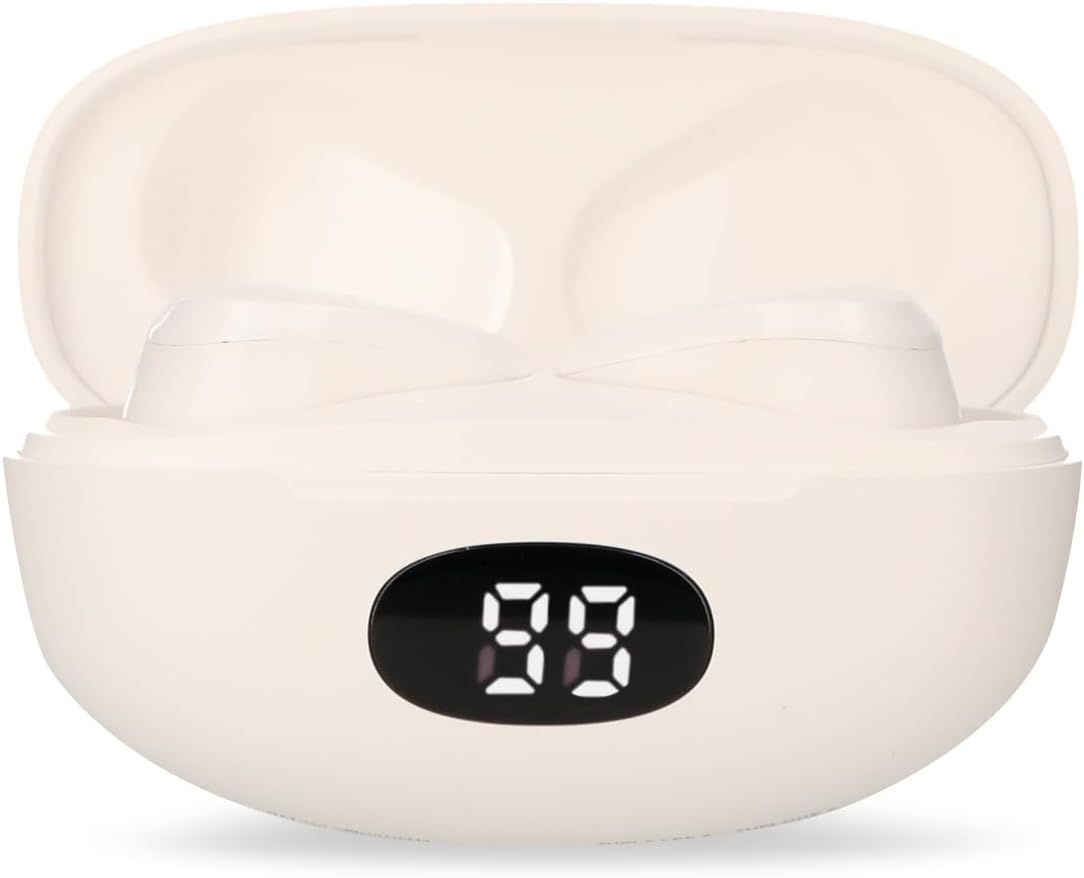


4. സജ്ജീകരണം
4.1 ഇയർബഡുകളും കേസും ചാർജ് ചെയ്യുന്നു
- പ്രാരംഭ ചാർജ്: ആദ്യമായി ഉപയോഗിക്കുന്നതിന് മുമ്പ്, ഇയർബഡുകളും ചാർജിംഗ് കേസും പൂർണ്ണമായും ചാർജ് ചെയ്യുക.
- കേസ് ചാർജ് ചെയ്യുന്നത്: Connect the provided USB Type-C cable to the charging port on the case and the other end to a USB power source (e.g., computer, wall adapter). The LED display on the case will indicate charging status.
- ഇയർബഡുകൾ ചാർജ് ചെയ്യുന്നു: Place the earbuds into the charging case. Ensure they are correctly seated; the earbuds will automatically begin charging. The LED display on the case will show the earbuds' charging status.
- ചാർജ്ജ് സമയം: A full charge for both the earbuds and case typically takes up to 1.5 hours.
4.2 ബ്ലൂടൂത്ത് ജോടിയാക്കൽ
- പവർ ഓൺ: Open the charging case. The earbuds will automatically power on and enter pairing mode. You may hear an audible prompt.
- ബ്ലൂടൂത്ത് സജീവമാക്കുക: On your mobile device (smartphone, tablet, etc.), go to the Bluetooth settings and ensure Bluetooth is enabled.
- ഉപകരണം തിരഞ്ഞെടുക്കുക: ഇതിനായി തിരയുക available Bluetooth devices. Select "RadioShack Snow" or a similar name from the list.
- ബന്ധിപ്പിക്കുക: Once selected, your device should connect to the earbuds. A confirmation sound or message may indicate successful pairing.
- വീണ്ടും ബന്ധിപ്പിക്കുക: After initial pairing, the earbuds will automatically connect to the last paired device when removed from the charging case and Bluetooth is active on your device.
5. പ്രവർത്തന നിർദ്ദേശങ്ങൾ
The RadioShack TWS Earbuds feature a multifunction touch button for easy control.
5.1 പവർ ഓൺ/ഓഫ്
- പവർ ഓൺ: Open the charging case, and the earbuds will power on automatically. Alternatively, press and hold the touch area on both earbuds for approximately 3 seconds.
- പവർ ഓഫ്: Place the earbuds back into the charging case and close the lid. They will power off automatically. Alternatively, press and hold the touch area on both earbuds for approximately 5 seconds.
5.2 മ്യൂസിക് പ്ലേബാക്ക്
- പ്ലേ/താൽക്കാലികമായി നിർത്തുക: ഇയർബഡുകളിൽ ഏതിലെങ്കിലും ഒന്നിലെ ടച്ച് ഏരിയയിൽ ഒരു തവണ ടാപ്പ് ചെയ്യുക.
- അടുത്ത ട്രാക്ക്: വലതുവശത്തെ ഇയർബഡിലെ ടച്ച് ഏരിയയിൽ രണ്ടുതവണ ടാപ്പ് ചെയ്യുക.
- മുമ്പത്തെ ട്രാക്ക്: ഇടതുവശത്തെ ഇയർബഡിലെ ടച്ച് ഏരിയയിൽ രണ്ടുതവണ ടാപ്പ് ചെയ്യുക.
5.3 കോൾ മാനേജ്മെന്റ്
- ഉത്തരം/അവസാന കോൾ: ഇയർബഡുകളിൽ ഏതിലെങ്കിലും ഒന്നിലെ ടച്ച് ഏരിയയിൽ ഒരു തവണ ടാപ്പ് ചെയ്യുക.
- കോൾ നിരസിക്കുക: Press and hold the touch area on either earbud for approximately 2 seconds.
5.4 വോളിയം നിയന്ത്രണം
- വോളിയം വർദ്ധിപ്പിക്കുക: വലതുവശത്തെ ഇയർബഡിലെ ടച്ച് ഏരിയയിൽ മൂന്ന് തവണ ടാപ്പ് ചെയ്യുക.
- വോളിയം കുറയ്ക്കുക: ഇടതുവശത്തെ ഇയർബഡിലെ ടച്ച് ഏരിയയിൽ മൂന്ന് തവണ ടാപ്പ് ചെയ്യുക.
5.5 വോയ്സ് അസിസ്റ്റന്റ്
- വോയ്സ് അസിസ്റ്റന്റിനെ സജീവമാക്കുക: Press and hold the touch area on either earbud for approximately 2 seconds (when not on a call).
6. പരിപാലനം
നിങ്ങളുടെ ഇയർബഡുകളുടെ ദീർഘായുസ്സും മികച്ച പ്രകടനവും ഉറപ്പാക്കാൻ, ഈ പരിപാലന മാർഗ്ഗനിർദ്ദേശങ്ങൾ പാലിക്കുക:
- വൃത്തിയാക്കൽ: ഇയർബഡുകളും ചാർജിംഗ് കെയ്സും വൃത്തിയാക്കാൻ മൃദുവായതും ഉണങ്ങിയതും ലിന്റ് രഹിതവുമായ തുണി ഉപയോഗിക്കുക. അബ്രാസീവ് ക്ലീനറുകൾ, ആൽക്കഹോൾ, കെമിക്കൽ ലായകങ്ങൾ എന്നിവ ഉപയോഗിക്കരുത്.
- ചെവി ടിപ്പുകൾ: Regularly remove and clean the ear tips with a damp തുണി. വീണ്ടും ഘടിപ്പിക്കുന്നതിന് മുമ്പ് അവ പൂർണ്ണമായും ഉണങ്ങിയെന്ന് ഉറപ്പാക്കുക.
- ചാർജിംഗ് കോൺടാക്റ്റുകൾ: If charging issues occur, gently clean the charging contacts on both the earbuds and inside the case with a dry cotton swab.
- സംഭരണം: ഉപയോഗത്തിലില്ലാത്തപ്പോൾ, പൊടിയിൽ നിന്നും കേടുപാടുകളിൽ നിന്നും സംരക്ഷിക്കാൻ ഇയർബഡുകൾ അവയുടെ ചാർജിംഗ് കേസിൽ സൂക്ഷിക്കുക. തണുത്തതും വരണ്ടതുമായ സ്ഥലത്ത് സൂക്ഷിക്കുക.
- വെള്ളം ഒഴിവാക്കുക: ഈ ഇയർബഡുകൾ വാട്ടർപ്രൂഫ് അല്ല. വെള്ളം, ഈർപ്പം, അല്ലെങ്കിൽ ഉയർന്ന താപനില എന്നിവയിൽ സമ്പർക്കം പുലർത്തുന്നത് ഒഴിവാക്കുക.
7. പ്രശ്നപരിഹാരം
നിങ്ങളുടെ ഇയർബഡുകളിൽ എന്തെങ്കിലും പ്രശ്നങ്ങൾ നേരിടുകയാണെങ്കിൽ, ഇനിപ്പറയുന്ന പൊതുവായ പ്രശ്നങ്ങളും പരിഹാരങ്ങളും പരിശോധിക്കുക:
| പ്രശ്നം | സാധ്യമായ കാരണം | പരിഹാരം |
|---|---|---|
| ഇയർബഡുകൾ ജോടിയാക്കുന്നില്ല | Earbuds are not in pairing mode or Bluetooth is off on device. | Ensure earbuds are out of the case and Bluetooth is enabled on your device. Forget previous pairings and try again. |
| ഇയർബഡുകളിൽ നിന്ന് ശബ്ദമില്ല | Volume too low, earbuds not connected, or media paused. | Increase volume on both earbuds and device. Check Bluetooth connection. Ensure media is playing. |
| ഒരു ഇയർബഡ് പ്രവർത്തിക്കുന്നില്ല | Low battery, connection issue, or earbud not properly seated in case. | Place both earbuds back in the case, close, then reopen. Ensure both are charged. Re-pair if necessary. |
| ചാർജിംഗ് കേസ് ചാർജുചെയ്യുന്നില്ല | Faulty cable, power source, or dirty charging port. | Try a different USB-C cable and power adapter. Clean the charging port. |
| മോശം ഓഡിയോ നിലവാരം | Distance from device, interference, or low battery. | Move closer to your device. Avoid environments with strong Wi-Fi or other Bluetooth signals. Charge earbuds. |
8 സ്പെസിഫിക്കേഷനുകൾ
Detailed technical specifications for the RadioShack TWS Bluetooth Wireless Earbuds, Model 100128651 (Snow):
- മോഡലിൻ്റെ പേര്: മഞ്ഞ്
- മോഡൽ നമ്പർ: 100128651
- കണക്റ്റിവിറ്റി: വയർലെസ്, ബ്ലൂടൂത്ത്
- ബ്ലൂടൂത്ത് പതിപ്പ്: 5.1
- വയർലെസ് ശ്രേണി: 10 മീറ്റർ വരെ (33 അടി)
- ഇയർബഡ് ബാറ്ററി: 3.7V DC, 30 mAh (each)
- ചാർജിംഗ് കെയ്സ് ബാറ്ററി: 3.7V DC, 250 mAh
- Charging Input (Earbuds): 5V DC, 30 mA
- Charging Input (Case): 5V DC, 220 mA
- ചാർജിംഗ് പോർട്ട്: യുഎസ്ബി ടൈപ്പ്-സി
- മുഴുവൻ ചാർജ്ജ് സമയം: ഏകദേശം 1.5 മണിക്കൂർ
- ഇയർബഡ് പ്ലേബാക്ക് സമയം: 4 മണിക്കൂർ വരെ (തുടർച്ചയായി)
- Total Playback Time (with case): 12 മണിക്കൂർ വരെ
- നിയന്ത്രണ രീതി: സ്പർശിക്കുക
- മൈക്രോഫോൺ: Included (for hands-free calls)
- പ്രത്യേക സവിശേഷതകൾ: Voice Assistant support, Ergonomic Design, Passive Noise Cancellation
- അനുയോജ്യത: iOS, Android ഉപകരണങ്ങൾ
- UPC: 7503038212252
- പാക്കേജ് അളവുകൾ: 17.7 x 8.5 x 4.7 സെ.മീ
- പാക്കേജ് ഭാരം: 150 ഗ്രാം
9. വാറൻ്റിയും പിന്തുണയും
RadioShack products are manufactured with quality and reliability in mind. For warranty information, please refer to the documentation provided at the time of purchase or visit the official RadioShack webനിങ്ങളുടെ പ്രദേശത്തിനായുള്ള സൈറ്റ്.
For technical support or customer service, please contact:
- Webസൈറ്റ്: www.radioshack.com.mx
- ഫോൺ: 55 2582 0999
പിന്തുണയുമായി ബന്ധപ്പെടുമ്പോൾ നിങ്ങളുടെ മോഡൽ നമ്പറും (100128651) വാങ്ങിയതിന്റെ തെളിവും തയ്യാറാക്കി വയ്ക്കുക.