
Phomemo M08F Pro
Phomemo M08F Portable Thermal Printer User Manual
Model: M08F Pro
Your guide to setting up, operating, and maintaining your Phomemo M08F printer.
1. ആമുഖം
Thank you for choosing the Phomemo M08F Portable Thermal Printer. This compact and lightweight A4 thermal printer is designed for convenience, allowing you to print documents anytime, anywhere. It is compatible with both mobile devices (iOS and Android via Bluetooth) and computers (Mac OS, Windows, Chrome OS, Linux via USB cable).
This manual provides detailed instructions to help you get started, operate, and maintain your printer for optimal performance.
2. പാക്കേജ് ഉള്ളടക്കം
നിങ്ങളുടെ പാക്കേജിൽ എല്ലാ ഇനങ്ങളും ഉണ്ടെന്ന് ദയവായി പരിശോധിക്കുക:
- Phomemo M08F പോർട്ടബിൾ തെർമൽ പ്രിന്റർ
- USB Cable (for charging and PC connection)
- ദ്രുത ആരംഭ ഗൈഡ്
- Phomemo A4 Thermal Paper (sampലെ പാക്ക്)
3. ഉൽപ്പന്നം കഴിഞ്ഞുview
Familiarize yourself with the main components of your Phomemo M08F printer.

ചിത്രം 3.1: Phomemo M08F Portable Thermal Printer in use, demonstrating its compact size and A4 printing capability. A smartphone displays the Phomemo app, indicating various printing options.

ചിത്രം 3.2: The Phomemo M08F printer connected to a laptop, highlighting its compatibility with Windows, Mac OS, Chrome OS, and Linux operating systems for versatile use.
4. സജ്ജീകരണ ഗൈഡ്
4.1 പ്രിന്റർ ചാർജ് ചെയ്യുന്നു
Before first use, fully charge the printer. Connect the provided USB cable to the printer's charging port and a power adapter (not included) or a computer's USB port. The indicator light will show charging status.
- ചാർജിംഗ് സൂചകം: Refer to the Quick Start Guide for specific light behavior (e.g., Red for charging, Green for fully charged).
4.2 തെർമൽ പേപ്പർ ലോഡുചെയ്യുന്നു
The Phomemo M08F uses A4 thermal paper. Ensure you load the paper correctly for optimal printing.
- Open the paper cover on the printer.
- Insert a sheet of A4 thermal paper with the printable side facing up.
- Gently push the paper until the printer automatically feeds it slightly.
- പേപ്പർ കവർ സുരക്ഷിതമായി അടയ്ക്കുക.

ചിത്രം 4.1: Phomemo M08F A4 thermal paper, specifically designed for this printer model to ensure high-quality thermal prints without ink.
4.3 Software Installation (for PC/Mac)
For computer connectivity, you need to install the appropriate drivers.
- Visit the official Phomemo driver download page: https://phomemo.com/pages/m08f
- Download and install the driver compatible with your operating system (Windows, Mac OS, Chrome OS, Linux).
- ഇൻസ്റ്റാളേഷൻ പൂർത്തിയാക്കാൻ ഓൺ-സ്ക്രീൻ നിർദ്ദേശങ്ങൾ പാലിക്കുക.

ചിത്രം 4.2: USB cable connection for the Phomemo M08F printer to a laptop, illustrating the necessity of downloading drivers from the official Phomemo website for PC/Mac compatibility.
4.4 App Installation (for Mobile Devices)
For wireless printing via Bluetooth, download the Phomemo app on your smartphone or tablet.
- ഇതിനായി തിരയുക "Phomemo" on the Apple App Store (for iOS) or Google Play Store (for Android).
- Download and install the official Phomemo app.

ചിത്രം 4.3: The Phomemo M08F printer demonstrating Bluetooth connectivity with a smartphone. The image shows the Phomemo app icon and links to download from the App Store and Google Play, facilitating wireless printing.
5. പ്രവർത്തന നിർദ്ദേശങ്ങൾ
5.1 Connecting via Bluetooth (Mobile)
- Ensure your Phomemo M08F printer is turned on and charged.
- നിങ്ങളുടെ മൊബൈൽ ഉപകരണത്തിൽ ബ്ലൂടൂത്ത് പ്രവർത്തനക്ഷമമാക്കുക.
- Phomemo ആപ്പ് തുറക്കുക.
- Within the app, search for available devices and select "M08F" to pair.
- കണക്റ്റുചെയ്തുകഴിഞ്ഞാൽ, ആപ്പ് കണക്ഷൻ വിജയകരമാണെന്ന് സൂചിപ്പിക്കും.
5.2 Connecting via USB (PC/Mac)
- Ensure the printer drivers are installed on your computer (refer to Section 4.3).
- Connect the Phomemo M08F printer to your computer using the provided USB cable.
- Your computer should recognize the printer. You can now print directly from your applications.
5.3 പ്രമാണങ്ങൾ അച്ചടിക്കൽ
The Phomemo M08F is ideal for printing various documents, including contracts, invoices, and study materials.
ചിത്രം 5.1: A professional using the Phomemo M08F printer in a mobile office setting, demonstrating its utility for printing documents like sales contracts on the go.

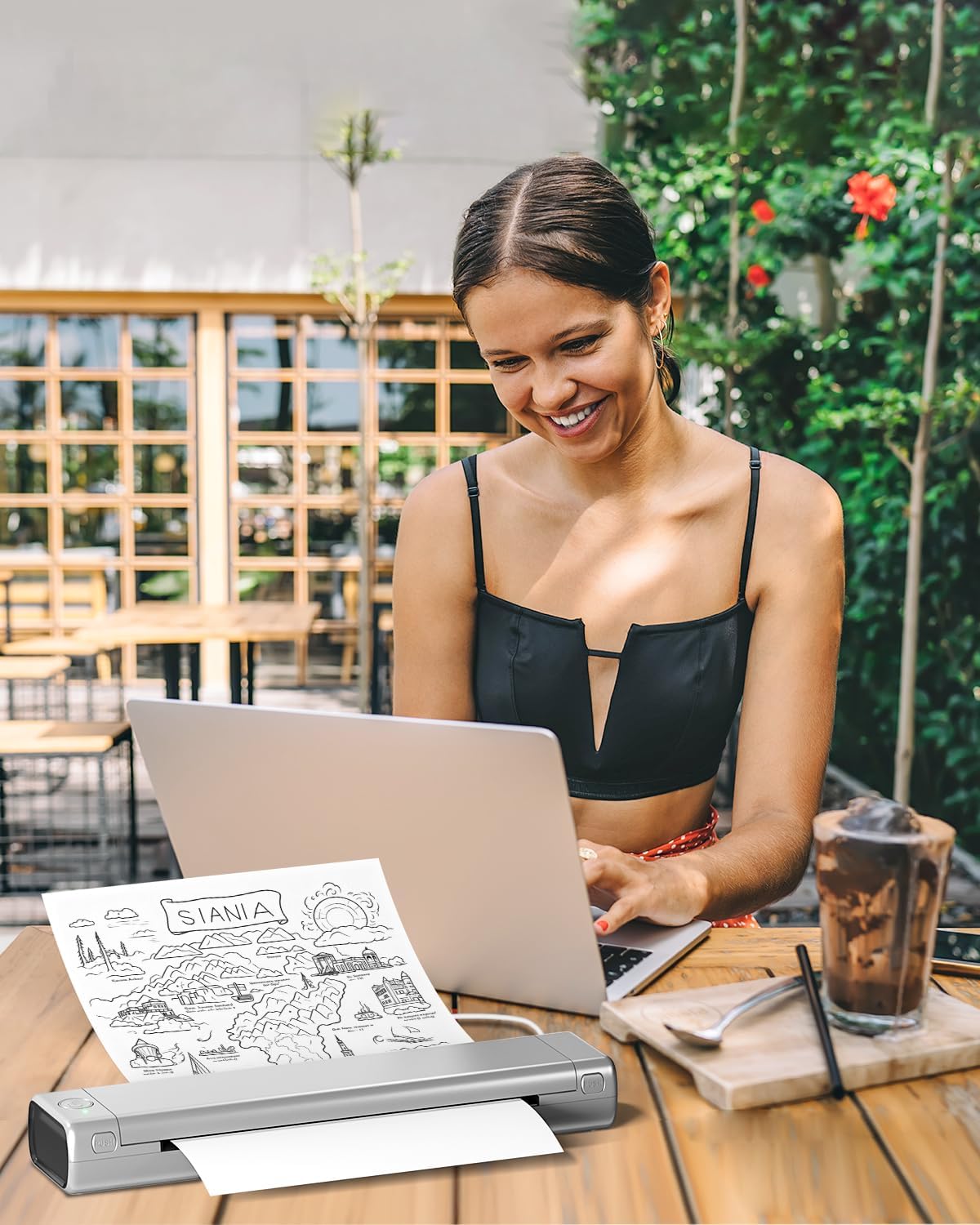
ചിത്രം 5.2: A woman using the Phomemo M08F printer outdoors with her laptop, illustrating the printer's portability and convenience for travel, study, or remote work.

ചിത്രം 5.3: Children in a classroom environment interacting with the Phomemo M08F printer, demonstrating its applicability for educational activities and printing learning materials.

ചിത്രം 5.4: A group of individuals collaborating around a table, utilizing the Phomemo M08F printer to print design mock-ups or planning documents, showcasing its versatility in professional settings.
5.4 പ്രിന്റ് നിലവാരം
The Phomemo M08F provides a print clarity of up to 203 DPI with black and white thermal printing. For best results, ensure your thermal paper is of good quality and properly loaded.
6. പരിപാലനം
6.1 പ്രിന്റ് ഹെഡ് വൃത്തിയാക്കൽ
To maintain print quality, regularly clean the print head. Use a cotton swab lightly dampഐസോപ്രോപൈൽ ആൽക്കഹോൾ ഉപയോഗിച്ച് നിറച്ചത്. പ്രിന്റ് ഹെഡ് ഉപരിതലം സൌമ്യമായി തുടയ്ക്കുക. ഉപയോഗിക്കുന്നതിന് മുമ്പ് പൂർണ്ണമായും ഉണങ്ങാൻ അനുവദിക്കുക.
6.2 ബാറ്ററി കെയർ
- Charge the printer regularly, even if not in frequent use, to prolong battery life.
- പ്രിന്ററിനെ തീവ്രമായ താപനിലയിൽ തുറന്നുകാട്ടുന്നത് ഒഴിവാക്കുക.
- ദീർഘനേരം സൂക്ഷിക്കുകയാണെങ്കിൽ, സൂക്ഷിക്കുന്നതിന് മുമ്പ് ബാറ്ററി ഏകദേശം 50% ചാർജ് ചെയ്യുക.
6.3 പേപ്പർ സംഭരണം
Store thermal paper in a cool, dry place away from direct sunlight and heat to prevent premature fading of prints.
7. പ്രശ്നപരിഹാരം
7.1 പൊതുവായ പ്രശ്നങ്ങളും പരിഹാരങ്ങളും
| പ്രശ്നം | സാധ്യമായ കാരണം | പരിഹാരം |
|---|---|---|
| പ്രിന്റർ ഓണാക്കുന്നില്ല | ബാറ്ററി ചാർജ് കുറവാണ്; പവർ ബട്ടൺ ശരിയായി അമർത്തിയിട്ടില്ല. | പ്രിന്റർ ചാർജ് ചെയ്യുക; പവർ ബട്ടൺ കുറച്ച് സെക്കൻഡ് അമർത്തിപ്പിടിക്കുക. |
| മോശം പ്രിന്റ് നിലവാരം / മങ്ങിയ പ്രിന്റുകൾ | Print head dirty; Low battery; Incorrect paper type or orientation; Old thermal paper. | Clean the print head (Section 6.1); Charge the printer; Ensure correct thermal paper is loaded with printable side up; Use fresh thermal paper. |
| ബ്ലൂടൂത്ത് വഴി ബന്ധിപ്പിക്കാൻ കഴിയില്ല | Bluetooth not enabled; Printer not in pairing mode; App issue; Interference. | Ensure Bluetooth is on and printer is discoverable; Restart printer and mobile device; Reinstall Phomemo app; Move closer to printer. |
| Cannot print from PC/Mac | Drivers not installed; Incorrect USB connection; Printer not selected. | Install drivers (Section 4.3); Try a different USB port or cable; Select Phomemo M08F as the printer in your application. |
| പേപ്പർ ജാം | Improper paper loading; Damaged paper. | Open paper cover and carefully remove jammed paper; Ensure paper is loaded straight and not wrinkled. |
If you encounter issues not listed here, please refer to the Phomemo official webസൈറ്റ് അല്ലെങ്കിൽ ഉപഭോക്തൃ പിന്തുണയുമായി ബന്ധപ്പെടുക.
8 സ്പെസിഫിക്കേഷനുകൾ
| ഫീച്ചർ | വിശദാംശങ്ങൾ |
|---|---|
| മോഡലിൻ്റെ പേര് | M08F Pro |
| പ്രിൻ്റിംഗ് ടെക്നോളജി | തെർമൽ |
| കണക്റ്റിവിറ്റി | ബ്ലൂടൂത്ത്, യുഎസ്ബി |
| പരമാവധി മീഡിയ വലുപ്പം | A4 |
| Print Resolution (B&W) | 203 dpi or more |
| ഉൽപ്പന്ന അളവുകൾ | 35P x 6.5lx 4H സെന്റീമീറ്റർ |
| ഇനത്തിൻ്റെ ഭാരം | 34.99 ഗ്രാം |
| ബാറ്ററി തരം | ലിഥിയം-അയൺ (ഉൾപ്പെടുത്തിയിരിക്കുന്നു) |
| അനുയോജ്യമായ ഉപകരണങ്ങൾ | ലാപ്ടോപ്പ്, പിസി, സ്മാർട്ട്ഫോൺ, ടാബ്ലെറ്റ് |
| പിന്തുണയ്ക്കുന്ന OS | Android, iOS, Mac OS, Windows, Chrome OS, Linux |
9. വാറൻ്റിയും പിന്തുണയും
9.1 വാറൻ്റി വിവരങ്ങൾ
The Phomemo M08F Portable Thermal Printer comes with a limited warranty. Please refer to the warranty card included in your package or visit the official Phomemo webവിശദമായ വാറന്റി നിബന്ധനകൾക്കും വ്യവസ്ഥകൾക്കും സൈറ്റ്.
വാറന്റി തരം: പരിമിത വാറൻ്റി
9.2 ഉപഭോക്തൃ പിന്തുണ
For technical assistance, troubleshooting, or any inquiries regarding your Phomemo M08F printer, please contact Phomemo customer support through their official channels:
- ഉദ്യോഗസ്ഥൻ Webസൈറ്റ്: https://phomemo.com
- ഡ്രൈവർ ഡൗൺലോഡ്: https://phomemo.com/pages/m08f
- ഔദ്യോഗിക പേജിലെ കോൺടാക്റ്റ് വിഭാഗം കാണുക. webഇമെയിൽ അല്ലെങ്കിൽ ഫോൺ പിന്തുണയ്ക്കുള്ള സൈറ്റ്.
Ask a question about this manual
Ask about setup, troubleshooting, compatibility, parts, safety, or missing instructions. Manuals+ will review the question and use this page’s manual context to help answer it.