
ഫോമെമോ M832
ഫോമെമോ M832 പോർട്ടബിൾ തെർമൽ പ്രിന്റർ ഉപയോക്തൃ മാനുവൽ
മോഡൽ: M832
ആമുഖം
The Phomemo M832 Portable Thermal Printer is a compact, inkless printing solution designed for convenience and mobility. This manual provides comprehensive instructions for setting up, operating, and maintaining your printer, ensuring optimal performance and longevity.
ബോക്സിൽ എന്താണുള്ളത്
- 1 x Phomemo M832 Portable Printer
- 1 x Thermal paper roll (pre-installed in the printer paper bin)
- 1 x ഫ്ലാനൽ സ്റ്റോറേജ് ബാഗ്
- 1 x യുഎസ്ബി-സി ചാർജിംഗ് കേബിൾ
- 1 x ദ്രുത ആരംഭ ഗൈഡ്
ഉൽപ്പന്നം കഴിഞ്ഞുview
Familiarize yourself with the key components of your Phomemo M832 printer:
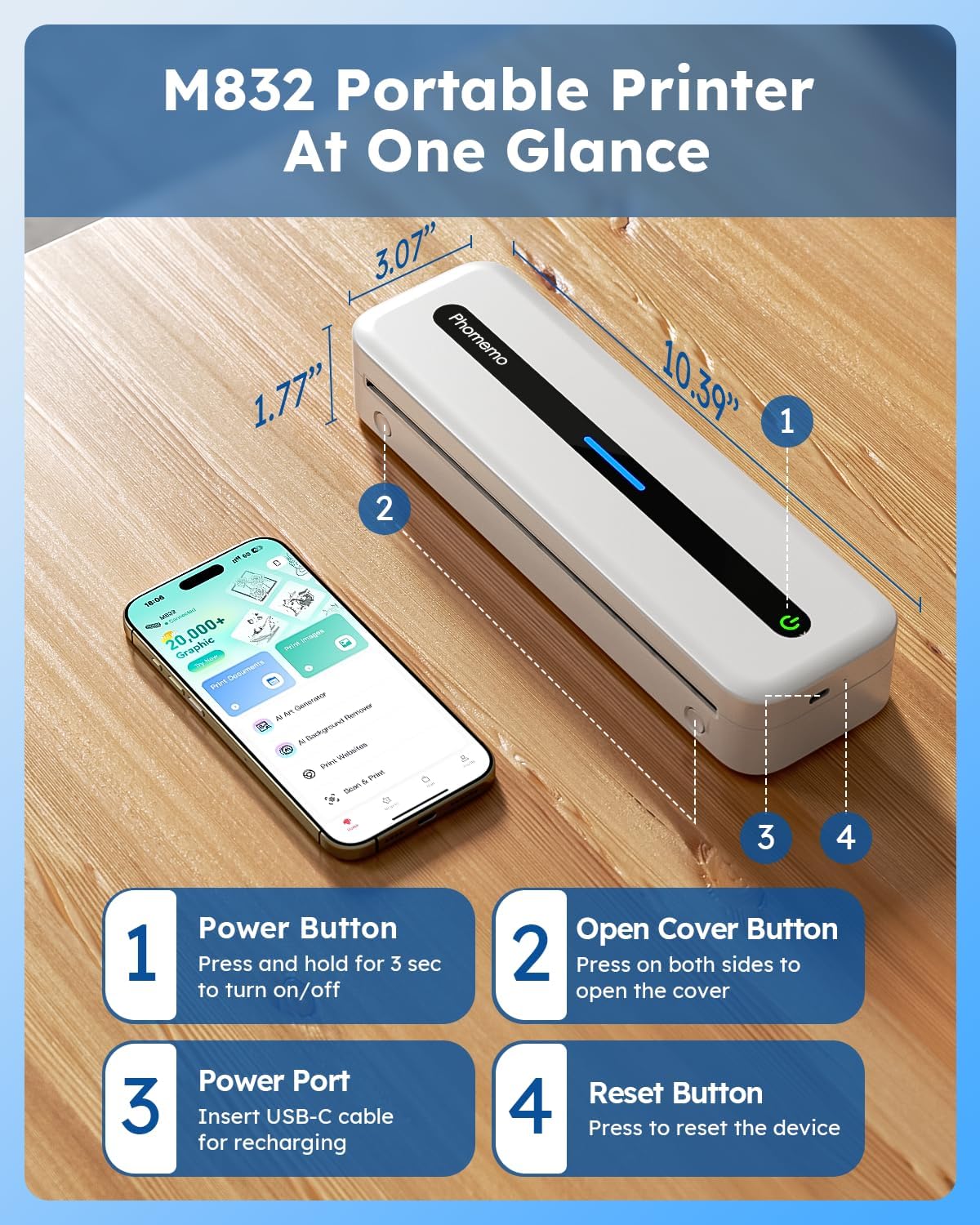
ചിത്രം: Phomemo M832 Portable Printer showing its dimensions and button locations.
- പവർ ബട്ടൺ: Press and hold for 3 seconds to turn the printer on or off.
- കവർ ബട്ടൺ തുറക്കുക: Press on both sides simultaneously to open the printer cover for paper loading.
- പവർ പോർട്ട്: Insert the USB-C cable here for charging the printer.
- റീസെറ്റ് ബട്ടൺ: Press to reset the device if needed.
സജ്ജമാക്കുക
1. പ്രിന്റർ ചാർജ് ചെയ്യുന്നു
Before first use, fully charge the printer. Connect the provided USB-C cable to the printer's power port and the other end to a 5V 2A power adapter (not included). Avoid using chargers with output above 5V.

ചിത്രം: The Phomemo M832 printer being charged, illustrating its 2600mAh battery and capacity for 150 continuous prints.
The built-in 2600mAh rechargeable battery allows for printing up to 150 sheets on a full charge.
2. തെർമൽ പേപ്പർ ലോഡുചെയ്യുന്നു
The Phomemo M832 supports various thermal paper types and sizes, including 8.5" x 11" US Letter, A4, 2.08''(53mm), 3.15''(80mm), and 4.33''(110mm). It can use thermal roll paper, folded thermal paper, and single sheet thermal paper.
- Press the open cover buttons on both sides of the printer to open the top cover.
- Insert the thermal paper into the paper bin, ensuring the printable side is facing up. For roll paper, remove any plastic wrapping and ensure the leading edge is straight.
- നിങ്ങളുടെ പേപ്പറിന്റെ വീതിക്ക് അനുയോജ്യമായ രീതിയിൽ പേപ്പർ ഗൈഡുകൾ ക്രമീകരിക്കുക.
- മുകളിലെ കവർ ശരിയായ സ്ഥാനത്ത് ക്ലിക്കു ചെയ്യുന്നത് വരെ ദൃഢമായി അടയ്ക്കുക.

ചിത്രം: The Phomemo M832 printer demonstrating compatibility with various thermal paper sizes and types, including single sheet, continuous, and roll paper.
3. നിങ്ങളുടെ ഉപകരണത്തിലേക്ക് കണക്റ്റുചെയ്യുന്നു
Bluetooth Connection (for Mobile Phones/Tablets)
The Phomemo M832 is compatible with iOS 13 and above, and Android 7 and above.
- Download the "Phomemo" app from the App Store (iOS) or Google Play Store (Android).
- നിങ്ങളുടെ മൊബൈൽ ഉപകരണത്തിൽ ബ്ലൂടൂത്ത് പ്രവർത്തനക്ഷമമാക്കിയിട്ടുണ്ടെന്ന് ഉറപ്പാക്കുക.
- Open the Phomemo app and follow the in-app instructions to connect to your printer. The app will guide you through the pairing process.

ചിത്രം: Visual guide for connecting the Phomemo M832 printer to a mobile device via Bluetooth using the Phomemo app.
USB-C Cable Connection (for Laptops/Computers)
The printer is compatible with macOS 10.14 and above, Windows 7/8/10/11 (both 32-bit and 64-bit), Chrome OS, and Linux.
- Connect your M832 printer to your laptop or computer using the provided USB-C cable.
- Download and install the necessary drivers from m832.phomemo.com.
- Once drivers are installed, select the M832 printer from your computer's print options to begin printing.

ചിത്രം: Instructions for connecting the Phomemo M832 printer to a laptop or computer using a USB-C cable and installing drivers.
പ്രവർത്തന നിർദ്ദേശങ്ങൾ
Basic Printing Steps
- Ensure the printer is powered on and connected to your device (via Bluetooth or USB-C).
- പ്രമാണം, ചിത്രം തുറക്കുക, അല്ലെങ്കിൽ web page you wish to print on your device.
- Select the print option from your application or device settings.
- Choose "Phomemo M832" as your printer.
- Adjust print settings (e.g., paper size, orientation) as needed.
- Initiate the print job. The printer will feed the thermal paper and produce the printout.

ചിത്രം: The Phomemo M832 printer in action, demonstrating its ability to print documents, invoices, and other materials from a connected smartphone.
പ്രിൻ്റ് ക്വാളിറ്റി
The Phomemo M832 features a 300 DPI (dots per inch) print resolution, providing clear and crisp black and white prints. This high resolution ensures that text and graphics are sharp and legible.

ചിത്രം: A visual comparison highlighting the enhanced print quality of the Phomemo M832 (300 DPI) compared to a 200 DPI printer.
Inkless Printing Technology
This printer utilizes advanced thermal technology, eliminating the need for ink cartridges, toner, or ribbons. This design prevents common issues like clogging and reduces ongoing costs, making printing more efficient and economical. Only thermal paper is required for operation.

ചിത്രം: Illustration of the Phomemo M832's inkless thermal printing technology, showing no need for ink, toner, or ribbons.
ബഹുമുഖ ഉപയോഗം
The compact and portable design of the Phomemo M832 makes it suitable for various environments and uses, including:
- യാത്ര: Ideal for business trips, vehicle use (cars, trucks), and mobile notary services.
- Office & Home: Perfect for small offices, home use, and printing documents, contracts, invoices, and receipts.
- വിദ്യാഭ്യാസം: Useful for students and teachers for printing study notes, worksheets, and customized cards.
- വ്യക്തിഗത ഉപയോഗം: Great for printing recipes, letters, shopping lists, and DIY projects.

ചിത്രം: The Phomemo M832 printer being used in various settings: on a flight, outdoors, in an office, and on a campus, highlighting its portability.
മെയിൻ്റനൻസ്
പ്രിൻ്റർ വൃത്തിയാക്കുന്നു
To ensure consistent print quality and prolong the life of your printer, regular cleaning is recommended:
- പ്രിന്റർ ഓഫാക്കി പവർ സ്രോതസ്സിൽ നിന്ന് വിച്ഛേദിക്കുക.
- Gently wipe the exterior of the printer with a soft, dry, lint-free cloth.
- To clean the thermal print head, use a cotton swab lightly dampened with isopropyl alcohol. Wipe the print head gently and allow it to dry completely before closing the cover or using the printer.
- മൃദുവായ ബ്രഷ് അല്ലെങ്കിൽ കംപ്രസ് ചെയ്ത വായു ഉപയോഗിച്ച് പേപ്പർ പാതയിൽ നിന്ന് ഏതെങ്കിലും പേപ്പർ പൊടി അല്ലെങ്കിൽ അവശിഷ്ടങ്ങൾ നീക്കം ചെയ്യുക.
Thermal Paper Storage
Store thermal paper in a cool, dry place away from direct sunlight, heat, and humidity. Exposure to these elements can degrade the paper's thermal coating, leading to faded or unreadable prints over time.
ട്രബിൾഷൂട്ടിംഗ്
This section addresses common issues you might encounter with your Phomemo M832 printer.
| പ്രശ്നം | സാധ്യമായ കാരണം | പരിഹാരം |
|---|---|---|
| പ്രിന്റർ ഓണാകുന്നില്ല. | ബാറ്ററി കുറവോ പവർ പ്രശ്നമോ. | Ensure the printer is charged. Connect to a 5V 2A power source using the USB-C cable. |
| ബ്ലൂടൂത്ത് വഴി ബന്ധിപ്പിക്കാൻ കഴിയില്ല. | Bluetooth not enabled, app issue, or interference. |
|
| Poor print quality (faded, inconsistent). | Print head dirty, incorrect paper, or low battery. |
|
| Paper jam or misfeed. | Improper paper loading or damaged paper. |
|
| കമ്പ്യൂട്ടർ (USB) പ്രിന്റർ തിരിച്ചറിഞ്ഞില്ല. | നഷ്ടപ്പെട്ടതോ തെറ്റായതോ ആയ ഡ്രൈവറുകൾ. |
|
സ്പെസിഫിക്കേഷനുകൾ
| ഫീച്ചർ | വിശദാംശങ്ങൾ |
|---|---|
| മോഡലിൻ്റെ പേര് | M832 പോർട്ടബിൾ പ്രിന്റർ |
| ഉൽപ്പന്ന അളവുകൾ | 10.39"D x 1.77"W x 3.07"H |
| ഇനത്തിൻ്റെ ഭാരം | 1.52 പൗണ്ട് |
| പ്രിൻ്റിംഗ് ടെക്നോളജി | തെർമൽ |
| കണക്റ്റിവിറ്റി ടെക്നോളജി | ബ്ലൂടൂത്ത്, യുഎസ്ബി ടൈപ്പ് സി |
| പരമാവധി കറുപ്പും വെളുപ്പും പ്രിന്റ് റെസല്യൂഷൻ | 300 ഡിപിഐ |
| പരമാവധി മീഡിയ വലുപ്പം | 8.5 x 11 ഇഞ്ച് (യുഎസ് ലെറ്റർ) |
| പിന്തുണയ്ക്കുന്ന ഷീറ്റ് വലുപ്പങ്ങൾ | 8.5" X 11" (US Letter), A4, 4.33" (110mm), 3.15"(80mm), 2.08"(53mm) Inches |
| അനുയോജ്യമായ ഉപകരണങ്ങൾ | Smartphones, PC, Tablets, Laptops (iOS, Android, macOS, Windows, Chrome OS, Linux) |
| ബാറ്ററി ശേഷി | 2600mAh (ലിഥിയം അയോൺ) |
| Prints per Full Charge | 150 ഷീറ്റുകൾ വരെ |
| Inkless Printing | അതെ |
| നിയന്ത്രണ രീതി | ആപ്പ് |
| ഉൾപ്പെടുത്തിയ ഘടകങ്ങൾ | Printer, Thermal paper roll, Flannel Storage Bag, USB-C Cable, Quick Start Guide |
വാറൻ്റിയും പിന്തുണയും
For warranty information and technical support, please refer to the official Phomemo website or contact Phomemo customer service. Details can typically be found in the Quick Start Guide included with your product or on the manufacturer's webസൈറ്റ്.
You can also visit the Phomemo Store on Amazon for additional product information and support resources: Phomemo Store
Ask a question about this manual
Ask about setup, troubleshooting, compatibility, parts, safety, or missing instructions. Manuals+ will review the question and use this page’s manual context to help answer it.