AW-D01 Compatible Remote Control
ആമുഖം
This manual provides instructions for the replacement remote control compatible with various Aiwa Smart TV models. This remote is designed to offer essential control functions for your television. Please note that this is a replacement unit, and while it provides core functionality, some advanced or specific features of your original remote may not be supported.
ഉൽപ്പന്നം കഴിഞ്ഞുview
The replacement remote control is an ergonomic device crafted from high-quality ABS plastic, ensuring durability and comfortable handling. It is designed to be compatible with a range of Aiwa Smart TVs.
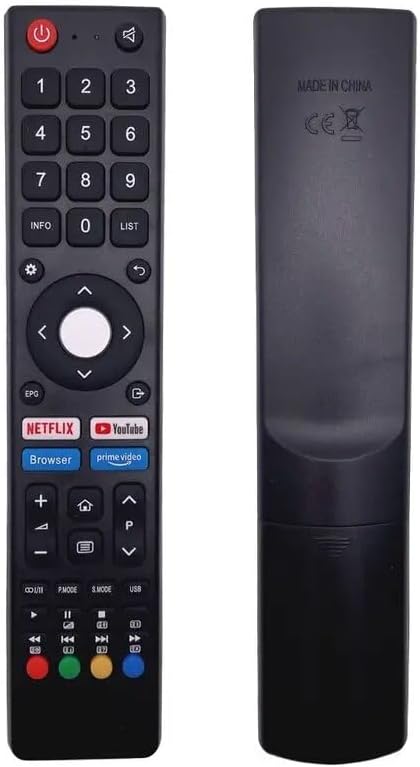
ചിത്രം: മുന്നിലും പിന്നിലും view of the replacement remote control. The front shows various buttons including number pad, navigation, volume, channel, and dedicated app buttons. The back is plain black with 'MADE IN CHINA' text.
പ്രധാന സവിശേഷതകൾ:
- അനുയോജ്യത: Designed for Aiwa AW-D01, AWA650US, AWA550US, AWA500US, AWA400S, AW-LED43G7S, AW-LED50X8FL, AW-LED55X8FL, AW-LED65X8FL Smart TVs.
- എർഗണോമിക് ഡിസൈൻ: പിടിക്കാനും ഉപയോഗിക്കാനും സൗകര്യപ്രദമാണ്.
- മോടിയുള്ള മെറ്റീരിയൽ: Constructed from ABS plastic.
- നിറം: Available in black or white (color sent randomly).
പാക്കേജ് ഉള്ളടക്കം:
- 1 x Replacement Remote Control (batteries not included)
സജ്ജമാക്കുക
To begin using your new remote control, follow these simple steps for battery installation:
- റിമോട്ട് കൺട്രോളിന്റെ പിൻഭാഗത്ത് ബാറ്ററി കമ്പാർട്ട്മെന്റ് കണ്ടെത്തുക.
- ബാറ്ററി കമ്പാർട്ട്മെന്റ് കവർ തുറക്കാൻ താഴേക്ക് സ്ലൈഡ് ചെയ്യുക അല്ലെങ്കിൽ ഒരു അമ്പടയാളം സൂചിപ്പിക്കുന്ന ദിശയിലേക്ക് സ്ലൈഡ് ചെയ്യുക.
- കമ്പാർട്ടുമെന്റിനുള്ളിലെ അടയാളപ്പെടുത്തലുകളുമായി പോസിറ്റീവ് (+), നെഗറ്റീവ് (-) ടെർമിനലുകൾ ശരിയായി വിന്യസിക്കുന്നുണ്ടെന്ന് ഉറപ്പാക്കാൻ രണ്ട് AAA ബാറ്ററികൾ (ഉൾപ്പെടുത്തിയിട്ടില്ല) ഇടുക.
- സുരക്ഷിതമായി ക്ലിക്ക് ചെയ്യുന്നതുവരെ ബാറ്ററി കമ്പാർട്ട്മെന്റ് കവർ തിരികെ സ്ഥലത്തേക്ക് സ്ലൈഡുചെയ്ത് അടയ്ക്കുക.
Your remote control is now ready for use. No programming is typically required for this replacement remote.
പ്രവർത്തന നിർദ്ദേശങ്ങൾ
This remote control provides intuitive access to your TV's primary functions. Familiarize yourself with the button layout to enhance your viewഅനുഭവം.

ചിത്രം: മുൻഭാഗം view of the replacement remote control, showing the layout of all buttons including power, number pad, navigation, volume, channel, and dedicated app buttons for Netflix, YouTube, and Prime Video.
Common Button Functions:
- പവർ ബട്ടൺ (ചുവപ്പ്): ടിവി ഓണാക്കുകയോ ഓഫാക്കുകയോ ചെയ്യുന്നു.
- നമ്പർ പാഡ് (0-9): Directly input channel numbers.
- വോളിയം കൂട്ടുക/താഴ്ത്തുക (+/-): ഓഡിയോ വോളിയം ക്രമീകരിക്കുന്നു.
- ചാനൽ മുകളിലേക്കും താഴേക്കും (P+/P-): ടിവി ചാനൽ മാറ്റുന്നു.
- Navigation Buttons (Arrows & OK): മെനുകളിലൂടെ നാവിഗേറ്റ് ചെയ്ത് തിരഞ്ഞെടുപ്പുകൾ സ്ഥിരീകരിക്കുക.
- തിരികെ/മടങ്ങുക: മുമ്പത്തെ സ്ക്രീനിലേക്കോ മെനുവിലേക്കോ മടങ്ങുന്നു.
- വീട്: ടിവിയുടെ പ്രധാന സ്മാർട്ട് ഹബ്ബിലേക്കോ ഹോം സ്ക്രീനിലേക്കോ ആക്സസ് നൽകുന്നു.
- നെറ്റ്ഫ്ലിക്സ്, യൂട്യൂബ്, പ്രൈം വീഡിയോ: Dedicated buttons for quick access to these streaming applications.
- നിശബ്ദമാക്കുക: ടിവി ഓഡിയോ നിശബ്ദമാക്കുന്നു.
- ഇൻപുട്ട്/ഉറവിടം: ഇൻപുട്ട് ഉറവിടം മാറ്റുന്നു (HDMI, AV, മുതലായവ).
മെയിൻ്റനൻസ്
ശരിയായ പരിചരണം നിങ്ങളുടെ റിമോട്ട് കൺട്രോളിന്റെ ആയുസ്സ് വർദ്ധിപ്പിക്കും:
- വൃത്തിയാക്കൽ: Use a soft, dry cloth to clean the remote. For stubborn dirt, slightly dampതുണിയിൽ വെള്ളം ഒഴിക്കുക. കഠിനമായ രാസവസ്തുക്കളോ അബ്രസീവ് ക്ലീനറുകളോ ഉപയോഗിക്കുന്നത് ഒഴിവാക്കുക.
- ബാറ്ററി മാറ്റിസ്ഥാപിക്കൽ: റിമോട്ടിന്റെ പ്രതികരണം മന്ദഗതിയിലാകുകയോ പ്രവർത്തിക്കുന്നത് നിർത്തുകയോ ചെയ്യുമ്പോൾ ബാറ്ററികൾ മാറ്റിസ്ഥാപിക്കുക. എല്ലായ്പ്പോഴും ഒരേ സമയം രണ്ട് ബാറ്ററികളും ഒരേ തരത്തിലുള്ള പുതിയവ ഉപയോഗിച്ച് മാറ്റിസ്ഥാപിക്കുക.
- സംഭരണം: നേരിട്ടുള്ള സൂര്യപ്രകാശത്തിൽ നിന്നും കടുത്ത താപനിലയിൽ നിന്നും മാറി തണുത്തതും വരണ്ടതുമായ സ്ഥലത്ത് റിമോട്ട് സൂക്ഷിക്കുക.
- തുള്ളികൾ ഒഴിവാക്കുക: തുള്ളികൾ ആന്തരിക ഘടകങ്ങളെ നശിപ്പിക്കുമെന്നതിനാൽ, ശാരീരിക ആഘാതത്തിൽ നിന്ന് റിമോട്ടിനെ സംരക്ഷിക്കുക.
ട്രബിൾഷൂട്ടിംഗ്
If you encounter issues with your remote control, consider the following common solutions:
- റിമോട്ട് പ്രതികരിക്കുന്നില്ല:
- ശരിയായ പോളാരിറ്റിയോടെ (+/-) ബാറ്ററികൾ ശരിയായി ചേർത്തിട്ടുണ്ടെന്ന് ഉറപ്പാക്കുക.
- പഴയ ബാറ്ററികൾ പുതിയവ ഉപയോഗിച്ച് മാറ്റിസ്ഥാപിക്കുക.
- Check for any obstructions between the remote and the TV's infrared sensor.
- ടിവിയുടെ സെൻസറിന്റെ ഫലപ്രദമായ പരിധിക്കുള്ളിലാണെന്ന് ഉറപ്പാക്കുക.
- പ്രവർത്തിക്കാത്ത ചില പ്രവർത്തനങ്ങൾ:
- As a replacement remote, some specific or advanced functions of your original TV remote may not be supported. This is normal for universal or replacement remotes.
- Verify that the function you are trying to use is a standard TV control function.
- ഇടയ്ക്കിടെയുള്ള പ്രവർത്തനം:
- ഇത് കുറഞ്ഞ ബാറ്ററി പവർ സൂചിപ്പിക്കാം. ബാറ്ററികൾ മാറ്റിസ്ഥാപിക്കുക.
- മറ്റ് ഇലക്ട്രോണിക് ഉപകരണങ്ങളിൽ നിന്നുള്ള ഇടപെടലുകൾ ഇല്ലെന്ന് ഉറപ്പാക്കുക.
If problems persist, or if you have specific questions regarding compatibility with your TV model, it is recommended to provide your original remote's part number or your TV unit's model number to the seller for further assistance.
സ്പെസിഫിക്കേഷനുകൾ
| ഫീച്ചർ | വിശദാംശങ്ങൾ |
|---|
| മോഡൽ അനുയോജ്യത | Aiwa AW-D01, AWA650US, AWA550US, AWA500US, AWA400S, AW-LED43G7S, AW-LED50X8FL, AW-LED55X8FL, AW-LED65X8FL Smart TVs |
| മെറ്റീരിയൽ | എബിഎസ് പ്ലാസ്റ്റിക് |
| പ്രത്യേക ഫീച്ചർ | എർഗണോമിക് ഡിസൈൻ |
| നിറം | Black / White (Randomly Sent) |
| പവർ ഉറവിടം | 2 x AAA ബാറ്ററികൾ (ഉൾപ്പെടുത്തിയിട്ടില്ല) |
| പിന്തുണയ്ക്കുന്ന ഉപകരണങ്ങളുടെ പരമാവധി എണ്ണം | 5 (Set Top Box, Television, Stereo System, DVD/Blu-ray Player, Home Theater) |
| നിർമ്മാതാവ് | ജനറിക് |
| ASIN | B0CL9J983W |
വാറൻ്റിയും പിന്തുണയും
This product is a replacement remote control. While specific warranty details are not provided, the remote is tested for functionality prior to delivery to ensure it is in working condition upon arrival.
For any questions, compatibility concerns, or troubleshooting beyond the scope of this manual, please contact the seller or manufacturer directly. Providing your original remote's part number or your TV's model number can help expedite support.
Ask a question about this manual
Ask about setup, troubleshooting, compatibility, parts, safety, or missing instructions. Manuals+ will review the question and use this page’s manual context to help answer it.
