1. ആമുഖം
This manual provides instructions for the use and maintenance of your new replacement remote control for various Hitachi Smart TV models. This remote is designed to function as a direct replacement for your original remote, offering essential control over your television.
Please note that as a replacement unit, some advanced or specific functions present on your original remote might not be fully supported. It is recommended to verify compatibility with your specific TV model.
2. ഉൽപ്പന്നം കഴിഞ്ഞുview
The replacement remote control features a standard layout for easy navigation and control of your Hitachi Smart TV. It is typically supplied in either black or white color, chosen at random.
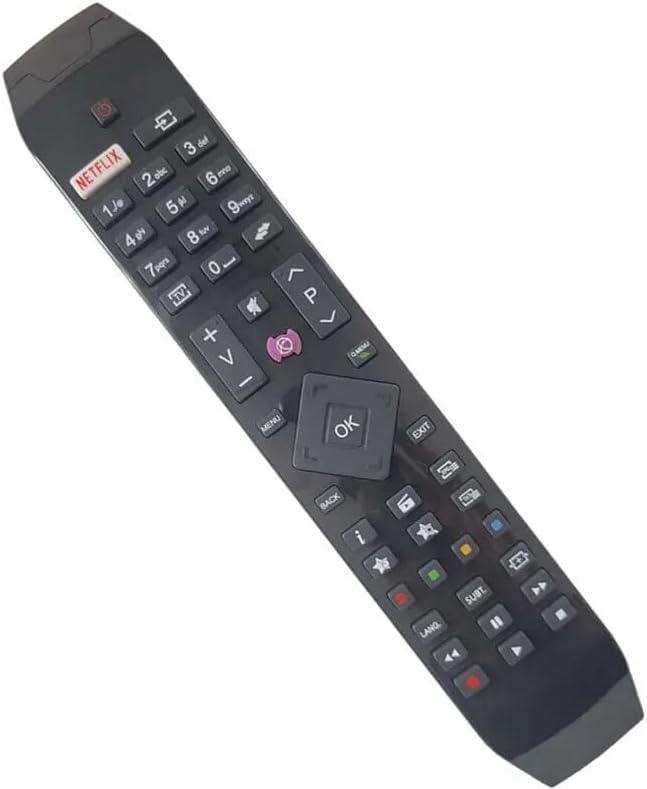
ചിത്രം 2.1: കോണാകൃതിയിലുള്ളത് view of the replacement remote control, highlighting its ergonomic design and button layout.

ചിത്രം 2.2: ഫ്രണ്ടൽ view of the replacement remote control, detailing the arrangement of function buttons.
The remote includes dedicated buttons for common functions such as Power, Volume Up/Down, Channel Up/Down, Mute, and a central navigation pad with an OK button. It also features quick access buttons for streaming services like Netflix and other smart TV functionalities.
3. സജ്ജീകരണം
3.1 ബാറ്ററി ഇൻസ്റ്റാളേഷൻ
- റിമോട്ട് കൺട്രോളിന്റെ പിൻഭാഗത്ത് ബാറ്ററി കമ്പാർട്ട്മെന്റ് കണ്ടെത്തുക.
- സ്ലൈഡ് ചെയ്ത് ബാറ്ററി കവർ തുറക്കുക.
- കമ്പാർട്ടുമെന്റിനുള്ളിലെ അടയാളപ്പെടുത്തലുകളുമായി പോസിറ്റീവ് (+), നെഗറ്റീവ് (-) ടെർമിനലുകൾ ശരിയായി വിന്യസിക്കുന്നുണ്ടെന്ന് ഉറപ്പാക്കാൻ രണ്ട് AAA ബാറ്ററികൾ (ഉൾപ്പെടുത്തിയിട്ടില്ല) ഇടുക.
- ബാറ്ററി കവർ സുരക്ഷിതമായി അടയ്ക്കുക.
3.2 പ്രാരംഭ ഉപയോഗം
Once batteries are installed, the remote control is ready for use. Point the remote directly at your Hitachi Smart TV and press the Power button to turn on the television. No pairing or programming is typically required for this replacement remote.
4. പ്രവർത്തന നിർദ്ദേശങ്ങൾ
This remote control provides standard functionality for your Hitachi Smart TV. Below are common operations:
- പവർ ബട്ടൺ: ടിവി ഓണാക്കുകയോ ഓഫാക്കുകയോ ചെയ്യുന്നു.
- വോളിയം ബട്ടണുകൾ (+/-): ടിവി വോളിയം കൂട്ടുകയോ കുറയ്ക്കുകയോ ചെയ്യുന്നു.
- Channel Buttons (P+/-): ടിവി ചാനൽ മുകളിലേക്കോ താഴേക്കോ മാറ്റുന്നു.
- നിശബ്ദ ബട്ടൺ: ടിവി ഓഡിയോ നിശബ്ദമാക്കുകയോ അൺമ്യൂട്ടുചെയ്യുകയോ ചെയ്യുന്നു.
- നാവിഗേഷൻ പാഡ് (മുകളിലേക്ക്/താഴേക്ക്/ഇടത്/വലത്/ശരി): Used to navigate menus and confirm selections on the TV screen.
- Netflix ബട്ടൺ: Direct access to the Netflix application (if supported by your TV model).
- മെനു/ഹോം ബട്ടൺ: Accesses the TV's main menu or smart home screen.
- ബാക്ക്/എക്സിറ്റ് ബട്ടൺ: മുമ്പത്തെ സ്ക്രീനിലേക്ക് മടങ്ങുന്നു അല്ലെങ്കിൽ ഒരു മെനുവിൽ നിന്ന് പുറത്തുകടക്കുന്നു.
- നമ്പർ ബട്ടണുകൾ (0-9): For direct channel input or other numerical selections.
For specific advanced functions or smart TV features, refer to your Hitachi TV's original user manual.
5 അനുയോജ്യത
This replacement remote control is compatible with various Hitachi Smart TV models. Known compatible models include, but are not limited to:
- 43HL15W69
- 43HL5W69
- 48HB6W62A
- 49HB5W62
- 49HB6W62H
- 32HB6T41A
- 43HB5T62
- 43HK4W64
- 43HK5W64
If your specific TV model is not listed, it is recommended to compare your original remote with the images provided or contact the seller for confirmation of compatibility.
6. പരിപാലനം
6.1 ബാറ്ററി മാറ്റിസ്ഥാപിക്കൽ
Replace batteries when the remote's response becomes sluggish or stops working. Always replace both batteries at the same time with new ones of the same type (AAA). Do not mix old and new batteries, or different types of batteries.
6.2 വൃത്തിയാക്കൽ
To clean the remote control, gently wipe it with a soft, dry cloth. For stubborn dirt, a slightly damp cloth can be used, but ensure no moisture enters the remote. Do not use abrasive cleaners or solvents.
6.3 സംഭരണം
Store the remote in a cool, dry place away from direct sunlight and extreme temperatures. If the remote will not be used for an extended period, it is advisable to remove the batteries to prevent leakage.
7. പ്രശ്നപരിഹാരം
- റിമോട്ട് പ്രതികരിക്കുന്നില്ല:
- ശരിയായ പോളാരിറ്റിയോടെ ബാറ്ററികൾ ശരിയായി ചേർത്തിട്ടുണ്ടോയെന്ന് പരിശോധിക്കുക.
- ബാറ്ററികൾ പുതിയവ ഉപയോഗിച്ച് മാറ്റിസ്ഥാപിക്കുക.
- Ensure there are no obstructions between the remote and the TV's infrared sensor.
- റിമോട്ട് ടിവിയിലേക്ക് നേരിട്ട് ചൂണ്ടുക.
- ചില പ്രവർത്തനങ്ങൾ പ്രവർത്തിക്കുന്നില്ല:
- As a replacement remote, certain advanced or specific functions of your original TV remote may not be supported. This is normal.
- Verify that the function you are trying to use is standard for a TV remote.
- റിമോട്ട് ഇടയ്ക്കിടെ പ്രവർത്തിക്കുന്നു:
- ബാറ്ററികൾ കുറവായിരിക്കാം; അവ മാറ്റി സ്ഥാപിക്കുക.
- ബാറ്ററി കോൺടാക്റ്റുകൾ വൃത്തിയുള്ളതും നാശമില്ലാത്തതുമാണെന്ന് ഉറപ്പാക്കുക.
If issues persist after following these steps, please contact the seller for further assistance.
8 സ്പെസിഫിക്കേഷനുകൾ
| ബ്രാൻഡ് | ജനറിക് |
| നിർമ്മാതാവ് | ജനറിക് |
| അനുയോജ്യമായ ഉപകരണങ്ങൾ | Hitachi Smart TVs (e.g., 43HL15W69, 43HL5W69, 48HB6W62A, 49HB5W62, 49HB6W62H, 32HB6T41A, 43HB5T62, 43HK4W64, 43HK5W64) |
| പ്രത്യേക ഫീച്ചർ | എർഗണോമിക് |
| നിറം | Black/White (randomly sent) |
| പിന്തുണയ്ക്കുന്ന ഉപകരണങ്ങളുടെ പരമാവധി എണ്ണം | 5 (as a universal remote, though this is a replacement for specific TVs) |
| പവർ ഉറവിടം | 2 x AAA ബാറ്ററികൾ (ഉൾപ്പെടുത്തിയിട്ടില്ല) |
| മെറ്റീരിയൽ | എബിഎസ് പ്ലാസ്റ്റിക് |
9. വാറൻ്റിയും പിന്തുണയും
Specific warranty information for this replacement remote control is not provided in the product details. For any warranty claims, technical support, or further inquiries, please contact the seller directly through your purchase platform.
It is recommended to retain your purchase receipt as proof of purchase for any support requests.


