
GARMEE JW-924AC
GARMEE WiFi Dongle 1300Mbps User Manual
Model: JW-924AC
ആമുഖം
This manual provides comprehensive instructions for the installation, operation, and maintenance of your GARMEE WiFi Dongle 1300Mbps. This dual-band wireless USB adapter is designed to provide high-speed internet connectivity for your PC, desktop, or laptop, supporting both 2.4GHz and 5GHz bands.
Please read this manual carefully before using the product to ensure proper functionality and to maximize your device's performance.
ഉൽപ്പന്നം കഴിഞ്ഞുview ഫീച്ചറുകളും
The GARMEE WiFi Dongle is a high-performance wireless adapter offering superior speed and reliability.
- ഹൈ-സ്പീഡ് കണക്റ്റിവിറ്റി: Up to 1300Mbps wireless speed (867Mbps on 5GHz, 400Mbps on 2.4GHz).
- ഡ്യുവൽ-ബാൻഡ് പിന്തുണ: Operates on both 2.4GHz and 5GHz bands for flexible and interference-free connections.
- യുഎസ്ബി 3.0 ഇന്റർഫേസ്: Ensures faster and more stable data transfers compared to USB 2.0.
- External 5dBi Antennas: Enhances signal reception and transmission for improved range and stability.
- വിശാലമായ അനുയോജ്യത: Supports Windows 11/10/8/7/Vista/XP and Mac OS.
- പ്ലഗ് & പ്ലേ: Driver-free installation for many operating systems.

Image: The GARMEE WiFi Dongle, a black USB adapter with two adjustable antennas, designed for enhanced wireless connectivity.
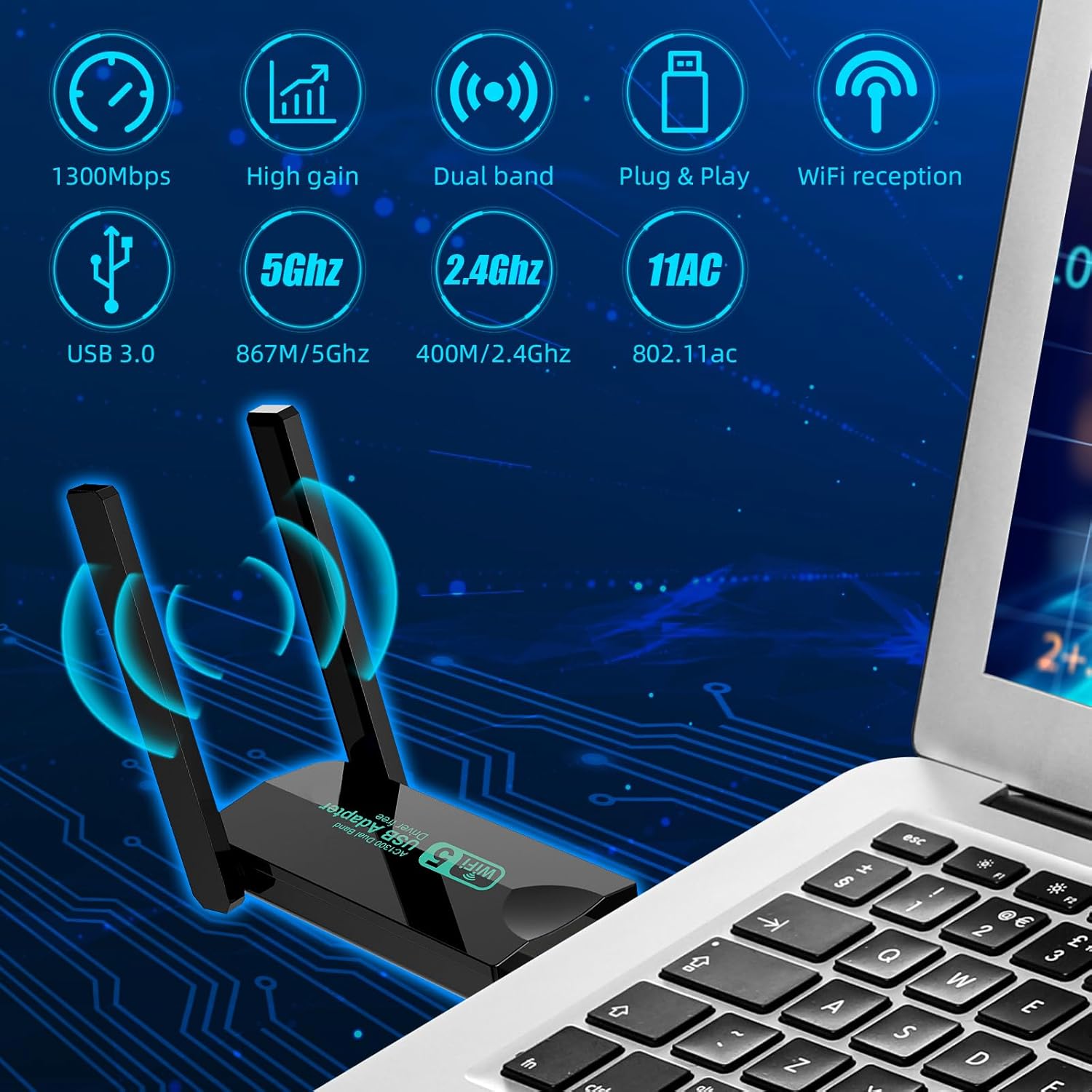
Image: Diagram illustrating key features of the dongle including 1300Mbps speed, high gain, dual band, plug & play, WiFi reception, USB 3.0, 5GHz, 2.4GHz, and 802.11ac standard.
പാക്കേജ് ഉള്ളടക്കം
നിങ്ങളുടെ പാക്കേജിൽ എല്ലാ ഇനങ്ങളും ഉണ്ടെന്ന് ദയവായി പരിശോധിക്കുക:
- 1 x GARMEE WiFi Dongle 1300Mbps (Model: JW-924AC)
- 1 x ഉപയോക്തൃ മാനുവൽ (ഈ പ്രമാണം)
സജ്ജീകരണ ഗൈഡ്
1. Driver Installation (Windows/Mac OS)
For most modern operating systems (Windows 10/11, newer Mac OS versions), the dongle is designed to be plug-and-play, meaning drivers will install automatically upon connection. If automatic installation does not occur, or for older operating systems, follow these steps:
- Connect the Dongle: Insert the GARMEE WiFi Dongle into an available USB 3.0 port on your computer. While compatible with USB 2.0, USB 3.0 ports offer optimal performance.
- ഓട്ടോമാറ്റിക് ഡ്രൈവർ ഇൻസ്റ്റാളേഷൻ: Wait for your operating system to detect the new hardware and attempt to install drivers automatically. This may take a few moments.
- ഡ്രൈവർ ഇൻസ്റ്റലേഷൻ മാനുവൽ (ആവശ്യമെങ്കിൽ): If the driver does not install automatically, you may need to download it from the official GARMEE support webസൈറ്റ്. ഉൽപ്പന്ന പാക്കേജിംഗോ നിർമ്മാതാവിന്റെയോ കാണുക website for specific driver download instructions.

Image: A visual representation of the dongle's compatibility with various operating systems, including Windows 7, 8.1, XP, 10/11, Vista, and Mac OS 10.9-10.15.

Image: Close-up of the USB 3.0 connector on the GARMEE WiFi Dongle, highlighting its faster data transfer capabilities compared to USB 2.0.
പ്രവർത്തന നിർദ്ദേശങ്ങൾ
1. ഒരു Wi-Fi നെറ്റ്വർക്കിലേക്ക് കണക്റ്റുചെയ്യുന്നു
Once the drivers are successfully installed, your computer will recognize the GARMEE WiFi Dongle as a wireless adapter.
- നെറ്റ്വർക്ക് ക്രമീകരണങ്ങൾ ആക്സസ് ചെയ്യുക:
- വിൻഡോസ്: സിസ്റ്റം ട്രേയിലെ (സ്ക്രീനിന്റെ താഴെ വലത് കോണിലുള്ള) Wi-Fi ഐക്കണിൽ ക്ലിക്ക് ചെയ്യുക.
- മാക് ഒഎസ്: Click the Wi-Fi icon in the menu bar (top right corner of the screen).
- നെറ്റ്വർക്ക് തിരഞ്ഞെടുക്കുക: ലഭ്യമായ Wi-Fi നെറ്റ്വർക്കുകളുടെ ഒരു ലിസ്റ്റ് ദൃശ്യമാകും. നിങ്ങൾക്ക് ആവശ്യമുള്ള നെറ്റ്വർക്ക് തിരഞ്ഞെടുക്കുക.
- പാസ്വേഡ് നൽകുക: ആവശ്യപ്പെടുകയാണെങ്കിൽ, തിരഞ്ഞെടുത്ത നെറ്റ്വർക്കിനായുള്ള വൈഫൈ പാസ്വേഡ് (സുരക്ഷാ കീ) നൽകുക.
- ബന്ധിപ്പിക്കുക: Click "Connect" to establish the connection.
2. Utilizing Dual-Band Capabilities (2.4GHz vs. 5GHz)
Your GARMEE WiFi Dongle supports both 2.4GHz and 5GHz Wi-Fi bands.
- 2.4GHz ബാൻഡ്: Offers wider coverage and better penetration through walls, suitable for general browsing and longer distances. Speeds up to 400Mbps.
- 5GHz ബാൻഡ്: Provides faster speeds and less interference, ideal for online gaming, 4K video streaming, and large file transfers. Speeds up to 867Mbps. Requires closer proximity to the router.
If your router broadcasts both bands with different SSIDs (e.g., "MyWiFi_2.4G" and "MyWiFi_5G"), you can manually select which band to connect to from the available network list. For optimal performance, connect to the 5GHz band when possible.

Image: Illustration showing the dongle's ability to both receive Wi-Fi for a desktop computer and launch Wi-Fi (hotspot) for a mobile phone from a laptop.

Image: Visual comparison of 2.4GHz and 5GHz band performance, indicating 1300Mbps total speed and suggesting 5GHz offers faster performance for demanding tasks.
മെയിൻ്റനൻസ്
To ensure the longevity and optimal performance of your GARMEE WiFi Dongle, consider the following maintenance tips:
- ഇത് വൃത്തിയായി സൂക്ഷിക്കുക: Periodically wipe the dongle with a soft, dry cloth to remove dust. Avoid using liquid cleaners.
- ശരിയായ സംഭരണം: When not in use, store the dongle in a cool, dry place away from direct sunlight and extreme temperatures.
- ശ്രദ്ധയോടെ കൈകാര്യം ചെയ്യുക: Avoid dropping the dongle or subjecting it to physical shock. Do not force it into USB ports.
- ആന്റിന കെയർ: Handle the antennas gently. While adjustable, excessive force can damage them.
ട്രബിൾഷൂട്ടിംഗ്
| പ്രശ്നം | സാധ്യമായ കാരണം | പരിഹാരം |
|---|---|---|
| Dongle not detected / No Wi-Fi networks found. |
|
|
| കുറഞ്ഞ വൈഫൈ വേഗത. |
|
|
| ഇടയ്ക്കിടെയുള്ള വിച്ഛേദങ്ങൾ. |
|
|
സ്പെസിഫിക്കേഷനുകൾ
| ഫീച്ചർ | വിശദാംശങ്ങൾ |
|---|---|
| മോഡൽ നമ്പർ | JW-924AC |
| ബ്രാൻഡ് | ഗാർമീ |
| വയർലെസ് സ്റ്റാൻഡേർഡ് | 802.11ac (വൈ-ഫൈ 5) |
| ഡാറ്റ കൈമാറ്റ നിരക്ക് | 1300 Mbps വരെ (5GHz-ൽ 867 Mbps, 2.4GHz-ൽ 400 Mbps) |
| ഫ്രീക്വൻസി ബാൻഡുകൾ | 2.4 GHz ഉം 5 GHz ഉം |
| ആൻ്റിന തരം | 5dBi Dual External Antennas |
| ഇൻ്റർഫേസ് | USB 3.0 (യുഎസ്ബി 2.0-ന് പിന്നിലേക്ക് അനുയോജ്യം) |
| അനുയോജ്യമായ ഉപകരണങ്ങൾ | ലാപ്ടോപ്പ്, ഡെസ്ക്ടോപ്പ് പിസി |
| ഓപ്പറേറ്റിംഗ് സിസ്റ്റം പിന്തുണ | Windows 11/10/8/7/Vista/XP, Mac OS |
| നിറം | കറുപ്പ് |
| പാക്കേജ് അളവുകൾ | 13.5 x 8 x 2.1 സെ.മീ |
| ഇനത്തിൻ്റെ ഭാരം | 30 ഗ്രാം |
വാറൻ്റിയും പിന്തുണയും
GARMEE products are designed for reliability and performance. For warranty information and technical support, please refer to the contact details provided on the product packaging or visit the official GARMEE webസൈറ്റ്.
വാറൻ്റി ക്ലെയിമുകൾക്കായി നിങ്ങളുടെ വാങ്ങിയതിൻ്റെ തെളിവ് സൂക്ഷിക്കുക.
Ask a question about this manual
Ask about setup, troubleshooting, compatibility, parts, safety, or missing instructions. Manuals+ will review the question and use this page’s manual context to help answer it.