
SD-508
SDRD SD-508 Wireless Bluetooth Karaoke Speaker User Manual
മോഡൽ: SD-508
ആമുഖം
വാങ്ങിയതിന് നന്ദി.asing the SDRD SD-508 Wireless Bluetooth Karaoke Speaker. This portable karaoke machine is designed to provide high-quality audio and an enjoyable karaoke experience with its integrated speaker and two wireless microphones. Featuring Bluetooth 5.0 connectivity, a long-lasting rechargeable battery, and versatile input options, the SD-508 is perfect for music playback and vocal performances anywhere.
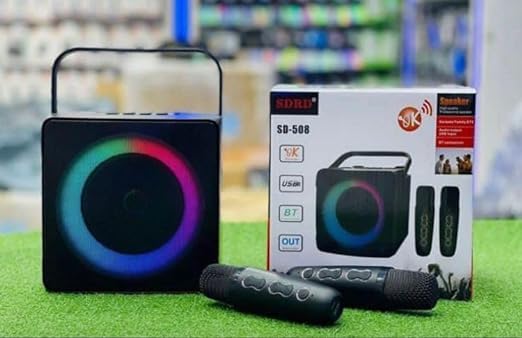
Image: The SDRD SD-508 speaker, its retail box, and two wireless microphones. The speaker features a colorful LED ring around its front grille.
സുരക്ഷാ വിവരങ്ങൾ
- ഉപകരണം വെള്ളത്തിലോ അമിതമായ ഈർപ്പത്തിലോ തുറന്നുകാട്ടരുത്.
- തീവ്രമായ താപനില ഒഴിവാക്കുക.
- ഉപകരണം സ്വയം വേർപെടുത്തുകയോ നന്നാക്കാൻ ശ്രമിക്കുകയോ ചെയ്യരുത്. യോഗ്യതയുള്ള സേവന ഉദ്യോഗസ്ഥരെ ബന്ധപ്പെടുക.
- നിർദ്ദിഷ്ട ചാർജിംഗ് വോളിയം മാത്രം ഉപയോഗിക്കുകtage (5V) to prevent damage.
- കുട്ടികൾക്ക് ലഭ്യമാകാതെ സൂക്ഷിക്കുക.
പാക്കേജ് ഉള്ളടക്കം
പാക്കേജിൽ ഇനിപ്പറയുന്ന ഇനങ്ങൾ ഉണ്ടോ എന്ന് പരിശോധിക്കുക:
- SDRD SD-508 Wireless Bluetooth Karaoke Speaker (1 unit)
- Wireless Microphones (2 units)
- ചാർജിംഗ് കേബിൾ (1 യൂണിറ്റ്)
- ഓഡിയോ കേബിൾ (1 യൂണിറ്റ്)
- ഉപയോക്തൃ മാനുവൽ (ഈ പ്രമാണം)
ഉൽപ്പന്നം കഴിഞ്ഞുview
The SDRD SD-508 features a compact design with intuitive controls and multiple connectivity options, making it highly portable.
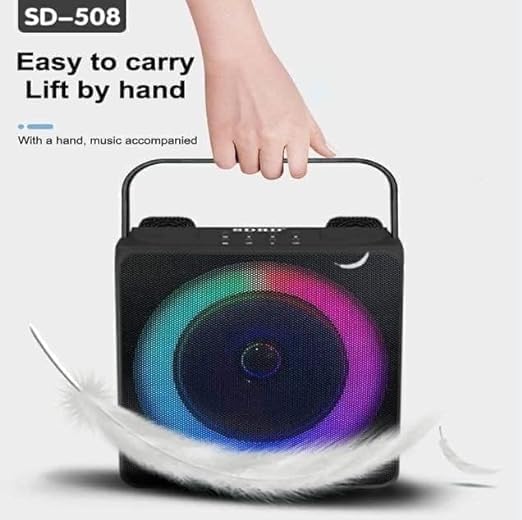
Image: A hand lifting the SDRD SD-508 speaker by its integrated handle, emphasizing its lightweight and portable design for easy transport.
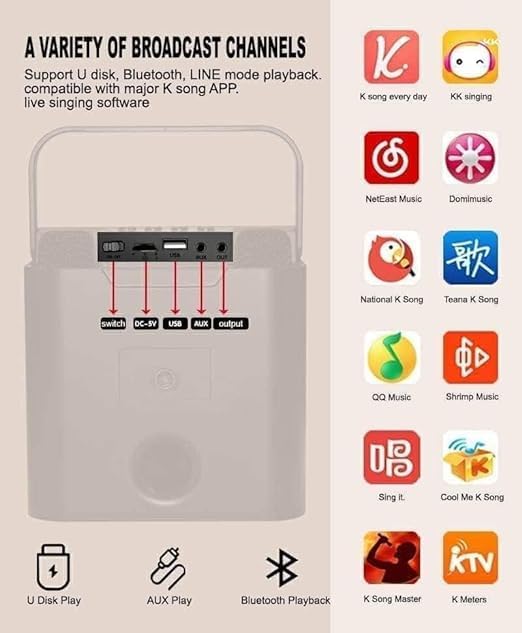
ചിത്രം: വിശദമായ ഒരു ചിത്രം view of the speaker's rear panel, highlighting the power switch, DC-5V charging port, USB port, AUX input, and AUX output. Red arrows point to each port for clarity.
നിയന്ത്രണങ്ങളും തുറമുഖങ്ങളും:
- വൈദ്യുതി സ്വിച്ച്: സ്പീക്കർ ഓൺ/ഓഫ് ചെയ്യുന്നു.
- DC-5V ചാർജിംഗ് പോർട്ട്: സ്പീക്കറിന്റെ ആന്തരിക ബാറ്ററി ചാർജ് ചെയ്യുന്നതിന്.
- USB പോർട്ട്: For U-disk playback.
- AUX ഇൻപുട്ട്: Connect external audio devices via 3.5mm audio cable.
- ഓക്സ് ഔട്ട്പുട്ട്: Connect to other audio systems.
- Microphone Volume Controls: Adjust microphone volume (on microphones).
- Speaker Volume Controls: Adjust main speaker volume (on speaker).
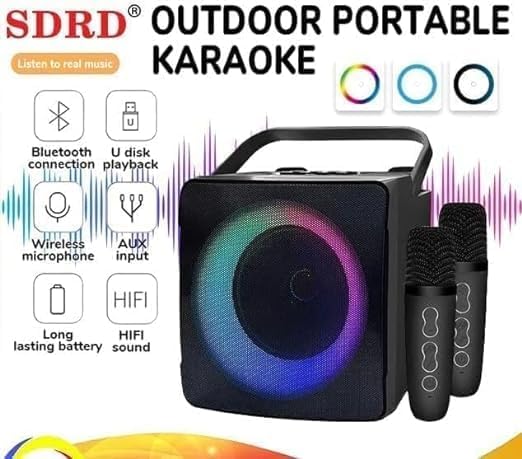
Image: The SDRD SD-508 speaker with two microphones, accompanied by icons illustrating its key features: Bluetooth connectivity, U-disk playback, wireless microphone support, AUX input, long-lasting battery, and HIFI sound quality.
സജ്ജമാക്കുക
1. സ്പീക്കറെ ചുമതലപ്പെടുത്തൽ:
- Connect the provided charging cable to the DC-5V port on the speaker.
- കേബിളിന്റെ മറ്റേ അറ്റം ഒരു 5V USB പവർ അഡാപ്റ്ററുമായി ബന്ധിപ്പിക്കുക (ഉൾപ്പെടുത്തിയിട്ടില്ല).
- The charging indicator will illuminate. Allow 2-3 hours for a full charge.
- A full charge provides approximately 3-5 hours of continuous use.
2. Charging the Microphones:
The wireless microphones are typically powered by internal rechargeable batteries or standard AA/AAA batteries. Refer to the microphone's specific instructions for charging or battery replacement.
3. പ്രാരംഭ പവർ ഓൺ:
Flip the power switch on the speaker to the "ON" position. The speaker will power on and indicate its current mode.
പ്രവർത്തന നിർദ്ദേശങ്ങൾ
1 ബ്ലൂടൂത്ത് കണക്ഷൻ:

Image: The SDRD SD-508 speaker with two microphones, illustrating its Bluetooth 5.0 compatibility across Android, Windows, and iOS devices. The image emphasizes a 10-meter wireless connection range.
- Ensure the speaker is powered on and in Bluetooth mode (it usually defaults to this or announces "Bluetooth Mode").
- നിങ്ങളുടെ സ്മാർട്ട്ഫോണിലോ ടാബ്ലെറ്റിലോ കമ്പ്യൂട്ടറിലോ ബ്ലൂടൂത്ത് പ്രവർത്തനക്ഷമമാക്കി ലഭ്യമായ ഉപകരണങ്ങൾക്കായി തിരയുക.
- Select "SD-508" from the list of devices.
- Once connected, the speaker will confirm the connection, and you can play audio from your device.
- The Bluetooth connection range is approximately 10 meters.
2. U-Disk Playback:
- Insert a USB flash drive (U-disk) containing MP3 audio fileസ്പീക്കറിലെ യുഎസ്ബി പോർട്ടിലേക്ക്.
- The speaker will automatically switch to U-disk mode and begin playing music.
- Use the speaker's controls to navigate tracks (if available).
3. AUX ഇൻപുട്ട്:
- Connect one end of the provided audio cable to the AUX input port on the speaker.
- മറ്റേ അറ്റം നിങ്ങളുടെ ബാഹ്യ ഉപകരണത്തിന്റെ (ഉദാ: MP3 പ്ലെയർ, കമ്പ്യൂട്ടർ) ഹെഡ്ഫോൺ ജാക്കുമായോ ഓഡിയോ ഔട്ട്പുട്ടുമായോ ബന്ധിപ്പിക്കുക.
- The speaker will switch to AUX mode, and audio from your device will play through the speaker.
4. Using the Wireless Microphones:
- Ensure the microphones are charged and powered on. They should automatically pair with the speaker.
- Adjust the microphone volume using the controls on the microphone itself.
- For karaoke, play music via Bluetooth, U-disk, or AUX, and sing along through the microphones.
- The speaker has dedicated slots to store the microphones when not in use, preventing loss or damage.
5. Karaoke Functionality:
The SD-508 supports various karaoke applications and platforms. You can use popular K-song apps on your connected device (phone, tablet) and output the audio to the speaker while using the wireless microphones for vocals.
Image: The SDRD SD-508 speaker's rear panel with input/output ports, alongside a grid of popular karaoke application icons, indicating compatibility with various K-song apps for live singing software.
മെയിൻ്റനൻസ്
- വൃത്തിയാക്കൽ: സ്പീക്കറും മൈക്രോഫോണുകളും വൃത്തിയാക്കാൻ മൃദുവായതും ഉണങ്ങിയതുമായ തുണി ഉപയോഗിക്കുക. അബ്രസീവ് ക്ലീനറുകളോ ലായകങ്ങളോ ഉപയോഗിക്കരുത്.
- സംഭരണം: നേരിട്ടുള്ള സൂര്യപ്രകാശത്തിൽ നിന്നും കടുത്ത താപനിലയിൽ നിന്നും മാറി തണുത്തതും വരണ്ടതുമായ സ്ഥലത്ത് ഉപകരണം സൂക്ഷിക്കുക.
- ബാറ്ററി കെയർ: To prolong battery life, charge the speaker regularly, even if not in frequent use. Avoid fully discharging the battery for extended periods.
- മൈക്രോഫോൺ സംഭരണം: Utilize the designated microphone placements on the speaker to securely store the microphones when not in use, preventing damage or loss.
ട്രബിൾഷൂട്ടിംഗ്
| പ്രശ്നം | സാധ്യമായ കാരണം | പരിഹാരം |
|---|---|---|
| ശക്തിയില്ല | ബാറ്ററി തീർന്നു. | സ്പീക്കർ പൂർണ്ണമായും ചാർജ് ചെയ്യുക. |
| സ്പീക്കറിൽ നിന്ന് ശബ്ദമില്ല | ശബ്ദം വളരെ കുറവാണ്; തെറ്റായ മോഡ്; ഉപകരണം കണക്റ്റുചെയ്തിട്ടില്ല. | Increase volume; ensure correct input mode (Bluetooth, AUX, USB); re-pair Bluetooth device. |
| മൈക്രോഫോണുകൾ പ്രവർത്തിക്കുന്നില്ല | Microphones not powered on or charged; out of range. | Ensure microphones are charged and turned on. Keep them within range of the speaker. |
| ബ്ലൂടൂത്ത് കണക്ഷൻ അസ്ഥിരമാണ് | Too far from speaker; interference. | Move device closer to the speaker; avoid obstacles or other wireless devices. |
സ്പെസിഫിക്കേഷനുകൾ

Image: A detailed specification table for the SDRD SD-508, including product name, Bluetooth version, speaker power, battery size, charging mode, material, microphone charging time, package size, and main functions. It also lists available colors (Black, White, Gold).
| ഫീച്ചർ | വിശദാംശങ്ങൾ |
|---|---|
| ഉൽപ്പന്നത്തിൻ്റെ പേര് | SD-508 |
| ബ്ലൂടൂത്ത് പതിപ്പ് | ബ്ലൂടൂത്ത് 5.0 |
| സ്പീക്കർ പവർ | 10W |
| ബാറ്ററി വലിപ്പം | 3.7V / 2400 mAh (Speaker) |
| ചാർജിംഗ് മോഡ് | Charger (5V-2A) |
| മെറ്റീരിയൽ | എബിഎസ് പ്ലാസ്റ്റിക് |
| മൈക്രോഫോൺ ചാർജ് ചെയ്യുന്ന സമയം | 1-2 മണിക്കൂർ |
| റണ്ണിംഗ് ടൈം | 2-3 hours (Microphone), 3-5 hours (Speaker) |
| ബ്ലൂടൂത്ത് ദൂരം | 10 മീറ്റർ |
| മൈക്രോഫോൺ ദൂരം | 10 മീറ്റർ |
| ഉൽപ്പന്ന അളവുകൾ | 10 x 12 x 10 സെ.മീ |
| ഭാരം | 1.3 കി.ഗ്രാം |
| ഉൾപ്പെടുത്തിയ ഘടകങ്ങൾ | Speaker, 2 Wireless Microphones, Data Cable, Audio Cable, Manual |
| പ്രധാന പ്രവർത്തനങ്ങൾ | Bluetooth, Line-in, U-disk, K Song mode |
വാറൻ്റിയും പിന്തുണയും
This product comes with a standard manufacturer's warranty. Please retain your purchase receipt for warranty claims. For technical support, troubleshooting assistance, or warranty inquiries, please contact your retailer or the manufacturer's customer service.
For more information, you may visit the official product page or contact the seller through the platform where you purchased the item.
Ask a question about this manual
Ask about setup, troubleshooting, compatibility, parts, safety, or missing instructions. Manuals+ will review the question and use this page’s manual context to help answer it.