
1. ആമുഖം
The AVATTO TRV10 is a smart thermostat radiator valve designed to provide intelligent control over your home heating system. Utilizing Zigbee technology, it integrates seamlessly with Tuya-compatible smart home platforms, allowing for precise temperature management, scheduling, and remote control via a smartphone application. This manual provides detailed instructions for the installation, operation, and maintenance of your TRV10 device.
2. ഉൽപ്പന്നം കഴിഞ്ഞുview
The AVATTO TRV10 features a compact design with an integrated display for local temperature readings and settings. It is powered by batteries and communicates wirelessly with a Zigbee gateway.
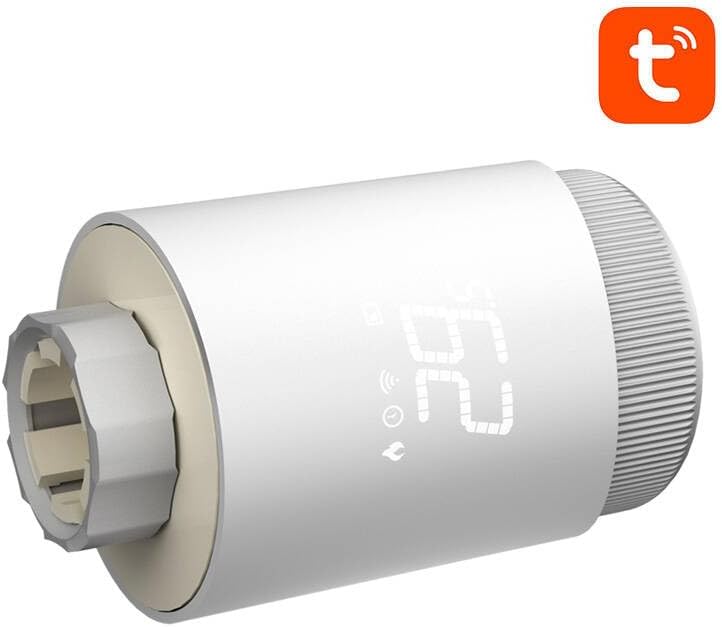
ചിത്രം 2.1: ഫ്രണ്ട് view of the AVATTO TRV10 Smart Thermostat Radiator Valve, showing the digital display and control knob.

ചിത്രം 2.2: വശം view of the AVATTO TRV10 Smart Thermostat Radiator Valve, illustrating the connection point for the radiator valve.
പ്രധാന ഘടകങ്ങൾ:
- ഡിജിറ്റൽ ഡിസ്പ്ലേ: Shows current temperature, mode, and battery status.
- നിയന്ത്രണ നോബ്: Used for manual temperature adjustment and menu navigation.
- Valve Connector: Attaches to the radiator valve body.
- ബാറ്ററി കമ്പാർട്ട്മെൻ്റ്: പവർ സ്രോതസ്സ് സ്ഥാപിക്കുന്നു.
3. പാക്കേജ് ഉള്ളടക്കം
അൺബോക്സ് ചെയ്യുമ്പോൾ പാക്കേജ് ഉള്ളടക്കങ്ങൾ പരിശോധിക്കുക. ഏതെങ്കിലും ഇനങ്ങൾ നഷ്ടപ്പെട്ടാലോ കേടായാലോ, നിങ്ങളുടെ റീട്ടെയിലറെ ബന്ധപ്പെടുക.
- AVATTO TRV10 Smart Thermostat Radiator Valve
- ഉപയോക്തൃ മാനുവൽ (ഈ പ്രമാണം)
- Adapter rings (various sizes for compatibility with different radiator valves)
- AA Batteries (may or may not be included, check packaging)
4 സ്പെസിഫിക്കേഷനുകൾ
| ഫീച്ചർ | വിശദാംശങ്ങൾ |
|---|---|
| മോഡൽ നമ്പർ | TRV10 |
| ബ്രാൻഡ് | അവട്ടോ |
| കണക്റ്റിവിറ്റി | സിഗ്ബി |
| അനുയോജ്യത | തുയ സ്മാർട്ട് / സ്മാർട്ട് ലൈഫ് ആപ്പ് |
| വൈദ്യുതി വിതരണം | AA Batteries (typically 2x AA) |
| താപനില പരിധി | 5°C - 30°C (ക്രമീകരിക്കാവുന്നത്) |
| താപനില കൃത്യത | ±0.5°C |
| വാൽവ് കണക്ഷൻ | M30x1.5 (with various adapters) |
5. സജ്ജീകരണവും ഇൻസ്റ്റാളേഷനും
5.1 ബാറ്ററി ഇൻസ്റ്റാളേഷൻ
- Twist and remove the battery cover from the top or back of the TRV10 unit.
- ആവശ്യമായ AA ബാറ്ററികൾ ഇടുക, ശരിയായ പോളാരിറ്റി (+/-) ഉറപ്പാക്കുക.
- Replace the battery cover securely. The display should light up.
5.2 റേഡിയേറ്റർ വാൽവിൽ മൗണ്ടിംഗ്
- Identify your existing radiator valve type.
- Select the appropriate adapter ring from the package that matches your valve.
- Screw the adapter ring onto your radiator valve body.
- Align the TRV10 unit with the adapter ring and screw it on until it is hand-tight. Do not overtighten.
- The TRV10 will perform an initial calibration cycle.
5.3 Pairing with Zigbee Gateway and Tuya App
- Ensure you have a compatible Zigbee gateway connected to your home network and the Tuya Smart or Smart Life app installed on your smartphone.
- Open the Tuya Smart / Smart Life app and navigate to add a new device.
- Follow the app's instructions to put your Zigbee gateway into pairing mode.
- On the TRV10 device, press and hold the control knob for approximately 5-8 seconds until the Zigbee icon on the display starts flashing. This indicates pairing mode.
- The app should discover the TRV10. Select it to complete the pairing process.
- Once paired, the Zigbee icon on the TRV10 display will stop flashing and remain solid.
- You can now control and configure the TRV10 via the Tuya app.
6. പ്രവർത്തന നിർദ്ദേശങ്ങൾ
6.1 മാനുവൽ താപനില ക്രമീകരണം
- Rotate the control knob clockwise to increase the target temperature.
- Rotate the control knob counter-clockwise to decrease the target temperature.
- The new target temperature will be displayed temporarily and then the display will revert to the current room temperature.
6.2 ആപ്പ് നിയന്ത്രണം
Once paired with the Tuya Smart / Smart Life app, you can access advanced control features:
- Remote Temperature Setting: Adjust the target temperature from anywhere.
- ഷെഡ്യൂളിംഗ്: Create custom heating schedules for different days and times.
- മോഡ് തിരഞ്ഞെടുക്കൽ: Switch between various operating modes (e.g., Auto, Manual, Holiday, Boost).
- ചൈൽഡ് ലോക്ക്: Prevent unauthorized manual adjustments on the device.
- വിൻഡോ ഡിറ്റക്ഷൻ തുറക്കുക: Automatically turns off heating if a sudden temperature drop is detected.
6.3 ഓപ്പറേറ്റിംഗ് മോഡുകൾ
- യാന്ത്രിക മോഡ്:
- The TRV10 follows the programmed schedule set in the app.
- മാനുവൽ മോഡ്:
- The TRV10 maintains a constant temperature set manually, overriding the schedule.
- അവധിക്കാല മോഡ്:
- Maintains a low, energy-saving temperature for a specified duration when you are away.
- ബൂസ്റ്റ് മോഡ്:
- Quickly heats the room to a high temperature for a short period.
7. പരിപാലനം
7.1 ബാറ്ററി മാറ്റിസ്ഥാപിക്കൽ
When the battery icon on the display flashes or the device stops responding, it's time to replace the batteries.
- Remove the TRV10 unit from the radiator valve by unscrewing it.
- ബാറ്ററി കവർ നീക്കം ചെയ്യുക.
- Replace the old batteries with new AA batteries, ensuring correct polarity.
- Reattach the battery cover and remount the TRV10 onto the radiator valve. The device will recalibrate.
7.2 വൃത്തിയാക്കൽ
Wipe the exterior of the TRV10 with a soft, dry cloth. Do not use abrasive cleaners or allow water to enter the device.
8. പ്രശ്നപരിഹാരം
| പ്രശ്നം | സാധ്യമായ കാരണം | പരിഹാരം |
|---|---|---|
| ഉപകരണം ഓണാക്കുന്നില്ല. | ബാറ്ററികൾ തീർന്നിരിക്കുന്നു അല്ലെങ്കിൽ തെറ്റായി ചേർത്തിരിക്കുന്നു. | ബാറ്ററി പോളാരിറ്റി പരിശോധിച്ച് പുതിയ ബാറ്ററികൾ ഉപയോഗിച്ച് മാറ്റിസ്ഥാപിക്കുക. |
| Cannot pair with Zigbee gateway. | TRV10 not in pairing mode; Gateway not in pairing mode; Too far from gateway. | Ensure both devices are in pairing mode. Move TRV10 closer to the gateway. Check gateway status. |
| പ്രതീക്ഷിച്ചതുപോലെ റേഡിയേറ്റർ ചൂടാക്കൽ/തണുപ്പിക്കൽ നടത്തുന്നില്ല. | Valve stuck; Incorrect temperature setting; TRV10 not fully calibrated. | Manually check the radiator valve. Verify temperature settings in the app. Re-mount the TRV10 to trigger recalibration. |
| ആപ്പ് ഉപകരണം ഓഫ്ലൈനിൽ കാണിക്കുന്നു. | Zigbee gateway offline; TRV10 battery low; Poor Zigbee signal. | Check gateway's internet connection. Replace TRV10 batteries. Consider a Zigbee repeater if signal is weak. |
9. വാറൻ്റിയും പിന്തുണയും
The AVATTO TRV10 Smart Thermostat Radiator Valve comes with a standard manufacturer's warranty. Please refer to the warranty card included with your purchase or contact your retailer for specific warranty terms and conditions.
For technical support, troubleshooting assistance, or inquiries regarding your device, please contact AVATTO customer service or your local distributor. Contact information can typically be found on the product packaging or the official AVATTO webസൈറ്റ്.