
ആമുഖം
വാങ്ങിയതിന് നന്ദി.asing the Music Hero Mini Rio Wireless Karaoke Speaker with Microphone. This device is designed to provide a high-quality audio experience for various occasions, including parties, events, and training sessions. It features wireless connectivity, a portable design, and a microphone with voice modulation effects. Please read this manual carefully to ensure proper use and maintenance of your product.
പാക്കേജ് ഉള്ളടക്കം
പാക്കേജിൽ എല്ലാ ഇനങ്ങളും ഉണ്ടെന്ന് ഉറപ്പാക്കുക:
- 1 x വയർലെസ് സ്പീക്കർ
- 1 x വയർലെസ് മൈക്രോഫോൺ
- 1 x യുഎസ്ബി-സി ചാർജിംഗ് കേബിൾ
- 1 x ഉപയോക്തൃ മാനുവൽ

Image: The Music Hero Mini Rio Wireless Karaoke Speaker and Microphone, showing the rear panel with ports and a list of package contents.
ഉൽപ്പന്നം കഴിഞ്ഞുview
Familiarize yourself with the main components of your speaker and microphone.
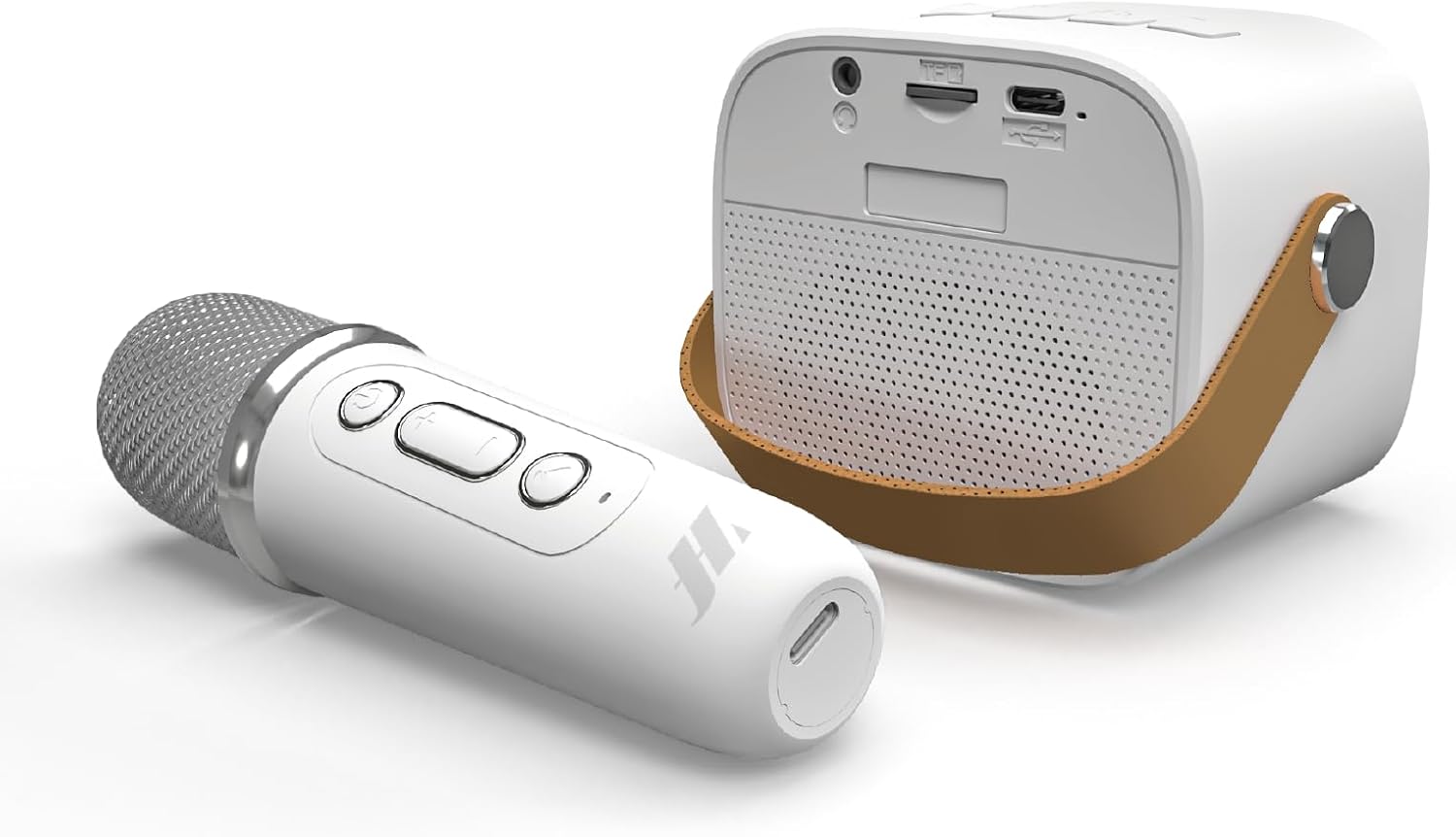
ചിത്രം: വശം view of the Music Hero Mini Rio Wireless Karaoke Speaker and Microphone, highlighting the compact design and controls.

ചിത്രം: മുൻഭാഗം view of the Music Hero Mini Rio Wireless Karaoke Speaker and Microphone, showcasing the speaker grille and microphone design.
സജ്ജമാക്കുക
സ്പീക്കറും മൈക്രോഫോണും ചാർജ് ചെയ്യുന്നു
Before first use, fully charge both the speaker and the microphone.
- Connect the supplied USB-C charging cable to the charging port on the speaker.
- USB-C കേബിളിന്റെ മറ്റേ അറ്റം അനുയോജ്യമായ ഒരു USB പവർ അഡാപ്റ്ററുമായി ബന്ധിപ്പിക്കുക (ഉൾപ്പെടുത്തിയിട്ടില്ല).
- Repeat the process for the microphone using the same USB-C cable.
- The charging indicator (if present) will show the charging status and turn off or change color when fully charged.
A full charge provides up to 3 hours of continuous playback for the speaker.
പവർ ചെയ്യുന്നത് ഓൺ/ഓഫ്
- സ്പീക്കർ: Press and hold the Power button until the indicator light turns on/off.
- മൈക്രോഫോൺ: Press and hold the Power button until the indicator light turns on/off.
പ്രവർത്തന നിർദ്ദേശങ്ങൾ
ബ്ലൂടൂത്ത് കണക്ഷൻ
- സ്പീക്കർ ഓണാണെന്നും ബ്ലൂടൂത്ത് ജോടിയാക്കൽ മോഡിലാണെന്നും ഉറപ്പാക്കുക (ഇൻഡിക്കേറ്റർ ലൈറ്റ് മിന്നിമറയും).
- നിങ്ങളുടെ മൊബൈൽ ഉപകരണത്തിൽ (സ്മാർട്ട്ഫോൺ, ടാബ്ലെറ്റ് മുതലായവ), ബ്ലൂടൂത്ത് പ്രവർത്തനക്ഷമമാക്കി ലഭ്യമായ ഉപകരണങ്ങൾക്കായി തിരയുക.
- Select "Music Hero Mini Rio" (or similar name) from the list of devices.
- Once connected, the speaker will emit a confirmation sound, and the indicator light will become solid.
The microphone will automatically connect to the speaker when both are powered on and within range.
TF കാർഡ് പ്ലേബാക്ക്
The speaker supports TF (microSD) cards up to 32GB for direct music playback.
- Insert a TF card with audio fileസ്പീക്കറിലെ നിയുക്ത സ്ലോട്ടിലേക്ക് എസ്.
- സ്പീക്കർ സ്വയമേവ TF കാർഡ് മോഡിലേക്ക് മാറുകയും സംഗീതം പ്ലേ ചെയ്യാൻ തുടങ്ങുകയും ചെയ്യും.
സ്പീക്കർ നിയന്ത്രണങ്ങൾ
Use the integrated buttons on the speaker to manage playback:
- വോളിയം കൂട്ടുക/താഴ്ത്തുക: '+' അല്ലെങ്കിൽ '-' ബട്ടണുകൾ അമർത്തുക.
- പ്ലേ/താൽക്കാലികമായി നിർത്തുക: പ്ലേ/പോസ് ബട്ടൺ അമർത്തുക.
- അടുത്തത് / മുമ്പത്തെ ട്രാക്ക്: Press and hold the '+' or '-' buttons (or short press, depending on model).
Microphone Usage and Voice Effects
The wireless microphone offers 5 voice modulation effects.
- ആലാപനം: Speak or sing into the microphone. Your voice will be ampസ്പീക്കറിലൂടെ പറഞ്ഞു.
- വോയ്സ് ഇഫക്റ്റുകൾ: Press the dedicated effect button on the microphone to cycle through the 5 available voice modulation effects.
- മൈക്രോഫോൺ വോളിയം: Adjust the microphone volume using its dedicated controls.
മെയിൻ്റനൻസ്
- ഉപകരണം വരണ്ടതായി സൂക്ഷിക്കുക. ഈർപ്പത്തിനോ ഉയർന്ന താപനിലയ്ക്കോ വിധേയമാക്കരുത്.
- Clean the speaker and microphone with a soft, dry cloth. Do not use abrasive cleaners or solvents.
- ഉപയോഗത്തിലില്ലാത്തപ്പോൾ തണുത്തതും ഉണങ്ങിയതുമായ സ്ഥലത്ത് ഉപകരണം സൂക്ഷിക്കുക.
- ശക്തമായ ആഘാതങ്ങൾക്ക് ഉപകരണം ഇടുകയോ ഇടുകയോ ചെയ്യുന്നത് ഒഴിവാക്കുക.
ട്രബിൾഷൂട്ടിംഗ്
| പ്രശ്നം | സാധ്യമായ കാരണം | പരിഹാരം |
|---|---|---|
| ശക്തിയില്ല | ബാറ്ററി തീർന്നു. | Charge the speaker/microphone using the USB-C cable. |
| ബ്ലൂടൂത്ത് വഴി ബന്ധിപ്പിക്കാൻ കഴിയില്ല | Bluetooth is not enabled on your device or speaker is not in pairing mode. | Ensure Bluetooth is enabled on both devices. Put the speaker into pairing mode. Move devices closer. |
| സ്പീക്കറിൽ നിന്ന് ശബ്ദമില്ല | Volume is too low, device is paused, or incorrect input source. | Increase volume, press play, check Bluetooth connection or TF card insertion. |
| മൈക്രോഫോൺ പ്രവർത്തിക്കുന്നില്ല | Microphone is off, battery low, or not paired with speaker. | Ensure microphone is charged and powered on. It should automatically pair with the speaker. |
സ്പെസിഫിക്കേഷനുകൾ
| ഫീച്ചർ | വിശദാംശങ്ങൾ |
|---|---|
| മോഡലിൻ്റെ പേര് | Speaker Rio Karaoke |
| മോഡൽ നമ്പർ | MHSPKARARIOBTW |
| ബ്രാൻഡ് | Music Hero |
| സ്പീക്കർ പവർ | 3W |
| കണക്റ്റിവിറ്റി | Bluetooth, TF Card (up to 32GB) |
| ബ്ലൂടൂത്ത് പതിപ്പ് | വി. 5.3 |
| വയർലെസ് ദൂരം | 10 മീ |
| സ്പീക്കർ ബാറ്ററി ശേഷി | 500 mAh |
| മൈക്രോഫോൺ ബാറ്ററി ശേഷി | 200 mAh |
| സ്പീക്കർ പ്ലേടൈം | 3.0 മണിക്കൂർ |
| ചാർജിംഗ് സമയം | 1.5 മണിക്കൂർ |
| സ്റ്റാൻഡ്ബൈ സമയം | 24 മണിക്കൂർ |
| ഓഡിയോ ഫ്രീക്വൻസി | 120 ഹെർട്സ് - 20 കിലോ ഹെർട്സ് |
| ഇൻപുട്ട് | 5 V D.C. - 1A max |
| അളവുകൾ (സ്പീക്കർ) | 8D x 6B x 7H cm |
| Weight (Speaker) | 1.3 കി.ഗ്രാം |
| ഉൾപ്പെടുത്തിയ ഘടകങ്ങൾ | Speaker, Microphone, USB-C Charging Cable |
സുരക്ഷാ വിവരങ്ങൾ
- ഉപകരണം ഡിസ്അസംബ്ലിംഗ് ചെയ്യുകയോ പരിഷ്കരിക്കുകയോ ചെയ്യരുത്.
- വെള്ളം, തീ, ഉയർന്ന താപനില എന്നിവയിൽ നിന്ന് അകന്നു നിൽക്കുക.
- ദീർഘനേരം നേരിട്ട് സൂര്യപ്രകാശം ഏൽക്കരുത്.
- നൽകിയിരിക്കുന്ന ചാർജിംഗ് കേബിളോ സാക്ഷ്യപ്പെടുത്തിയ തത്തുല്യമായതോ മാത്രം ഉപയോഗിക്കുക.
- പ്രാദേശിക നിയന്ത്രണങ്ങൾ അനുസരിച്ച് ബാറ്ററികളും ഇലക്ട്രോണിക് ഘടകങ്ങളും ഉത്തരവാദിത്തത്തോടെ നിർമാർജനം ചെയ്യുക.
വാറൻ്റിയും പിന്തുണയും
For warranty information and customer support, please refer to the documentation included with your purchase or visit the official Music Hero website. The product comes with a standard manufacturer's warranty against defects in materials and workmanship.
For technical assistance or inquiries, please contact your retailer or the manufacturer's customer service.