
ANCEL V5 HD
ANCEL V5 HD Heavy Duty Truck Scanner User Manual
Model: V5 HD
1. ഉൽപ്പന്നം കഴിഞ്ഞുview
The ANCEL V5 HD is an advanced diagnostic scan tool specifically engineered for heavy-duty trucks and commercial vehicles. It offers comprehensive system diagnostics, over 40 reset functions, and full bi-directional control, making it an essential tool for professional technicians and vehicle owners.
Equipped with a high-performance Android 10.0 tablet, a 7-inch LCD touch screen, and dual-band Wi-Fi, the V5 HD provides efficient and accurate vehicle analysis. Its robust hardware and extensive vehicle coverage ensure reliable performance across a wide range of truck brands and models.

Figure 1.1: ANCEL V5 HD Heavy Duty Truck Scanner. This image shows the diagnostic tool with its main interface, highlighting its key features like 40+ service functions, bi-directional active test, full system diagnostic, and full OBD2 function.
2. ആരംഭിക്കലും സജ്ജീകരണവും
Before using your ANCEL V5 HD scanner, please ensure it is properly set up and charged.
2.1 പ്രാരംഭ ചാർജിംഗ്
The device comes with a built-in 5000mAh rechargeable battery. For optimal performance, fully charge the device before its first use. Connect the provided charging cable to the device's charging port and plug it into a suitable power source.
2.2 പവർ ഓൺ/ഓഫ്
- പവർ ഓണാക്കാൻ: സ്ക്രീൻ പ്രകാശിക്കുന്നത് വരെ ഉപകരണത്തിന്റെ വശത്തുള്ള പവർ ബട്ടൺ അമർത്തിപ്പിടിക്കുക.
- പവർ ഓഫ് ചെയ്യാൻ: പവർ ബട്ടൺ അമർത്തിപ്പിടിക്കുക, തുടർന്ന് ഓൺ-സ്ക്രീൻ ഓപ്ഷനുകളിൽ നിന്ന് "പവർ ഓഫ്" തിരഞ്ഞെടുക്കുക.
2.3 Language and Wi-Fi Setup
Upon first boot-up, you may be prompted to select your preferred language. The V5 HD supports multiple languages including English, French, Russian, German, Italian, Portuguese, Spanish, Japanese, Korean, Dutch, Polish, and Swedish.
Connect the device to a Wi-Fi network for software updates and remote assistance. Navigate to "Settings" on the main screen, then select "Wi-Fi" to choose and connect to an available 2.4GHz or 5GHz network.
3. സ്കാനർ പ്രവർത്തിപ്പിക്കൽ
The ANCEL V5 HD offers a wide array of diagnostic and service functions. This section outlines the primary operational modes.
3.1 പൂർണ്ണ സിസ്റ്റം ഡയഗ്നോസ്റ്റിക്സ്
The V5 HD provides OE-level full system diagnostics for nearly all systems in semi-commercial vehicles, including engine, transmission, ABS, SRS, airbag, and instrument panel. This allows for rapid identification and resolution of vehicle issues.

Figure 3.1: OE-Level Full System Diagnostics. This image illustrates the comprehensive coverage of vehicle systems, including Drivetrain, Evap, Instrument, Transmission, Fuel System, Suspension, SATC, Engine, EPS, ESP, Exhaust, SAS, Chassis, BMS, Brake, and ABS.
3.2 പ്രത്യേക പ്രവർത്തനങ്ങളും പുനഃസജ്ജീകരണങ്ങളും
The tool includes over 40 reset functions to restore vehicle systems to original specifications, clearing error codes and resolving performance issues. Key functions include:
- ABS, SRS, DPF, EPB, BMS resets.
- DPF regeneration, parameter setting, idle speed adjustment, speed limit adjustment.
- ABS Bleeding, Oil Reset, PRV Valve Test, Broken Cylinder Test, Clear Spec DTC, ECU Reset, ECU Programming.
- Compression Test, Speed Control, Off-cylinder Test, EGR Valve Testing, Odometer Light Test, Locking ECU, Cylinder Cutout Test, Engine Speed Test.
- Programming VIN, Acceleration Test, Injection Pressure Test, Fuel Pump Solenoid Test, Common Rail Pressure Test, Intake Valve Actuator Solenoid Test.

Figure 3.2: 40+ Service Functions. This image displays the range of maintenance functions available, including DPF Regeneration, Urea Drive, Speed Limit Adjustment, Idle Speed Adjustment, Service Reset, Injector Coding, Parameter Setting, and Cylinder Cut-off/Compression Test.
3.3 Bi-Directional Control / Active Test
The V5 HD can not only read but also erase fault codes. Its bi-directional control allows for rapid assessment of repair effectiveness through various tests, including Aftertreatment Testing, Injector Testing, Fuel Pump Testing, Cylinder Testing, A/C Compressor Testing, and Heated Oxygen Sensor Testing.

Figure 3.3: Bi-Directional / Active Test. This image demonstrates the ability to temporarily activate or control vehicle systems to pinpoint malfunctions, showing examples like EGR Solenoid Control and Cylinder Balance Test.
3.4 DPF Regeneration and Urea Drive
The DPF Regeneration function ensures the effectiveness of particulate matter filters, reducing harmful substances in exhaust. The Urea Drive (DEF/SCR/EGR) function helps ensure compliance with emission standards and improves engine performance.
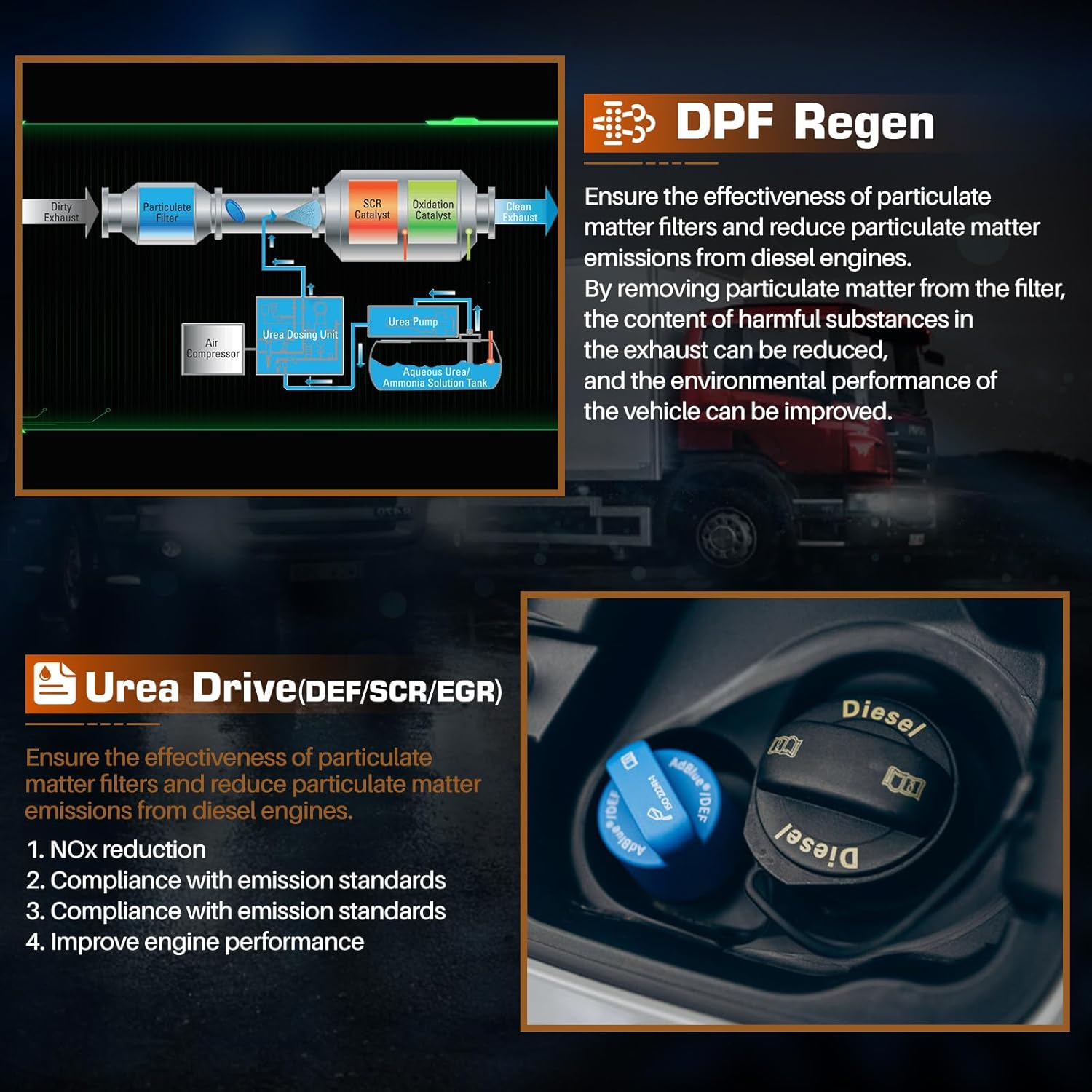
Figure 3.4: DPF Regen and Urea Drive. This image provides a visual explanation of the DPF regeneration process and the Urea Drive system, detailing their roles in emission control and engine performance.
3.5 ഇസിയു കോഡിംഗ്
The ECU Coding feature allows for advanced programming and customization, including matching/learning codes, programming new ECUs, writing VINs, programming new TCUs, recoding replacement parts, performing transmission quick relearn, unlocking hidden features, and disabling annoying functions.
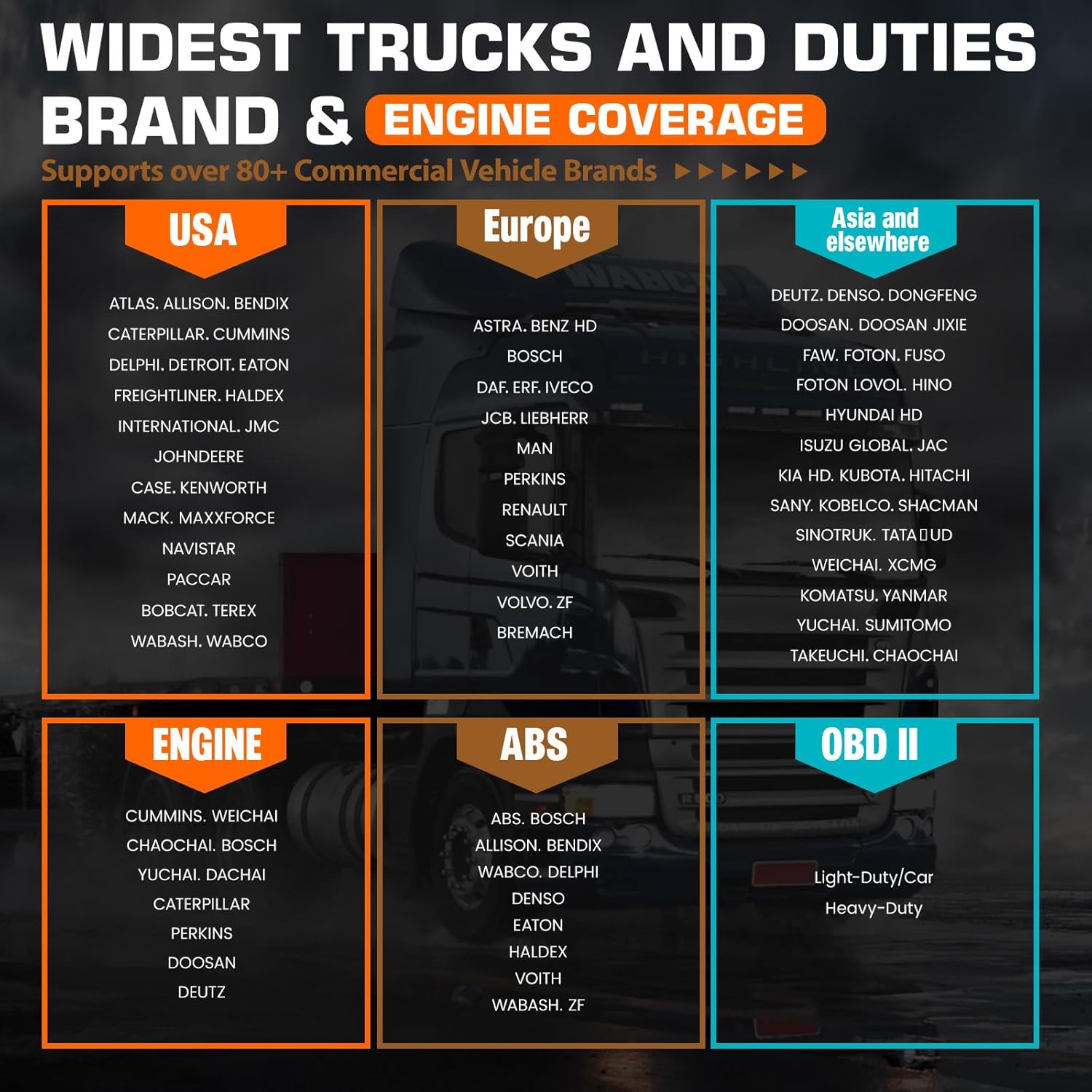
Figure 3.5: ECU Coding. This image highlights the advanced ECU coding functions, such as matching/learning codes, programming new ECUs, and unlocking hidden features.
3.6 പൂർണ്ണ OBD2 പ്രവർത്തനങ്ങൾ
The V5 HD supports all OBD2 functions for both cars and trucks, including reading ECU info, reading and erasing codes, data stream, I/M readiness, vehicle information, freeze frame, EVAP system test, actuations, and DTC lookup.

Figure 3.6: Full OBD2 Functions. This image displays the comprehensive OBD2 capabilities, including reading and erasing diagnostic trouble codes, viewing live data streams, and performing various system tests.
3.7 വാഹന കവറേജ്
The ANCEL V5 HD is designed for 12V & 24V semi trucks, pickup trucks, heavy-duty trucks, and 99% of commercial vehicles, supporting over 80 vehicle brands. This includes major brands like CUMMINS, CATERPILLAR, FREIGHTLINER, VOLVO, IVECO, DAF, MAN, RENAULT, SCANIA, and many more.
4. പരിപാലനം
Proper maintenance ensures the longevity and optimal performance of your ANCEL V5 HD scanner.
4.1 വൃത്തിയാക്കലും സംഭരണവും
- സോഫ്റ്റ്, ഡി ഉപയോഗിച്ച് ഉപകരണം തുടയ്ക്കുകamp തുണി. ഉരച്ചിലുകളോ ലായകങ്ങളോ ഉപയോഗിക്കുന്നത് ഒഴിവാക്കുക.
- Store the scanner in a cool, dry place, away from direct sunlight and extreme temperatures.
- Keep the diagnostic cables and connectors clean and free from debris.
4.2 സോഫ്റ്റ്വെയർ അപ്ഡേറ്റുകൾ
Regular software updates are crucial for maintaining compatibility with new vehicle models and ensuring access to the latest diagnostic features. The ANCEL V5 HD supports "One-click Update" via Wi-Fi. Ensure your device is connected to the internet and navigate to the "Update" section on the main menu to check for and install available updates.
5. പ്രശ്നപരിഹാരം
നിങ്ങൾ നേരിട്ടേക്കാവുന്ന പൊതുവായ പ്രശ്നങ്ങൾക്കുള്ള മാർഗ്ഗനിർദ്ദേശം ഈ വിഭാഗം നൽകുന്നു.
5.1 പൊതു പ്രശ്നങ്ങൾ
- ഉപകരണം ഓണാക്കുന്നില്ല: ബാറ്ററി ചാർജ് ചെയ്തിട്ടുണ്ടെന്ന് ഉറപ്പാക്കുക. ചാർജർ കണക്റ്റ് ചെയ്ത് വീണ്ടും ശ്രമിക്കുക.
- വാഹനവുമായി ആശയവിനിമയം ഇല്ല:
- Verify the diagnostic cable is securely connected to both the scanner and the vehicle's OBD port.
- Ensure the vehicle's ignition is in the ON position (engine off or running, as required by the test).
- Check if the vehicle's battery voltagഇ മതി.
- സോഫ്റ്റ്വെയർ മരവിപ്പിക്കൽ അല്ലെങ്കിൽ മന്ദഗതിയിലുള്ള പ്രകടനം:
- ഉപകരണം പുനരാരംഭിക്കുക.
- Ensure sufficient storage space (2GB RAM + 32GB ROM, expandable). Clear unnecessary data if needed.
- Perform a software update to ensure you have the latest version.
5.2 അനുയോജ്യതാ കുറിപ്പ്
Compatibility with the ANCEL V5 HD varies depending on the truck model and year. If you are uncertain about whether the V5 HD is suitable for your specific truck, it is recommended to reach out to ANCEL support for confirmation before making your purchase or attempting diagnostics.
6 സ്പെസിഫിക്കേഷനുകൾ
| ഫീച്ചർ | വിവരണം |
|---|---|
| ഓപ്പറേറ്റിംഗ് സിസ്റ്റം | ആൻഡ്രോയിഡ് 10.0 |
| പ്രദർശിപ്പിക്കുക | 7 ഇഞ്ച് എൽസിഡി ടച്ച് സ്ക്രീൻ |
| പ്രോസസ്സർ | 1.4GHz ഒക്ടാ-കോർ സിപിയു |
| മെമ്മറി | 2 ജിബി റാം + 32 ജിബി റോം (വികസിപ്പിക്കാവുന്നത്) |
| ബാറ്ററി | 5000mAh Rechargeable Battery (up to 15+ hours) |
| വൈഫൈ | 2.4GHz & 5GHz Dual-band |
| പിന്തുണയ്ക്കുന്ന പ്രോട്ടോക്കോളുകൾ | J1939, 1708, ISO14230, ISO15765, ISO9141, ISO11898, E-J1850 VPW, etc. |
7. പിന്തുണയും വാറണ്ടിയും
For any inquiries, technical assistance, or support, please contact ANCEL customer service:
- ആമസോൺ സന്ദേശങ്ങൾ: Reach out via the Amazon platform.
- ഇമെയിൽ: amazon@anceltech.com
- ചോദ്യോത്തര വിഭാഗം: Utilize the product's Q&A section on Amazon.
ANCEL strives to respond to inquiries within an average of 4 hours to ensure prompt assistance.
7.1 വാറൻ്റി വിവരങ്ങൾ
Specific warranty details are typically provided with your product packaging or can be obtained by contacting ANCEL customer support directly. Please retain your proof of purchase for warranty claims.
Ask a question about this manual
Ask about setup, troubleshooting, compatibility, parts, safety, or missing instructions. Manuals+ will review the question and use this page’s manual context to help answer it.