
1. ആമുഖവും അവസാനവുംview
The Vekesen D02 TikTok Scrolling Ring is a versatile Bluetooth remote control designed to enhance your digital media experience. It allows for hands-free control of various applications on your smartphone, including TikTok, Ebook readers, camera functions, and music playback. This manual provides detailed instructions for setup, operation, and maintenance of your device.
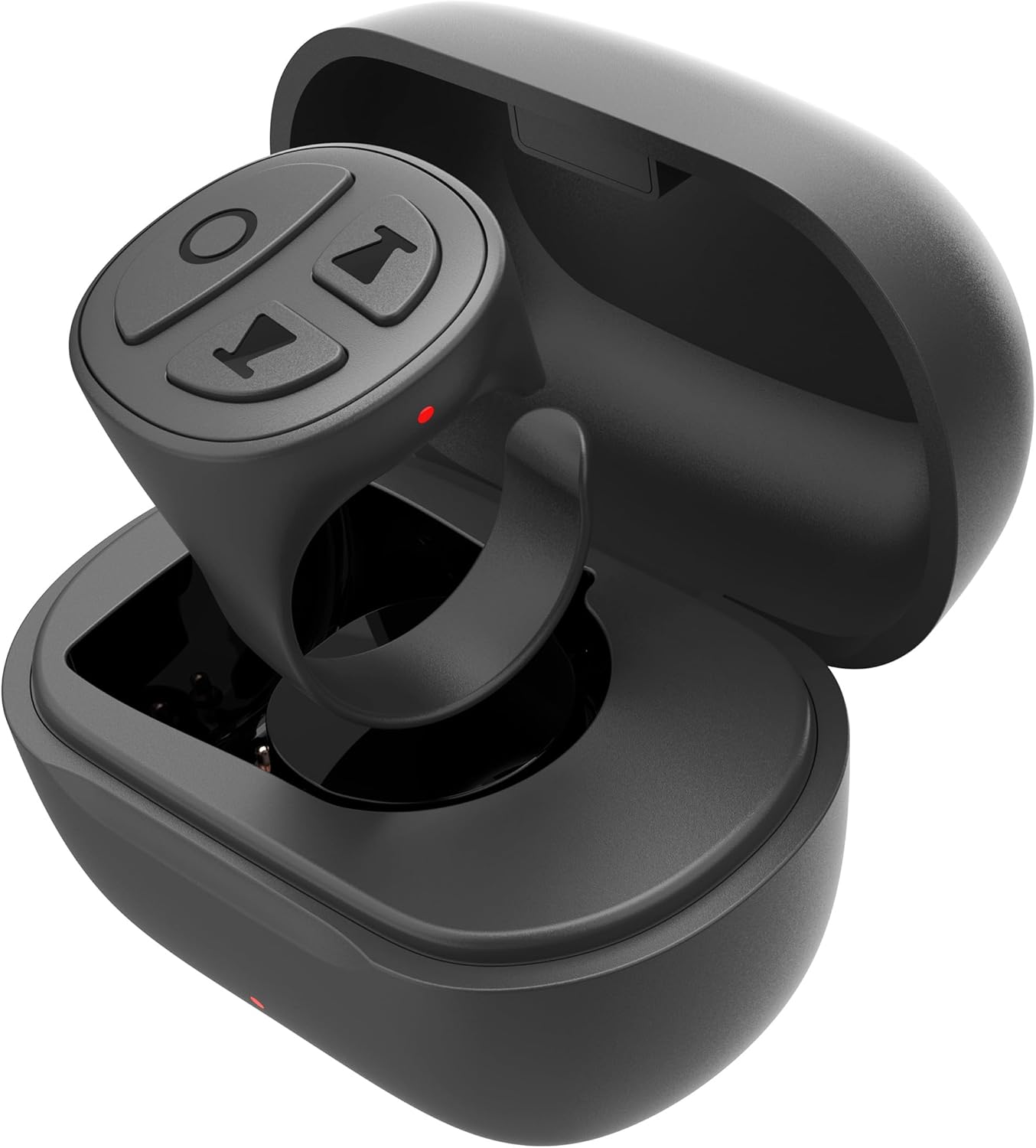
Image: The Vekesen D02 TikTok Scrolling Ring, a compact black device with four control buttons, rests within its matching charging case.
2. ഉൽപ്പന്ന സവിശേഷതകൾ
- TikTok Scrolling: Effortlessly scroll up/down, left/right, pause/play videos, adjust volume, and send likes.
- Ebook Page Turner: Remotely control page turning in compatible E-book applications (e.g., Kindle App).
- Bluetooth Camera Shutter: Capture photos and record videos from a distance of up to 33 feet.
- മ്യൂസിക് റിമോട്ട്: Control music playback, including play/pause, skip tracks, and volume adjustment.
- അനുയോജ്യത: Works with both iOS and Android devices.
3. സജ്ജീകരണ ഗൈഡ്
3.1 ബ്ലൂടൂത്ത് ജോടിയാക്കൽ
- Ensure the scrolling ring is charged.
- Press and hold the power button on the ring for 3 seconds until the red and blue indicator lights flash alternately. This indicates the device is in pairing mode.
- On your smartphone, navigate to ക്രമീകരണങ്ങൾ > ബ്ലൂടൂത്ത്.
- ബ്ലൂടൂത്ത് ഓണാക്കുക.
- Locate "D02" in the list of available devices and tap to connect. Once connected, the indicator lights on the ring will stop flashing.
3.2 iOS Specific Settings (AssistiveTouch)
For iPhone and iPad users, enabling AssistiveTouch is required for full functionality. Android devices do not require this step.
- തുറക്കുക ക്രമീകരണങ്ങൾ നിങ്ങളുടെ iOS ഉപകരണത്തിലെ ആപ്പ്.
- ടാപ്പ് ചെയ്യുക പ്രവേശനക്ഷമത.
- ടാപ്പ് ചെയ്യുക സ്പർശിക്കുക.
- ടാപ്പ് ചെയ്യുക അസിസ്റ്റീവ് ടച്ച്.
- ടോഗിൾ ചെയ്യുക അസിസ്റ്റീവ് ടച്ച് switch to the 'On' position. A small gray dot will appear on your screen.
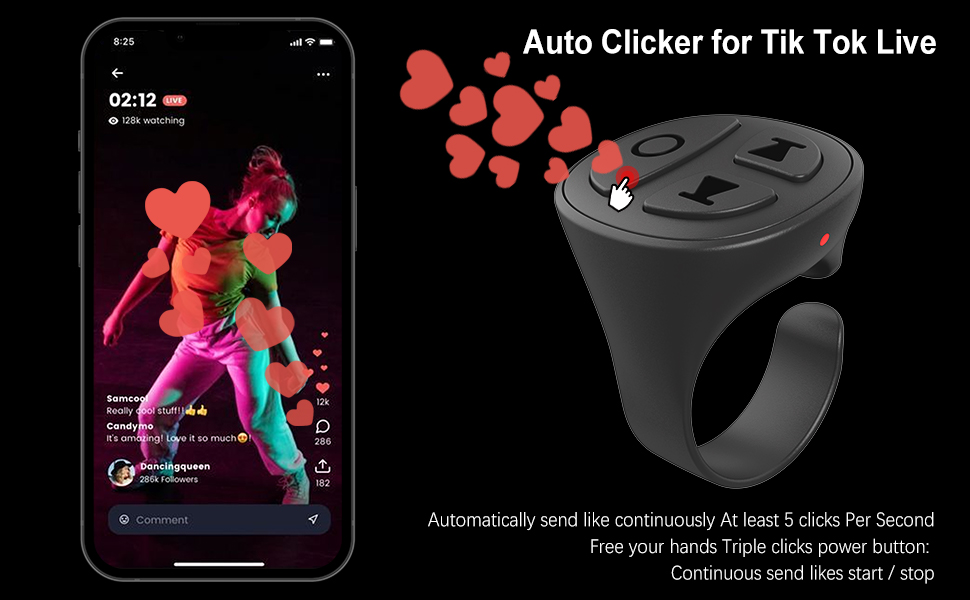
Image: A visual guide demonstrating the steps to enable AssistiveTouch on an iPhone, showing the sequence from Settings to Accessibility, Touch, and finally activating AssistiveTouch.
Video: A demonstration of connecting the Vekesen D02 TikTok Scrolling Ring to an iPhone via Bluetooth and enabling the necessary AssistiveTouch setting for proper functionality.
4. പ്രവർത്തന നിർദ്ദേശങ്ങൾ
4.1 Switching Modes (TikTok Video / Music)
The Vekesen D02 has two primary modes: TikTok Video Mode and Music Mode. To switch between modes, press and hold the up and down buttons simultaneously for 2 seconds. The indicator lights will flash to confirm the mode change.
- TikTok Video Mode: Used for TikTok, short video apps, reading apps, and camera apps.
- സംഗീത മോഡ്: Used for music apps and phone call apps.

Image: A diagram showing the Vekesen D02 TikTok Scrolling Ring and instructions on how to switch between TikTok Video Mode and Music Mode by pressing the up and down buttons.
4.2 TikTok Video Control
Ensure the ring is in TikTok Video Mode.
- Single click (Power button): Pause/Play video.
- Double click (Power button): Send a like.
- Triple click (Power button): Continuous send likes (start/stop).
- Single click (Up button): മുമ്പത്തെ വീഡിയോ.
- Double click (Up button): Swipe left.
- Press and hold (Up button): വോളിയം കുറഞ്ഞു.
- Single click (Down button): അടുത്ത വീഡിയോ.
- Double click (Down button): വലത്തേക്ക് സ്വൈപ്പ് ചെയ്യുക.
- Press and hold (Down button): വോളിയം കൂട്ടുക.
- Press and hold (Left button for 1 second): Lock/Open screen.

Image: A smartphone displaying a TikTok video, with the Vekesen D02 TikTok Scrolling Ring shown next to it, highlighting its various control functions for video navigation and interaction.
Video: A demonstration of the auto-clicker feature for sending continuous likes during a TikTok Live session using the Vekesen D02 TikTok Scrolling Ring.
4.3 Ebook Page Turning (Kindle App)
The D02 ring supports page turning in the Kindle App. It is important to note that this functionality is for the Kindle App on smartphones/tablets, not for dedicated Kindle e-reader devices.
- Open the Kindle App and select a book.
- Tap the middle of the screen to bring up the menu.
- Tap the 'Aa' icon (Font & Layout settings).
- Go to the 'Layout' tab.
- Turn off the "Continuous Scrolling" option.
- ക്രമീകരണങ്ങളിൽ നിന്ന് പുറത്തുകടക്കുക.
- Now, double-click the Up button to turn the page backward, and double-click the Down button to turn the page forward.

Image: A visual comparison showing that the Vekesen D02 TikTok Scrolling Ring works with the Kindle App on a smartphone (indicated by 'YES') but not with a physical Kindle device (indicated by 'NO').
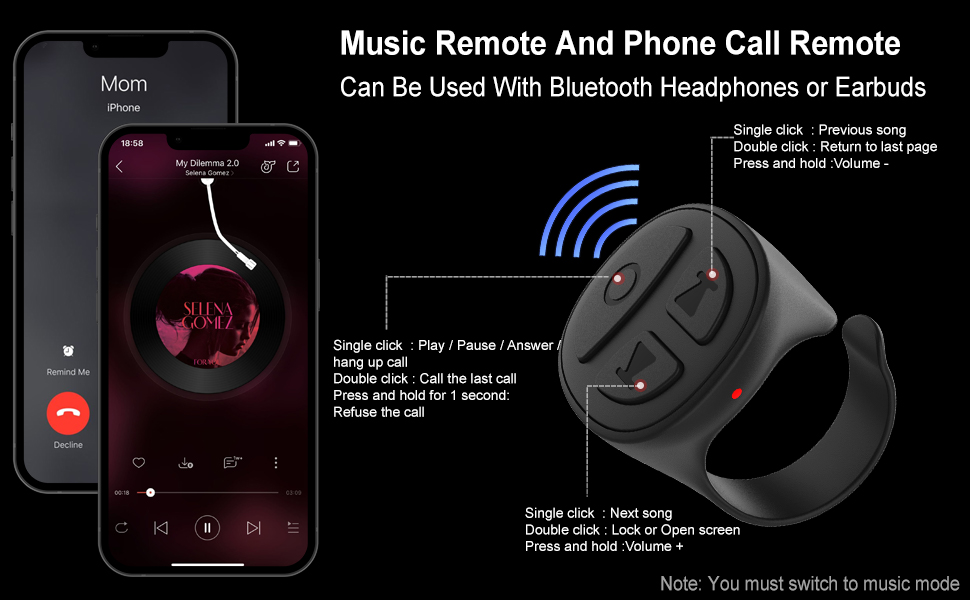
Image: A detailed screenshot guide on how to configure the Kindle App settings, specifically turning off 'Continuous Scrolling', to enable page turning with the Vekesen D02 TikTok Scrolling Ring.
4.4 Camera Shutter Remote
In TikTok Video Mode, you can use the ring as a remote camera shutter.
- Open your phone's camera app.
- Long press either the Up or Down button on the ring to take a picture or start/stop video recording.
4.5 Music and Phone Call Control
Ensure the ring is in Music Mode.
- Single click (Power button): Play/Pause music; Answer/Hang up call.
- Double click (Power button): Call the last contact.
- Press and hold (Power button for 1 second): വരുന്ന കോൾ നിരസിക്കുക.
- Single click (Up button): മുമ്പത്തെ ഗാനം.
- Double click (Up button): Return to last page.
- Press and hold (Up button): വോളിയം കുറഞ്ഞു.
- Single click (Down button): അടുത്ത ഗാനം.
- Double click (Down button): Lock/Open screen.
- Press and hold (Down button): വോളിയം കൂട്ടുക.

Image: A visual representation of the Vekesen D02 TikTok Scrolling Ring's controls for managing music playback and handling phone calls, indicating which buttons perform specific actions in Music Mode.
5. ചാർജിംഗും ബാറ്ററി ലൈഫും
The Vekesen D02 Scrolling Ring comes with a portable charging case.
- ചാർജിംഗ് സമയം: ഫുൾ ചാർജിനായി ഏകദേശം 1 മണിക്കൂർ.
- Single Use Battery Life: Up to 40 hours (based on 2 hours of daily use, providing approximately three weeks of use).
- ചാർജിംഗ് കേസുള്ള ബാറ്ററി ലൈഫ്: 280 മണിക്കൂർ വരെ.

Image: An infographic illustrating the charging time and extended battery life provided by the Vekesen D02 TikTok Scrolling Ring's charging case.
6. പ്രശ്നപരിഹാരം
6.1 ഉപകരണം ജോടിയാക്കുന്നില്ല
- Ensure the ring is charged and in pairing mode (red and blue lights flashing alternately).
- നിങ്ങളുടെ സ്മാർട്ട്ഫോണിൽ ബ്ലൂടൂത്ത് പ്രവർത്തനക്ഷമമാക്കിയിട്ടുണ്ടോയെന്ന് പരിശോധിക്കുക.
- Try restarting both the ring and your smartphone.
- മുമ്പ് ജോടിയാക്കിയിട്ടുണ്ടെങ്കിൽ, നിങ്ങളുടെ ഫോണിന്റെ ബ്ലൂടൂത്ത് ക്രമീകരണങ്ങളിൽ ഉപകരണം മറന്ന് വീണ്ടും ജോടിയാക്കാൻ ശ്രമിക്കുക.
6.2 Functions Not Working on iOS
- Confirm that AssistiveTouch is enabled in your iOS Accessibility settings (refer to Section 3.2).
- Ensure your iOS version is compatible (iOS 14.8 or higher is generally recommended for optimal performance).
6.3 Ebook Page Turning Issues
- Verify you are using a compatible E-book അപ്ലിക്കേഷൻ (e.g., Kindle App), not a dedicated E-reader device.
- Check that "Continuous Scrolling" is disabled within the E-book app's layout settings (refer to Section 4.3).
7 സ്പെസിഫിക്കേഷനുകൾ
| ഫീച്ചർ | സ്പെസിഫിക്കേഷൻ |
|---|---|
| മോഡൽ നമ്പർ | D02 |
| ഉൽപ്പന്ന അളവുകൾ | 1 x 0.86 x 1.2 ഇഞ്ച് |
| ഇനത്തിൻ്റെ ഭാരം | 0.16 ഔൺസ് |
| കണക്റ്റിവിറ്റി | ബ്ലൂടൂത്ത് |
| അനുയോജ്യമായ ഉപകരണങ്ങൾ | Android devices, iOS devices |
| പരമാവധി പിന്തുണയ്ക്കുന്ന ഉപകരണങ്ങൾ | 1 |
8. വാറൻ്റിയും പിന്തുണയും
Vekesen provides a ഒരു വർഷത്തെ നിർമ്മാതാവിന്റെ വാറന്റി for this product. If you encounter any issues or have questions regarding your Vekesen D02 TikTok Scrolling Ring, please contact Vekesen customer support for assistance. Your satisfaction is important to us.