
മോൺസ്റ്റർ XKT12
മോൺസ്റ്റർ XKT12 ഗെയിമിംഗ് ഇയർഫോൺസ് ഉപയോക്തൃ മാനുവൽ
Comprehensive guide for your Monster XKT12 Wireless Bluetooth Earphones.
ഉൽപ്പന്നം കഴിഞ്ഞുview
The Monster XKT12 Gaming Earphones are designed for an immersive audio experience with advanced Bluetooth 5.3 technology. Featuring HIFI sound and noise reduction, these TWS earbuds are perfect for gaming, sports, and daily use.

Image: The Monster XKT12 earphones securely placed within their purple charging case, showcasing their compact and portable design.
പ്രധാന സവിശേഷതകൾ:
- ബ്ലൂടൂത്ത് V5.3: Ensures stable and continuous connection with compatible devices.
- HIFI സൗണ്ട് ക്വാളിറ്റി: Equipped with a 13mm PU+wool paper composite diaphragm for authentic sound, deep bass, and clear treble.
- TWS Master-Slave Free Switching: Both earbuds can function as the main earphone, offering flexible usage.
- Sensitive Microphone: Provides clear communication for calls.
- നീണ്ട ബാറ്ററി ലൈഫ്: Up to 5 hours of music playback on a single charge for the headphones, with the charging case providing additional power.
- എർഗണോമിക് ഡിസൈൻ: Semi-in-ear design for a comfortable and stable fit, suitable for extended wear and sports.
സജ്ജീകരണ ഗൈഡ്
1. പ്രാരംഭ ചാർജിംഗ്
Before first use, fully charge the earphones and the charging case. Connect the charging case to a USB power source using a compatible cable. The indicator lights on the case will show charging status.
- Charging time (charging box): Approximately 1.5 hours.
- Battery capacity (charging box): 3.7V 300mAh.
- Battery capacity (headphone): 3.7V 33mAh.

Image: The Monster XKT12 charging case illustrating its extended battery life capability, ensuring prolonged usage.
2. നിങ്ങളുടെ ഉപകരണവുമായി ജോടിയാക്കുന്നു
ആദ്യമായി ചാർജിംഗ് കേസിൽ നിന്ന് പുറത്തെടുക്കുമ്പോൾ ഇയർഫോണുകൾ യാന്ത്രികമായി പെയറിംഗ് മോഡിലേക്ക് പ്രവേശിക്കും.
- ചാർജിംഗ് കേസ് തുറന്ന് രണ്ട് ഇയർഫോണുകളും നീക്കം ചെയ്യുക.
- നിങ്ങളുടെ മൊബൈൽ ഫോണിലോ ബ്ലൂടൂത്ത് പ്രവർത്തനക്ഷമമാക്കിയ ഉപകരണത്തിലോ, ബ്ലൂടൂത്ത് ക്രമീകരണങ്ങളിലേക്ക് പോകുക.
- ഇതിനായി തിരയുക "Monster XKT12" in the list of available devices.
- Select "Monster XKT12" to connect. Once connected, a voice prompt will confirm the successful pairing.

Image: A smartphone displaying its Bluetooth settings, with "Monster XKT12" listed as a connected device, demonstrating the pairing process.
The earphones support TWS master-slave free switching, meaning either earbud can be used independently after initial pairing.

Image: A visual representation of the TWS master-slave free switching technology, highlighting that both earphones can operate independently as main units.
പ്രവർത്തന നിർദ്ദേശങ്ങൾ
ഇയർഫോണുകൾ ധരിക്കുന്നു
Gently insert the earphones into your ears, ensuring a comfortable and secure fit. The semi-in-ear design is crafted for stability during various activities.
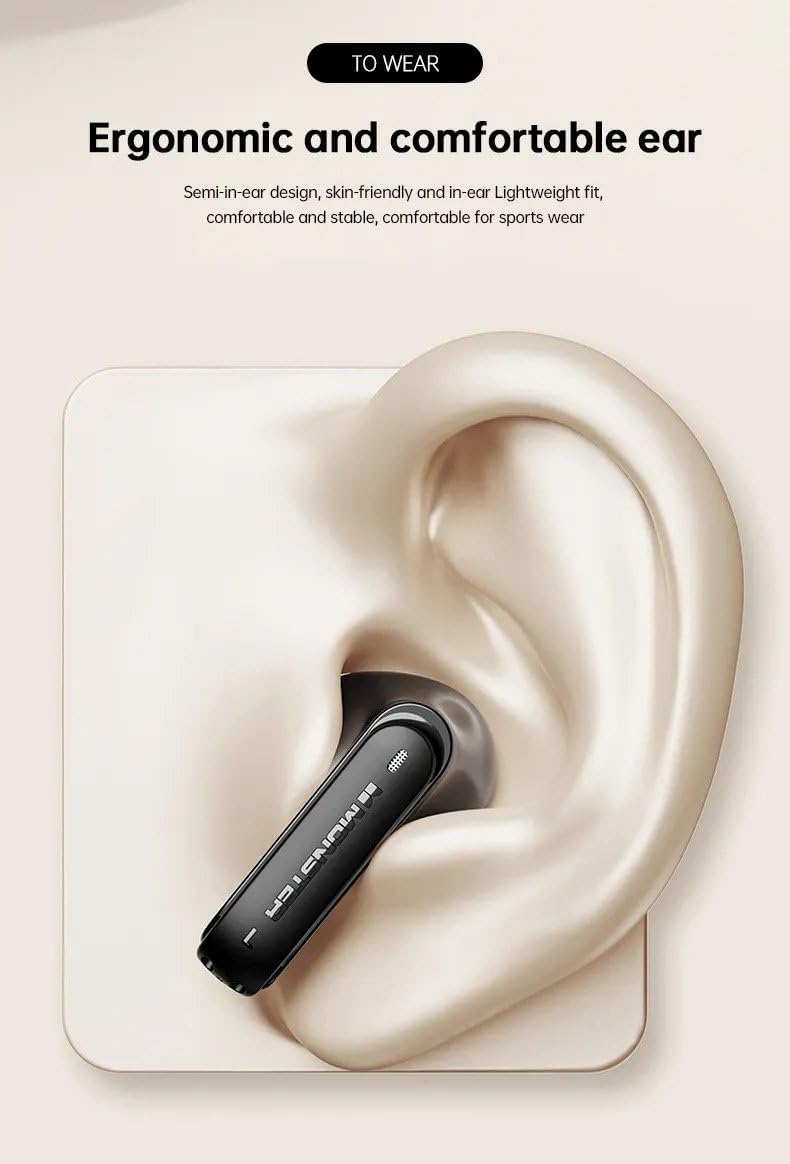
Image: An illustration demonstrating the ergonomic design and proper placement of the Monster XKT12 earphone in the ear for optimal comfort and stability.
ടച്ച് നിയന്ത്രണങ്ങൾ
The Monster XKT12 earphones feature intuitive touch controls on each earbud. Specific functions may vary slightly based on your device and application.
- പ്ലേ/താൽക്കാലികമായി നിർത്തുക: ഇയർബഡുകളിൽ ഏതെങ്കിലുമൊന്നിൽ ഒറ്റ ടാപ്പ് ചെയ്യുക.
- അടുത്ത ട്രാക്ക്: വലത് ഇയർബഡിൽ രണ്ടുതവണ ടാപ്പ് ചെയ്യുക.
- മുമ്പത്തെ ട്രാക്ക്: ഇടത് ഇയർബഡിൽ രണ്ടുതവണ ടാപ്പ് ചെയ്യുക.
- ഉത്തരം/അവസാന കോൾ: ഇൻകമിംഗ് കോൾ വരുമ്പോൾ ഏത് ഇയർബഡിലും ഒറ്റ ടാപ്പ് ചെയ്യുക.
- കോൾ നിരസിക്കുക: ഇൻകമിംഗ് കോൾ വരുമ്പോൾ ഇയർബഡുകളിൽ ഏതെങ്കിലുമൊന്ന് 2 സെക്കൻഡ് അമർത്തിപ്പിടിക്കുക.
- വോയ്സ് അസിസ്റ്റന്റിനെ സജീവമാക്കുക: ഇയർബഡുകളിൽ ഏതെങ്കിലുമൊന്നിൽ മൂന്ന് തവണ ടാപ്പ് ചെയ്യുക.
കോളുകൾ ചെയ്യലും സ്വീകരിക്കലും
The built-in sensitive microphone ensures clear voice transmission during calls.

ചിത്രം: വിശദമായ ഒരു ചിത്രം view of the Monster XKT12 earphone, emphasizing its high-definition sensitive microphone for clear call quality.
- To answer an incoming call, tap either earbud once.
- To end an active call, tap either earbud once.
- To reject an incoming call, press and hold either earbud for 2 seconds.
മെയിൻ്റനൻസ്
Cleaning Your Earphones
പതിവായി വൃത്തിയാക്കുന്നത് ശബ്ദ നിലവാരവും ശുചിത്വവും നിലനിർത്താൻ സഹായിക്കുന്നു.
- Use a soft, dry, lint-free cloth to wipe the surface of the earphones and charging case.
- കഠിനമായ അഴുക്കിന്, ചെറുതായി dampവെള്ളം അല്ലെങ്കിൽ നേരിയതും ഉരച്ചിലുകൾ ഇല്ലാത്തതുമായ ഒരു ക്ലീനർ ഉപയോഗിച്ച് തുണിയിൽ തടവുക. ഏതെങ്കിലും ദ്വാരങ്ങളിൽ ദ്രാവകം കയറുന്നത് ഒഴിവാക്കുക.
- Do not use alcohol, benzene, or other harsh chemicals.
- Clean the charging contacts on both the earphones and the case periodically with a dry cotton swab.
സംഭരണം
ഉപയോഗത്തിലില്ലാത്തപ്പോൾ, പൊടിയിൽ നിന്നും കേടുപാടുകളിൽ നിന്നും സംരക്ഷിക്കാൻ ഇയർഫോണുകൾ അവയുടെ ചാർജിംഗ് കേസിൽ സൂക്ഷിക്കുക.
- നേരിട്ടുള്ള സൂര്യപ്രകാശത്തിൽ നിന്നും തീവ്രമായ താപനിലയിൽ നിന്നും അകന്ന് തണുത്തതും വരണ്ടതുമായ സ്ഥലത്ത് സൂക്ഷിക്കുക.
- ഈർപ്പമുള്ള അന്തരീക്ഷത്തിൽ സൂക്ഷിക്കുന്നത് ഒഴിവാക്കുക.
ബാറ്ററി കെയർ
ബാറ്ററി ആയുസ്സ് വർദ്ധിപ്പിക്കാൻ:
- Charge the earphones regularly, even if not used frequently.
- റീചാർജ് ചെയ്യുന്നതിനുമുമ്പ് ബാറ്ററി പൂർണ്ണമായും ഡിസ്ചാർജ് ചെയ്യുന്നത് ഒഴിവാക്കുക.
- കഠിനമായ ചൂടിലോ തണുപ്പിലോ ഉപകരണം തുറന്നുകാട്ടരുത്.
ട്രബിൾഷൂട്ടിംഗ്
If you encounter issues with your Monster XKT12 earphones, please refer to the following common solutions:
| പ്രശ്നം | സാധ്യമായ പരിഹാരം |
|---|---|
| ഇയർഫോണുകൾ ജോടിയാക്കുന്നില്ല/കണക്റ്റ് ചെയ്യുന്നില്ല. |
|
| ഒരു ഇയർബഡിൽ നിന്ന് ശബ്ദമില്ല. |
|
| കുറഞ്ഞ വോളിയം അല്ലെങ്കിൽ മോശം ശബ്ദ നിലവാരം. |
|
| ചാർജിംഗ് കേസ് ചാർജ് ചെയ്യുന്നില്ല. |
|
സ്പെസിഫിക്കേഷനുകൾ
| ഫീച്ചർ | വിശദാംശങ്ങൾ |
|---|---|
| മോഡൽ നമ്പർ | XKT12 |
| ബ്ലൂടൂത്ത് പതിപ്പ് | V5.3 |
| ട്രാൻസ്മിഷൻ ദൂരം | ≥10മി |
| ഡ്രൈവർ വ്യാസം | 13 മി.മീ |
| ഡ്രൈവർ പ്രതിരോധം | 32Ω±15% |
| സംവേദനക്ഷമത | 109 ± 3dB |
| ഫ്രീക്വൻസി പ്രതികരണം | 20Hz-20kHz |
| ചാർജിംഗ് ബോക്സ് ബാറ്ററി കപ്പാസിറ്റി | 3.7V 300mAh |
| ഹെഡ്ഫോൺ ബാറ്ററി ശേഷി | 3.7V 33mAh |
| ചാർജ് ചെയ്യുന്ന സമയം (ചാർജിംഗ് ബോക്സ്) | 1.5 മണിക്കൂർ |
| Music Playback Time (Headphones) | 5 മണിക്കൂർ |
| ചെവി പ്ലേസ്മെൻ്റ് | ചെവിയിൽ |
| ഫോം ഫാക്ടർ | ചെവിയിൽ |
| ശബ്ദ നിയന്ത്രണം | ഒന്നുമില്ല |
വാറൻ്റിയും പിന്തുണയും
This product is covered by a standard manufacturer's warranty against defects in materials and workmanship. Please refer to the retailer's policy or contact the point of purchase for specific warranty terms and conditions.
For technical support or further assistance, please contact the customer service department of your retailer or the manufacturer. Keep your purchase receipt as proof of purchase.
Ask a question about this manual
Ask about setup, troubleshooting, compatibility, parts, safety, or missing instructions. Manuals+ will review the question and use this page’s manual context to help answer it.