
മോൺസ്റ്റർ XKT12
മോൺസ്റ്റർ XKT12 ഗെയിമിംഗ് ഇയർഫോൺസ് ഉപയോക്തൃ മാനുവൽ
Model: XKT12 | Brand: Monster
1. ആമുഖം
Thank you for choosing the Monster XKT12 Gaming Earphones. These wireless Bluetooth 5.3 headphones are designed to provide a high-fidelity audio experience with clear sound, deep bass, and effective noise reduction, ideal for gaming and everyday listening. This manual will guide you through the setup, operation, and maintenance of your new earphones.
പാക്കേജ് ഉള്ളടക്കം:
- Monster XKT12 Wireless Earbuds (Left & Right)
- ചാർജിംഗ് കേസ്
- യുഎസ്ബി ചാർജിംഗ് കേബിൾ
- ഉപയോക്തൃ മാനുവൽ
2. സുരക്ഷാ മാർഗ്ഗനിർദ്ദേശങ്ങൾ
Please read these safety instructions carefully before using your earphones to ensure proper and safe operation.
- ശ്രവണ സംരക്ഷണം: കേൾവിക്ക് കേടുപാടുകൾ സംഭവിക്കുന്നത് തടയാൻ ദീർഘനേരം ഉയർന്ന ശബ്ദത്തിൽ കേൾക്കുന്നത് ഒഴിവാക്കുക.
- ഡ്രൈവിംഗ് സുരക്ഷ: Do not use earphones while driving, cycling, or operating machinery where the inability to hear ambient sounds could pose a danger.
- ജലവും ഈർപ്പവും: Keep the earphones and charging case away from water, rain, or any liquids. They are not waterproof.
- ചൂട്: Do not expose the product to extreme temperatures, direct sunlight, or open flames.
- നീക്കം ചെയ്യൽ: പ്രാദേശിക നിയന്ത്രണങ്ങൾ അനുസരിച്ച് ഉൽപ്പന്നവും അതിന്റെ ബാറ്ററിയും ഉത്തരവാദിത്തത്തോടെ സംസ്കരിക്കുക. ഗാർഹിക മാലിന്യങ്ങൾക്കൊപ്പം സംസ്കരിക്കരുത്.
3. ആരംഭിക്കുന്നു
3.1 ഇയർബഡുകളും കേസും ചാർജ് ചെയ്യുന്നു
Before first use, fully charge both the earphones and the charging case.
- ഇയർബഡുകൾ ചാർജിംഗ് കേസിൽ വയ്ക്കുക, അവ ശരിയായി ഇട്ടിട്ടുണ്ടെന്ന് ഉറപ്പാക്കുക.
- USB ചാർജിംഗ് കേബിൾ കേസിലെ ചാർജിംഗ് പോർട്ടിലേക്കും മറ്റേ അറ്റം ഒരു USB പവർ സ്രോതസ്സിലേക്കും (ഉദാ: കമ്പ്യൂട്ടർ, വാൾ അഡാപ്റ്റർ) ബന്ധിപ്പിക്കുക.
- കേസിലെ ഇൻഡിക്കേറ്റർ ലൈറ്റുകൾ ചാർജിംഗ് സ്റ്റാറ്റസ് കാണിക്കും. പൂർണ്ണമായി ചാർജ് ചെയ്തുകഴിഞ്ഞാൽ, ലൈറ്റുകൾ പൂർത്തിയായി അല്ലെങ്കിൽ ഓഫായി എന്ന് സൂചിപ്പിക്കും.
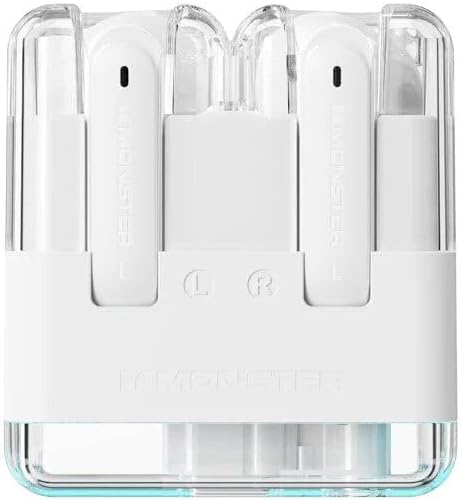
ചിത്രം: മുകളിൽ view of the Monster XKT12 gaming earphones inside their transparent white charging case, showing the 'L' and 'R' indicators for left and right earbuds. This image illustrates how the earbuds are placed within the charging case for charging.
3.2 നിങ്ങളുടെ ഉപകരണവുമായി ജോടിയാക്കൽ
The earphones will automatically enter pairing mode when taken out of the case.
- Ensure the earphones are charged and remove them from the charging case. They will automatically power on and enter pairing mode.
- നിങ്ങളുടെ ഉപകരണത്തിൽ (സ്മാർട്ട്ഫോൺ, ടാബ്ലെറ്റ്, കമ്പ്യൂട്ടർ), ബ്ലൂടൂത്ത് പ്രവർത്തനക്ഷമമാക്കുക.
- ഇതിനായി തിരയുക Bluetooth devices and select "Monster XKT12" from the list.
- കണക്റ്റ് ചെയ്തുകഴിഞ്ഞാൽ, ഒരു സ്ഥിരീകരണ ടോൺ നിങ്ങൾ കേൾക്കും, ഇയർഫോണുകൾ ഉപയോഗത്തിന് തയ്യാറാകും.

Image: A smartphone screen displaying the Bluetooth settings menu, showing the 'Monster XKT12' device connected. Two Monster XKT12 charging cases in beige and purple are visible in the foreground, illustrating the connection process on a mobile device.
4. ഓപ്പറേഷൻ
4.1 പവർ ഓൺ/ഓഫ്
- പവർ ഓൺ: ചാർജിംഗ് കെയ്സിൽ നിന്ന് ഇയർബഡുകൾ നീക്കം ചെയ്യുമ്പോൾ അവ സ്വയമേവ ഓണാകും.
- പവർ ഓഫ്: Earbuds automatically power off when placed back into the charging case.
4.2 മ്യൂസിക് പ്ലേബാക്ക്
- പ്ലേ/താൽക്കാലികമായി നിർത്തുക: ഒന്നുകിൽ ഇയർബഡിൽ ഒരിക്കൽ ടാപ്പ് ചെയ്യുക.
- അടുത്ത ട്രാക്ക്: വലത് ഇയർബഡിൽ രണ്ടുതവണ ടാപ്പ് ചെയ്യുക.
- മുമ്പത്തെ ട്രാക്ക്: ഇടത് ഇയർബഡിൽ രണ്ടുതവണ ടാപ്പ് ചെയ്യുക.
4.3 കോൾ മാനേജ്മെന്റ്
- ഉത്തരം/അവസാന കോൾ: ഒന്നുകിൽ ഇയർബഡിൽ ഒരിക്കൽ ടാപ്പ് ചെയ്യുക.
- കോൾ നിരസിക്കുക: ഏതെങ്കിലും ഇയർബഡിൽ 2 സെക്കൻഡ് അമർത്തിപ്പിടിക്കുക.
4.4 വോയ്സ് അസിസ്റ്റന്റ്
- വോയ്സ് അസിസ്റ്റന്റിനെ സജീവമാക്കുക: ഒന്നുകിൽ ഇയർബഡിൽ മൂന്ന് തവണ ടാപ്പ് ചെയ്യുക.
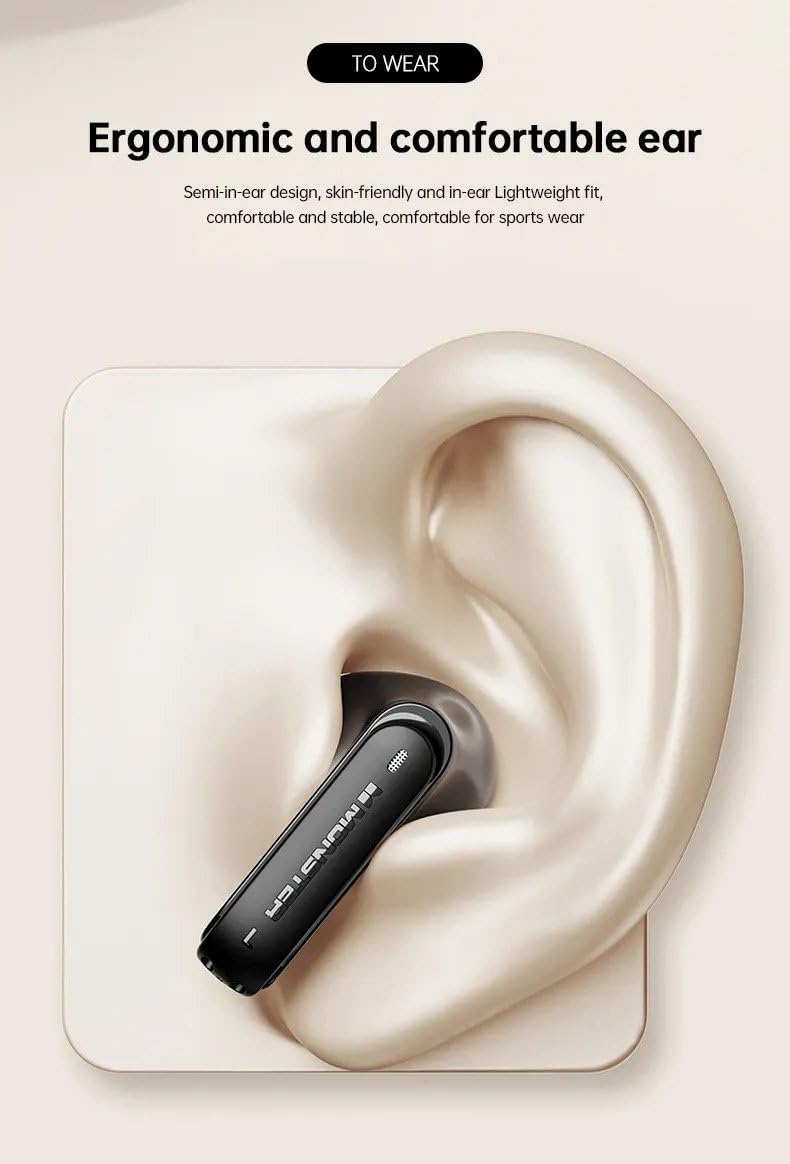
Image: A close-up illustration of a Monster XKT12 earbud comfortably placed within the ear canal, demonstrating its semi-in-ear ergonomic design for a stable and comfortable fit. This image highlights the comfortable and secure fit of the earbud.
5. പരിചരണവും പരിപാലനവും
- വൃത്തിയാക്കൽ: ഇയർബഡുകളും ചാർജിംഗ് കെയ്സും വൃത്തിയാക്കാൻ മൃദുവായതും ഉണങ്ങിയതും ലിന്റ് രഹിതവുമായ തുണി ഉപയോഗിക്കുക. കഠിനമായ രാസവസ്തുക്കളോ ഉരച്ചിലുകളുള്ള വസ്തുക്കളോ ഉപയോഗിക്കരുത്.
- സംഭരണം: ഉപയോഗത്തിലില്ലാത്തപ്പോൾ, പൊടിയിൽ നിന്നും കേടുപാടുകളിൽ നിന്നും സംരക്ഷിക്കാൻ ഇയർഫോണുകൾ അവയുടെ ചാർജിംഗ് കേസിൽ സൂക്ഷിക്കുക.
- ബാറ്ററി കെയർ: To preserve battery life, avoid fully discharging the battery frequently. Charge the earphones regularly, even if not in constant use.
- തീവ്രമായ അവസ്ഥകൾ ഒഴിവാക്കുക: Do not expose the earphones to extreme temperatures, high humidity, or corrosive environments.
6. പ്രശ്നപരിഹാരം
If you encounter issues with your Monster XKT12 earphones, please refer to the following common problems and solutions:
| പ്രശ്നം | പരിഹാരം |
|---|---|
| ഇയർബഡുകൾ പവർ ഓൺ ആകുന്നില്ല. | Ensure the earbuds are charged. Place them in the charging case and connect the case to a power source. |
| ഉപകരണവുമായി ജോടിയാക്കാൻ കഴിയില്ല. | Make sure Bluetooth is enabled on your device. Ensure the earbuds are in pairing mode (out of the case). Try forgetting the device on your phone and re-pairing. |
| ഒന്നോ രണ്ടോ ഇയർബഡുകളിൽ നിന്ന് ശബ്ദമില്ല. | Check the volume level on your device. Ensure earbuds are properly connected. Try resetting the earbuds (refer to manufacturer's specific reset instructions if available). |
| ചാർജിംഗ് കേസ് ചാർജ് ചെയ്യുന്നില്ല. | Check the USB cable and power adapter. Try a different cable or power source. |
7 സാങ്കേതിക സവിശേഷതകൾ
| ഫീച്ചർ | സ്പെസിഫിക്കേഷൻ |
|---|---|
| മോഡൽ നമ്പർ | XKT12 |
| ബ്ലൂടൂത്ത് പതിപ്പ് | V5.3 |
| ട്രാൻസ്മിഷൻ ദൂരം | ≥10മി |
| ഡ്രൈവർ വ്യാസം | Ø13mm |
| ഡ്രൈവർ പ്രതിരോധം | 32Ω ±15% |
| സംവേദനക്ഷമത | 109 ± 3dB |
| ഫ്രീക്വൻസി പ്രതികരണം | 20Hz-20kHz |
| ചാർജിംഗ് കെയ്സ് ബാറ്ററി കപ്പാസിറ്റി | 3.7V 300mAh |
| ഹെഡ്ഫോൺ ബാറ്ററി ശേഷി | 3.7V 33mAh |
| ചാർജ് ചെയ്യുന്ന സമയം (ചാർജിംഗ് ബോക്സ്) | ഏകദേശം 1.5 മണിക്കൂർ |
| Music Playback Time (Headphones) | ഏകദേശം 5 മണിക്കൂർ |
| നിറം | വെള്ള |
| ചെവി പ്ലേസ്മെൻ്റ് | ചെവിയിൽ |
| ഫോം ഫാക്ടർ | ചെവിയിൽ |
| ശബ്ദ നിയന്ത്രണം | ഒന്നുമില്ല |

Image: A detailed infographic highlighting key features of the Monster XKT12 earphones, including high-fidelity sound quality, sensitive microphone for HD calls, audio and video synchronization, smart compatibility, and Bluetooth 5.3 technology. This image visually summarizes the core technical advantages.

Image: An infographic illustrating the 24-hour long battery life of the Monster XKT12 earphones when used with the charging case, with a large '24' at the center of a circular battery indicator. This image emphasizes the extended usage time.
8. വാറൻ്റി വിവരങ്ങൾ
Monster products are manufactured to the highest quality standards. This product is covered by a limited warranty against defects in materials and workmanship from the date of original purchase. Please retain your proof of purchase for warranty claims. Specific warranty terms and conditions may vary by region. For detailed warranty information, please refer to the official Monster webസൈറ്റ് അല്ലെങ്കിൽ ഉപഭോക്തൃ പിന്തുണയുമായി ബന്ധപ്പെടുക.
9. ഉപഭോക്തൃ പിന്തുണ
If you have any questions, require technical assistance, or need to report an issue with your Monster XKT12 earphones, please contact our customer support team:
- Webസൈറ്റ്: ഔദ്യോഗിക മോൺസ്റ്റർ സന്ദർശിക്കുക webപതിവുചോദ്യങ്ങൾക്കും പിന്തുണാ ഉറവിടങ്ങൾക്കുമുള്ള സൈറ്റ്.
- ഇമെയിൽ: നിങ്ങളുടെ ഉൽപ്പന്ന പാക്കേജിംഗ് അല്ലെങ്കിൽ ഔദ്യോഗിക webഉപഭോക്തൃ സേവന ഇമെയിലിനുള്ള സൈറ്റ്.
- ഫോൺ: നിങ്ങളുടെ ഉൽപ്പന്ന പാക്കേജിംഗ് അല്ലെങ്കിൽ ഔദ്യോഗിക webഉപഭോക്തൃ സേവന ഫോൺ നമ്പറുകൾക്കായുള്ള സൈറ്റ്.
Please note: Specifications are subject to change without notice.
Ask a question about this manual
Ask about setup, troubleshooting, compatibility, parts, safety, or missing instructions. Manuals+ will review the question and use this page’s manual context to help answer it.